
[转]TOMCAT原理以及处理HTTP请求的过程、ContextPath ServletPath
一、TOMCAT
1 - Tomcat Server的组成部分
1.1 - Server
A Server element represents the entire Catalina servlet container. (Singleton)
<Server port="8005" shutdown="SHUTDOWN" debug="0">
<Server>属性含义:
--------------------------------------------------------------
className :指定实现org.apache.catalina.Server接口的类,默认值为org.apache.catalina.core.StandardServer.
port :指定Tomcat服务器监听shutdown命令的端口.终止Tomcat服务运行时,必须在Tomcat服务器所在的机器上发出Shutdown命令.该属性是必须设定的.
shutdown :指定终止Tomcat服务器运行时,发给Tomcat服务器的shutdown监听端口的字符串.该属性是必须设定的.
1.2 - Service
A Service element represents the combination of one or more Connector components that share a single Engine
Service是这样一个集合:它由一个或者多个Connector组成,以及一个Engine,负责处理所有Connector所获得的客户请求
<Service>元素由org.apache.catalina.Service接口定义,它包含一个<Engine>元素,以及一个或多个<Connector>元素,这些<Connector>元素共享一个<Engine>元素. 例如,在范例文件中配置了两个<Service>元素
<Service name="Catalina">
name="Apache">
第一个<Service>处理所有直接由Tomcat服务器接收的Web客户请求,第二个<Service>处理由Apache服务器转发过来的Web客户请求.
<Service <Service>属性含义:
--------------------------------------------------------------
className :指定实现org.apache.catalina.Service接口的类,默认值为org.apache.catalina.core.StandardService.
name :定义Service的名字.
1.3 - Connector
一个Connector将在某个指定端口上侦听客户请求,并将获得的请求交给Engine来处理,从Engine处获得回应并返回客户
TOMCAT有两个典型的Connector,一个直接侦听来自browser的http请求,一个侦听来自其它WebServer的请求
Coyote Http/1.1 Connector 在端口8080处侦听来自客户browser的http请求
Coyote JK2 Connector 在端口8009处侦听来自其它WebServer(Apache)的servlet/jsp代理请求
1.4 - Engine
The Engine element represents the entire request processing machinery associated with a particular Service
It receives and processes all requests from one or more Connectors
and returns the completed response to the Connector for ultimate transmission back to the client
Engine下可以配置多个虚拟主机Virtual Host,每个虚拟主机都有一个域名
当Engine获得一个请求时,它把该请求匹配到某个Host上,然后把该请求交给该Host来处理
Engine有一个默认虚拟主机,当请求无法匹配到任何一个Host上的时候,将交给该默认Host来处理
1.5 - Host
代表一个Virtual Host,虚拟主机,每个虚拟主机和某个网络域名Domain Name相匹配
每个虚拟主机下都可以部署(deploy)一个或者多个Web App,每个Web App对应于一个Context,有一个Context path
当Host获得一个请求时,将把该请求匹配到某个Context上,然后把该请求交给该Context来处理
匹配的方法是“最长匹配”,所以一个path==""的Context将成为该Host的默认Context
所有无法和其它Context的路径名匹配的请求都将最终和该默认Context匹配
1.6 - Context
一个Context对应于一个Web Application,一个Web Application由一个或者多个Servlet组成
Context在创建的时候将根据配置文件$CATALINA_HOME/conf/web.xml和$WEBAPP_HOME/WEB-INF/web.xml载入Servlet类
当Context获得请求时,将在自己的映射表(mapping table)中寻找相匹配的Servlet类
如果找到,则执行该类,获得请求的回应,并返回
假设来自客户的请求为:
http://localhost:8080/wsota/wsota_index.jsp
1) 请求被发送到本机端口8080,被在那里侦听的Coyote HTTP/1.1 Connector获得
2) Connector把该请求交给它所在的Service的Engine来处理,并等待来自Engine的回应
3) Engine获得请求localhost/wsota/wsota_index.jsp,匹配它所拥有的所有虚拟主机Host
4) Engine匹配到名为localhost的Host(即使匹配不到也把请求交给该Host处理,因为该Host被定义为该Engine的默认主机)
5) localhost Host获得请求/wsota/wsota_index.jsp,匹配它所拥有的所有Context
6) Host匹配到路径为/wsota的Context(如果匹配不到就把该请求交给路径名为""的Context去处理)
7) path="/wsota"的Context获得请求/wsota_index.jsp,在它的mapping table中寻找对应的servlet
8) Context匹配到URL PATTERN为*.jsp的servlet,对应于JspServlet类
9) 构造HttpServletRequest对象和HttpServletResponse对象,作为参数调用JspServlet的doGet或doPost方法
10)Context把执行完了之后的HttpServletResponse对象返回给Host
11)Host把HttpServletResponse对象返回给Engine
12)Engine把HttpServletResponse对象返回给Connector
13)Connector把HttpServletResponse对象返回给客户browser
执行流程

Tomcat处理http的请求处理过程(来自极客学院)
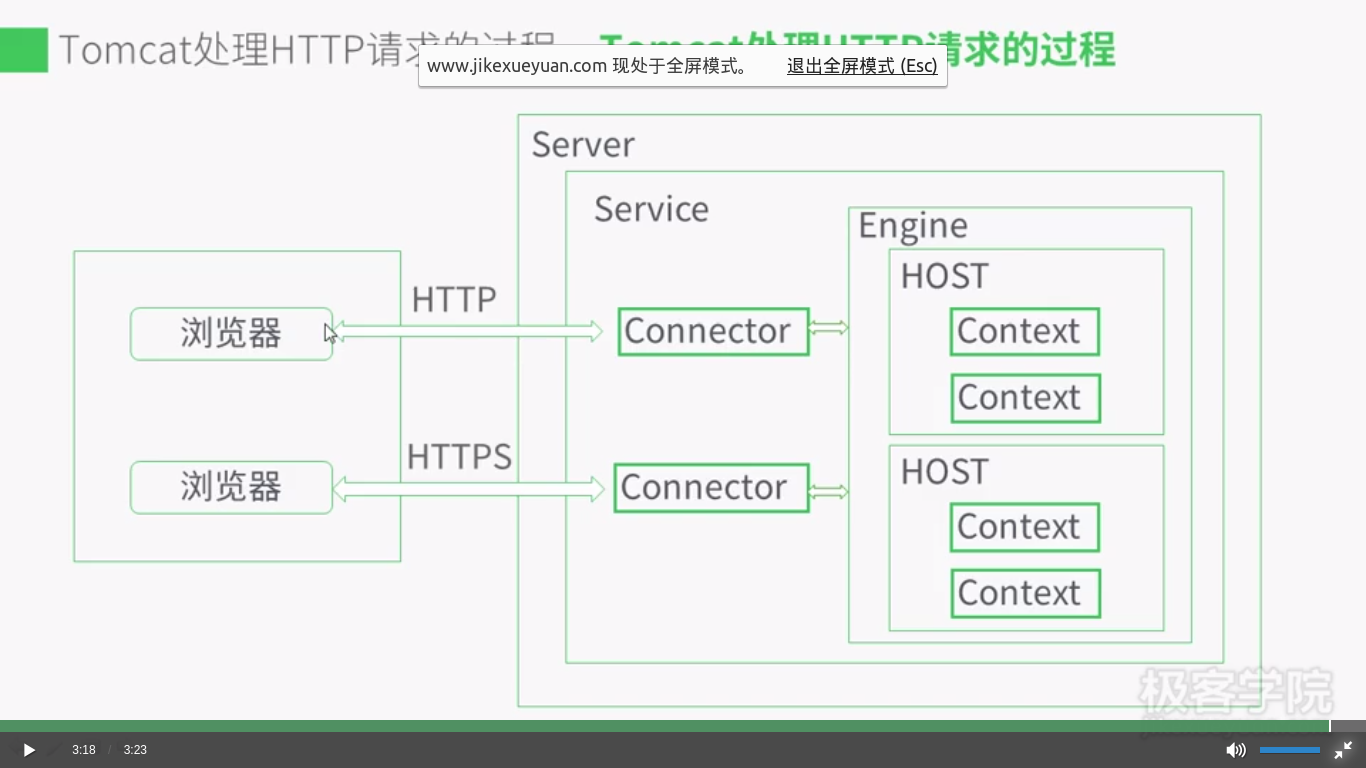
二、Context Path、Servlet Path、Path info
                        |-- Context Path --|-- Servlet Path -|--Path Info--|

http://www.myserver.com     /mywebapp        /helloServlet      /hello

                        |-------- Request URI  ----------------------------|
Remember the following three points:
1. Request URI = context path + servlet path + path info.
2. Context paths and servlet paths start with a / but do not end with it.
3. HttpServletRequest provides three methods getContextPath(),
getServletPath() and getPathInfo() to retrieve the context path,
the servlet path, and the path info, respectively, associated with a request.
Identifying the servlet path Servlet 路径匹配
To match a request URI with a servlet, the servlet container follows a simple algorithm.
Once it identifies the context path, if any, it evaluates the remaining part of the
request URI with the servlet mappings specified in the deployment descriptor, in the
following order. If it finds a match at any step, it does not take the next step.
1 The container tries to match the request URI to a servlet mapping. If it finds a
match, the complete request URI (except the context path) is the servlet path. In
this case, the path info is null. 精确匹配优先
2 It tries to recursively match the longest path by stepping down the request URI
path tree a directory at a time, using the / character as a path separator, and determining
if there is a match with a servlet. If there is a match, the matching part
of the request URI is the servlet path and the remaining part is the path info. 最长匹配
3 If the last node of the request URI contains an extension (.jsp, for example),
the servlet container tries to match it to a servlet that handles requests for the
specified extension. In this case, the complete request URI is the servlet path
and the path info is null.扩展匹配,如果url最后一段包含扩展,容器将会根据扩展选择合适的servlet。
4 If the container is still unable to find a match, it will forward the request to the
default servlet. If there is no default servlet, it will send an error message indicating
the servlet was not found.默认或报错
<servlet-mapping>
<servlet-name>RedServlet</servlet-name>
<url-pattern>/red/*</url-pattern>
</servlet-mapping>
<servlet-mapping>
<servlet-name>RedServlet</servlet-name>
<url-pattern>/red/red/*</url-pattern>
</servlet-mapping>
<servlet-mapping>
<servlet-name>RedBlueServlet</servlet-name>
<url-pattern>/red/blue/*</url-pattern>
</servlet-mapping>
<servlet-mapping>
<servlet-name>BlueServlet</servlet-name>
<url-pattern>/blue/</url-pattern>
</servlet-mapping>
<servlet-mapping>
<servlet-name>GreenServlet</servlet-name>
<url-pattern>/green</url-pattern>
</servlet-mapping>
<servlet-mapping>
<servlet-name>ColorServlet</servlet-name>
<url-pattern>*.col</url-pattern>
</servlet-mapping>
Request URI Servlet Used Servlet Path Path Info
/colorapp/red RedServlet /red null
/colorapp/red/ RedServlet /red /
/colorapp/red/aaa RedServlet /red /aaa
/colorapp/red/blue/aa RedBlueServlet /red/blue /aa
/colorapp/red/red/aaa RedServlet /red/red /aaa
/colorapp/aa.col ColorServlet /aa.col null
/colorapp/hello/aa.col ColorServlet /hello/aa.col null
/colorapp/red/aa.col RedServlet /red /aa.col
/colorapp/blue NONE(Error message)
/colorapp/hello/blue/ NONE(Error message)
/colorapp/blue/mydir NONE(Error message)
/colorapp/blue/dir/aa.col ColorServlet /blue/dir/aa.col null
/colorapp/green GreenServlet /green null
[转]TOMCAT原理以及处理HTTP请求的过程、ContextPath ServletPath的更多相关文章
- TOMCAT原理详解及请求过程(转载)
转自https://www.cnblogs.com/hggen/p/6264475.html TOMCAT原理详解及请求过程 Tomcat: Tomcat是一个JSP/Servlet容器.其作为Ser ...
- TOMCAT原理详解及请求过程
Tomcat: Tomcat是一个JSP/Servlet容器.其作为Servlet容器,有三种工作模式:独立的Servlet容器.进程内的Servlet容器和进程外的Servlet容器. Tomcat ...
- Tomcat学习(二)------Tomcat原理详解及请求过程
Tomcat: Tomcat是一个JSP/Servlet容器.其作为Servlet容器,有三种工作模式:独立的Servlet容器.进程内的Servlet容器和进程外的Servlet容器. Tomcat ...
- 网站开发进阶(四)Tomcat Server处理一个http请求的过程
Tomcat Server处理一个http请求的过程 假设来自客户的请求为: http://localhost:8080/wsota/wsota_index.jsp 1) 请求被发送到本机端口8080 ...
- Tomcat Server处理一个http请求的过程
Tomcat Server处理一个http请求的过程 假设来自客户的请求为: http://localhost:8080/wsota/wsota_index.jsp 1) 请求被发送到本机端口8080 ...
- Spring框架系列(14) - SpringMVC实现原理之DispatcherServlet处理请求的过程
前文我们有了IOC的源码基础以及SpringMVC的基础,我们便可以进一步深入理解SpringMVC主要实现原理,包含DispatcherServlet的初始化过程和DispatcherServlet ...
- Tomcat目录结构及Tomcat Server处理一个http请求的过程
http://blog.sina.com.cn/s/blog_62cb15980101jh9x.html 1.Tomcat的结构概述 Tomcat服务器是由一系列可配置的组件构成,其核心组件是 ...
- Tomcat 原理篇
TOMCAT 原理篇一.Tomcat 组成(Tomcat 由以下组件组成) 1.server a) Server是一个Catalina Servlet容器: b) Server 可以包含一个或多个se ...
- tomcat原理
1 - Tomcat Server的组成部分 1.1 - Server A Server element represents the entire Catalina servlet containe ...
随机推荐
- 【Kill】两条Linux命令彻底杀死Oracle
今天编写的两条极具杀伤力的命令,它可以瞬间将Oracle杀死在无形之中.后面我将给出简单注释并展示一下它的威力.$ ps -ef |grep $ORACLE_SID|grep -v grep|awk ...
- 分组求和SQL示例
1.ROLLUP和CUBE函数,自动汇总数据 select * from test_tbl的数据这样的 col_a col_b col_c ---- ----- ...
- ISO14443 ISO15693 ISO18000
[提要]射频标签的通信标准是标签芯片设计的依据,目前国际上与RFID相关的通信标准主要有:ISO/IEC 18000标准(包括7个部分,涉及125KHz, 13.56MHz, 433MHz, 860- ...
- Qt 继承QWidget setstylesheet解决
void myMainWidget::paintEvent(QPaintEvent * e) { QStyleOption opt; opt.init(this); QPainter p(this); ...
- 利用bind搭建dns
下载bind,我下载的是bind-9.3.1rc1.tar.gz 我下载的文件放在/root目录下 进入目录解压缩 [root@linux root]#tar xfz bind-9.3.1rc1.ta ...
- Qtwebkit配置,设置交叉编译环境 - croop520的专栏 - 博客频道 - CSDN.NET
Qtwebkit配置,设置交叉编译环境 - croop520的专栏 - 博客频道 - CSDN.NET Qtwebkit配置,设置交叉编译环境 分类: Qt Webkit 2012-04-12 15: ...
- 文件下载 .net
protected void Button1_Click(object sender, EventArgs e) { /* 微软为Response对象提供了一个新的方法TransmitFile来解决 ...
- vs调试MEX文件
http://www.cnblogs.com/lukylu/p/4042306.html matlab里面无法单步调试mex函数,故需转到VS上面调试,这里采用VS2010. 参考网上很多人写的方法但 ...
- 「Foundation」结构体
一.基本知识 Foundation—基础框架.框架中包含了很多开发中常用的数据类型,如结构体,枚举,类等,是其他ios框架的基础. 如果要想使用foundation框架中的数据类型,那么包含它的主头文 ...
- Servlet学习的两个案例之网站访问次数的统计
一.统计次数的Servlet源码 package com.shanrengo; import java.io.IOException; import javax.servlet.ServletCont ...