
python课程第一天作业1-模拟登录
第一周作业:
作业1:编写登陆接口
- 输入用户名密码
- 认证成功后显示欢迎信息
- 输错三次后锁定
流程图:
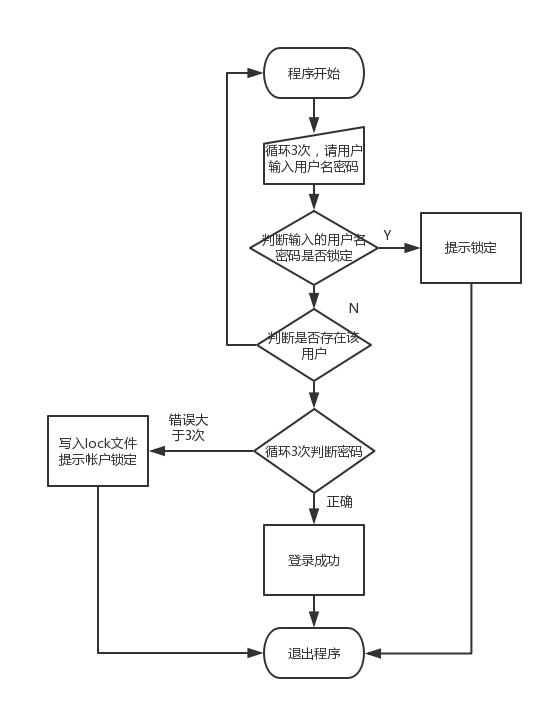
代码:后来修改过一次:
#!/usr/bin/env python

# -*-conding:utf-8-**

# __Author__:'liudong'

#!/usr/bin/env python

# -*-coding:utf-8-*-

# __author__="Life"

print('You have three times to login,otherwise your account will be locked!')

for i in range(3):

    username = input('Please input your username:')

    lock_file = open('account_lock.txt', 'r')

    lock_list = lock_file.readlines()  # 已经被锁定用户清单文件

    for lock_line in lock_list:     #判断用户输入的名字是否已经锁定(在锁定的文件列表中)

        lock_line = lock_line.strip('\n')

        if username == lock_line:

            print('Your account is locked!')

            lock_file.close()

            exit()

    user_account=open('user_account.txt','r')

    user_account_list=user_account.readlines()

    #print(user_account_list)

    for user in user_account_list:

        (user_infile,password_infile)=user.strip('\n').split()

        if username == user_infile:

            #print(user_infile)

            j = 0

            while j < 3:

                password = input('Please input your password:')

                if password == password_infile:

                    print('login successed!')

                    user_account.close()

                    lock_file.close()

                    exit()

                else:

                    print('Invalid username or password...')

                    print('this is the %d time(s)' % (j + 1))

                j+=1

            else:

                lock_file = open('account_lock.txt', 'w')

                lock_file.write(username + '\n') #锁定用记名写入锁定文件

                print('Your account is locked! Please,contact adminstrator to unlock your account!')

                exit()

    else:

        print('user %s is not exists,please input again:')

lock_file.close()

user_account.close()
python课程第一天作业1-模拟登录的更多相关文章
- Python课程第一天作业
一.第一题:简述编译型与解释型语言的区别,且分别列出你知道的哪些语言属于编译型,哪些属于解释型? 计算机是不能理解高级语言的,更不能直接执行高级语言,它只能直接理解机器语言,所以使用任何高级语言编写的 ...
- Python爬虫初学(三)—— 模拟登录知乎
模拟登录知乎 这几天在研究模拟登录, 以知乎 - 与世界分享你的知识.经验和见解为例.实现过程遇到不少疑问,借鉴了知乎xchaoinfo的代码,万分感激! 知乎登录分为邮箱登录和手机登录两种方式,通过 ...
- Python 3.3.3 使用requests模拟登录网站
在模拟登录上,requests确实比python标准库中的相关模块更加简洁. 假设你需要去爬一组页面(targetUrls),而这些页面要登录才能进行访问.那么requests能够提供一种相当简单的语 ...
- python爬虫【实战篇】模拟登录人人网
requests 提供了一个叫做session类,来实现客户端和服务端的会话保持 使用方法 1.实例化一个session对象 2.让session发送get或者post请求 session = req ...
- python入门第一天作业。讲师写的代码。
#!/uer/bin/env python # _*_ coding: utf-8 _*_ import sys retry_limit = 3 retry_count = 0 account_fil ...
- Python课程第二天作业
一.统计字符串格式 要求: # 1.统计元组中所有数据属于字符串的个数,提示: isinstance() # 数据: t1 = (1, 2, '3', '4', 5, '6') # 结果: 3 代码 ...
- Python课程第八天作业
第一题: 1.自定义一个 Fruit 类:该类有一个 类属性: identify:值为"水果",有两个对象属性: name,price:值由实例化对象时赋值,一个类方法: get_ ...
- python课程第一天笔记-la
http://www.cnblogs.com/onda/ ----------------------20170423 一:Cpython pypy 区别 等;Cpython 是一行一行解释, ...
- python3作业:模拟登录
__author__ = "bin007" customer = {}#存储用户信息#处理用户信息文件try: with open('login.txt','r',encoding ...
随机推荐
- PartialViewResult用法
后台代码 ) { IList<TestModel> lstTestModel = this.GetModelList(categoryid); return PartialView(lst ...
- cocos2d-x创建新项目模板
1.起因 长期使用项目中自带的HelloWorldScene来创建模板工程,不知大家有木有感到厌烦? 我是个懒人,所以就弄了个新的模板工程.这样最起码可以不用每次都把HelloWorldScene删掉 ...
- HDU 4606 Occupy Cities (计算几何+最短路+最小路径覆盖)
转载请注明出处,谢谢http://blog.csdn.net/ACM_cxlove?viewmode=contents by---cxlove 题目:给出n个城市需要去占领,有m条线段是障碍物, ...
- 工作流activiti-01个人小结
最近公司需要开发工作流 使用的是activiti 个人拿着官方的User Guide 摸索了好几天 现做个小结: 对公司的小型OA开发一般用到如下几点: 1.依据客户业务得到业务流程图 可以是xm ...
- trident教程
(一)理论基础更多理论以后再补充,或者参考书籍1.trident是什么?Trident is a high-level abstraction for doing realtime computi ...
- Web 端 js 导出csv文件(使用a标签)
前言 导出文件,使用最多的方式还是服务器端来处理.比如jsp 中使用response 的方式. 但是,有时候可能就想使用web 前端是否也可以把页面上的内容导出来呢? 比如说,导出页面的一个表格. 这 ...
- 活动倒计时代码(精确到毫秒)jquery插件
<!DOCTYPE html> <html> <head> <meta charset="utf-8"> <title> ...
- 用dup2和dup产生一份file descriptor 的拷贝
在类Unix操作系统里面,.dup2和dup都通过系统调用来产生一份file descriptor 的拷贝. dup对我来说还很简单 int dup(int filedes); dup2就 ...
- 复杂事件处理引擎—Esper入门
说明: 以下内容,可以参考Esper官方网站<Qucik start & Tutorial >(顺序做了部分调整). PS:因为英语水平有限(大学期间刚过CET4的英语小盲童一枚) ...
- 移植rom移动TD到联通W
1.修改build.prop TD为 ril.flightmode.poweroffMD=0 ril.telephony.mode=2 改为 ril.flightmode.poweroffMD=1 r ...