
Ext布局
Ext主要包括11种标准布局方式:Auto(自动布局)、CheckboxGroup(复选框组布局)、Fit(自适应布局)、Column(列布局)、Accordion(折叠布局)、Table(表格布局)、Card(卡片式布局)、Border(边框布局)、Anchor(锚点布局)、Box(盒布局)、Absolute(绝对位置布局)。
一.Auto(自动布局):默认布局方式,使用原始的HTML文档流来布局子元素,并把布局调用传递到子容器。
二.Fit(自适应布局):将使唯一的子元素充满容器,如果在当前容器中存在多个子面板则只有第一个会被显示,代码如下:
     Ext.create('Ext.Panel',{

              title : 'fit布局示例',

              frame : true,

              height : 200,

              width : 300,

              renderTo : Ext.getBody(),

              defaults : { bodyStyle :'backgroundColor:#ffc' },

              layout : 'fit',

             items : [{

                  title : '嵌套面板一',

                  html : '面板一',

                  width : 100

                 },

                 {

                 title : '嵌套面板二',

                 html : '面板二',

                 width : 100

             }]

      });
fit图例:

三.Accordion(折叠布局):手风琴式布局,代码如下:
    Ext.create('Ext.Panel', {

                title : 'Accordion折叠布局',

                width : 300,

                height : 300,

                defaults : {

                    bodyStyle : 'padding:15px'

                },

                layout : {

                    type : 'accordion',

                    animate : true,

                    activeOnTop : true

                    //multi : true    可以同时打开多个面板

                },

                items : [{

                            title : 'Panel 1',

                            html : 'Panel content!'

                        }, {

                            title : 'Panel 2',

                            html : 'Panel content!'

                        }, {

                            title : 'Panel 3',

                            html : 'Panel content!'

                        }],

                renderTo : Ext.getBody()

            });
Accordion图例:

四.Card(卡片式布局):该布局会包含多个子面板,任何时候都只有一个面板处于显示状态,这种布局类经常用来制作向导和标签页。该布局的重点方法是setActiveItem,因为一次只能显示一个子面板,所以切换子面板的唯一途径,就是调用setActiveItem方法。接收一个子面板id或者索引作为参数。Card布局并没有提供一个子面板的导航机制,导航逻辑需要开发人员自己实现。代码如下:
var cardPanel = Ext.create('Ext.Panel',{

              title : 'card布局示例',

              frame :true,

              height : 200,

              width : 300,

              renderTo : Ext.getBody(),

              defaults : {

                 bodyStyle : 'backgroundColor:#ffc'

             },

             layout : 'card',

             items : [{

                      title : '嵌套面板一',

                      html : '面板一',

                      width : 100

                  },{

                      title : '嵌套面板二',

                      html :'面板二',

                      width : 100

                  }],

              buttons : [{

                      text : '上一个',

                      handler : function(){

                          var card = cardPanel.layout;

                          if(card.getPrev())

                              card.setActiveItem(card.getPrev());

                          }

                  },{

                      text : '下一个',

                      handler : function(){

                          var card = cardPanel.layout;

                          if(card.getNext())

                             card.setActiveItem(card.getNext());

                 }

             }]

         });
card图例:

五.Anchor(锚点布局):根据容器大小为其所包含的子面板进行定位的布局,如果容器大小发生变化,所有子面板的位置都会根据规则重新计算,并重新渲染。注意配置项的使用。
*anchorSize(父类提供):用来设置虚拟容器的大小,默认情况下anchor布局是根据容器自身的大小来进行计算定位的,如果提供了anchorSize属性则anchor布局就会根据该尺寸生成一个虚拟容器,然后根据这个虚拟容器的大小来进行计算定位。
*anchor(子容器提供):可以给百分比,也可以是偏移值,还可以是参考边('right','r','bottom','b').
    Ext.create('Ext.Panel', {

            width: 500,

            height: 400,

            title: "AnchorLayout Panel",

            layout: 'anchor',

            renderTo: Ext.getBody(),

            items: [

                {

                    xtype: 'panel',

                    title: '75% Width and 20% Height',

                    anchor: '75% 20%'

                },

                {

                    xtype: 'panel',

                    title: 'Offset -300 Width & -200 Height',

                    anchor: '-300 -200'

                },

                {

                    xtype: 'panel',

                    title: 'Mixed Offset and Percent',

                    anchor: '-250 20%'

                }

            ]

      });
anchor图例:

六.Absolute(绝对位置布局): 根据x、y坐标进行定位。
七.CheckboxGroup(复选框组布局): 实现了按列布局表单组件Ext.form.CheckboxGroup 和 Ext.form.RadioGroup功能,代码如下:
    Ext.create('Ext.Panel',

              { title : 'checkboxgroup布局示例',

              frame : true,

              height : 200,

              width : 300,

              renderTo : Ext.getBody(),

              defaults : {

                  bodyStyle : 'backgroundColor:#ffc',

                  labelWidth : 50,

                  labelAlign :'left'

              },

              items : [

                  {

                      xtype : 'radiogroup',

                      fieldLabel : '性别',

                      columns :2,

                      width : 250,

                      items : [

                          {boxLabel : '男', name : 'sex', inputValue :'male' },

                          {boxLabel : '女', name : 'sex', inputValue : 'female'}

                      ]

                  },{

                      xtype : 'checkboxgroup',

                      fieldLabel : '兴趣',

                      columns : 3,

                      width : 250,

                      items : [

                          { boxLabel: '游泳', name: 'rb', inputValue: '1' },

                          { boxLabel: '阅读', name: 'rb', inputValue: '2', checked: true },

                         { boxLabel: '游戏', name: 'rb', inputValue: '3' },

                           { boxLabel: '电影', name: 'rb', inputValue: '4' },

                        { boxLabel: '散步', name: 'rb',inputValue: '5' },

                           { boxLabel: '登山', name: 'rb', inputValue: '6' } ]

                   }]

          });
CheckboxGroup图例:

八.Column(列布局): 这是一种多列风格的布局样式,每一列的宽度都可以根据百分比或者固定值来进行设置,高度允许根据内容进行变化,它支持一个特殊的属性columnWidth,每一个加入到容器中的子面板都可以通过columnWidth配置项指定百分比或使用width配置,来确定列宽。width配置项是以像素为单位的固定宽度,必须是大于或等于1的数字。columnWidth配置项是以百分比为单位的相对宽度,必须是大于0小于1的小数,例如 ".25".固定值优先于百分比进行计算,也就是说,百分比计算的基础宽度是父容器的宽度减去固定列宽之后剩余的宽度值。代码如下:
    Ext.create('Ext.Panel',{

                  title : 'column布局示例',

                  frame : true,

                  height :150,

                  width : 300,

                  renderTo : Ext.getBody(),

                  defaults : { bodyStyle :'backgroundColor:#ffc', height : 100 },

                  layout : 'column',

                  items : [

                      { title : '嵌套面板一', html : '面板一', width : 100 },

                      { title : '嵌套面板二', html :'面板二', columnWidth : .3 },

                      { title : '嵌套面板三', html : '面板三',columnWidth : .7 }

                  ]

          });
column图例:

九.Table(表格布局):这种布局允许你非常容易地渲染内容到HTML表格中,可以指定列数、跨行、跨列、可以创建出复杂的表格布局。代码如下:
    Ext.create('Ext.panel.Panel', {

                title : 'Table Layout',

                width : 300,

                height : 150,

                layout : {

                    type : 'table',

                    columns : 3

                },

                defaults : {

                    bodyStyle : 'padding:20px'

                },

                items : [{

                            html : 'Cell A content',

                            rowspan : 2

                        }, {

                            html : 'Cell B content',

                            colspan : 2

                        }, {

                            html : 'Cell C content'

                        }, {

                            html : 'Cell D content'

                        }],

                renderTo : Ext.getBody()

            });
table图例:
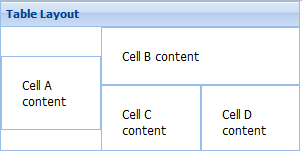
10.Border(边框布局):将容器分为5个部分:east,west,north,south,center。通过region进行指定。
    Ext.create('Ext.Panel', {

                        width : 500,

                        height : 300,

                        title : 'Border布局示例',

                        layout : 'border',

                        items : [

                                {

                                    title : 'center',

                                    html : '中部',

                                    region : 'center'

                                },{

                                    title : 'north',

                                    html : '北部',

                                    region : 'north'

                                }, {

                                    title : 'south',

                                    html : '南部',

                                    region : 'south'

                                }, {

                                    title : 'east',

                                    html : '东部',

                                    region : 'east',

                                    width : 100

                                },{

                                    title : 'west',

                                    html : '西部',

                                    region : 'west',

                                    width : 50

                                }],

                        renderTo : Ext.getBody()

                    });
border图例:

11.Box(盒布局):又分为HboxLayout(水平盒布局) 和 VboxLayout(垂直盒布局),通过子元素的flex配置项来划分父容器的空间。代码如下:
    Ext.create('Ext.Panel', {

                    width: 400,

                    height: 200,

                    title: "box盒布局",

                    layout: {

                        type: 'hbox',

                        align: 'stretch'    //子面板高度充满父容器

                    },

                    renderTo: document.body,

                    items: [{

                        xtype: 'panel',

                        title: '占2/4',

                        flex: 2

                    },{

                        xtype: 'panel',

                        title: '占1/4',

                        flex: 1

                    },{

                        xtype: 'panel',

                        title: '占1/4',

                        flex: 1

                    }]

                });
box图例:

Ext布局的更多相关文章
- 关于系统首页绘制问题(ext布局+c#后台加入数据)经html输出流输出响应client
关于系统首页绘制问题,业务需求 TODO 绘制系统首页(Main.aspx) 採用的技术:functioncharts+jquery+ext布局+c#+html 解说篇:1,服务端aspx,2,服务端 ...
- Ext布局篇
EXT标准布局类 收藏 面板相当于一张干净的白纸,如果直接在上面添加内容,将很难控制面板中内容的显示位置,面板元素越多就越显得凌乱,所以需要在面板上划分不同的区域,将面板内容展示到希望的位置上.E ...
- ext布局问题之tab panel内的gridpanel内容数据变多,出现滚动条
1)解决之道: 1.修改tabPanel var tabs= new Ext.TabPanel({ border: false, region:'center', id:'center', activ ...
- Ext.NET 4.1.0 搭建页面布局
Ext.NET目前的最新版本为4.1.0,可以从官网:ext.net上下载,具体下载网址为:http://ext.net/download/. 文件下载下来后,在\lib\目录下存在3个文件夹,分别对 ...
- 【Ext.Net学习笔记】02:Ext.Net用法概览、Ext.Net MessageBus用法、Ext.Net布局
Ext.Net用法概览 Ext.Net还是很强大,如果运用熟练可以极大的提高编程效率.如果你也要学习Ext.Net,原文博主推荐书籍:<Ext.Net Web 应用程序开发教程>,是英文的 ...
- [转载]ExtJs4 笔记(9) Ext.Panel 面板控件、 Ext.window.Window 窗口控件、 Ext.container.Viewport 布局控件
作者:李盼(Lipan)出处:[Lipan] (http://www.cnblogs.com/lipan/)版权声明:本文的版权归作者与博客园共有.转载时须注明本文的详细链接,否则作者将保留追究其法律 ...
- Extjs4.2布局——Ext.container.ViewportView
先贴出官方文档的关于此布局的描述:“ 一个专门的容器用于可视应用领域(浏览器窗口). Viewport渲染自身到网页的documet body区域, 并自动将自己调整到适合浏览器窗口的大小,在窗口大小 ...
- Extjs4.2布局——layout: accordion(Ext.layout.container.Accordion)
API这样介绍这种布局: 示例:(来自API)注:打开默认展开第一个面板. Ext.create('Ext.panel.Panel', { title: 'Accordion Layout', wid ...
- Ext.Net 布局
Ext.Net 布局 Panel布局类有10种:容器布局,自适应布局,折叠布局,卡片式布局,锚点布局,绝对位置布局,表单布局,列布局,表格布局,边框布局 1,Ext.layout.Cont ...
随机推荐
- 关于js中select的简单操作,以及js前台计算,span简单操作
<!DOCTYPE html> <html> <head> <meta http-equiv="Content-Type" content ...
- 同一DataTable下创建多个结构数据相同的DataView的小问题
昨天在根据经理的要求修改公司后台的时候,遇到了一个很奇怪的问题 DataView dvFocus = ]); DataView dvLook = ]); DataView dvNewUser = ]) ...
- Ubuntu自定义命令
回到主文件夹 $ cd ~ 建立.bash_aliases $ touch .bash_aliases $ vim .bash_aliases 在此文件中加入一句话: alias cdlauncher ...
- emjio表情转json
今天碰到了上传文字给服务端的时候emjio表情转成json就不对了 有大神帮忙解决了,记笔记记笔记--- #import "NSString+EncodedString.h" @i ...
- OC中限制UITextView的最大字数的实现
一.属性 //自定义的textview @property (weak, nonatomic) IBOutlet UITextView *textview; //添加一个bool类型的属性 @prop ...
- C++服务器设计(五):多设备类型及消息事件管理
在传统的服务器系统中,服务器仅针对接收到的客户端消息进行解析,并处理后回复响应.在该过程中服务器并不会主动判断客户端类型.但在现实中,往往存在多种类型的客户端设备,比如物联网下的智能家居系统,就存在智 ...
- YUI的类型判断函数
1.首先定义一个关于类型的对象,及相关变量 类型判断对象 ar L = Y.Lang || (Y.Lang = {}), STRING_PROTO = String.prototype, TOSTRI ...
- 【转】nginx之主配置文件:root和alias
nginx指定文件路径有两种方式root和alias,这两者的用法区别,使用方法总结了下,方便大家在应用过程中,快速响应.root与alias主要区别在于nginx如何解释location后面的uri ...
- 禁用ubuntu的触摸板和独显
#!/bin/bash #This is a vgaoff & touchpadoff #By spinestars #-2-18#TouchPad & VGA OFF == ];th ...
- oc语言--BLOCK和协议
一.BOLCK (一)简介 BLOCK是什么?苹果推荐的类型,效率高,在运行中保存代码.用来封装和保存代码,有点像函数,BLOCK可以在任何时候执行. BOLCK和函数的相似性:(1)可以保存代码(2 ...