
Android Studio常用小技巧
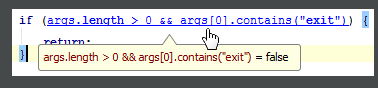
1. Debug 模式查看变量的值;
To quickly evaluate the value of any expression while debugging the program, hold Alt and click this expression to see its value and calculate it, call a method, etc.
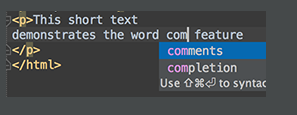
2. 自动补全快捷键,默认,自己设置过快捷键以自己的为准:
Use Basic Completion (Ctrl+空格) for completing words in text and comments in files of many different types.
All the words from the current file that start with the typed prefix will appear in the lookup list.
3. 快捷键,查看参数信息,文档:
The shortcuts such as Ctrl+Shift+空格 (View | Quick Documentation), Ctrl+P in default keymap (View | Parameter Info), F3 (Navigate | Declaration) and others can be used not only in the editor but in the code completion popup list as well.
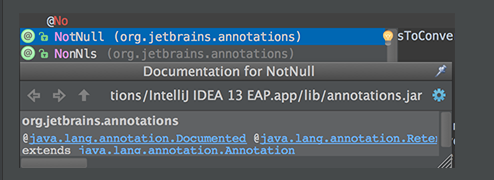
When using Code Completion, you can accept the currently highlighted selection in the popup list with the period character (.), comma (,), semicolon (;), space and other characters.
The selected name is automatically entered in the editor followed by the entered character.
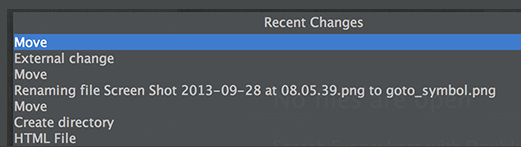
4。 查看最近的修改:
Use Alt+Shift+C in default keymap to quickly review your recent changes to the project.
5. 补全if , do while ,try catch 语句:
Use Ctrl+Shift+Enter to complete a current statement such as if, do-while, try-catch, return (or a method call) into a syntactically correct construct (e.g. add curly braces).
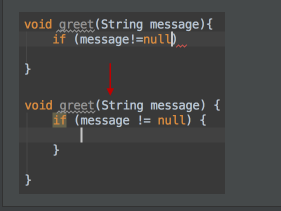
6.Run / Debug快捷键:
By pressing Alt+Shift+F10 you can access the Run/Debug dropdown on the main toolbar, without the need to use your mouse.
7. 关于提交代码:
If you don't want to commit some of your changes to the repository, you can set them aside for a while, by moving to a separate changelist, or by putting them to a shelf. Select such file in the Local tab of the Changes tool window, and on the context menu choose Move to Another Changelist, or Shelve Changes.
8. 查看全局方法:
You can view all methods of the implemented interfaces in a class, if you place the caret at the implements keyword in the class declaration, press Alt+Shift+O, and select the desired interface from the list:
9。 查看一个方法的所以出口:
To view all exit points of a method, place the caret at one of them, e.g. the return statement, and press Alt+Shift+O:
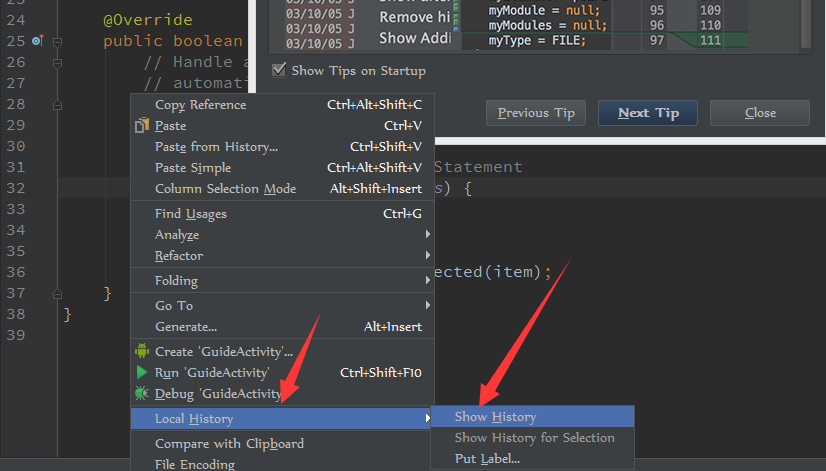
10. 查看每一行代码最近的改变情况:
Version control annotations show the latest changes of each line in one click.
Just right-click an annotation and use the Show Diff command in the context menu.

11. 关于编辑正则表达式:
You can avoid escaping backslashes in your regular expressions. Start typing a regular expression, then press Alt+Enter and choose Edit RegExp. The regular expression opens in a separate tab in the editor, where you can type backslashes as is.
All changes are synchronized with the original regular expression, and escapes are presented automatically. When ready, just press Esc to close the regular expression editor.

12. 使用shell脚本:
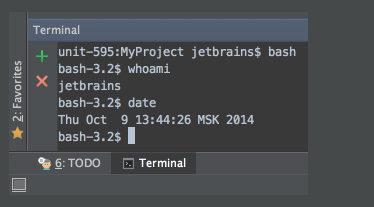
You don't need to leave Android Studio to work with your favorite shell. Just click the Terminal tool window button, and enjoy using the embedded local terminal.
Android Studio常用小技巧的更多相关文章
- 最强 Android Studio 使用小技巧和快捷键
写在前面 本文翻译自 Android Studio Tips by Philippe Breault,一共收集了62个 Android Studio 使用小技巧和快捷键. 根据这些小技巧的使用场景,本 ...
- 最强 Android Studio 使用小技巧和快捷键总结
最强 Android Studio 使用小技巧和快捷键总结 写在前面 本文翻译自 Android Studio Tips by Philippe Breault,一共收集了62个 Android ...
- Android课程---Android Studio使用小技巧:提取方法代码片段
这篇文章主要介绍了Android Studio使用小技巧:提取方法代码片段,本文分享了一个快速复制粘贴方法代码片段的小技巧,并用GIF图演示,需要的朋友可以参考下 今天来给大家介绍一个非常有用的Stu ...
- Android Studio 使用小技巧和快捷键
Android Studio 使用小技巧和快捷键 Alt+回车 导入包,自己主动修正 Ctrl+N 查找类 Ctrl+Shift+N 查找文件 Ctrl+Alt+L 格式化代码 Ctrl+Alt ...
- Android开发学习之路-Android Studio开发小技巧
上一次发过了一个介绍Studio的,这里再发一个补充下. 我们都知道,Android Studio的功能是非常强大的,也是很智能的.如果有人告诉你学Android开发要用命令行,你可以告诉他Andro ...
- Android Studio使用小技巧:提取方法代码片段
http://www.jb51.net/article/65510.htm 今天来给大家介绍一个非常有用的Studio Tips,有些时候我们在一个方法内部写了过多的代码,然后想要把一些代码提取出来再 ...
- Android Studio每日小技巧
一般的什么快捷键,技巧的文章也有很多.我也看过很多.下面这些事我在来自国外大神发布的:Android Studio Tips of the Day查看到的,而且对于我来说有帮助的及没用过的. Andr ...
- Android Studio 使用小技巧
1.如何打开设置界面? File --> Settings 快捷键 Ctrl + Alt + s 2.修改Java文件字体大小 ? File --> Settings --> E ...
- Visual Studio常用小技巧一:代码段+快捷键+插件=效率
用了visual studio 5年多,也该给自己做下备忘录了.每次进新的组换新的电脑,安装自己熟悉的环境又得重新配置,不做些备忘老会忘记一些东西.工具用的好,效率自然翻倍. 1,代码段 在Visua ...
随机推荐
- 存储和读取MYSQL时间戳
from_unixtime(date,'%Y%m%d')是MySQL里的时间函数date为需要处理的参数(该参数是Unix 时间戳),可以是字段名,也可以直接是Unix 时间戳字符串后面的 '%Y%m ...
- SSH框架常会出现的一些错误
1.jquery datatable插件报JSON数据错误 错误原因:hql语句拼接有问题,前一个字符串与后一个字符串之间缺少空格,导致数据库查询失败. 2.addInput页面中input内容不为空 ...
- DataTable中执行DataTable.Select("条件"),
我们在使用Sql ******这些数据库时,可以轻松的通过Sum.Aver.Count等统计出相关结果,那么,在已经把数据检索出来的DataSet(DataTable)中呢?特别是通过Web Serv ...
- mysql学习(九)sql语句
SQL种类: DDL:数据定义语言 DML:数据操作语言 DQL:数据查询语言 DCL:数据控制语言 DDL: show databases; //查询数据库 create database if n ...
- 创建style和修改style
1.创建style 在res/values/styles.xml中设置style 根元素<resource> 子元素:<style> 属性:name:样式的名称 parent: ...
- MySQL常用的指令
MySQL指令在网上百度出来的是一大堆,在此只是整理平时用的比较多的指令. 百度文库中的这篇文章可以参考http://wenku.baidu.com/view/b5e83a27ccbff121dd36 ...
- java改变图片文件尺寸
package test.common; import java.awt.Graphics; import java.awt.Image; import java.awt.image.Buffered ...
- Oracle EBS-SQL (WIP-2):检查非标任务没挂自己本身.sql
SELECT WE.WIP_ENTITY_NAME, MSI.SEGMENT1, MSI.DESCRIPTION, WDJ.CLASS_CODE, WDJ.START_QUANTITY, WDJ.SC ...
- ApiDemos示例学习(1)——ApiDemos示例的导入
---恢复内容开始--- 今天准备开始写这个ApiDemos示例的学习日记了,放在网上以监督自己! 首先是导入该示例.如果我们在配置Android开发环境是,利用Android SDK 安装包中的SD ...
- 浅析C++内存分配与释放操作过程——三种方式可以分配内存new operator, operator new,placement new
引言:C++中总共有三种方式可以分配内存,new operator, operator new,placement new. 一,new operator 这就是我们最常使用的 new 操作符.查看汇 ...