
08_MSTP(数通华为)
1. 网络拓扑

2. SW1配置
[SW1]vlan batch 10 20 30 40
[SW1]stp mode mstp
进入MSTP配置视图,MSTP域名为huawei,同时配置VLAN到实例的映射,并激活MSTP配置
[SW1]stp region-configuration
[SW1-mst-region]region-name huawei
[SW1-mst-region]instance 1 vlan 10 20
[SW1-mst-region]instance 2 vlan 30 40
[SW1-mst-region]active region-configuration
配置各实例的优先级,SW1配置为实例1CIST的主根、实例2的次根
[SW1]stp instance 0 priority 0(实例0,这是默认的系统实例,暂时不用理会)
[SW1]stp instance 1 priority 0 (或者 stp instance 1 root primary)
[SW1]stp instance 2 priority 4096 (或者stp instance 2 root secondary)
[SW1]stp enable
配置端口trunk模式
[SW1-GigabitEthernet0/0/22]port link-type trunk
[SW1-GigabitEthernet0/0/22]port trunk allow-pass vlan all
[SW1-GigabitEthernet0/0/24]port link-type trunk
[SW1-GigabitEthernet0/0/24]port trunk allow-pass vlan all
3. SW2配置
[SW2] vlan batch 10 20 30 40
[SW2] stp mode mstp
[SW2] stp region-configuration
[SW2-mst-region] region-name huawei
[SW2-mst-region] instance 1 vlan 10 20
[SW2-mst-region] instance 2 vlan 30 40
[SW2-mst-region] active region-configuration
[SW1] stp instance 0 priority 4096
[SW2] stp instance 1 priority 4096
[SW2] stp instance 2 priority 0
[SW2] stp enable
[SW2-GigabitEthernet0/0/24] port link-type trunk
[SW2-GigabitEthernet0/0/24] port trunk allow-pass vlan all
[SW2-GigabitEthernet0/0/23] port link-type trunk
[SW2-GigabitEthernet0/0/23] port trunk allow-pass vlan all
4. SW3配置
[SW3] vlan batch 10 20 30 40
[SW3] stp mode mstp
[SW3] stp region-configuration
[SW3-mst-region] region-name huawei
[SW3-mst-region] instance 1 vlan 10 20
[SW3-mst-region] instance 2 vlan 30 40
[SW3-mst-region] active region-configuration
[SW3] stp enable
[SW3-GigabitEthernet0/0/22] port link-type trunk
[SW3-GigabitEthernet0/0/22] port trunk allow-pass vlan all
[SW3-GigabitEthernet0/0/23] port link-type trunk
[SW3-GigabitEthernet0/0/23] port trunk allow-pass vlan all
5. 查看配置
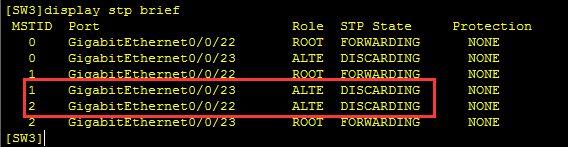
实例1 的23端口是阻塞的,实例2的22端口是阻塞的。
08_MSTP(数通华为)的更多相关文章
- 07_LACP负载分担(数通华为)
1. 网络拓扑 2. SW1配置:[SW1]vlan batch 10 20[SW1]interface GigabitEthernet 0/0/1[SW1-GigabitEthernet0/0/1] ...
- 08_STP(数通华为)
1. 网络拓扑 2. 激活生成树[SW1]stp mode stp [SW1]stp enable [SW2]stp mode stp [SW2]stp enable [SW3]stp mode st ...
- 05_配置交换机SSH服务(数通华为)
1. 网络拓扑: 2. SW1配置:2.1 配置为Access口,vlan 10:[SW1]vlan 10[SW1-GigabitEthernet0/0/1]port link-type access ...
- 04_配置交换机Telnet服务(数通华为)
1. 网络拓扑: 2. SW1配置:2.1 配置为Access口,vlan 10:[SW1]vlan 10[SW1-GigabitEthernet0/0/1]port link-type access ...
- 03_vlan & access & trunk 口(数通华为)
1. 网络拓扑: 2. SW1配置: 2.1 关闭设备调试信息:<Huawei>undo terminal monitor <Huawei>undo terminal debu ...
- 02_搭建HTTP客户端与服务器(数通华为)
1.选择客户端和服务端: 2.服务端创建HTTP目录: 3.客户端访问下载:
- 01_搭建基本的FTP服务器(数通华为)
1.选择客户端和服务端: 2.FTP服务端配置设置待FTP的文件: 3.客户端配置访问: 4.双击下载到本地:
- 浅谈数通畅联ECP与EAC的区别
最近收到很多客户的提问,AEAI ECP企业云联平台是什么产品?为什么AEAI ECP中包括集成套件?EAC也是数通畅联的产品吗?同样涉及集成两者有什么区别呢?诸如此类的问题还有很多. 其实AEAI ...
- 攻克数通,斩获云计算!誉天Double HCIE学员考证秘笈揭晓
不知不觉,已经过了四个月的时间了,我是六月多报名云计算的,本来是奔着邹Sir去的,但是当时邹sir已经上到HCIE的课程了,只能蹭学弟之前的录屏看.等到七月八号,又正式跟了曾曦老师上了一次完整的课程. ...
随机推荐
- Docker 制作定制asp.netcore 的容器
上文Windows docker k8s asp.net core的k8swebap镜像只是一个asp.net core程序,在实际生产中我们希望容器中还有一些其他程序,比如ssh 和telegraf ...
- Django 安装使用
Django 安装使用 Django 介绍: Django是一个开放源代码的Web应用框架,由Python写成.采用了MVT的框架模式,即模型M,视图V和模版T.它最初是被开发来用于管理劳伦斯出版集团 ...
- 示例:WPF中自定义MessageService应用DialogHost、Snackbar、NotifyIcon显示各种场景提示消息
原文:示例:WPF中自定义MessageService应用DialogHost.Snackbar.NotifyIcon显示各种场景提示消息 一.目的:不同交互场景需要提示不同的消息,不同的消息需要用不 ...
- SUSE12Sp3-使用Docker导入镜像并安装redis,zookeeper,kafka
首先在另外一台联网电脑拉取最新的redis,zookeeper,kafka镜像 docker pull redis docker pull zookeeper docker pull wurstmei ...
- java 泛型和object比较
引言 我们使用object和泛型做形参,都是为了让这个方法能接收更多类型的对象,让程序变得更健壮,代码复用率更高.当我们回看自己写的代码时会发现,好像使用泛型的地方使用object也可以,使用obje ...
- 图像上划矩形(cv.line()函数)
在图像上划矩形 import numpy as npimport cv2 as cvimg=np.zeros((400,400),np.uint8)cv.line(img,(100,100),(350 ...
- python自动备份阿里云数据库binlog
#coding:utf8from aliyunsdkcore import clientfrom aliyunsdkrds.request.v20140815 import DescribeBacku ...
- English--五大基本句型基本概念
English|五大基本句型基本概念 英语的基本句型是整个英语的框架体系,所以,祝愿看到此文的伙伴们,都可以牢牢掌握! 前言 目前所有的文章思想格式都是:知识+情感. 知识:对于所有的知识点的描述.力 ...
- jQuery源码二之extend的实现
extend是jQuery中一个比较核心的代码,如果有查看jQuery的源码的话,就会发现jQuery在多处调用了extend方法. 作用 对任意对象进行扩展 扩展某个实例对象 对jquery本身的实 ...
- CSS3 完善盒模型
CSS3 改善了传统盒模型结构,增强了盒子构成要素的功能,扩展了盒模型显示的方式. 改善结构:为盒子新增轮廓区: 增强功能:内容区增强 CSS 自动添加内容功能,增强内容移除.换行处理:允许多重定义背 ...