
后端&前端零碎知识点和注意问题
后端
1. Spring自带的MD5加密工具类
import org.springframework.util.DigestUtils;

String md5Password = DigestUtils.md5DigestAsHex(password.getBytes());
2. 数据库的字段名不要含有 is
比如数据库有个字段为is_valid,那么到代码里这个变量为isValid。如果恰好这个变量是Boolean类型的,那么如果返回数据到前端,那么json串为{"valid":true},可以看见is被无形去掉了。

看自动生成的get方法,没有get前缀,都是因为Boolean类型的get方法都是以is开头的,而这样会覆盖掉你名字里的is前缀,所以如果你的变量为Boolean类型命名要避免以is开头。
3. invalid comparison: org.springframework.web.bind.annotation.RequestMethod and java.lang.String
别人留下的坑:
mybatis里面的sql语句,org.springframework.web.bind.annotation.RequestMethod是个枚举类
<if test="requestMethod!=null and requestMethod!='' ">

    REQUEST_METHOD=#{requestMethod , jdbcType=VARCHAR, typeHandler=org.apache.ibatis.type.EnumTypeHandler},

</if>
这里的判断:requestMethod != '' 导致报错,因为你一个枚举类怎么能跟字符串作比较呢?
4. 修改html页面,IDEA不自动部署的问题
首先禁用掉当前模板引擎的缓存,比如:spring.thymeleaf.cache=false,页面修改之后按Ctrl+F9重新Build Project
5. org.springframework.web.servlet.config.annotation.WebMvcConfigurerAdapter 已废弃
自5.0版本开始,MVC相关配置可直接实现 org.springframework.web.servlet.config.annotation.WebMvcConfigurer
import com.example.demo.interceptor.CommonInterceptor;

import org.springframework.beans.factory.annotation.Autowired;

import org.springframework.context.annotation.Configuration;

import org.springframework.web.servlet.config.annotation.InterceptorRegistry;

import org.springframework.web.servlet.config.annotation.WebMvcConfigurer;

@Configuration

public class MyWebConfig implements WebMvcConfigurer {

    @Autowired

    private CommonInterceptor commonInterceptor;

    /**

     * 配置拦截器

     * @param registry

     */

    @Override

    public void addInterceptors(InterceptorRegistry registry) {

        registry.addInterceptor(commonInterceptor).addPathPatterns("/**").excludePathPatterns("/login");

    }

}
6. 查看SpringBoot默认的配置类
在application.properties里面配置debug=true,在启动的时候就会打印开启的默认配置类。

7. maven打包SpringBoot项目后,java -jar命令报错,找不到主清单属性
<plugin>

    <groupId>org.springframework.boot</groupId>

    <artifactId>spring-boot-maven-plugin</artifactId>

    <version>${spring.boot.version}</version>

    <!--解决打包后,执行java -jar 命令,找不到主清单属性-->

    <executions>

        <execution>

            <phase>package</phase>

            <goals>

                <goal>repackage</goal>

            </goals>

        </execution>

    </executions>

</plugin>
8. Java解析HTML/XML字符串
<dependency>

    <groupId>dom4j</groupId>

    <artifactId>dom4j</artifactId>

    <version>1.6.1</version>

</dependency>
代码
import org.dom4j.Document;

import org.dom4j.DocumentException;

import org.dom4j.DocumentHelper;

import org.dom4j.Element;

import java.util.HashMap;

import java.util.Map;

public class Test {

    public static void main(String[] args) throws DocumentException {

        parse(create());

    }

    private static String create(){

        Document document = DocumentHelper.createDocument();

        Element rootElement = document.addElement("response");

        Map<String,String> postMap = new HashMap<>();

        postMap.put("code", "200");

        postMap.put("msg", "操作成功!");

        for (String key : postMap.keySet()) {

            Element element = rootElement.addElement(key);

            element.setText(postMap.get(key));

        }

        String xml = document.getRootElement().asXML();

        System.out.println("Create Result:" + xml);

        return xml;

    }

    private static void parse(String data) throws DocumentException {

        Document document = DocumentHelper.parseText(data);

        Element rootElement = document.getRootElement();

        System.out.println("==============Parse Result ==============");

        System.out.println(rootElement.element("code").getText());

        System.out.println(rootElement.element("msg").getText());

    }

}
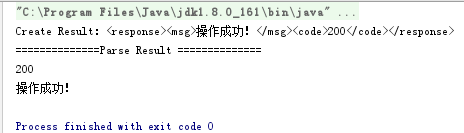
输出
9. 后端传递Long,前端精度丢失解决
import com.fasterxml.jackson.annotation.JsonFormat;

import com.fasterxml.jackson.databind.annotation.JsonSerialize;

import com.fasterxml.jackson.databind.ser.std.ToStringSerializer;

public class User {

    /**

     * 方法一

     */

    @JsonFormat(shape = JsonFormat.Shape.STRING)

    private Long userId;

    /**

     * 方法二

     */

    @JsonSerialize(using = ToStringSerializer.class)

    private Long orderId;

}
10. Integer对象转Comparable对象(来自JDK源码)
Integer x = 10;

Comparable<Integer> key = (Comparable<Integer>) x;

System.out.println(x.compareTo(1));
11. Optional的使用
List<String> list = null;

// 无论list是否为空,都会执行orElse

List<String> strings = Optional.ofNullable(list).orElse(new ArrayList<>());

// 只有list为空,才会执行orElseGet

List<String> strings2 = Optional.ofNullable(list).orElseGet(ArrayList::new);
12. 解析Excel
引入依赖
<!-- https://mvnrepository.com/artifact/org.apache.poi/poi -->

<dependency>

    <groupId>org.apache.poi</groupId>

    <artifactId>poi</artifactId>

    <version>4.1.2</version>

</dependency>

<!-- https://mvnrepository.com/artifact/org.apache.poi/poi-ooxml -->

<dependency>

    <groupId>org.apache.poi</groupId>

    <artifactId>poi-ooxml</artifactId>

    <version>4.1.2</version>

</dependency>
代码
import org.apache.poi.hssf.usermodel.HSSFWorkbook;

import org.apache.poi.ss.usermodel.Cell;

import org.apache.poi.ss.usermodel.Row;

import org.apache.poi.ss.usermodel.Sheet;

import org.apache.poi.ss.usermodel.Workbook;

import org.apache.poi.xssf.usermodel.XSSFWorkbook;

import java.io.File;

import java.io.FileInputStream;

import java.io.IOException;

import java.util.ArrayList;

import java.util.List;

public class Main {

    public static void main(String[] args) throws Exception {

        File file = new File("excel.xlsx");

        readExcel(file);

    }

    private static void readExcel(File file) throws IOException {

        FileInputStream in = new FileInputStream(file);

        List<String> codes = new ArrayList<>();

        Workbook wb = null;

        // 解析后缀

        String prefix = file.getName().substring(file.getName().lastIndexOf(".") + 1);

        // 根据后缀判断文件类型

        if ("xls".equals(prefix)){

            wb = new HSSFWorkbook(in);

        }else if ("xlsx".equals(prefix)){

            wb = new XSSFWorkbook(in);

        }

        if (wb != null){

            // sheet数量

            int numberOfSheets = wb.getNumberOfSheets();

            // 遍历sheet

            for (int i = 0; i < numberOfSheets; i++){

                Sheet sheet = wb.getSheetAt(i);

                // 遍历标题行(第0行)

                Row title = sheet.getRow(0);

                System.out.println("===============");

                for (int c = 0; c < title.getLastCellNum(); c++){

                    Cell cell = title.getCell(c);

                    System.out.print(selectCellType(cell) + "\t");

                }

                System.out.println("\n===============");

                // 遍历数据行(第1行开始)

                for (int j = 1; j <= sheet.getLastRowNum(); j++){

                    Row row = sheet.getRow(j);

                    for (int c = 0; c < row.getLastCellNum(); c++){

                        Cell cell = row.getCell(c);

                        System.out.print(selectCellType(cell) + "\t");

                    }

                    System.out.println();

                }

            }

        }

    }

    private static Object selectCellType(Cell cell){

        switch (cell.getCellType()){

            case BLANK:

                return "";

            case STRING:

                return cell.getStringCellValue();

            case BOOLEAN:

                return cell.getBooleanCellValue();

            case NUMERIC:

                return cell.getNumericCellValue();

            case FORMULA:

                return cell.getCellFormula();

            default:

                return "";

        }

    }

}
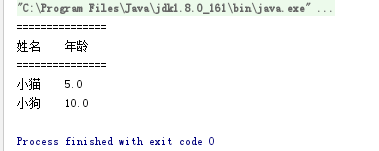
测试:
13. 按照逗号分隔的 String与List 互转
依赖
<!-- https://mvnrepository.com/artifact/org.apache.commons/commons-lang3 -->

<dependency>

    <groupId>org.apache.commons</groupId>

    <artifactId>commons-lang3</artifactId>

    <version>3.10</version>

</dependency>
代码
import org.apache.commons.lang3.StringUtils;
String text = "A,B,C,D,E";

// --------------String转List

List<String> stringList = Arrays.asList(text.split(","));

// --------------List转String

String join = StringUtils.join(stringList, ",");

System.out.println(stringList + "\t\t" + join);
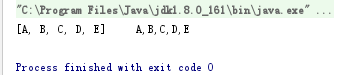
测试:
前端
1. string转number
<script>

$(document).ready(function(){

      var p = +$('p').text();

    $('div').text(p+1);

});

</script>

</head>

<body>

    <div></div>

    <p>1</p>

</body>

</html>
输出2而不是11
2. JQuery警告,低效的选择器用法
比如:
$('#resultData :checked');
会警告
Inefficient jQuery usage less... (Ctrl+F1)
Checks that jQuery selectors are used in an efficient way. It suggests to split descendant selectors which are prefaced with ID selector and warns about duplicated selectors which could be cached
应改成:
$('#resultData').find(':checked');
3. Comparison $.trim($(t[9]).val()) == "" may cause unexpected type coercion less...
比如:判断表单内容去除空格后是否为空
$.trim($(t[0]).val()) == ""
会警告

应改为:
$.trim($(t[0]).val()) === ""
4. new Boolean(value) 和 Boolean(value)的区别
前者是作为构造函数构造一个Boolean实例,得到的是一个对象;后者是作为普通函数调用,得到的是函数返回值false/true。
5. Ajax请求,传递的数组参数名称多了一个[]
利用JQuery的$.param(params,true)来解决
var myObject = {

  a: {

    one: 1,

    two: 2,

    three: 3

  },

  b: [1,2,3]

};

var recursiveEncoded = $.param(myObject);

var recursiveDecoded = decodeURIComponent($.param(myObject));

console.log(recursiveEncoded);

console.log(recursiveDecoded);

var shallowEncoded = $.param(myObject, true);

var shallowDecoded = decodeURIComponent(shallowEncoded);

console.log(shallowEncoded);

console.log(shallowDecoded);

6. Input 文件域重复上传,不触发change事件
<input type="file" id="upload">

  $("#upload").change(function(){

      // 上传或者其它操作

      // ....

      // 最后将value置为空

      $(this).val('');

  });
也可以用一个新的input替代当前的input。
后端&前端零碎知识点和注意问题的更多相关文章
- web开发前端面试知识点目录整理
web开发前端面试知识点目录整理 基本功考察 关于Html 1. html语义化标签的理解; 结构化的理解; 能否写出简洁的html结构; SEO优化 2. h5中新增的属性; 如自定义属性data, ...
- 中级前端必备知识点(2.5w+月薪)进阶 (分享知乎 : 平酱的填坑札记 关注专栏 用户:安大虎)
前端已经不再是5年前刚开始火爆时候的那种html+css+js+jquery的趋势了,现在需要你完全了解前端开发的同时,还要具备将上线.持续化.闭环.自动化.语义化.封装......等概念熟练运用到工 ...
- webdriver零碎知识点
#零碎知识点,用于记录平时遇到的比较杂的知识点 driver.current_url 获取当前url phantomjs 实现无浏览器界面自动化测试(driver = webdriver.Phanto ...
- 前端笔记知识点整合之JavaScript(三)关于条件判断语句、循环语句那点事
一.条件分支语句 条件分支语句,也叫作条件判断语句,就是根据某种条件执行某些语句,不执行某些语句. JS中有三种语法是可以表示条件分支的 1.1 if……else…… 条件分支的主力语法,这个主力 ...
- Android零碎知识点 1
Android零碎知识点 1 Android在2.3版本上开始支持KeyEvent.KEYCODE_PAGE_DOWN以及KeyEvent.KEYCODE_PAGE_UP的操作. Androi ...
- 程序迭代时测试操作的要点(后端&前端)
今晚直播课内容简介,视频可点击链接免费听 <程序迭代时测试操作的要点(后端&前端)> ===== 1:迭代时后台涉及的操作有哪些?如何进行 a.更新war包:用于访问web\app ...
- web前端面试知识点整理
一.HTML5新特性 本地存储 webStorage websocket webworkers新增地理位置等API对css3的支持canvas多媒体标签新增表单元素类型结构标签:header nav ...
- 史上最全的Java高级技术点,全是Java高级进阶技术,几乎包含了Java后端的所有知识点
史上最全的Java高级技术点,全是Java高级进阶技术,几乎包含了Java后端的所有知识点 1
- 一个新手后端需要了解的前端核心知识点之position(一)
以下内容是基于观看慕课网视频教程总结的知识点,边打代码边总结,符合自己的思维习惯.不是针对新手入门 我做程序的初衷是想做一个网站出来.HTML语言当然重要啊,缺什么就百度什么,很浪费时间,还是好好的打 ...
随机推荐
- 学习:Windows数据类型
WINDOWS API中出现的常见的数据类型有以下几种: 1.DWORD:DWORD用于表示无符号整型的数据类型,实际名为double word,32位 2.HANDLE:HANDLE为32位的数据类 ...
- 设置hystrix的熔断时间
hystrix的熔断时间默认为1秒,这对于一个要部署的服务器来说太短了,所以可以把这个时间设置大一点 这个时间设置在yml中没有提示,下面是设置的代码: hystrix: command: defau ...
- SDOI2019快速查询
链接 vijos 思路 虽然询问1e7,但他询问很有意思,所以最多修改1e5个. 先把他们修改的点缩小到1e5之内并没有什么影响. 然后维护mul和add.不修改很好弄,修改的点可以弄点式子加加减减弄 ...
- 【DP】【期望】$P1850$换教室
链接 题目描述 有 \(2n\) 节课程安排在$ n$ 个时间段上.在第 \(i\)(\(1 \leq i \leq n\))个时间段上,两节内容相同的课程同时在不同的地点进行,其中,牛牛预先被安排在 ...
- VUE的生命周期——钩子函数
- nginx 反向代理之 proxy_redirect
proxy_redirect 该指令用来修改被代理服务器返回的响应头中的Location头域和“refresh”头域. 语法结构为: proxy_redirect redirect replaceme ...
- 使用Lua脚本通过原子减防止超卖
需求 双十二要搞一个一分钱门票抢购的活动. 分析 性能分析,抢购时会发生高并发,如果仅仅依靠Mysql数据库,有可能因为大量的请求频繁访问数据库造成服务器雪崩,所以考虑通过Redis减库存,最终的数据 ...
- curl 设置超时时间
使用CURL时,有两个超时时间:一个是连接超时时间,另一个是数据传输的最大允许时间.连接超时时间用--connect-timeout参数来指定,数据传输的最大允许时间用-m参数来指定. curl -- ...
- nginx php-fpm 配置问题(1)
nginx php-fpm 配置问题(1) 1.问题 Nginx/FPM/PHP all php files say 'File not found.' nginx error日志: [erro ...
- python mysql数据库压力测试
python mysql数据库压力测试 pymysql 的执行时间对比 1,装饰器,计算插入1000条数据需要的时间 def timer(func): def decor(*args): start_ ...