
Redis NOAUTH Authentication required
redis设置密码后停止服务报错,NOAUTH Authentication required
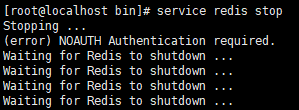
可以修改/etc/init.d/redis文件中的stop命令
$CLIEXEC -p $REDISPORT shutdown

改为

$CLIEXEC -a "password" -p $REDISPORT shutdown

上面"password"为你设置的密码

再次停止服务,服务成功关闭

Redis NOAUTH Authentication required的更多相关文章
- {Redis}NOAUTH Authentication required. Linux.cenOS
问题 [root@VM_0_12_centos redis]# ./bin/redis-cli -p 6379 127.0.0.1:6379> INFO NOAUTH Authenticatio ...
- Redis服务停止报错解决方案[NOAUTH Authentication required]
Redis服务器设置密码后,使用service redis stop 会出现以下信息: service redis stop Stopping ... OK (error) NOAUTH Authen ...
- REdis MASTER aborted replication NOAUTH Authentication required
对于REdis集群,如果设置了requirepass,则一定要设置masterauth,否则从节点无法正常工作,查看从节点日志可以看到哪下内容:19213:S 22 Apr 2019 10:52:17 ...
- redis安全 (error) NOAUTH Authentication required
Redis 安全 我们可以通过 redis 的配置文件设置密码参数,这样客户端连接到 redis 服务就需要密码验证,这样可以让你的 redis 服务更安全. 实例 我们可以通过以下命令查看是否设置了 ...
- Redis报错 : (error) NOAUTH Authentication required.
原文:Redis报错 : (error) NOAUTH Authentication required. 这个错误是因为没有用密码登陆认证 , 先输入密码试试 . 127.0.0.1:6379> ...
- Redis (error) NOAUTH Authentication required.
首先查看redis设置密码没 127.0.0.1:6379> config get requirepass 1) "requirepass" 2) "" ...
- redis 执行操作时提示(error) NOAUTH Authentication required.
(error) NOAUTH Authentication required. 出现认证问题,设置了认证密码,输入密码即可 127.0.0.1:6379> auth 123456
- redis出现错误:NOAUTH Authentication required.
出现认证问题,应该是设置了认证密码,输入密码既可以啦 注意密码是字符串形式! 127.0.0.1:6379> auth "yourpassword" 127.0.0.1:63 ...
- Jedis异常解决:NOAUTH Authentication required
引言 之前项目能够正常运行,因为默认选择db0,后来新的需求来了,不是默认db0,而是给参数选择db. 修改后代码如下,却报错NOAUTH Authentication required. 解决方法 ...
随机推荐
- vue要求更新3.0-》使用axios的时候出现错误
要求更新 使用axios报错 - Running completion hooks...error: 'options' is defined but never used (no-unused-va ...
- Entity Framework 学习系列(5) - EF 相关查询
目录 写在前面 一.使用Stopwatch 查询执行效率 二.简单查询 1.Linq写法: 2.Lambda表达式写法: 三.条件查询 1.Linq 写法 2.lambda 写法 四.聚合函数 1.L ...
- Git 快速极简图文教程 第一篇
Git简介 Git 是目前使用最广泛,最著名的工具.据了解,目前绝大部分互联网公司都已经全部切入到git作为版本管理工具,尤其是bat等头部公司,这是一个标准的技能. Git 最早是有linux之父, ...
- iOS11里判断Safari浏览器是无痕模式还是正常模式?
var isPrivate = false; try { window.openDatabase(null, null, null, null); } catch (_) { isPrivate = ...
- MySQL——python交互
与python交互之前我们需要安装一个MySQL的驱动模块Connector,这个驱动模块直接在cmd命令行输入 pip install mysql.connector 安装是否成功可以接着输入 py ...
- JS基础 —— 数据类型
JS数据类型分为简单数据类型(基本数据类型)和复杂数据类型(引用数据类型). 基本数据类型:Undefined.Null.Boolean.Number.String.Symbol. 引用数据类型:Ob ...
- flask Gunicorn和uwsgi并发对比(转载)
转载 结果 吞吐量(要求/秒) 响应时间(毫秒) 失误 吞吐量的标准偏差(要求/秒) 尽管uWSGI的性能在高负载下确实有些不稳定,但它看起来像Python应用服务器.uWSGI不仅速度快得离谱,而且 ...
- Django app安装,配置mysql,时区,模板,静态文件,媒体,admin
1.创建app python manage.py startapp 名字 Migrations 数据库同步目录,记录数据库同步的记录 init 包文件 Admin.py django自带的后台管理文件 ...
- JAVA并发-对象方法wait
最简单的东西,往往包含了最复杂的实现,因为需要为上层的存在提供一个稳定的基础,Object作为java中所有对象的基类,其存在的价值不言而喻,其中wait和notify方法的实现多线程协作提供了保证. ...
- Python基础之输出格式和If判断
格式化输出的三种方式 一.占位符 #占位符 name = 'nick' age = 19 print('my name is %s my age is %s' % (name, age)) age = ...