
Linux操作系统安全-使用gpg实现对称加密
Linux操作系统安全-使用gpg实现对称加密
作者:尹正杰
版权声明:原创作品,谢绝转载!否则将追究法律责任。
一.gpg工具包概述
1>.什么是gpg
GnuPG是GNU负责安全通信和数据存储的主席。它可以用于加密数据和创建数字签名。
2>.查看gpg的安装包
[root@node101.yinzhengjie.org.cn ~]# which gpg

/usr/bin/gpg

[root@node101.yinzhengjie.org.cn ~]#

[root@node101.yinzhengjie.org.cn ~]# rpm -qf /usr/bin/gpg

gnupg2-2.0.22-5.el7_5.x86_64

[root@node101.yinzhengjie.org.cn ~]#
3>.查看gpg的软件包详细信息
[root@node101.yinzhengjie.org.cn ~]# rpm -qi gnupg2

Name        : gnupg2

Version     : 2.0.22

Release     : 5.el7_5

Architecture: x86_64

Install Date: Mon 08 Jul 2019 04:23:21 PM CST

Group       : Applications/System

Size        : 6637796

License     : GPLv3+

Signature   : RSA/SHA256, Fri 13 Jul 2018 11:56:02 PM CST, Key ID 24c6a8a7f4a80eb5

Source RPM  : gnupg2-2.0.22-5.el7_5.src.rpm

Build Date  : Fri 13 Jul 2018 09:06:54 PM CST

Build Host  : x86-01.bsys.centos.org

Relocations : (not relocatable)

Packager    : CentOS BuildSystem <http://bugs.centos.org>

Vendor      : CentOS

URL         : http://www.gnupg.org/

Summary     : Utility for secure communication and data storage

Description :

GnuPG is GNU's tool for secure communication and data storage.  It can

be used to encrypt data and to create digital signatures.  It includes

an advanced key management facility and is compliant with the proposed

OpenPGP Internet standard as described in RFC2440 and the S/MIME

standard as described by several RFCs.

GnuPG 2.0 is a newer version of GnuPG with additional support for

S/MIME.  It has a different design philosophy that splits

functionality up into several modules. The S/MIME and smartcard functionality

is provided by the gnupg2-smime package.

[root@node101.yinzhengjie.org.cn ~]#
4>.创建测试文件用于加密和解密
[root@node101.yinzhengjie.org.cn ~]# echo "尹正杰到此一游" > f1.txt

[root@node101.yinzhengjie.org.cn ~]#

[root@node101.yinzhengjie.org.cn ~]# ll

total 4

-rw-r--r-- 1 root root 22 Dec 20 14:49 f1.txt

[root@node101.yinzhengjie.org.cn ~]#

[root@node101.yinzhengjie.org.cn ~]#

[root@node101.yinzhengjie.org.cn ~]# cat f1.txt

尹正杰到此一游

[root@node101.yinzhengjie.org.cn ~]#

[root@node101.yinzhengjie.org.cn ~]#
二.gpg实现对称加密实战案例
1>.在node101.yinzhengjie.org.cn节点使用gpg工具对称加密文件并拷贝到node108.yinzhengjie.org.cn节点上
[root@node101.yinzhengjie.org.cn ~]# ll

total 4

-rw-r--r-- 1 root root 22 Dec 20 14:49 f1.txt

[root@node101.yinzhengjie.org.cn ~]#

[root@node101.yinzhengjie.org.cn ~]# gpg -c f1.txt                            #执行该命令时会弹出一个如下图所示的对话框,需要我们交互式输入一个对称加密的密码,这个密码别忘记了,一会用到它。

[root@node101.yinzhengjie.org.cn ~]#

[root@node101.yinzhengjie.org.cn ~]# ll                                   #上述命令执行成功后,会多出来一个名为f1.txt.gpg的文件,源文件不变。

total 8

-rw-r--r-- 1 root root 22 Dec 20 14:49 f1.txt

-rw-r--r-- 1 root root 70 Dec 20 14:53 f1.txt.gpg

[root@node101.yinzhengjie.org.cn ~]#

[root@node101.yinzhengjie.org.cn ~]# scp f1.txt.gpg root@node108.yinzhengjie.org.cn:~        #将加密后的文件拷贝到另外一台服务器上去。

f1.txt.gpg                                                                                                                                100%   70    88.3KB/s   00:00

[root@node101.yinzhengjie.org.cn ~]#

[root@node101.yinzhengjie.org.cn ~]#
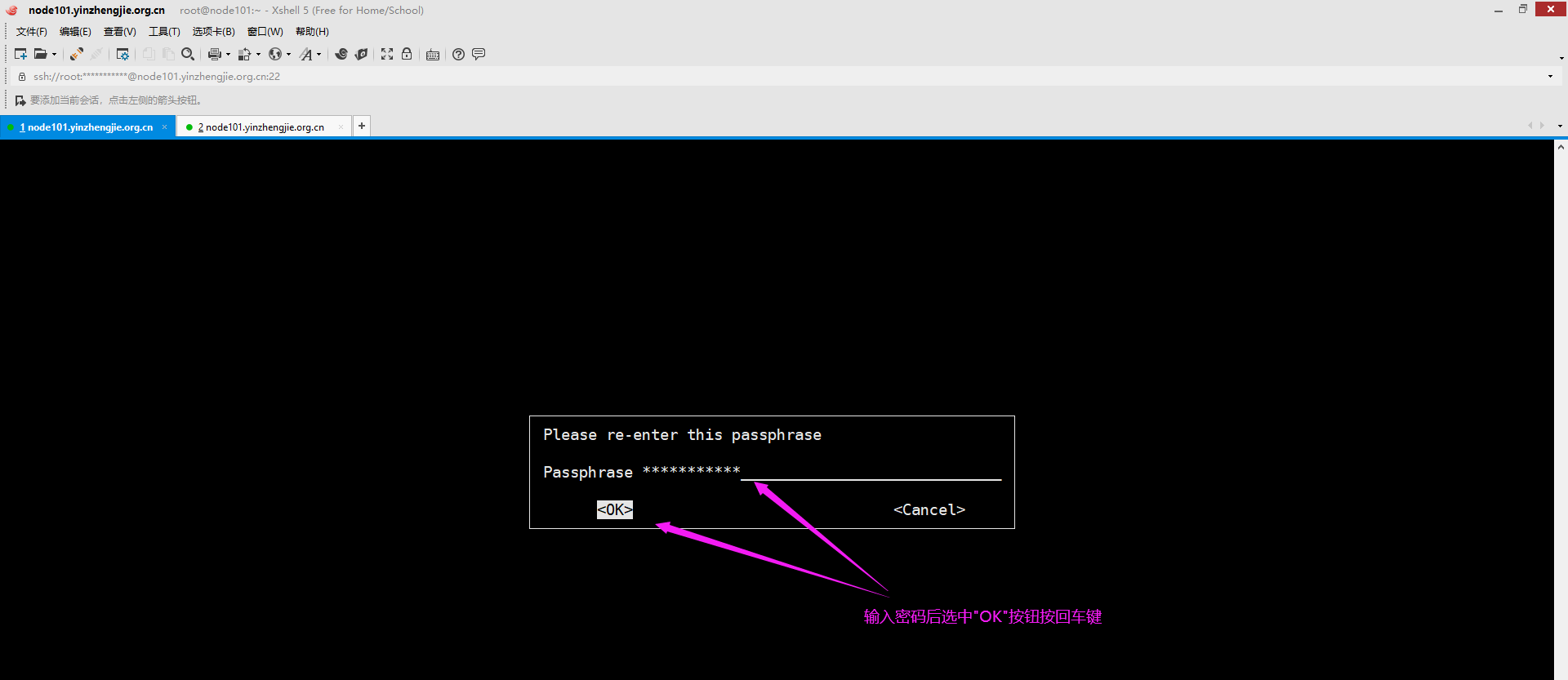
2>.在node108.yinzhengjie.org.cn解密文件内容
[root@node108.yinzhengjie.org.cn ~]# ll

total 4

-rw-r--r-- 1 root root 70 Dec 20 14:57 f1.txt.gpg

[root@node108.yinzhengjie.org.cn ~]#

[root@node108.yinzhengjie.org.cn ~]# gpg -o f1.txt -d f1.txt.gpg           #对gpg加密的文件进行解密操作,会弹出一个如下图所示的对话框,输入我们上面加密时的密码即可。

gpg: directory `/root/.gnupg' created

gpg: new configuration file `/root/.gnupg/gpg.conf' created

gpg: WARNING: options in `/root/.gnupg/gpg.conf' are not yet active during this run

gpg: keyring `/root/.gnupg/secring.gpg' created

gpg: keyring `/root/.gnupg/pubring.gpg' created

gpg: CAST5 encrypted data

gpg: encrypted with 1 passphrase

gpg: WARNING: message was not integrity protected

[root@node108.yinzhengjie.org.cn ~]#

[root@node108.yinzhengjie.org.cn ~]# ll                          #解密成功后,会生成一个新的文件,这个新的文件是我们上面使用"-o"参数指定的哟~

total 8

-rw-r--r-- 1 root root 22 Dec 20 15:01 f1.txt

-rw-r--r-- 1 root root 70 Dec 20 14:57 f1.txt.gpg

[root@node108.yinzhengjie.org.cn ~]#

[root@node108.yinzhengjie.org.cn ~]# cat f1.txt                      #发现解密后的数据是成功的

尹正杰到此一游

[root@node108.yinzhengjie.org.cn ~]#

[root@node108.yinzhengjie.org.cn ~]#
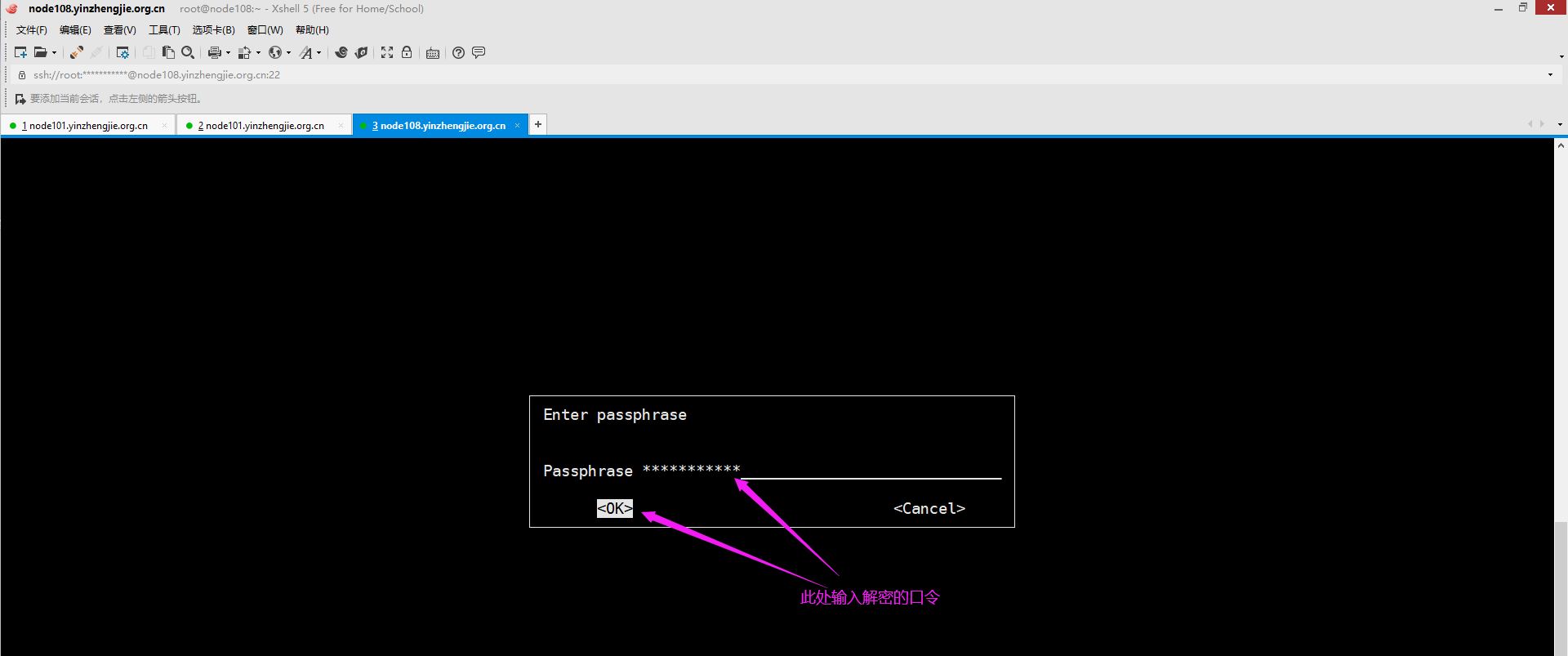
三.gpg实现非对称加密案例
1>.node101.yinzhengjie.org.cn生成密钥(该步骤可以在图形界面操作体验度会好点,使用字符界面也可以操作)
[root@node101.yinzhengjie.org.cn ~]# gpg --list-keys                  #目前没有管理的密钥

[root@node101.yinzhengjie.org.cn ~]#

[root@node101.yinzhengjie.org.cn ~]# gpg --gen-key                   #我们使用该命令会生成私钥和公钥

gpg (GnuPG) 2.0.22; Copyright (C) 2013 Free Software Foundation, Inc.

This is free software: you are free to change and redistribute it.

There is NO WARRANTY, to the extent permitted by law.

gpg: keyring `/root/.gnupg/secring.gpg' created

Please select what kind of key you want:

   (1) RSA and RSA (default)

   (2) DSA and Elgamal

   (3) DSA (sign only)

   (4) RSA (sign only)

Your selection?                                         #我们在这里可以选择加密算法,默认使用RSA算法

RSA keys may be between 1024 and 4096 bits long.

What keysize do you want? (2048) 1024                            #我们可以可以指定加密的位数,默认是1024位

Requested keysize is 1024 bits

Please specify how long the key should be valid.

         0 = key does not expire

      <n>  = key expires in n days

      <n>w = key expires in n weeks

      <n>m = key expires in n months

      <n>y = key expires in n years

Key is valid for? (0) 10                                    #设置密钥的有效期,默认未0,表示不过其,我这里输入的数字10,表示有效期是10天,我们也可以输入10w表示10个星期,也可输入10m表示10个月,还可以输入10y表示10年。

Key expires at Tue 31 Dec 2019 02:56:15 PM CST

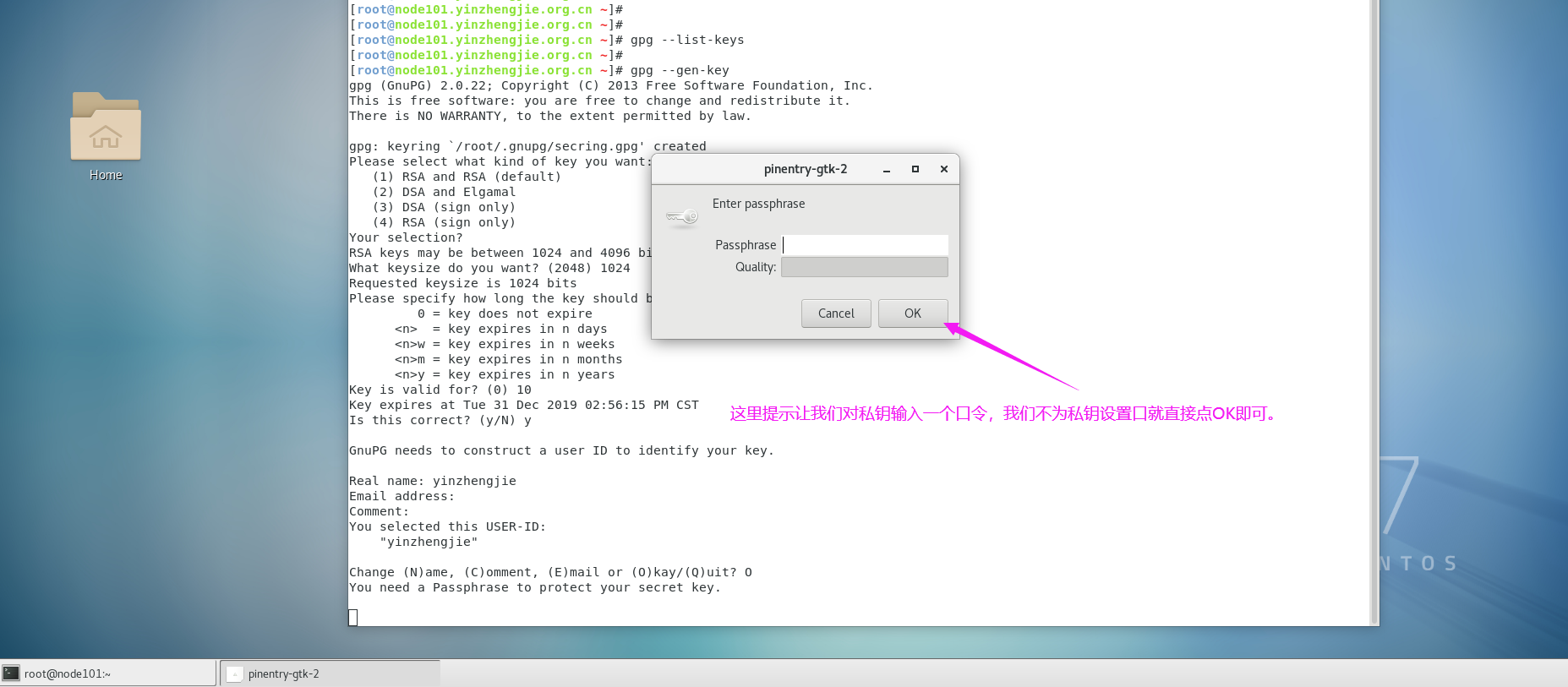
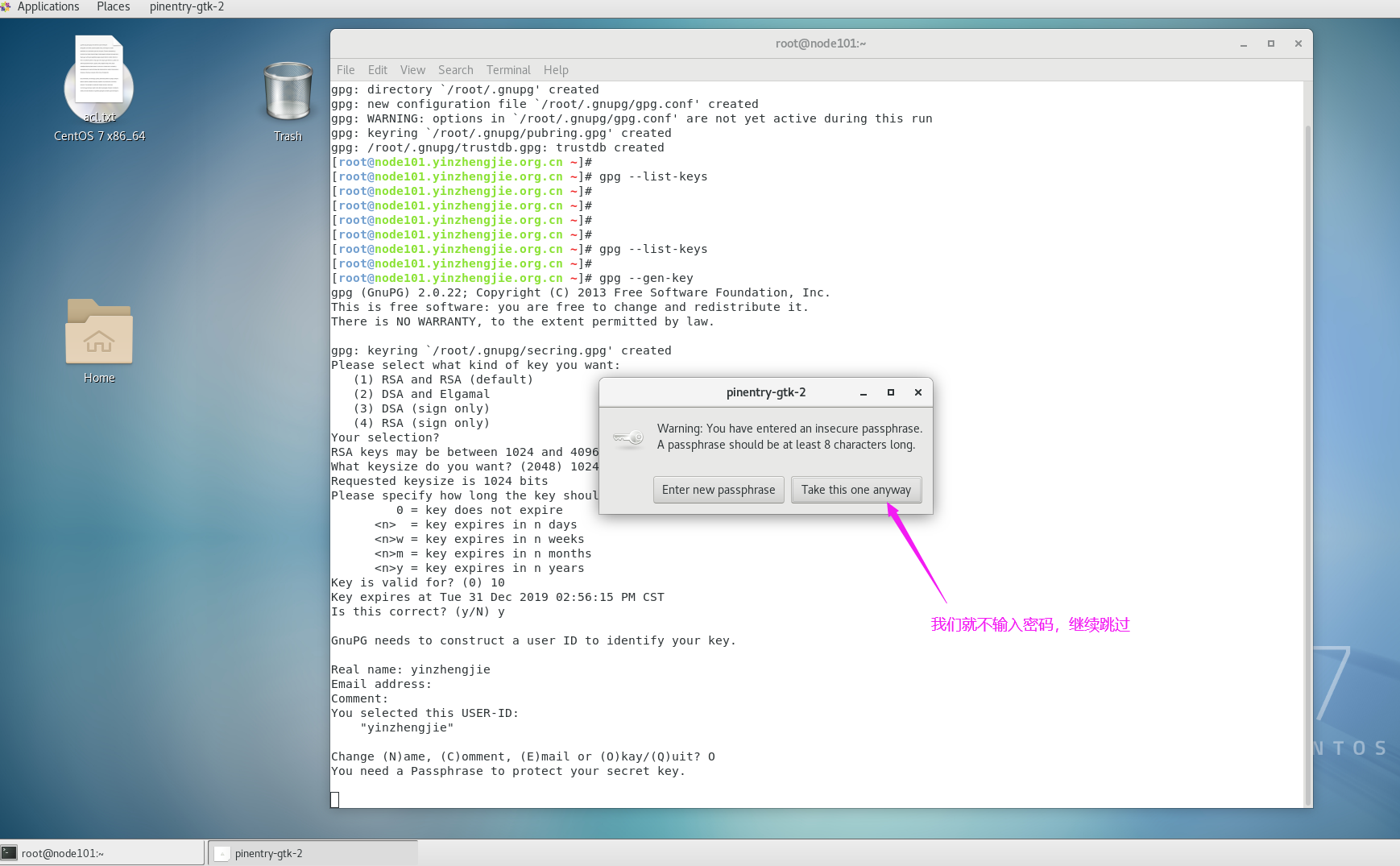
Is this correct? (y/N) y                                    #这是一个确认提示,我们输入"y"即可,默认为"N",接下来就全是图像界面操作了,如下图所示。

GnuPG needs to construct a user ID to identify your key.

Real name: yinzhengjie

Email address:

Comment:

You selected this USER-ID:

    "yinzhengjie"

Change (N)ame, (C)omment, (E)mail or (O)kay/(Q)uit? O

You need a Passphrase to protect your secret key.

You don't want a passphrase - this is probably a *bad* idea!

I will do it anyway.  You can change your passphrase at any time,

using this program with the option "--edit-key".

We need to generate a lot of random bytes. It is a good idea to perform

some other action (type on the keyboard, move the mouse, utilize the

disks) during the prime generation; this gives the random number

generator a better chance to gain enough entropy.

We need to generate a lot of random bytes. It is a good idea to perform

some other action (type on the keyboard, move the mouse, utilize the

disks) during the prime generation; this gives the random number

generator a better chance to gain enough entropy.

gpg: key 9A039AE7 marked as ultimately trusted

public and secret key created and signed.

gpg: checking the trustdb

gpg: 3 marginal(s) needed, 1 complete(s) needed, PGP trust model

gpg: depth: 0  valid:   1  signed:   0  trust: 0-, 0q, 0n, 0m, 0f, 1u

gpg: next trustdb check due at 2019-12-31

pub   1024R/9A039AE7 2019-12-21 [expires: 2019-12-31]

      Key fingerprint = FD59 DEBF 5278 6E06 5919  243A B0FB 8C5A 9A03 9AE7

uid                  yinzhengjie

sub   1024R/559B2D3F 2019-12-21 [expires: 2019-12-31]

[root@node101.yinzhengjie.org.cn ~]#

[root@node101.yinzhengjie.org.cn ~]#

[root@node101.yinzhengjie.org.cn ~]# ll ~/.gnupg/                     #经过一系列操作后会有以下文件

total 28

-rw-------. 1 root root 7680 Dec 21 14:55 gpg.conf

drwx------. 2 root root    6 Dec 21 14:58 private-keys-v1.d

-rw-------. 1 root root  667 Dec 21 15:05 pubring.gpg                  #存放公钥文件路径

-rw-------. 1 root root  667 Dec 21 15:05 pubring.gpg~

-rw-------. 1 root root  600 Dec 21 15:05 random_seed

-rw-------. 1 root root 1331 Dec 21 15:05 secring.gpg                  #存放私钥文件路径

srwxr-xr-x. 1 root root    0 Dec 21 14:58 S.gpg-agent

-rw-------. 1 root root 1280 Dec 21 15:05 trustdb.gpg

[root@node101.yinzhengjie.org.cn ~]#

[root@node101.yinzhengjie.org.cn ~]#

[root@node101.yinzhengjie.org.cn ~]# gpg --list-keys                    #查看当前主机管理的密钥

/root/.gnupg/pubring.gpg

------------------------

pub   1024R/9A039AE7 2019-12-21 [expires: 2019-12-31]

uid                  yinzhengjie

sub   1024R/559B2D3F 2019-12-21 [expires: 2019-12-31]

[root@node101.yinzhengjie.org.cn ~]#

[root@node101.yinzhengjie.org.cn ~]#
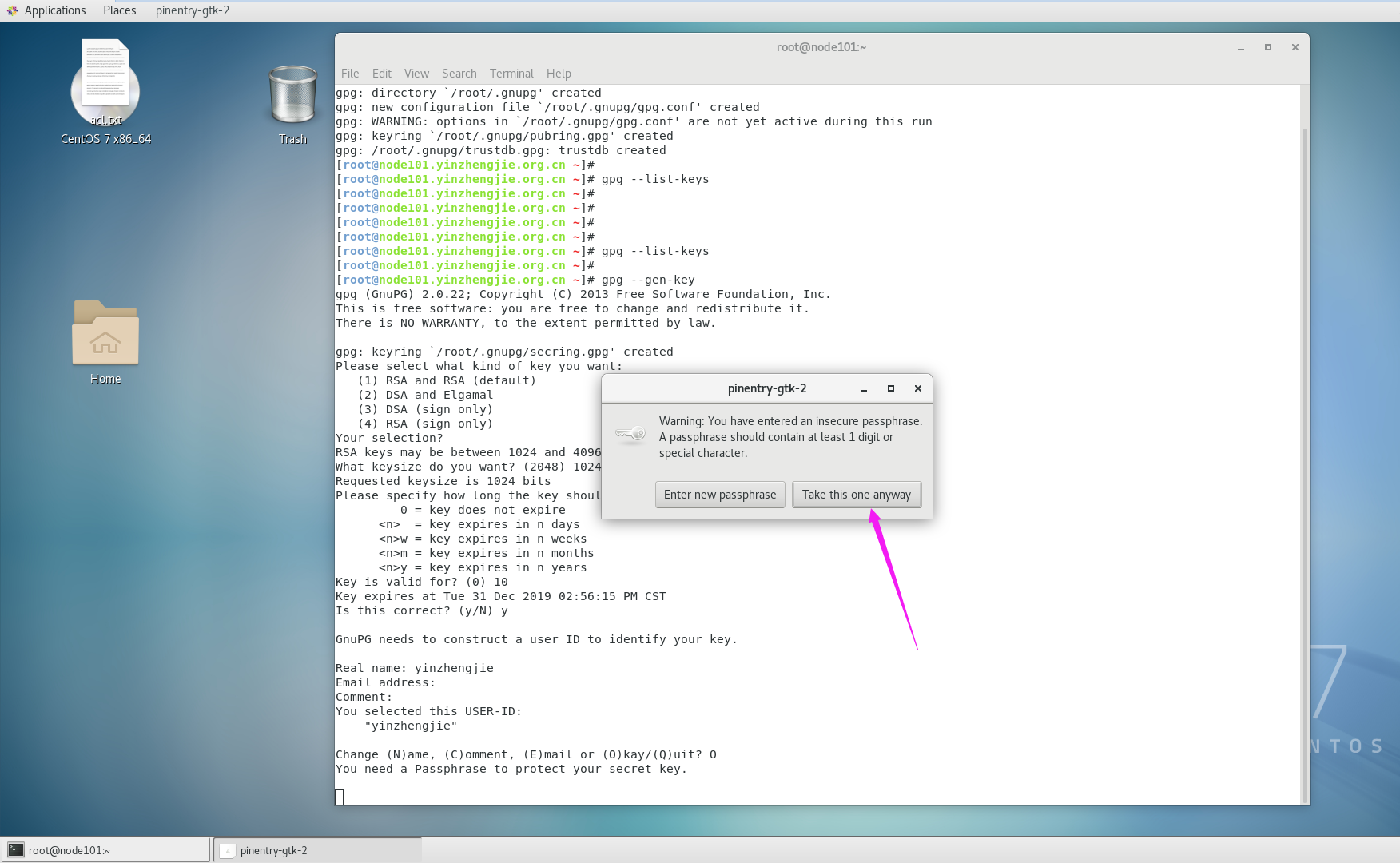
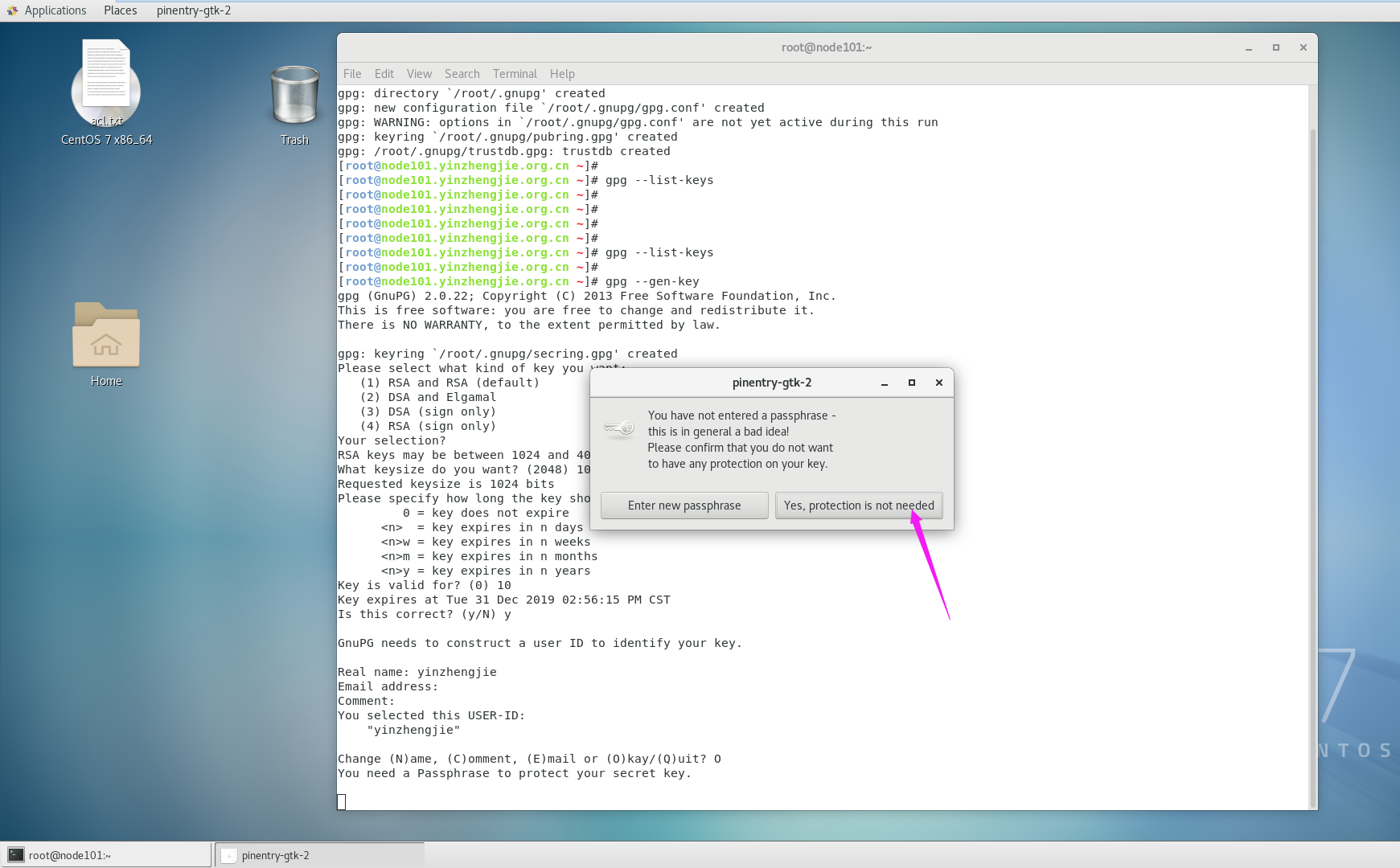

2>.以文本方式导出公钥并将公钥拷贝到node108.yinzhengjie.org.cn
[root@node101.yinzhengjie.org.cn ~]# gpg --list-keys

/root/.gnupg/pubring.gpg

------------------------

pub   1024R/45A32BE2 2019-12-20 [expires: 2019-12-30]

uid                  yinzhengjie

sub   1024R/83CADF8A 2019-12-20 [expires: 2019-12-30]

[root@node101.yinzhengjie.org.cn ~]#

[root@node101.yinzhengjie.org.cn ~]# ll ~/.gnupg/

total 28

-rw------- 1 root root 7680 Dec 20 14:50 gpg.conf

drwx------ 2 root root    6 Dec 20 14:50 private-keys-v1.d

-rw------- 1 root root  667 Dec 20 15:41 pubring.gpg

-rw------- 1 root root  667 Dec 20 15:41 pubring.gpg~

-rw------- 1 root root  600 Dec 20 15:41 random_seed

-rw------- 1 root root 1331 Dec 20 15:41 secring.gpg

srwxr-xr-x 1 root root    0 Dec 20 15:28 S.gpg-agent

-rw------- 1 root root 1280 Dec 20 15:41 trustdb.gpg

[root@node101.yinzhengjie.org.cn ~]#

[root@node101.yinzhengjie.org.cn ~]# ll

total 0

[root@node101.yinzhengjie.org.cn ~]#

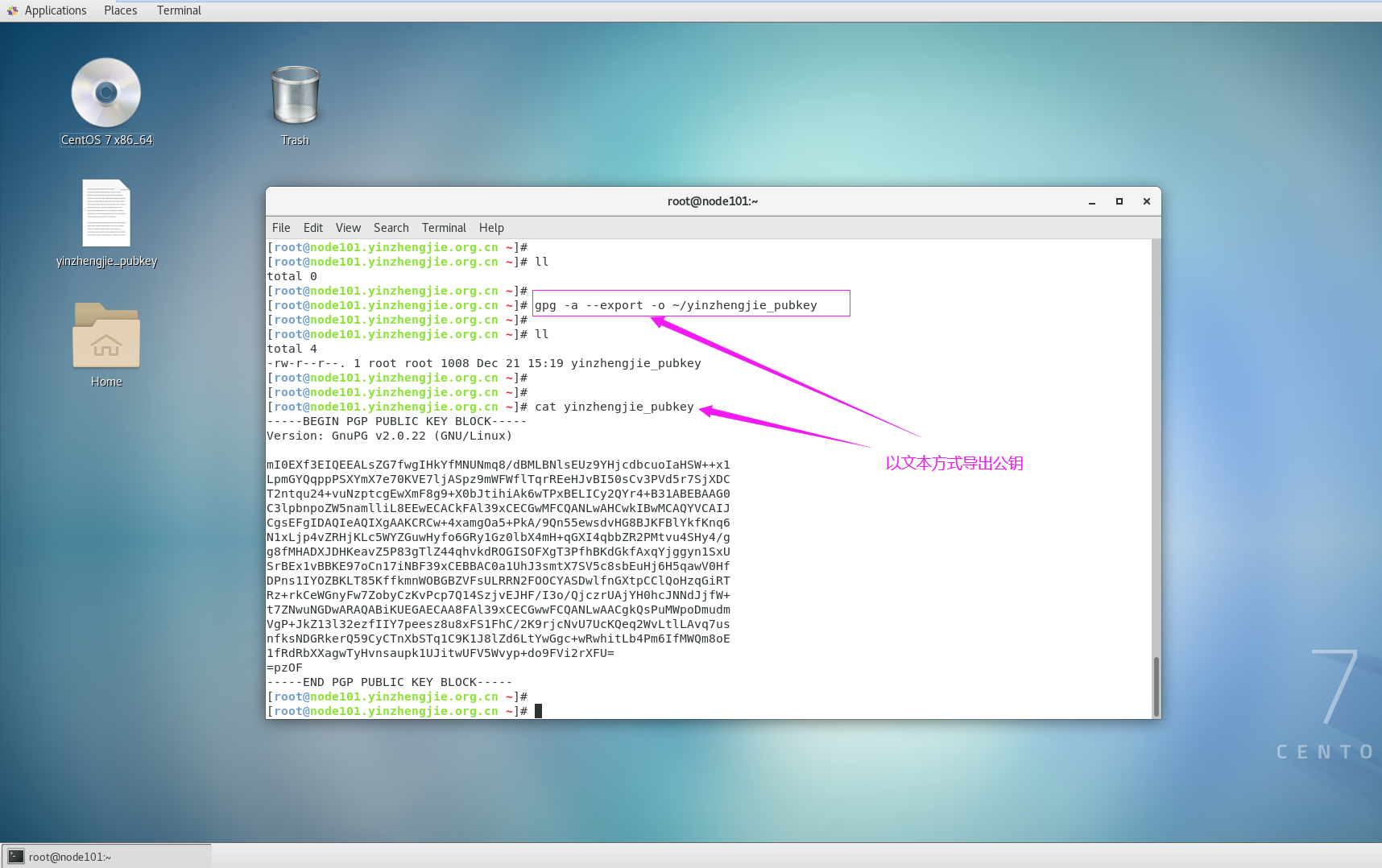
[root@node101.yinzhengjie.org.cn ~]# gpg -a --export -o ~/yinzhengjie_pubkey

[root@node101.yinzhengjie.org.cn ~]#

[root@node101.yinzhengjie.org.cn ~]# ll

total 4

-rw-r--r-- 1 root root 1008 Dec 20 19:28 yinzhengjie_pubkey

[root@node101.yinzhengjie.org.cn ~]#

[root@node101.yinzhengjie.org.cn ~]# scp yinzhengjie_pubkey root@node108.yinzhengjie.org.cn:~

yinzhengjie_pubkey                                                                                                                        100% 1008     1.3MB/s   00:00

[root@node101.yinzhengjie.org.cn ~]#
3>.node108.yinzhengjie.org.cn也生成自己的密钥对(字符界面操作版本,和图像界面操作大致相同,字符界面操作可能会有些卡顿,等会就好了)
[root@node108.yinzhengjie.org.cn ~]# gpg --gen-key

gpg (GnuPG) 2.0.22; Copyright (C) 2013 Free Software Foundation, Inc.

This is free software: you are free to change and redistribute it.

There is NO WARRANTY, to the extent permitted by law.

Please select what kind of key you want:

   (1) RSA and RSA (default)

   (2) DSA and Elgamal

   (3) DSA (sign only)

   (4) RSA (sign only)

Your selection?

RSA keys may be between 1024 and 4096 bits long.

What keysize do you want? (2048) 1024

Requested keysize is 1024 bits

Please specify how long the key should be valid.

         0 = key does not expire

      <n>  = key expires in n days

      <n>w = key expires in n weeks

      <n>m = key expires in n months

      <n>y = key expires in n years

Key is valid for? (0)

Key does not expire at all

Is this correct? (y/N) y

GnuPG needs to construct a user ID to identify your key.

Real name: yinzhengjie2019

Email address:

Comment:

You selected this USER-ID:

    "yinzhengjie2019"

Change (N)ame, (C)omment, (E)mail or (O)kay/(Q)uit? O

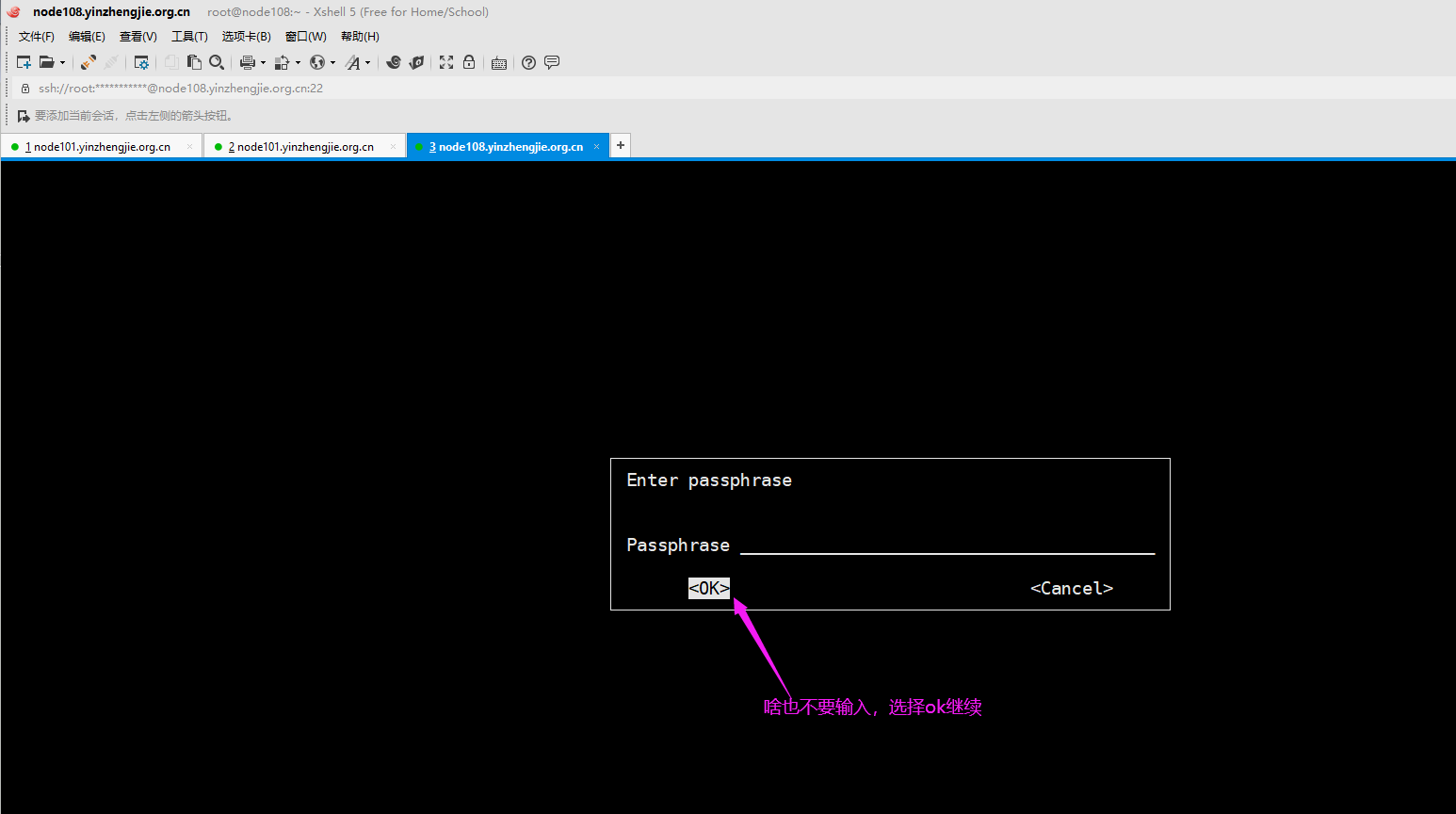
You need a Passphrase to protect your secret key.

You don't want a passphrase - this is probably a *bad* idea!

I will do it anyway.  You can change your passphrase at any time,

using this program with the option "--edit-key".

We need to generate a lot of random bytes. It is a good idea to perform

some other action (type on the keyboard, move the mouse, utilize the

disks) during the prime generation; this gives the random number

generator a better chance to gain enough entropy.

gpg: checking the trustdb

gpg: 3 marginal(s) needed, 1 complete(s) needed, PGP trust model

gpg: depth: 0  valid:   1  signed:   0  trust: 0-, 0q, 0n, 0m, 0f, 1u

pub   1024R/F20B56D1 2019-12-20

      Key fingerprint = 31A2 D20D 499F EAC5 84F2  65E9 C197 A66A F20B 56D1

uid                  yinzhengjie2019

sub   1024R/80334CCC 2019-12-20

[root@node108.yinzhengjie.org.cn ~]#

[root@node108.yinzhengjie.org.cn ~]#

[root@node108.yinzhengjie.org.cn ~]# ll ~/.gnupg/

total 28

-rw------- 1 root root 7680 Dec 20 15:50 gpg.conf

drwx------ 2 root root    6 Dec 20 15:51 private-keys-v1.d

-rw------- 1 root root  659 Dec 20 17:02 pubring.gpg

-rw------- 1 root root  659 Dec 20 17:02 pubring.gpg~

-rw------- 1 root root  600 Dec 20 17:02 random_seed

-rw------- 1 root root 1323 Dec 20 17:02 secring.gpg

srwxr-xr-x 1 root root    0 Dec 20 15:51 S.gpg-agent

-rw------- 1 root root 1280 Dec 20 17:02 trustdb.gpg

[root@node108.yinzhengjie.org.cn ~]#

[root@node108.yinzhengjie.org.cn ~]# gpg --list-keys                #node108.yinzhengjie.org.cn节点也生成了密钥对啦

/root/.gnupg/pubring.gpg

------------------------

pub   1024R/F20B56D1 2019-12-20

uid                  yinzhengjie2019

sub   1024R/80334CCC 2019-12-20

[root@node108.yinzhengjie.org.cn ~]#

[root@node108.yinzhengjie.org.cn ~]#
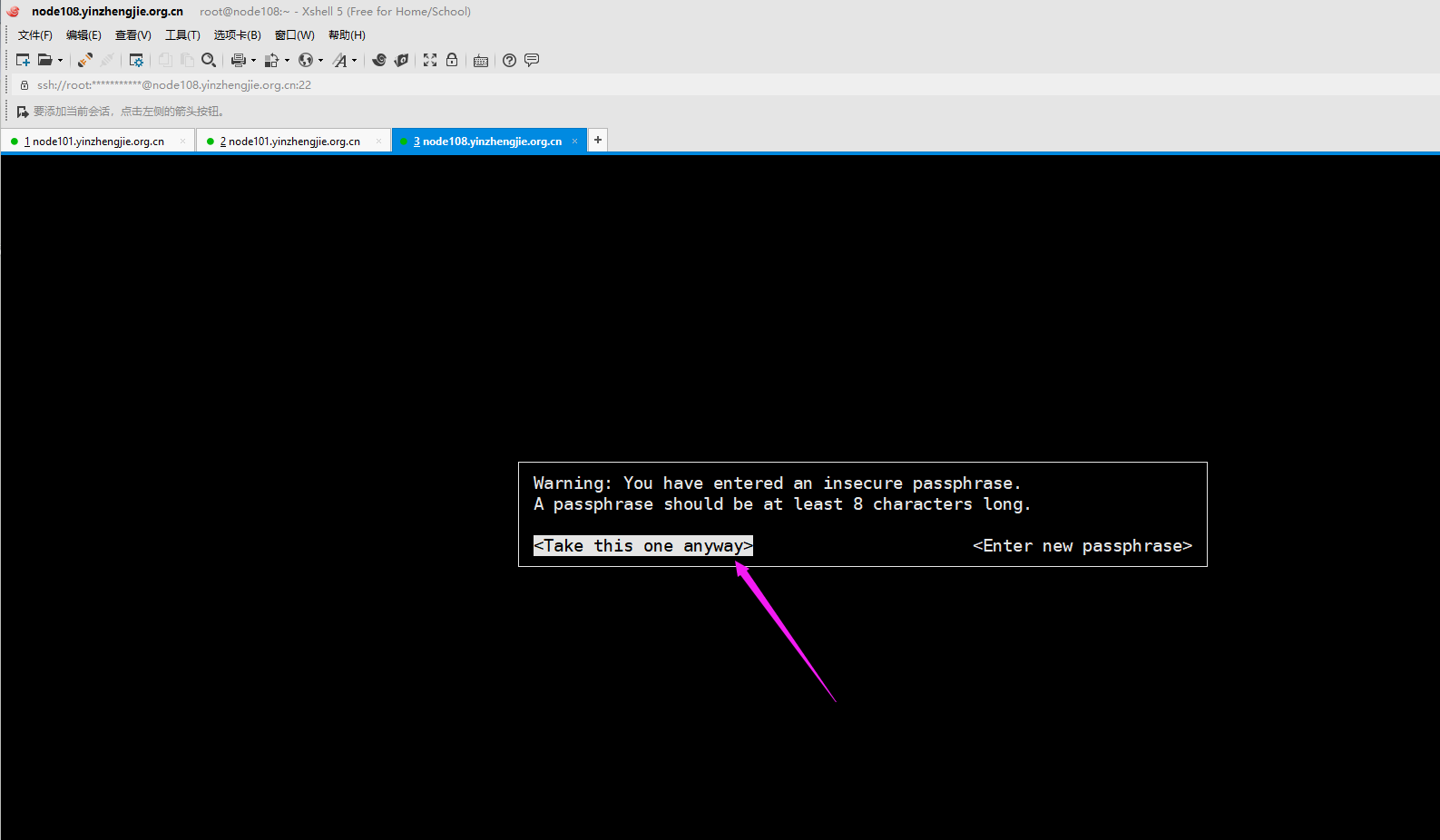
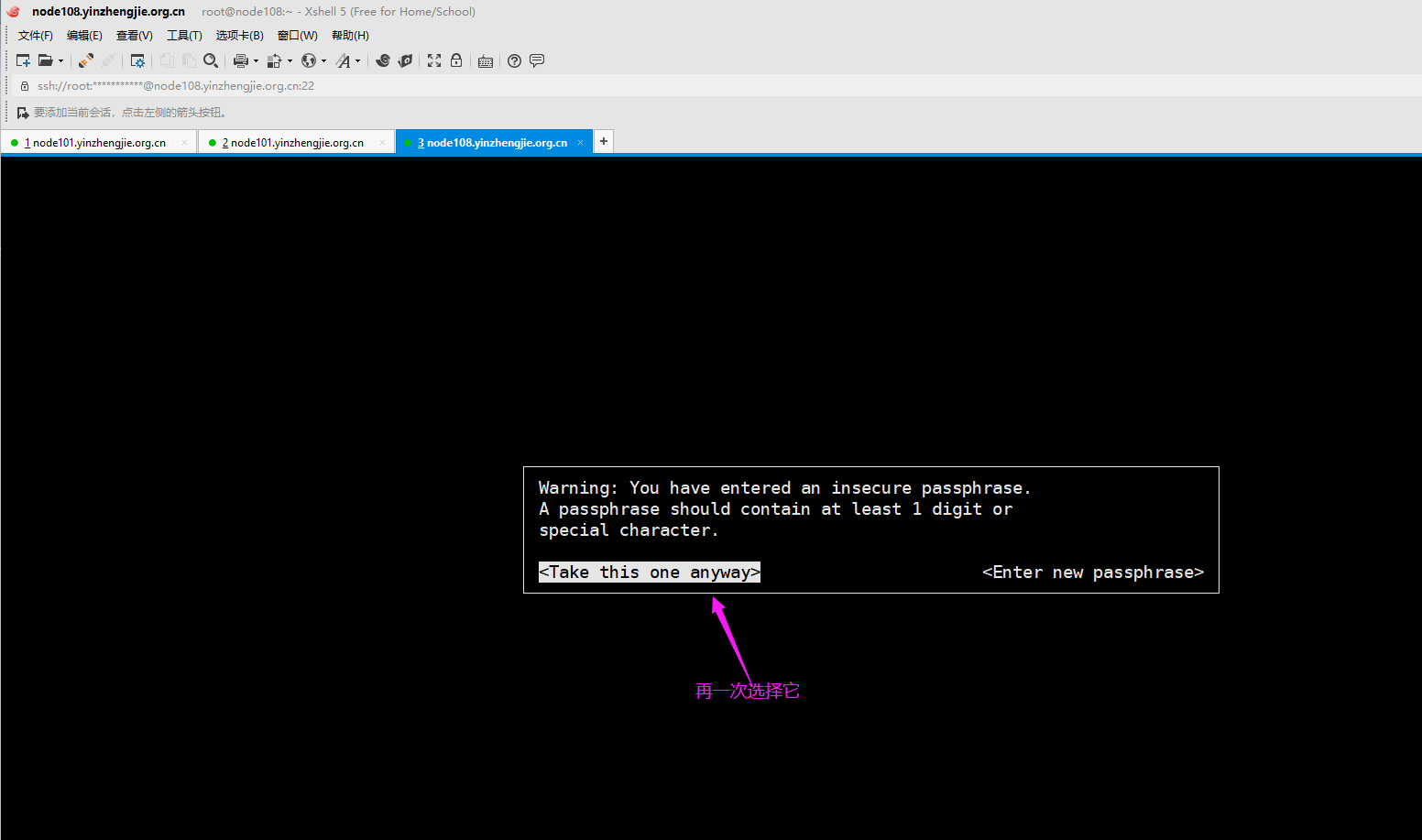
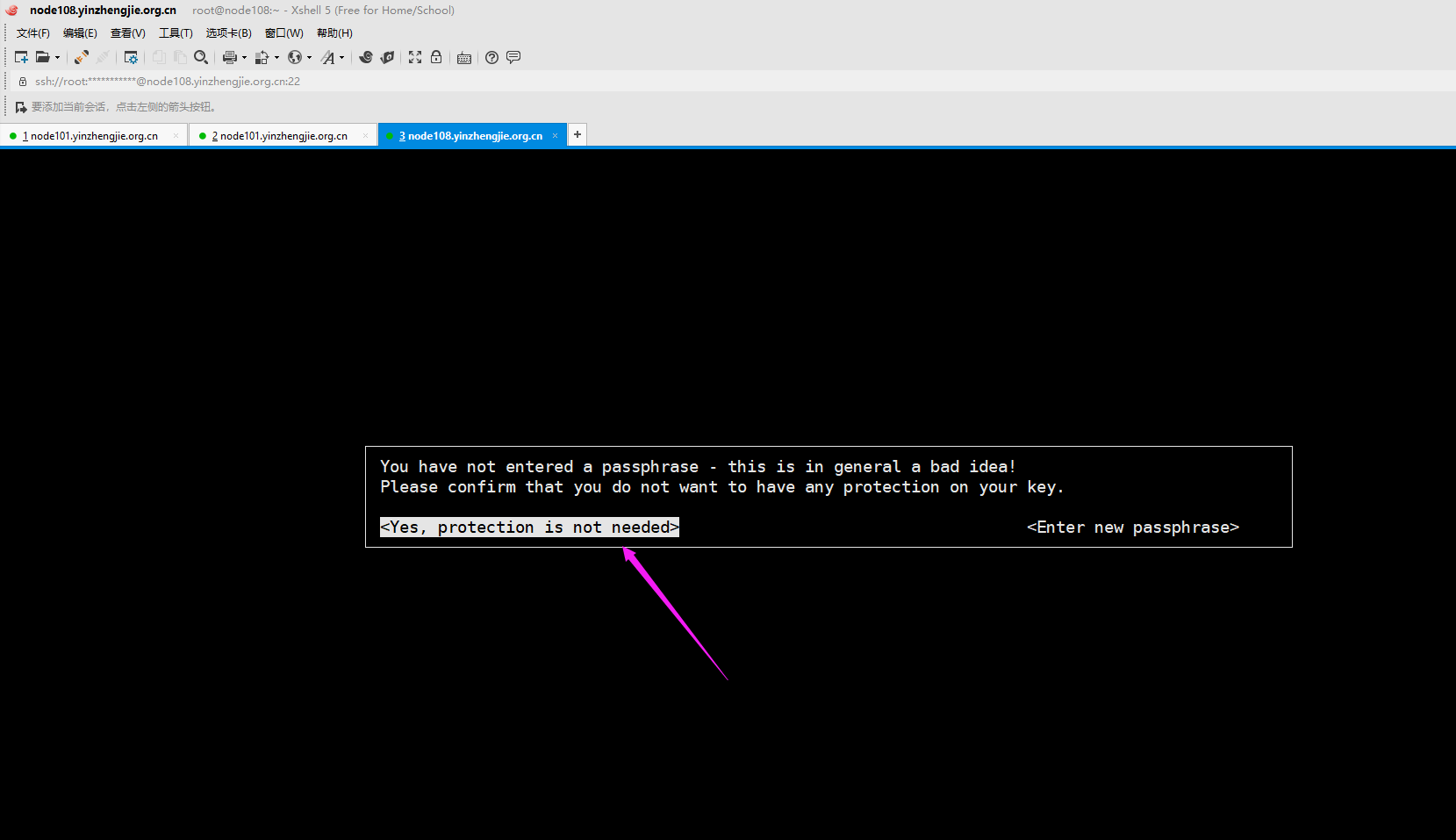

4>.node108.yinzhengjie.org.cn导入node101.yinzhengjie.org.cn
[root@node108.yinzhengjie.org.cn ~]# ll ~/.gnupg/

total 28

-rw------- 1 root root 7680 Dec 20 15:50 gpg.conf

drwx------ 2 root root    6 Dec 20 15:51 private-keys-v1.d

-rw------- 1 root root  659 Dec 20 17:02 pubring.gpg            #注意观察该文件大小,一会咱们要导入公钥,该文件大小就会发生变化

-rw------- 1 root root  659 Dec 20 17:02 pubring.gpg~

-rw------- 1 root root  600 Dec 20 17:02 random_seed

-rw------- 1 root root 1323 Dec 20 17:02 secring.gpg

srwxr-xr-x 1 root root    0 Dec 20 15:51 S.gpg-agent

-rw------- 1 root root 1280 Dec 20 17:02 trustdb.gpg

[root@node108.yinzhengjie.org.cn ~]#

[root@node108.yinzhengjie.org.cn ~]# gpg --list-keys

/root/.gnupg/pubring.gpg

------------------------

pub   1024R/F20B56D1 2019-12-20

uid                  yinzhengjie2019

sub   1024R/80334CCC 2019-12-20

[root@node108.yinzhengjie.org.cn ~]#

[root@node108.yinzhengjie.org.cn ~]# ll

total 4

-rw-r--r-- 1 root root 1008 Dec 20 19:29 yinzhengjie_pubkey

[root@node108.yinzhengjie.org.cn ~]#

[root@node108.yinzhengjie.org.cn ~]# gpg --import ~/yinzhengjie_pubkey           #导入node101.yinzhengjie.org.cn的公钥

gpg: key 45A32BE2: public key "yinzhengjie" imported

gpg: Total number processed: 1

gpg:               imported: 1  (RSA: 1)

[root@node108.yinzhengjie.org.cn ~]#

[root@node108.yinzhengjie.org.cn ~]# gpg --list-keys                    #可以看到多了node101.yinzhengjie.org.cn的公钥啦~

/root/.gnupg/pubring.gpg

------------------------

pub   1024R/F20B56D1 2019-12-20

uid                  yinzhengjie2019

sub   1024R/80334CCC 2019-12-20

pub   1024R/45A32BE2 2019-12-20 [expires: 2019-12-30]

uid                  yinzhengjie

sub   1024R/83CADF8A 2019-12-20 [expires: 2019-12-30]

[root@node108.yinzhengjie.org.cn ~]#

[root@node108.yinzhengjie.org.cn ~]#

[root@node108.yinzhengjie.org.cn ~]# ll ~/.gnupg/

total 28

-rw------- 1 root root 7680 Dec 20 15:50 gpg.conf

drwx------ 2 root root    6 Dec 20 15:51 private-keys-v1.d

-rw------- 1 root root 1326 Dec 20 19:30 pubring.gpg                  #不难发现该文件大小变大了

-rw------- 1 root root  659 Dec 20 17:02 pubring.gpg~

-rw------- 1 root root  600 Dec 20 17:02 random_seed

-rw------- 1 root root 1323 Dec 20 17:02 secring.gpg

srwxr-xr-x 1 root root    0 Dec 20 15:51 S.gpg-agent

-rw------- 1 root root 1280 Dec 20 17:02 trustdb.gpg

[root@node108.yinzhengjie.org.cn ~]#

[root@node108.yinzhengjie.org.cn ~]#
5>.在node108.yinzhengjie.org.cn节点对数据进行加密操作并发送给node101.yinzhengjie.org.cn节点
[root@node108.yinzhengjie.org.cn ~]# ll

total 4

-rw-r--r-- 1 root root 1008 Dec 20 19:29 yinzhengjie_pubkey

[root@node108.yinzhengjie.org.cn ~]#

[root@node108.yinzhengjie.org.cn ~]#

[root@node108.yinzhengjie.org.cn ~]# echo "尹正杰到此一游" > test.log

[root@node108.yinzhengjie.org.cn ~]#

[root@node108.yinzhengjie.org.cn ~]# ll

total 8

-rw-r--r-- 1 root root   22 Dec 20 19:33 test.log

-rw-r--r-- 1 root root 1008 Dec 20 19:29 yinzhengjie_pubkey

[root@node108.yinzhengjie.org.cn ~]#

[root@node108.yinzhengjie.org.cn ~]# cat test.log

尹正杰到此一游

[root@node108.yinzhengjie.org.cn ~]#

[root@node108.yinzhengjie.org.cn ~]#

[root@node108.yinzhengjie.org.cn ~]# gpg --list-keys

/root/.gnupg/pubring.gpg

------------------------

pub   1024R/F20B56D1 2019-12-20

uid                  yinzhengjie2019

sub   1024R/80334CCC 2019-12-20

pub   1024R/45A32BE2 2019-12-20 [expires: 2019-12-30]

uid                  yinzhengjie

sub   1024R/83CADF8A 2019-12-20 [expires: 2019-12-30]

[root@node108.yinzhengjie.org.cn ~]#

[root@node108.yinzhengjie.org.cn ~]# gpg -e -r yinzhengjie test.log

gpg: D719A354: There is no assurance this key belongs to the named user

pub  1024R/D719A354 2019-12-20 yinzhengjie

 Primary key fingerprint: 2BFC 4720 67E2 6239 F521  DF69 083B 5C92 ED52 774D

      Subkey fingerprint: 4862 316E D296 B6BA 5E71  EE7E 3E9C FD35 D719 A354

It is NOT certain that the key belongs to the person named

in the user ID.  If you *really* know what you are doing,

you may answer the next question with yes.

Use this key anyway? (y/N) y

[root@node108.yinzhengjie.org.cn ~]#

[root@node108.yinzhengjie.org.cn ~]# ll

total 12

-rw-r--r-- 1 root root  22 Dec 20 19:33 test.log

-rw-r--r-- 1 root root 236 Dec 20 20:10 test.log.gpg

-rw-r--r-- 1 root root 992 Dec 20 20:07 yinzhengjie_pubkey

[root@node108.yinzhengjie.org.cn ~]#

[root@node108.yinzhengjie.org.cn ~]# scp test.log.gpg root@node101.yinzhengjie.org.cn:~

The authenticity of host 'node101.yinzhengjie.org.cn (172.30.1.101)' can't be established.

ECDSA key fingerprint is SHA256:KEchoZnVBkijeoWfG2nvx2ptthsXv7IjkxIJYule57g.

ECDSA key fingerprint is MD5:52:c8:f5:6e:5f:cf:44:ec:c4:11:60:d2:d0:31:3c:da.

Are you sure you want to continue connecting (yes/no)? yes

Warning: Permanently added 'node101.yinzhengjie.org.cn,172.30.1.101' (ECDSA) to the list of known hosts.

root@node101.yinzhengjie.org.cn's password:

test.log.gpg                                                                                                                              100%  236   303.1KB/s   00:00

[root@node108.yinzhengjie.org.cn ~]#

[root@node108.yinzhengjie.org.cn ~]#
6>.node101.yinzhengjie.org.cn节点对node108.yizhengjie.org.cn节点传过来的数据进行解密操作
[root@node101.yinzhengjie.org.cn ~]# ll

total 4

-rw-r--r-- 1 root root 236 Dec 20 20:11 test.log.gpg

[root@node101.yinzhengjie.org.cn ~]#

[root@node101.yinzhengjie.org.cn ~]# gpg -d test.log.gpg               #直接解密数据会在当前终端显示

gpg: encrypted with 1024-bit RSA key, ID D719A354, created 2019-12-20

      "yinzhengjie"

尹正杰到此一游

[root@node101.yinzhengjie.org.cn ~]#

[root@node101.yinzhengjie.org.cn ~]# ll

total 4

-rw-r--r-- 1 root root 236 Dec 20 20:11 test.log.gpg

[root@node101.yinzhengjie.org.cn ~]#

[root@node101.yinzhengjie.org.cn ~]#

[root@node101.yinzhengjie.org.cn ~]# gpg -o res.log -d test.log.gpg           #将解密后的数据保存到指定文件中

gpg: encrypted with 1024-bit RSA key, ID D719A354, created 2019-12-20

      "yinzhengjie"

[root@node101.yinzhengjie.org.cn ~]#

[root@node101.yinzhengjie.org.cn ~]# ll

total 8

-rw-r--r-- 1 root root  22 Dec 20 20:12 res.log

-rw-r--r-- 1 root root 236 Dec 20 20:11 test.log.gpg

[root@node101.yinzhengjie.org.cn ~]#

[root@node101.yinzhengjie.org.cn ~]# cat res.log                     #很显然数据是准确的

尹正杰到此一游

[root@node101.yinzhengjie.org.cn ~]#

[root@node101.yinzhengjie.org.cn ~]#
7>.node108.yinzhengjie.org.cn节点删除公钥
[root@node108.yinzhengjie.org.cn ~]# gpg --list-keys

/root/.gnupg/pubring.gpg

------------------------

pub   1024R/ED52774D 2019-12-20

uid                  yinzhengjie

sub   1024R/D719A354 2019-12-20

[root@node108.yinzhengjie.org.cn ~]#

[root@node108.yinzhengjie.org.cn ~]# gpg --delete-keys yinzhengjie

gpg (GnuPG) 2.0.22; Copyright (C) 2013 Free Software Foundation, Inc.

This is free software: you are free to change and redistribute it.

There is NO WARRANTY, to the extent permitted by law.

pub  1024R/ED52774D 2019-12-20 yinzhengjie

Delete this key from the keyring? (y/N) y

[root@node108.yinzhengjie.org.cn ~]#

[root@node108.yinzhengjie.org.cn ~]# gpg --list-keys

[root@node108.yinzhengjie.org.cn ~]#

[root@node108.yinzhengjie.org.cn ~]#
8>.node101.yinzhengjie.org.cn节点删除公钥
[root@node101.yinzhengjie.org.cn ~]# gpg --list-keys

/root/.gnupg/pubring.gpg

------------------------

pub   1024R/ED52774D 2019-12-20

uid                  yinzhengjie

sub   1024R/D719A354 2019-12-20

[root@node101.yinzhengjie.org.cn ~]#

[root@node101.yinzhengjie.org.cn ~]# gpg --delete-secret-keys yinzhengjie        #要先删除私钥

gpg (GnuPG) 2.0.22; Copyright (C) 2013 Free Software Foundation, Inc.

This is free software: you are free to change and redistribute it.

There is NO WARRANTY, to the extent permitted by law.

sec  1024R/ED52774D 2019-12-20 yinzhengjie

Delete this key from the keyring? (y/N) y

This is a secret key! - really delete? (y/N) y

[root@node101.yinzhengjie.org.cn ~]#

[root@node101.yinzhengjie.org.cn ~]# gpg --list-keys

/root/.gnupg/pubring.gpg

------------------------

pub   1024R/ED52774D 2019-12-20

uid                  yinzhengjie

sub   1024R/D719A354 2019-12-20

[root@node101.yinzhengjie.org.cn ~]#

[root@node101.yinzhengjie.org.cn ~]# gpg --delete-keys yinzhengjie            #在删除公钥,有私钥存在的情况下直接删除公钥会报错的哟~

gpg (GnuPG) 2.0.22; Copyright (C) 2013 Free Software Foundation, Inc.

This is free software: you are free to change and redistribute it.

There is NO WARRANTY, to the extent permitted by law.

pub  1024R/ED52774D 2019-12-20 yinzhengjie

Delete this key from the keyring? (y/N) y

[root@node101.yinzhengjie.org.cn ~]#

[root@node101.yinzhengjie.org.cn ~]#

[root@node101.yinzhengjie.org.cn ~]# gpg --list-keys

gpg: checking the trustdb

gpg: no ultimately trusted keys found

[root@node101.yinzhengjie.org.cn ~]#

[root@node101.yinzhengjie.org.cn ~]# gpg --list-keys

[root@node101.yinzhengjie.org.cn ~]#

[root@node101.yinzhengjie.org.cn ~]#
四.使用gpg工具加密方式并不安全
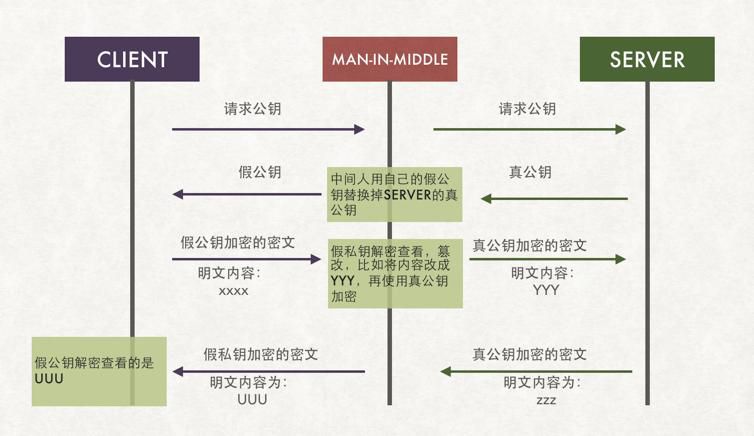
  如下图所示,如果在client和server端有一个中间人攻击就比较麻烦了。

  比如典型的ARP攻击,MAN-IN-MIDDLE可以模拟client和server端的IP地址,当client像server端请求公钥时,MAN-IN-MIDDLE模拟server端,生成一个假公钥发给Client端,与此同时他会模拟client端向server端发送请求获取真的公钥。

  client端得到假的公钥后使用假的公钥对数据继续加密后发送给它以为的server,结果这个加密钥本来就是MAN-IN-MIDDLE生成的,因此自然是可以用自己的私钥去解开并获取到相应的数据。如果不是铭感信息可能MAN-IN-MINDDLE会原样模拟一份发送给server端,当涉及到铭感信息后,很可能被MAN-IN-MIDDLE加以利用。

  因此使用gpg方式加密相对来说是存在安全风险的。为了解决这个问题,引入了证书颁发机构。

  关于证书的申请原理感兴趣的小伙伴可参考我的笔记:https://www.cnblogs.com/yinzhengjie/p/12071167.html
Linux操作系统安全-使用gpg实现对称加密的更多相关文章
- Linux操作系统安全-加密和安全扫盲篇
Linux操作系统安全-加密和安全 作者:尹正杰 版权声明:原创作品,谢绝转载!否则将追究法律责任. 一.墨菲定律 墨菲定律: 一种心理学效应,是由爱德华·墨菲(Edward A. Murphy)提出 ...
- Linux操作系统之grub加密实战案例
Linux操作系统之grub加密实战案例 作者:尹正杰 版权声明:原创作品,谢绝转载!否则将追究法律责任. 一.为grub设置明文密码案例 1>.修改"/boot/grub/grub. ...
- Linux操作系统安全-OpenSSL工具常用命令介绍
Linux操作系统安全-OpenSSL工具常用命令介绍 作者:尹正杰 版权声明:原创作品,谢绝转载!否则将追究法律责任. 一.OpenSSL开源项目有三个组件 openssl: 多用途的命令行工具,包 ...
- Linux操作系统安全-证书的申请原理
Linux操作系统安全-证书的申请原理 作者:尹正杰 版权声明:原创作品,谢绝转载!否则将追究法律责任. 一.APR的中间人攻击 如下图所示,如果在client和server端有一个中间人攻击就比较麻 ...
- Linux操作系统-CentOS6启动流程和服务管理
Linux操作系统-CentOS6启动流程和服务管理 作者:尹正杰 版权声明:原创作品,谢绝转载!否则将追究法律责任. 一.Linux组成 1>.Linux: kernel+rootfs ker ...
- Linux操作系统常用命令合集——第六篇-软件包操作(2个命令)
一.前言介绍 软件包即程序包 程序包管理 关键词:rpm程序包管理.YUM仓库管理.源码编译安装 程序包管理: 将编译好的应用程序的各组成文件打包一个或几个程序包文件,从而方便快捷地实现程序包的安装. ...
- Linux学习66 运维安全-通信加密和解密技术入门
一.Linux Service and Security 1.OpenSSL(ssl/tls)协议 2.OpenSSH(ssh)协议 3.bind(dns) 4.web(http):httpd(apa ...
- C#不对称加密
对称加密的缺点是双方使用相同的密钥和IV进行加密.解密.由于接收方必须知道密钥和IV才能解密数据,因此发送方需要先将密钥和IV传递给接收方.这就 有一个问题,如果攻击者截获了密钥和IV,也就等于知道了 ...
- 如何保护你的linux操作系统
如何保护你的linux操作系统 导读 在现在这个世道中,Linux操作系统的安全是十分重要的.但是,你得知道怎么干.一个简单反恶意程序软件是远远不够的,你需要采取其它措施来协同工作.那么试试下面这些手 ...
随机推荐
- Linux性能优化实战学习笔记:第三十七讲
一.上节回顾 上一节,我带你一起学习了网络性能的评估方法.简单回顾一下,Linux 网络基于 TCP/IP协议栈构建,而在协议栈的不同层,我们所关注的网络性能也不尽相同. 在应用层,我们关注的是应用程 ...
- [LeetCode] 421. Maximum XOR of Two Numbers in an Array 数组中异或值最大的两个数字
Given a non-empty array of numbers, a0, a1, a2, … , an-1, where 0 ≤ ai < 231. Find the maximum re ...
- [LeetCode] 98. Validate Binary Search Tree 验证二叉搜索树
Given a binary tree, determine if it is a valid binary search tree (BST). Assume a BST is defined as ...
- 利用ANSYS进行橡胶坝的静力分析和模态计算
这个是我一个同学的毕业论文,我也帮了一点小忙,所以征得同学同意,把相关的经验共享一下(当时候做得也很艰难,网上查到的可参考的资料太少了,而且没有具体步骤). 先占一个位子,以前的模型还有命令流文件都找 ...
- c# mongodb时间类型字段保存时相差八个小时解决办法
/// <summary> /// 添加时间 /// </summary> [BsonDateTimeOptions(Kind = DateTimeKind.Local)] p ...
- Linux基础及入门介绍
一.linux发展历程 ①1969年unix诞生贝尔实验室 ②谭宁邦:minix unix ③斯托曼(stallman),公司:自由软件基金会(FSF) 项目:GNU 规则:GPL(所有人可以自由传播 ...
- PHP 命名空间笔记
PHP 命名空间笔记 1.php文件代码如下<pre><?php//我用这样的命名空间表示处于blog下的article模块namespace Blog\Article; class ...
- 在 ubuntu 下安装 mono 和 xsp4 ,并测试
1. 安装完 ubuntu 后,在 ubuntu 软件中查看是否自带了 mono 运行时和 XSP4,如果没有,则选中后,点击安装按钮. 2. 安装完后,在终端(类似于 Windows 上的命令行工具 ...
- 提高性能,MySQL 读写分离环境搭建
这是松哥之前一个零散的笔记,整理出来分享给大伙! MySQL 读写分离在互联网项目中应该算是一个非常常见的需求了.受困于 Linux 和 MySQL 版本问题,很多人经常会搭建失败,今天松哥就给大伙举 ...
- Python转义序列
正则表达式参考:https://www.cnblogs.com/huxi/archive/2010/07/04/1771073.html