
201871020225-牟星源《面向对象程序设计(java)》第八周学习总结
201871020225-牟星源《面向对象程序设计(java)》第八周学习总结
|
项目 |
内容 |
|
这个作业属于哪个课程 |
https://www.cnblogs.com/nwnu-daizh/ |
|
这个作业的要求在哪里 |
|
|
作业学习目标 |
1. 掌握接口定义方法; 2. 掌握实现接口类的定义要求; 3. 掌握实现了接口类的使用要求; 4. 理解程序回调设计模式; 5. 掌握Comparator接口用法; 6. 掌握对象浅层拷贝与深层拷贝方法; 7. 掌握Lambda表达式语法; 8. 了解内部类的用途及语法要求。 |
正文:
第一部分:总结第六章理论知识
1. 接口
1) Java为了克服单继承的缺点,Java使用了接口, 一个类可以实现多个接口。
2) 在Java程序设计语言中,接口不是类,而是对类的一组需求描述,由常量和一组抽象方法组成。
3) 接口中不包括变量和有具体实现的方法。
4) 只要类实现了接口,则该类要遵从接口描述的统一格式进行定义,并且可以在任何需要该接口的地方使用这个类的对象。
5)声明方式: public interface 接口名 { …… } 接口体中包含常量定义和方法定义,接口中只进 行方法的声明,不提供方法的实现。
6)类似建立类的继承关系,接口也可以扩展。 接口的扩展技术使得从具有较高通用性的接口存在多条链延伸到具有较高专用性的接口。
扩展方法: public interface 接口1 extends接口2 { …… }
7)在类声明时用implements关键字声明使用一个或 多个接口
class Employee implementsPrintable { …… }
一个类使用了某个接口,那么这个类必须实现该 接口的所有方法,即为这些方法提供方法体。 一个类可以实现多个接口,接口间应该用逗号分 隔开。
class Employee implements Cloneable,Comparable
8)接口不能构造接口对象,但可以声明接口变量以指向一个实现了该接口的类对象。
Comparablex = new Comparable(…); //ERROR
Comparable x= new Employee(…); //OK
可以用instanceof检查对象是否实现了某个接口。
if (anObjectinstanceofComparable) { ……}
2. 接口与抽象类的区别:
(1)接口不能实现任何方法,而抽象类可以。
(2)类可以实现许多接口,但只有一个父类。
(3)接口不是类分级结构的一部分,无任何联系的类可以实现相同的接口。
3.(1) 回调(callback):一种程序设计模式,在这种模式中,可指出某个特定事件发生时程序应该采取的动作。
(2)在java.swing包中有一个Timer类,可以使用它在到达给定的时间间隔时触发一个事件。
4. Object类的Clone方法
1)当拷贝一个对象变量时,原始变量与拷贝变量引用同一个对象。这样,改变一个变量所引用 的对象会对另一个变量产生影响。
2)如果要创建一个对象新的copy,它的最初状态与 original一样,但以后可以各自改变状态,就需要使用Object类的clone方法。
5.(1)浅层拷贝:被拷贝对象的所有常量成员和基本类 型属性都有与原来对象相同的拷贝值,而若成员域是一个对象,则被拷贝对象该对象域的对象引 用仍然指向原来的对象。
(2)深层拷贝:被拷贝对象的所有成员域都含有与原 来对象相同的值,且对象域将指向被复制过的新对 象,而不是原有对象被引用的对象。换言之,深 层拷贝将拷贝对象内引用的对象也拷贝一遍。
6. Java Lambda 表达式是Java 8 引入的一个新的功能,主要用途是提供一个函数化的语法来简化编码。 Lambda表达式本质上是一个匿名方法。
public intadd(intx, inty) { return x + y; } 转成Lambda表达式后是: (intx, inty) -> x + y;
7.内部类(inner class)是定义在一个类内部的类。 外层的类成为外部类(outer class).
内部类主要用于事件处理。 使用内部类的原因有以下三个:
1)内部类方法可以访问该类定义所在的作用域中的数据,包括私有数据。
2)内部类能够隐藏起来,不为同一包中的其他类所见。
3)想要定义一个回调函数且不想编写大量代码时, 使用匿名内部类比较便捷。
第二部分:实验部分
1、实验目的与要求
(1) 掌握接口定义方法;
(2) 掌握实现接口类的定义要求;
(3) 掌握实现了接口类的使用要求;
(4) 掌握程序回调设计模式;
(5) 掌握Comparator接口用法;
(6) 掌握对象浅层拷贝与深层拷贝方法;
(7) 掌握Lambda表达式语法;
(8) 了解内部类的用途及语法要求。
2、实验内容和步骤
实验1: 导入第6章示例程序,测试程序并进行代码注释。
测试程序1:
l 编辑、编译、调试运行阅读教材214页-215页程序6-1、6-2,理解程序并分析程序运行结果;
l 在程序中相关代码处添加新知识的注释。
l 掌握接口的实现用法;
l 掌握内置接口Compareable的用法。
EmployeeSortTest.java代码如下:
|
2
3
4
5
6
7
8
9
10
11
12
13
14
15
16
17
18
19
20
21
22
23
24
25
26
27
|
package interfaces;import java.util.*;/** * This program demonstrates the use of the Comparable interface. * @version 1.30 2004-02-27 * @author Cay Horstmann */public class EmployeeSortTest{ public static void main(String[] args) { var staff = new Employee[3]; staff[0] = new Employee("Harry Hacker", 35000); staff[1] = new Employee("Carl Cracker", 75000); staff[2] = new Employee("Tony Tester", 38000); Arrays.sort(staff); //Arrays类中的sort发表方法可以对对象数组进行排序,但必须满足<对象所属的类必须实现了Comparable接口 //输出所有雇员的信息 for (Employee e : staff) System.out.println("name=" + e.getName() + ",salary=" + e.getSalary()); }} |
Employee.java代码如下:
package interfaces;
public class Employee implements Comparable<Employee>//用关键字implements将类声明为实现某个接口,并且为泛型Comparable接口提供一个类型参数Employee{ private String name; private double salary; public Employee(String name, double salary) { this.name = name; this.salary = salary; } public String getName() { return name; } public double getSalary() { return salary; } public void raiseSalary(double byPercent) { double raise = salary * byPercent / 100; salary += raise; } /** * Compares employees by salary * @param other another Employee object * @return a negative value if this employee has a lower salary than * otherObject, 0 if the salaries are the same, a positive value otherwise */ //任何实现Comparable接口的类都需要包含compareTo方法 public int compareTo(Employee other) //使用静态Double.compare方法,如果第一个参数小于第二个参数,返回一个负值;相等返回零;否则返回正值 { return Double.compare(salary, other.salary); }}运行结果:

测试程序2:
l 编辑、编译、调试以下程序,结合程序运行结果理解程序;
|
interface A { double g=9.8; void show( ); } class C implements A { public void show( ) {System.out.println("g="+g);} }
class InterfaceTest { public static void main(String[ ] args) { A a=new C( ); a.show( ); System.out.println("g="+C.g); } } |
代码如下:
interface A
//定义了一个接口A{ double g=9.8; void show( );}class C implements A//实现接口{ //方法 public void show( ) { System.out.println("g="+g); }}class test{ public static void main(String[ ] args) { A a=new C( ); //接口变量必须引用实现了接口的类对象 a.show( );//引用方法 System.out.println("g="+C.g); }}运行结果:

测试程序3:
l 在elipse IDE中调试运行教材223页6-3,结合程序运行结果理解程序;
l 26行、36行代码参阅224页,详细内容涉及教材12章。
l 在程序中相关代码处添加新知识的注释。
l 掌握回调程序设计模式;
代码如下:
package timer;
/** @version 1.02 2017-12-14 @author Cay Horstmann*/import java.awt.*;import java.awt.event.*;import java.time.*;import javax.swing.*;import javax.swing.Timer;//在到达给定时间间隔时发出通告public class TimerTest{ public static void main(String[] args) { //构造类对象 var listener = new TimePrinter(); //传递对象给Timer构造器 var timer = new Timer(10000, listener);//第一个参数是发出通告的时间间隔,单位为毫秒;第二个对象是监听器对象 timer.start();//启动定时器 //程序启动后,将会显示一个包含"Quit program?"字样对话框 JOptionPane.showMessageDialog(null, "Quit program?"); System.exit(0); }}class TimePrinter implements ActionListener//ActionListener接口{ //当到达指定时间间隔时定时器调用actionPerformed方法 public void actionPerformed(ActionEvent event)//ActionEvent参数提供了时间的相关信息 { System.out.println("At the tone, the time is " + Instant.ofEpochMilli(event.getWhen())); Toolkit.getDefaultToolkit().beep(); }}运行结果:
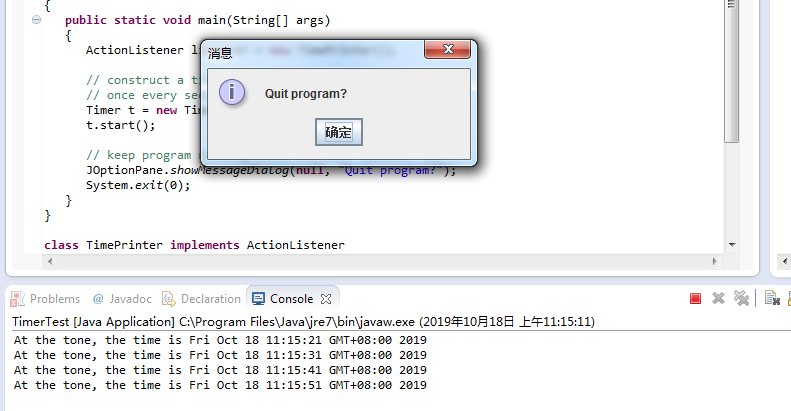
测试程序4:
l 调试运行教材229页-231页程序6-4、6-5,结合程序运行结果理解程序;
l 在程序中相关代码处添加新知识的注释。
l 掌握对象克隆实现技术;
l 掌握浅拷贝和深拷贝的差别。
CloneTest.java代码如下:
package clone;
/** * This program demonstrates cloning. * @version 1.11 2018-03-16 * @author Cay Horstmann */public class CloneTest{ public static void main(String[] args) throws CloneNotSupportedException { var original = new Employee("John Q. Public", 50000); original.setHireDay(2000, 1, 1); //clone方法 创建新对象copy,初始状态与Original相同,之后有不同的状态 Employee copy = original.clone(); copy.raiseSalary(10); copy.setHireDay(2002, 12, 31); System.out.println("original=" + original); System.out.println("copy=" + copy); }}Employee.java代码如下:
yee.java代码:
|
1
2
3
4
5
6
7
8
9
10
11
12
13
14
15
16
17
18
19
20
21
22
23
24
25
26
27
28
29
30
31
32
33
34
35
36
37
38
39
40
41
42
43
44
45
46
47
48
49
50
51
52
53
54
55
|
package clone;import java.util.Date;import java.util.GregorianCalendar;public class Employee implements Cloneable //深拷贝的clone方法{ private String name; private double salary; private Date hireDay; public Employee(String name, double salary) { this.name = name; this.salary = salary; hireDay = new Date(); } //声明异常 public Employee clone() throws CloneNotSupportedException //如果在一个对象上调用clone,如果对象的类没有实现Cloneable的接口。clone方法就会抛出CloneNotSupportedException { //调用Object.clone()方法 Employee cloned = (Employee) super.clone(); //克隆可变字段 cloned.hireDay = (Date) hireDay.clone(); return cloned; } /** * Set the hire day to a given date. * @param year the year of the hire day * @param month the month of the hire day * @param day the day of the hire day */ public void setHireDay(int year, int month, int day) { Date newHireDay = new GregorianCalendar(year, month - 1, day).getTime(); //实例域可变字段 hireDay.setTime(newHireDay.getTime()); } public void raiseSalary(double byPercent) { double raise = salary * byPercent / 100; salary += raise; } public String toString() { return "Employee[name=" + name + ",salary=" + salary + ",hireDay=" + hireDay + "]"; }} |
运行结果:

实验2: 导入第6章示例程序6-6,学习Lambda表达式用法。
l 调试运行教材233页-234页程序6-6,结合程序运行结果理解程序;
l 在程序中相关代码处添加新知识的注释。
l 将27-29行代码与教材223页程序对比,将27-29行代码与此程序对比,体会Lambda表达式的优点。
代码如下:
package lambda;
import java.util.*;import javax.swing.*;import javax.swing.Timer;/** * This program demonstrates the use of lambda expressions. * @version 1.0 2015-05-12 * @author Cay Horstmann */public class LambdaTest{ public static void main(String[] args) { var planets = new String[] { "Mercury", "Venus", "Earth", "Mars", "Jupiter", "Saturn", "Uranus", "Neptune" }; //toString方法输出planets对象 System.out.println(Arrays.toString(planets)); System.out.println("Sorted in dictionary order:"); //Arrays.sort方法按照字符顺序排序 Arrays.sort(planets); System.out.println(Arrays.toString(planets)); System.out.println("Sorted by length:"); //Arrays.sort方法按照字符串长度排序 Arrays.sort(planets, (first, second) -> first.length() - second.length()); System.out.println(Arrays.toString(planets)); //lambda表达式: (argument)-> body var timer = new Timer(1000, event -> System.out.println("The time is " + new Date())); timer.start(); //直到选择OK程序将一直进行 JOptionPane.showMessageDialog(null, "Quit program?"); System.exit(0); }}运行结果:
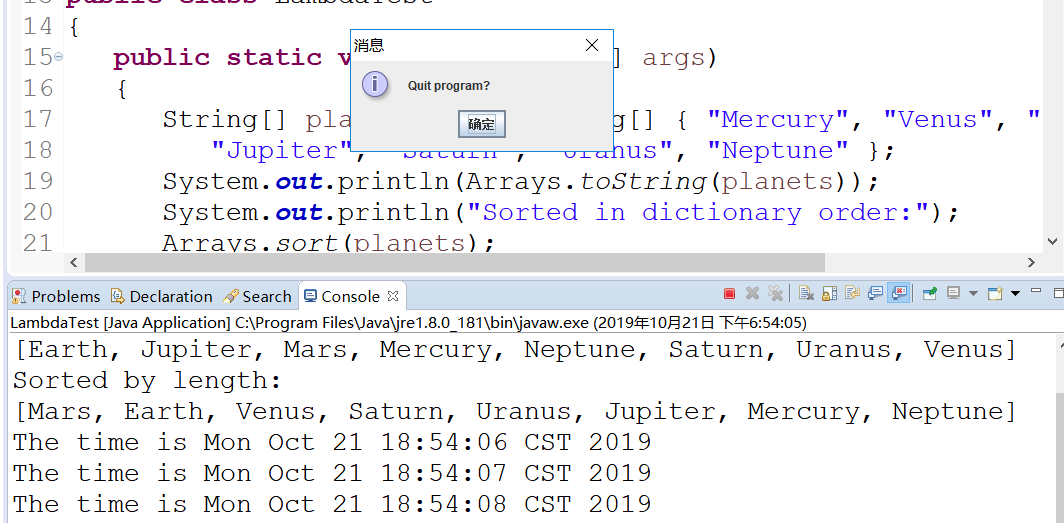
实验3: 编程练习
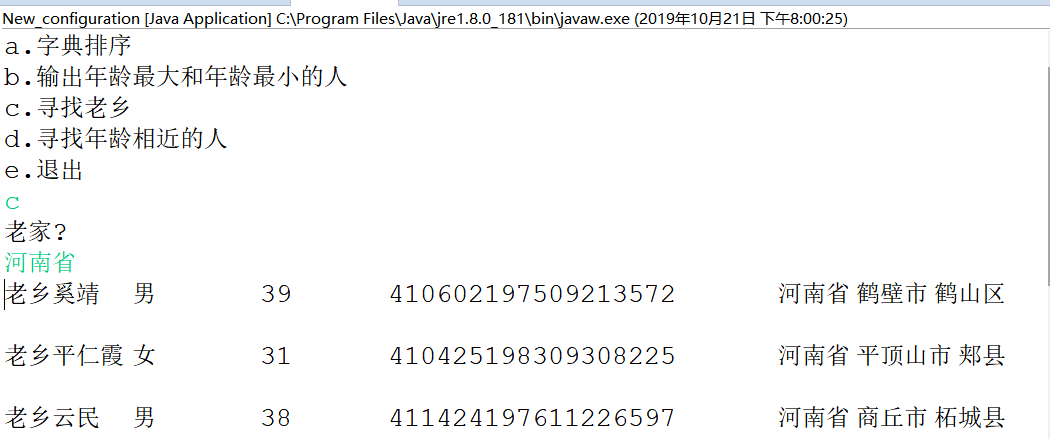
l 编制一个程序,将身份证号.txt 中的信息读入到内存中;
l 按姓名字典序输出人员信息;
l 查询最大年龄的人员信息;
l 查询最小年龄人员信息;
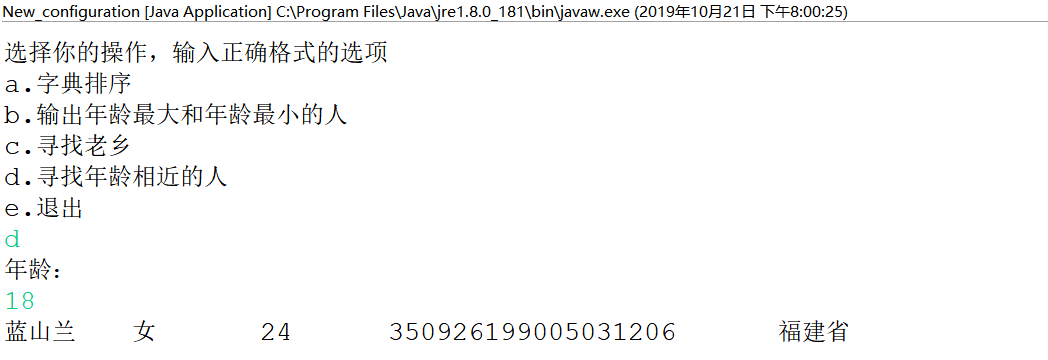
l 输入你的年龄,查询身份证号.txt中年龄与你最近人的姓名、身份证号、年龄、性别和出生地;
l 查询人员中是否有你的同乡。
Main代码如下:
package Six;import java.io.BufferedReader;import java.io.File;import java.io.FileInputStream;import java.io.FileNotFoundException;import java.io.IOException;import java.io.InputStreamReader;import java.util.ArrayList;import java.util.Arrays;import java.util.Collections;import java.util.Scanner;public class Main{ private static ArrayList<Student> studentlist; public static void main(String[] args) { studentlist = new ArrayList<>(); Scanner scanner = new Scanner(System.in); File file = new File("D:\\身份证号.txt"); try { FileInputStream fis = new FileInputStream(file); BufferedReader in = new BufferedReader(new InputStreamReader(fis)); String temp = null; while ((temp = in.readLine()) != null) { Scanner linescanner = new Scanner(temp); linescanner.useDelimiter(" "); String name = linescanner.next(); String number = linescanner.next(); String sex = linescanner.next(); String age = linescanner.next(); String province =linescanner.nextLine(); Student student = new Student(); student.setName(name); student.setnumber(number); student.setsex(sex); int a = Integer.parseInt(age); student.setage(a); student.setprovince(province); studentlist.add(student); } } catch (FileNotFoundException e) { System.out.println("学生信息文件找不到"); e.printStackTrace(); } catch (IOException e) { System.out.println("学生信息文件读取错误"); e.printStackTrace(); } boolean isTrue = true; while (isTrue) { System.out.println("选择你的操作,输入正确格式的选项"); System.out.println("a.字典排序"); System.out.println("b.输出年龄最大和年龄最小的人"); System.out.println("c.寻找老乡"); System.out.println("d.寻找年龄相近的人"); System.out.println("e.退出"); String m = scanner.next(); switch (m) { case "a": Collections.sort(studentlist); System.out.println(studentlist.toString()); break; case "b": int max=0,min=100; int j,k1 = 0,k2=0; for(int i=1;i<studentlist.size();i++) { j=studentlist.get(i).getage(); if(j>max) { max=j; k1=i; } if(j<min) { min=j; k2=i; } } System.out.println("年龄最大:"+studentlist.get(k1)); System.out.println("年龄最小:"+studentlist.get(k2)); break; case "c": System.out.println("老家?"); String find = scanner.next(); String place=find.substring(0,3); for (int i = 0; i <studentlist.size(); i++) { if(studentlist.get(i).getprovince().substring(1,4).equals(place)) System.out.println("老乡"+studentlist.get(i)); } break; case "d": System.out.println("年龄:"); int yourage = scanner.nextInt(); int near=agenear(yourage); int value=yourage-studentlist.get(near).getage(); System.out.println(""+studentlist.get(near)); break; case "e": isTrue = false; System.out.println("退出程序!"); break; default: System.out.println("输入有误"); } } } public static int agenear(int age) { int j=0,min=53,value=0,k=0; for (int i = 0; i < studentlist.size(); i++) { value=studentlist.get(i).getage()-age; if(value<0) value=-value; if (value<min) { min=value; k=i; } } return k; }}package Six;
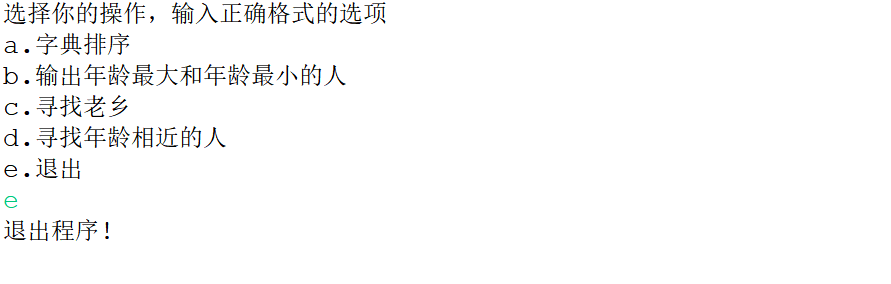
public class Student implements Comparable<Student> { private String name; private String number ; private String sex ; private int age; private String province; public String getName() { return name; } public void setName(String name) { this.name = name; } public String getnumber() { return number; } public void setnumber(String number) { this.number = number; } public String getsex() { return sex ; } public void setsex(String sex ) { this.sex =sex ; } public int getage() { return age; } public void setage(int age) { // int a = Integer.parseInt(age); this.age= age; } public String getprovince() { return province; } public void setprovince(String province) { this.province=province ; } public int compareTo(Student o) { return this.name.compareTo(o.getName()); } public String toString() { return name+"\t"+sex+"\t"+age+"\t"+number+"\t"+province+"\n"; } }运行结果:
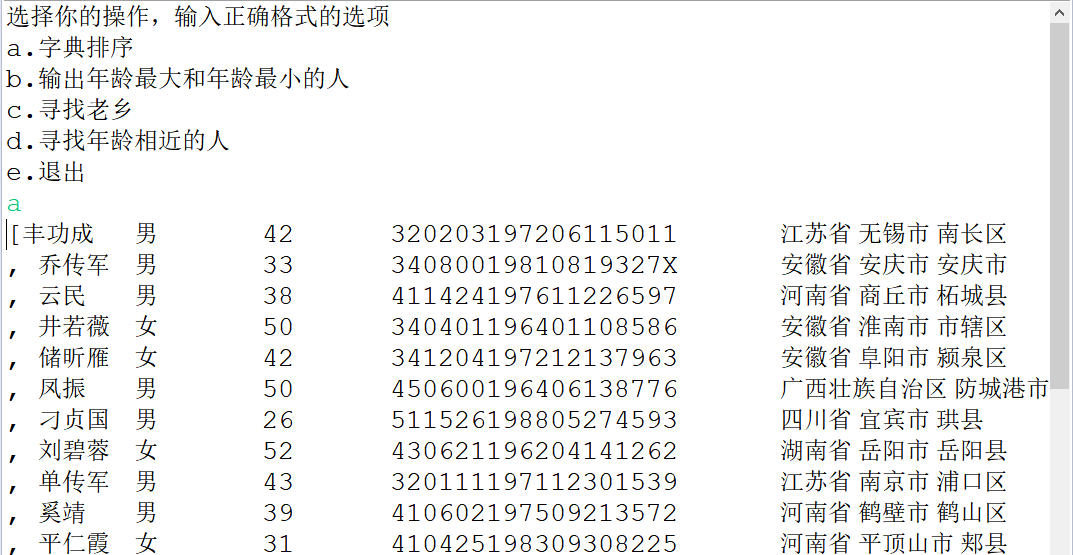
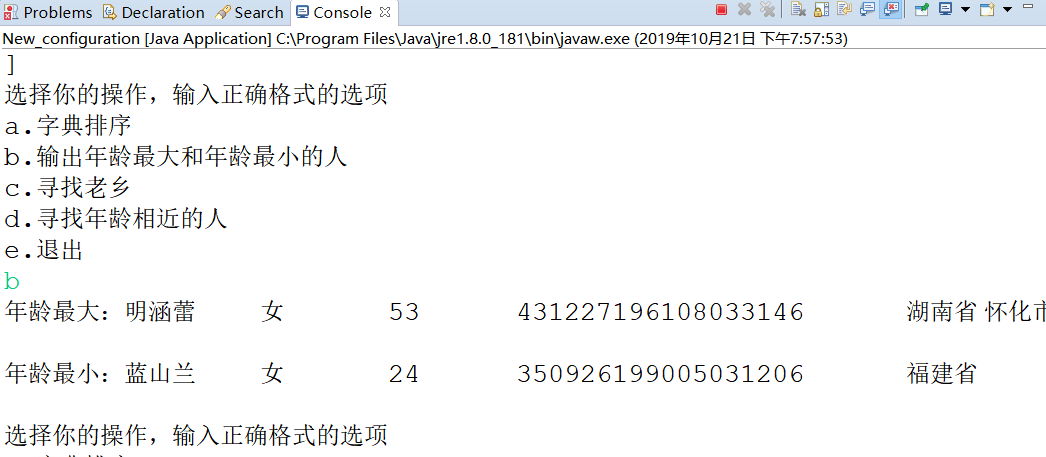
实验4:内部类语法验证实验
实验程序1:
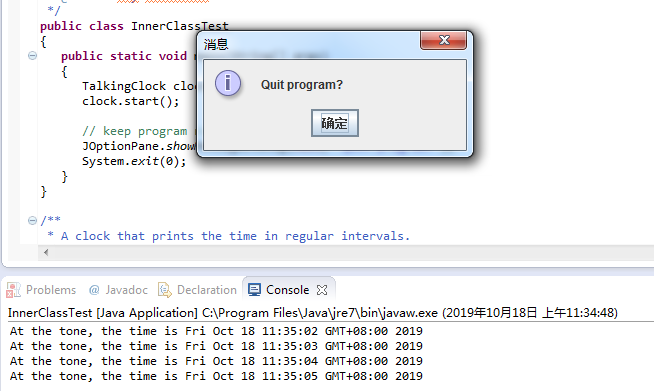
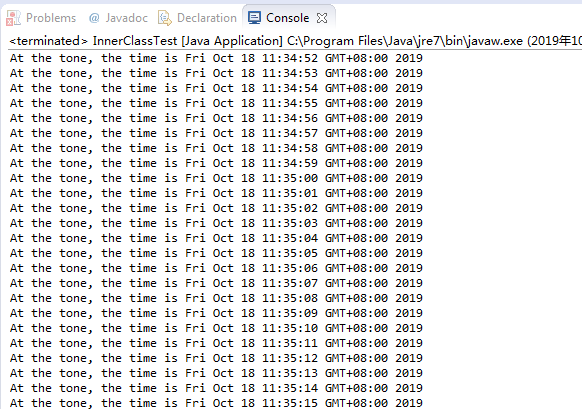
l 编辑、调试运行教材246页-247页程序6-7,结合程序运行结果理解程序;
l 了解内部类的基本用法。
代码如下:
1 import java.awt.*;
2 import java.awt.event.*;
3 import java.util.*;
4 import javax.swing.*;
5 import javax.swing.Timer;
6
7 /**
8 * This program demonstrates the use of inner classes.
9 * @version 1.11 2015-05-12
10 * @author Cay Horstmann
11 */
12 public class InnerClassTest
13 {
14 public static void main(String[] args)
15 {
16 TalkingClock clock = new TalkingClock(1000, true);
17 clock.start();
18
19 // keep program running until user selects "Ok"
20 JOptionPane.showMessageDialog(null, "Quit program?");
21 System.exit(0);
22 }
23 }
24
25 /**
26 * A clock that prints the time in regular intervals.
27 */
28 class TalkingClock
29 {
30 private int interval;
31 private boolean beep;
32
33 /**
34 * Constructs a talking clock
35 * @param interval the interval between messages (in milliseconds)
36 * @param beep true if the clock should beep
37 */
38 public TalkingClock(int interval, boolean beep)
39 {
40 this.interval = interval;
41 this.beep = beep;
42 }
43
44 /**
45 * Starts the clock.
46 */
47 public void start()
48 {
49 ActionListener listener = new TimePrinter();
50 Timer t = new Timer(interval, listener);
51 t.start();
52 }
53
54 public class TimePrinter implements ActionListener
55 {
56 public void actionPerformed(ActionEvent event)
57 {
58 System.out.println("At the tone, the time is " + new Date());
59 if (beep) Toolkit.getDefaultToolkit().beep();
60 }
61 }
62 }
运行结果:
实验程序2:
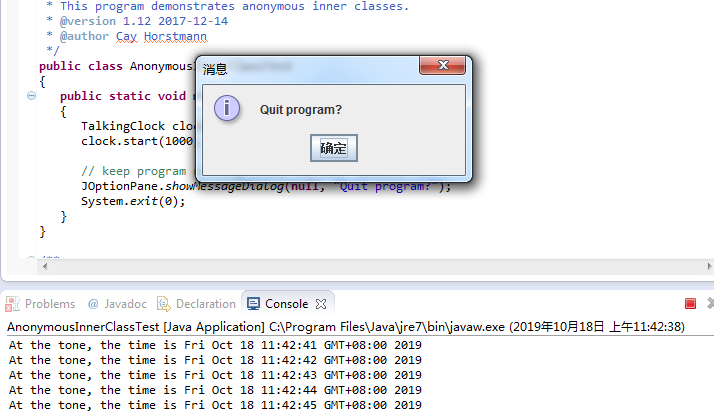
l 编辑、调试运行教材254页程序6-8,结合程序运行结果理解程序;
l 掌握匿名内部类的用法。
代码如下:
1 import java.awt.*;
2 import java.awt.event.*;
3 import java.util.*;
4 import javax.swing.*;
5 import javax.swing.Timer;
6
7 /**
8 * This program demonstrates anonymous inner classes.
9 * @version 1.11 2015-05-12
10 * @author Cay Horstmann
11 */
12 public class AnonymousInnerClassTest
13 {
14 public static void main(String[] args)
15 {
16 TalkingClock clock = new TalkingClock();
17 clock.start(1000, true);
18
19 // keep program running until user selects "Ok"
20 JOptionPane.showMessageDialog(null, "Quit program?");
21 System.exit(0);
22 }
23 }
24
25 /**
26 * A clock that prints the time in regular intervals.
27 */
28 class TalkingClock
29 {
30 /**
31 * Starts the clock.
32 * @param interval the interval between messages (in milliseconds)
33 * @param beep true if the clock should beep
34 */
35 public void start(int interval, boolean beep)
36 {
37 ActionListener listener = new ActionListener()
38 {
39 public void actionPerformed(ActionEvent event)
40 {
41 System.out.println("At the tone, the time is " + new Date());
42 if (beep) Toolkit.getDefaultToolkit().beep();
43 }
44 };
45 Timer t = new Timer(interval, listener);
46 t.start();
47 }
48 }
运行结果:
实验程序3:
l 在elipse IDE中调试运行教材257页-258页程序6-9,结合程序运行结果理解程序;
l 了解静态内部类的用法。
代码如下:
/**
* This program demonstrates the use of static inner classes. * @version 1.02 2015-05-12 * @author Cay Horstmann */public class StaticInnerClassTest{ public static void main(String[] args) { var values = new double[20]; for (int i = 0; i < values.length; i++) values[i] = 100 * Math.random(); ArrayAlg.Pair p = ArrayAlg.minmax(values); System.out.println("min = " + p.getFirst()); System.out.println("max = " + p.getSecond()); }}class ArrayAlg{ /** * A pair of floating-point numbers */ public static class Pair { private double first; private double second; /** * Constructs a pair from two floating-point numbers * @param f the first number * @param s the second number */ public Pair(double f, double s) { first = f; second = s; } /** * Returns the first number of the pair * @return the first number */ public double getFirst() { return first; } /** * Returns the second number of the pair * @return the second number */ public double getSecond() { return second; } } /** * Computes both the minimum and the maximum of an array * @param values an array of floating-point numbers * @return a pair whose first element is the minimum and whose second element * is the maximum */ public static Pair minmax(double[] values) { double min = Double.POSITIVE_INFINITY; double max = Double.NEGATIVE_INFINITY; for (double v : values) { if (min > v) min = v; if (max < v) max = v; } return new Pair(min, max); }}运行结果:

3.实验心得
通过本周的学习,我了解到了接口的作用与意义,接口和继承在某些方面比较相似,但是接口又在继承的基础上发展了一些优点,克服了java单继承的缺点。在学习过程中,可能是因为接口并不是具体的类,它只是实现,所以感觉接口比继承抽象一些,不太容易理解。
在实验中大部分实验可以独立完成并理解,但仍有一些部分难以理解,需要课后进行练习大量练习,在这周的学习中仍会继续努力。
201871020225-牟星源《面向对象程序设计(java)》第八周学习总结的更多相关文章
- 201771010134杨其菊《面向对象程序设计java》第九周学习总结
第九周学习总结 第一部分:理论知识 异常.断言和调试.日志 1.捕获 ...
- 201871010132-张潇潇《面向对象程序设计(java)》第一周学习总结
面向对象程序设计(Java) 博文正文开头 项目 内容 这个作业属于哪个课程 https://www.cnblogs.com/nwnu-daizh/ 这个作业的要求在哪里 https://www.cn ...
- 扎西平措 201571030332《面向对象程序设计 Java 》第一周学习总结
<面向对象程序设计(java)>第一周学习总结 正文开头: 项目 内容 这个作业属于哪个课程 https://www.cnblogs.com/nwnu-daizh/ 这个作业的要求在哪里 ...
- 杨其菊201771010134《面向对象程序设计Java》第二周学习总结
第三章 Java基本程序设计结构 第一部分:(理论知识部分) 本章主要学习:基本内容:数据类型:变量:运算符:类型转换,字符串,输入输出,控制流程,大数值以及数组. 1.基本概念: 1)标识符:由字母 ...
- 201871010124 王生涛《面向对象程序设计JAVA》第一周学习总结
项目 内容 这个作业属于哪个课程 https://www.cnblogs.com/nwnu-daizh/ 这个作业的要求在哪里 https://edu.cnblogs.com/campus/xbsf/ ...
- 201871010115——马北《面向对象程序设计JAVA》第二周学习总结
项目 内容 这个作业属于哪个课程 https://www.cnblogs.com/nwnu-daizh/ 这个作业的要求在哪里 https://www.cnblogs.com/nwnu-daizh/p ...
- 201777010217-金云馨《面向对象程序设计(Java)》第二周学习总结
项目 内容 这个作业属于哪个课程 https://www.cnblogs.com/nwnu-daizh/ 这个作业的要求在哪里 https://www.cnblogs.com/nwnu-daizh/p ...
- 201871010132——张潇潇《面向对象程序设计JAVA》第二周学习总结
项目 内容 这个作业属于哪个课程 https://www.cnblogs.com/nwnu-daizh/ 这个作业的要求在哪里 https://www.cnblogs.com/nwnu-daizh/p ...
- 201771010123汪慧和《面向对象程序设计Java》第二周学习总结
一.理论知识部分 1.标识符由字母.下划线.美元符号和数字组成, 且第一个符号不能为数字.标识符可用作: 类名.变量名.方法名.数组名.文件名等.第二部分:理论知识学习部分 2.关键字就是Java语言 ...
- 20155306 2016-2017-2 《Java程序设计》第八周学习总结
20155306 2016-2017-2 <Java程序设计>第八周学习总结 教材学习内容总结 第十五章 通用API 15.1 日志 java.util.loggging包提供了日志功能相 ...
随机推荐
- Jupyter notebook and Octave kernel installation
Jupyter notebook 安装 为了更加方便地写 Python 代码,还需要安装 Jupyter notebook. 利用 pip 安装 Jupyter notebook. 为什么要使用 Ju ...
- https://ggaaooppeenngg.github.io/
https://ggaaooppeenngg.github.io/
- Fontconfig error: Cannot load config file "infinality/conf.d"
reference: https://forums.gentoo.org/viewtopic-t-1079210-start-0.html resolved with following method ...
- React中的fetch请求相关
fetch在reactjs中等同于 XMLHttpRequest,它提供了许多与XMLHttpRequest相同的功能,但被设计成更具可扩展性和高效性. Fetch 的核心在于对 HTTP 接口的抽象 ...
- JVM&NIO&HashMap简单问
JVM&NIO&HashMap简单问 背景:前几天在网上看到关于JVM&NIO&HashMap的一些连环炮的面试题,整理下以备不时之需. 一.JVM Java的虚拟机的 ...
- Windows Azure Virtual Machine (39) 清除Linux挖矿病毒
<Windows Azure Platform 系列文章目录> 1.之前客户遇到了Azure Linux CPU 100%,症状如下: 2.SSH登录到Linux,查看crontab,有从 ...
- MySQL锁表查询SQL
// 查看进程 SHOW PROCESSLIST; // 查看是否锁表 SHOW OPEN TABLES WHERE In_use > 0; // 查看正在锁的事务 SELECT * FROM ...
- 漫谈微服务架构:什么是Spring Cloud,为何要选择Spring Cloud
Spring Cloud是基于Spring Boot的,因此还在使用SpringMVC的同学要先了解Spring Boot.先上一段官话,Spring Cloud是一个基于Spring Boo ...
- vue中引入mintui、vux重构简单的APP项目
最近在学习vue时也了解到一些常用的UI组件,有用于PC的和用于移动端的.用于PC的有:Element(饿了么).iView等:用于移动端APP的有Vux.Mint UI(饿了么).Vant(有赞团队 ...
- spring的@primary和@qualifier注解解决一个接口多个实现的注入问题
Spring中提供了@Primary和@Qualifier注解来解决一个接口多个实现的注入问题. @Primary注解 Spring中有提供一个@Primary注解,具体的作用是在一个接口有多个实现类 ...