
Spring-Cloud之Hystrix熔断器-5
一、在分布式系统中,服务与服务之间的依赖错综复杂,一种不可避免的情况就是某些服务会出现故障,导致依赖于它们的其他服务出现远程调度的线程阻塞 Hystrix是Netflix 公司开源的一个项目,它提供了熔断器功能,能够阻止分布式系统中出现联动故障 Hystrix 是通过隔离服务的访问点阻止联动故障的,并提供了故障的解决方案,从而提高了整个分布式系统的弹性。
二、Hystrix的产生:
在复杂的分布式系统中,可能有几十个服务相互依赖,这些服务由于某些原因,例如机房的不可靠性、网络服务商的不可靠性,导致某个服务不可用。如果系统不隔离该不可用的服务,可能会导致整个系统不可用。
对于依赖 30 个服务的应用程序,每个服务的正常运行时间为 99.99% ,对于单个服务来说, 99.99% 的可用是非常完美的。有99.99^30 = 99.7% 的可正常运行时间和 0.3% 的不可用时间,那么 10 亿次请求中有 3000000次失败,实际的情况可能比这更糟糕。
如果不设计整个系统的韧性,即使所有依赖关系表现良好,单个服务只有 0.01% 的不可用,由于整个系统的服务相互依赖,最终对整个系统的影响是非常大的。
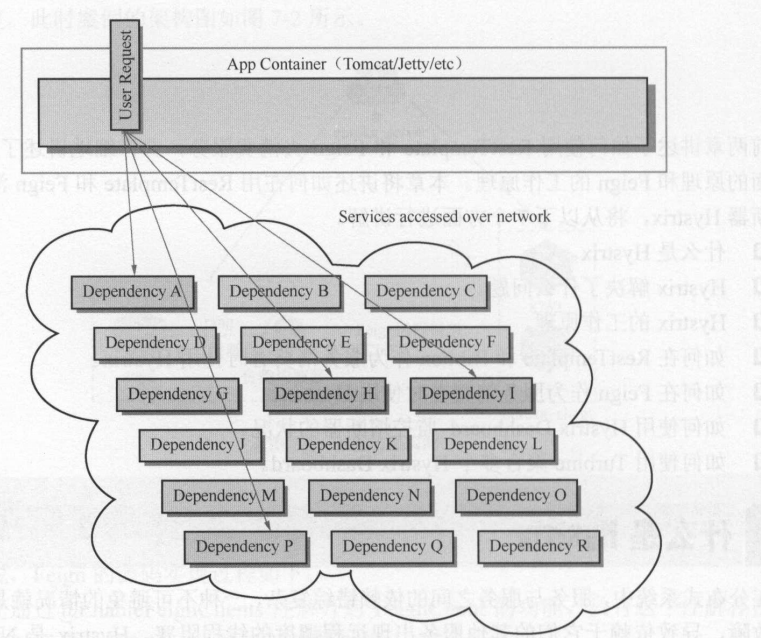
在上图中一个用户需要请求A、H、I、P。如果中间I服务网络延迟或者发生故障,即A、H、P不可用。在高并发的情况下,单个服务的延迟会导致整个请求都处于延迟状态,可能在几秒钟就使整个服务处于线程负载饱和的状态。
某个服务的单个点的请求故障会导致用户的请求处于阻塞状态,最终的结果就是整个服务的线程资源消耗殆尽。由于服务的依赖性,会导致依赖于该故障服务的其他服务也处于线程阻塞状态,最终导致这些服务的线程资源消耗殆尽 直到不可用,从而导致整个问服务系统都不可用,即雪崩效应。
为了防止雪崩效应,因而产生了熔断器模型。 Hystrix 是在业界表现非常好的 个熔断器模型实现的开源组件,它是 Spring Cloud 组件不可缺少的一部分。
三、Hystrix的设计原则:
1)防止单个服务的故障耗尽整个服务的 Servlet 容器(例如 Tomcat )的线程资源。
2)快速失败机制,如果某个服务出现了故障,则调用该服务的请求快速失败,而不是线程等待。
3)提供回退( fallback )方案,在请求发生故障时,提供设定好的回退方案。
4)使用熔断机制,防止故障扩散到其他服务。
5)提供熔断器的监控组件 Hystrix Dashboard ,可以实时监控熔断器的状态。
四、Hystrix的工作机制:
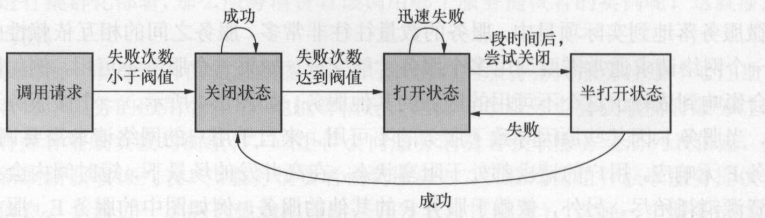
首先,当服务的某个 API 接口的失败次数在一定时间内小于设定的阀值时,熔断器处于关闭状态,该 API 接口正常提供服务 。当该API 接口处理请求的失败次数大于设定的阀值时, Hystrix 判定该 API 接口出现了故障,打开熔断器,这时请求该 API 接口会执行快速失败的逻辑(即 fall back 回退的逻辑),不执行业务逻辑,请求的线程不会处于阻塞状态。处于打开状态的熔断器,一段时间后会处于半打开状态,并将一定数量的请求执行正常逻辑。剩余的请求会执行快速失败,若执行正常逻辑的请求失败了,则熔断器继续打开。若成功了 ,则将熔断器关闭。这样熔断器就具有了自我修复的能力。
五、服务中对Hystrix的基本使用
1)Ribbon中使用Hystrix熔断器(我们基于前面的Spring-Cloud之Ribbon负载均衡-3代码进行改造)。
a、加入依赖
        <dependency>

            <groupId>org.springframework.cloud</groupId>

            <artifactId>spring-cloud-starter-netflix-hystrix</artifactId>

        </dependency>
b、加入注解(@EnableHystrix)开启熔断器功能
package com.cetc;

import org.springframework.boot.SpringApplication;

import org.springframework.boot.autoconfigure.SpringBootApplication;

import org.springframework.cloud.netflix.eureka.EnableEurekaClient;

import org.springframework.cloud.netflix.hystrix.EnableHystrix;

@SpringBootApplication

@EnableEurekaClient

@EnableHystrix

public class HystrixRibbonApplication {

    public static void main(String[] args) {

        SpringApplication.run(HystrixRibbonApplication.class, args);

    }

}
c、修改RibbonServiceImpl.class的实现,在getPort方法上面加入@HystrixCommand注解,这样这个接口就有了熔断器功能了,其中@HystrixCommand中的fallbackMethod为执行快速失败的方法。
package com.cetc.service.impl;

import com.cetc.service.IRibbonService;

import com.netflix.hystrix.contrib.javanica.annotation.HystrixCommand;

import org.springframework.beans.factory.annotation.Autowired;

import org.springframework.stereotype.Service;

import org.springframework.web.client.RestTemplate;

@Service

public class RibbonServiceImpl implements IRibbonService {

    @Autowired

    private RestTemplate restTemplate;

    @Override

    @HystrixCommand(fallbackMethod = "error")

    public Integer getPort() {

        return restTemplate.getForObject("http://client/api/test/getPort", Integer.class);

    }

    public Integer error() {

        return 0;

    }

}
d、测试。启动Eureka-Server、Eureka-Client、Hystrix-Ribbon端口分别为8670、8673、8677。

正常访问时:

服务异常时:

2)Feign中使用Hystrix(代码基于前面的Spring-Cloud之Feign声明式调用-4进行调整)
a、因为Feign中自带了Hystrix功能,所以不需要重新加入依赖。
b、在application.yaml中开启Hystrix的配置:
feign:

  hystrix:

    enabled: true
c、编写TestHystrix服务错误的执行方式,继承Feign接口
package com.cetc.feign.hystrix;

import com.cetc.feign.client.TestFeign;

import org.springframework.stereotype.Component;

@Component

public class TestHystrix implements TestFeign{

    @Override

    public Integer getPort() {

        return 0;

    }

}
d、在@FeignClient中加入回调的class。
package com.cetc.feign.client;

import com.cetc.config.FeignConfiguration;

import com.cetc.feign.hystrix.TestHystrix;

import org.springframework.cloud.openfeign.FeignClient;

import org.springframework.stereotype.Component;

import org.springframework.web.bind.annotation.GetMapping;

@Component

@FeignClient(value = "client", configuration = {FeignConfiguration.class}, fallback = TestHystrix.class)

public interface TestFeign {

    @GetMapping("/api/test/getPort")

    Integer getPort();

}
e、测试、启动Eureka-Server、Eureka-Client、Hystrix-Feign端口分别为8670、8673、8678。

正常访问:

服务器异常:

六、Hystrix Dashboard监控熔断器的状态。
在微服务架构中 ,为了保证服务实例的可用性,防止服务实例出现故障导致线程阻塞,而出现了熔断器模型 烙断器的状况反映了 个程序的可用性和健壮性,它是一个重要指标。Hystrix Dashboard 是监控 Hystrix 的熔断器状况的 个组件,提供了数据监控和 友好的图形化展示界面。
1)Hystrix Dashboard和Ribbon结合使用(代码基于上面的熔断器代码编写)
a、加入依赖
        <dependency>

            <groupId>org.springframework.boot</groupId>

            <artifactId>spring-boot-starter-actuator</artifactId>

        </dependency>

        <dependency>

            <groupId>org.springframework.cloud</groupId>

            <artifactId>spring-cloud-starter-netflix-hystrix</artifactId>

        </dependency>

        <dependency>

            <groupId>org.springframework.cloud</groupId>

            <artifactId>spring-cloud-netflix-hystrix-dashboard</artifactId>

        </dependency>
说明:因为是监控所以加入actuator。hystrix为起步依赖这里需要。
b、加入注解@EnableHystrixDashboard
package com.cetc;

import org.springframework.boot.SpringApplication;

import org.springframework.boot.autoconfigure.SpringBootApplication;

import org.springframework.cloud.netflix.eureka.EnableEurekaClient;

import org.springframework.cloud.netflix.hystrix.EnableHystrix;

import org.springframework.cloud.netflix.hystrix.dashboard.EnableHystrixDashboard;

@SpringBootApplication

@EnableEurekaClient

@EnableHystrix

@EnableHystrixDashboard

public class DashboardRibbonApplication {

    public static void main(String[] args) {

        SpringApplication.run(DashboardRibbonApplication.class, args);

    }

}
c、加入相关配置到application.yaml,放开actuator的访问
management:

  endpoints:

    web:

      exposure:

        include: ["*"]
d、测试。服务包含Eureka-Server、Eureka-Client、Dashboard-Ribbon。端口分别为8670、8673、8679

测试接口:

访问:http://127.0.0.1:8679/hystrix
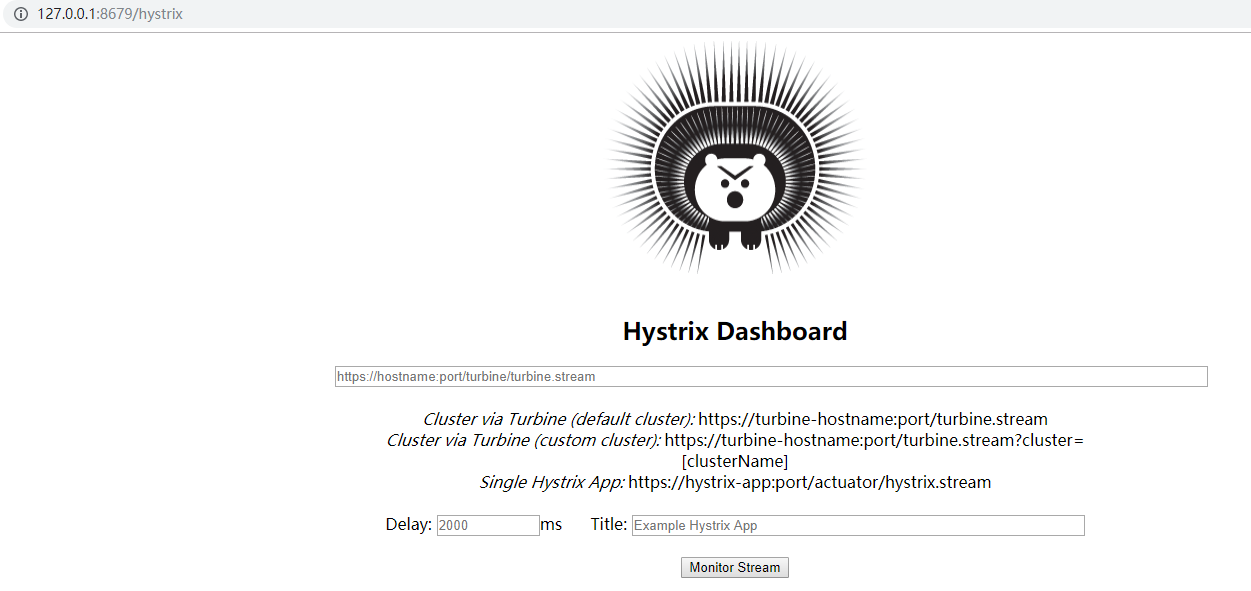
按照提示在输入框中对应链接:http://127.0.0.1:8679/actuator/hystrix.stream,点击Monitor Stream。测试效果

上面数字代表的意思如下:

2)Hystrix Dashboard和Feign结合使用(代码基于上面的熔断器代码编写)
a、加入依赖:
        <dependency>

            <groupId>org.springframework.boot</groupId>

            <artifactId>spring-boot-starter-actuator</artifactId>

        </dependency>

        <dependency>

            <groupId>org.springframework.cloud</groupId>

            <artifactId>spring-cloud-starter-netflix-hystrix</artifactId>

        </dependency>

        <dependency>

            <groupId>org.springframework.cloud</groupId>

            <artifactId>spring-cloud-netflix-hystrix-dashboard</artifactId>

        </dependency>
说明:虽然Feign继承了hystrix,但那不是起步依赖说以这里还是需要hystrix的依赖
b、加入注解:
package com.cetc;

import org.springframework.boot.SpringApplication;

import org.springframework.boot.autoconfigure.SpringBootApplication;

import org.springframework.cloud.netflix.eureka.EnableEurekaClient;

import org.springframework.cloud.netflix.hystrix.EnableHystrix;

import org.springframework.cloud.netflix.hystrix.dashboard.EnableHystrixDashboard;

import org.springframework.cloud.openfeign.EnableFeignClients;

@SpringBootApplication

@EnableEurekaClient

@EnableFeignClients

@EnableHystrix

@EnableHystrixDashboard

public class DashboardFeignApplication {

    public static void main(String[] args) {

        SpringApplication.run(DashboardFeignApplication.class, args);

    }

}
说明:为什么还是需要加入@EnableHystrix的注解呢,在使用Dashboard的时候需要这个注解,不然会出现错误。
c、修改application.yaml配置
feign:

  hystrix:

    enabled: true

management:

  endpoints:

    web:

      exposure:

        include: ["*"]
d、测试。启动服务有Eureka-Server、Eureka-Client、Dashboard-Feign。端口分别为8670、8673、8680.

测试正常的接口:

访问:http://127.0.0.1:8680/hystrix
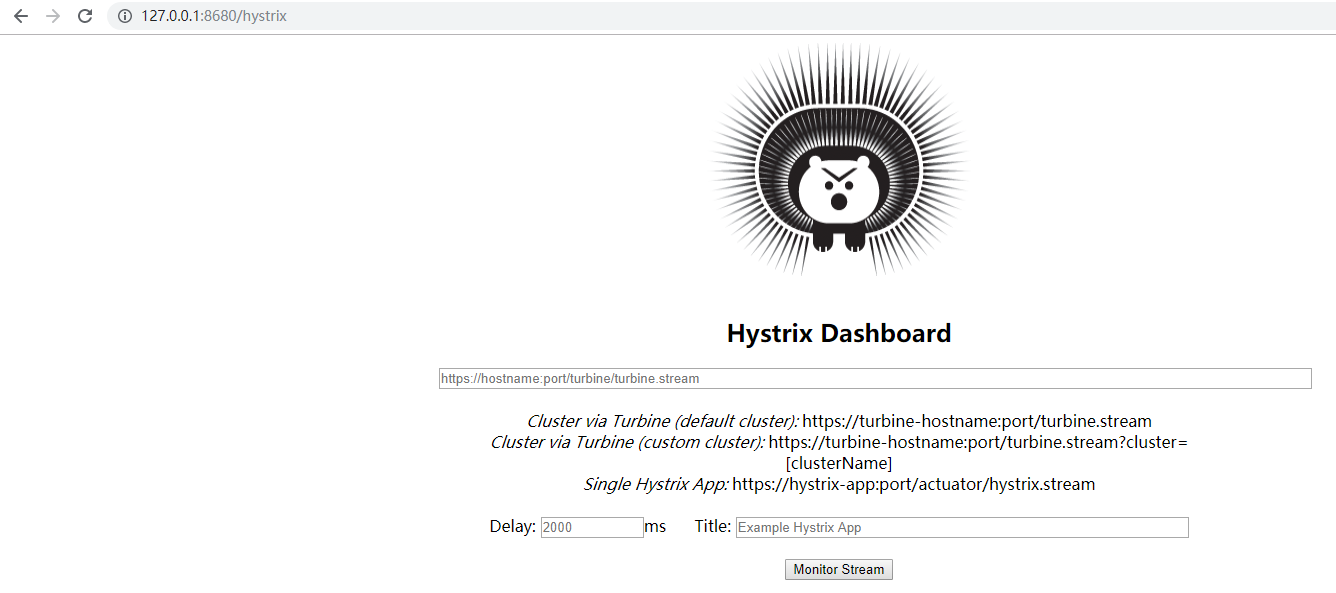
按提示输入监控链接:http://127.0.0.1:8680/actuator/hystrix.stream,点击Monitor Stream。效果如下:
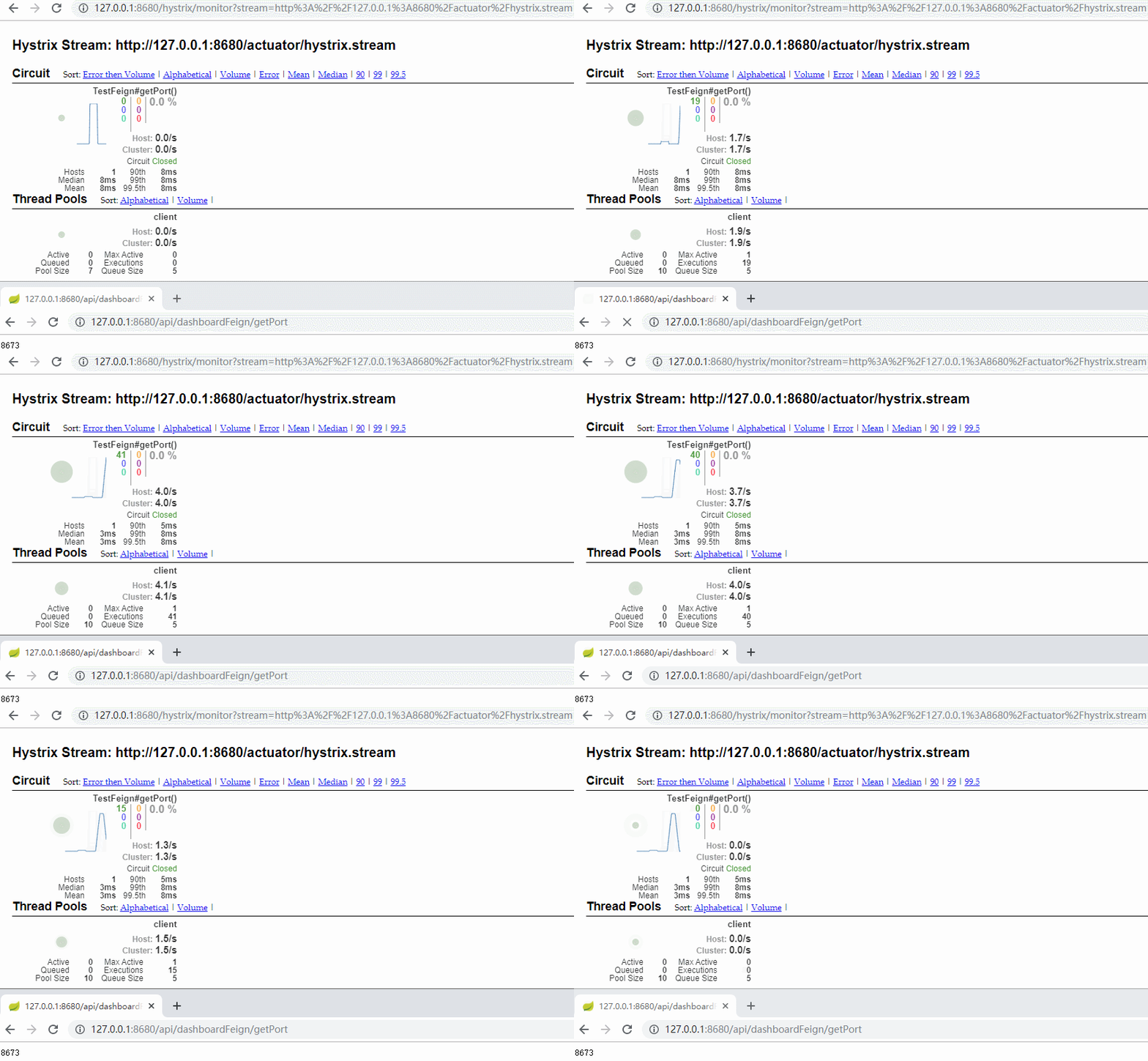
数字代表的意义:

七、Turbine聚合监控。
在使用 Hystrix Dashboard 组件监控服务的熔断器状况时, 每个服务都有一个HystrixDashboard 主页,当服务数量很多时,监控非常不方便。为了同时监控多个服务的熔断器的状况, Netflix 开源了 Hystrix 的另 个组件 Turbine Turbine 用于聚合多个 Hystrix Dashboard,将多个 Hystrix Dashboard 组件的数据放在一个页面上展示,进行集中监控。
1)加入依赖:
        <dependency>

            <groupId>org.springframework.boot</groupId>

            <artifactId>spring-boot-starter-actuator</artifactId>

        </dependency>

        <dependency>

            <groupId>org.springframework.cloud</groupId>

            <artifactId>spring-cloud-netflix-hystrix-dashboard</artifactId>

        </dependency>

        <dependency>

            <groupId>org.springframework.cloud</groupId>

            <artifactId>spring-cloud-netflix-turbine</artifactId>

        </dependency>
2)修改配置application.yaml
server:

  port: 8681

eureka:

  client:

    service-url:

      defaultZone:

        http://127.0.0.1:8670/eureka/ # 实际开发中建议使用域名的方式

spring:

  application:

    name: turbine

turbine:

  aggregator:

    cluster-config: default

  app-config: dashboard-ribbon,dashboard-feign

  cluster-name-expression: new String("default")

management:

  endpoints:

    web:

      exposure:

        include: ["*"]
说明:这里的turbine配置主要是加入服务app-config,两个服务均是之前写好的服务。
3)编写启动项加入注解:
package com.cetc;

import org.springframework.boot.SpringApplication;

import org.springframework.boot.autoconfigure.SpringBootApplication;

import org.springframework.cloud.netflix.eureka.EnableEurekaClient;

import org.springframework.cloud.netflix.hystrix.dashboard.EnableHystrixDashboard;

import org.springframework.cloud.netflix.turbine.EnableTurbine;

@SpringBootApplication

@EnableEurekaClient

@EnableHystrixDashboard

@EnableTurbine

public class TurbineApplication {

    public static void main(String[] args) {

        SpringApplication.run(TurbineApplication.class, args);

    }

}
4)测试。启动服务有Eureka-Server、Eureka-Client、Dashboard-Ribbon、Dashboard-Feign、Turbine。端口分别为8670、8673、8679、8680、8681.

测试正常服务访问:


打开:http://127.0.0.1:8681/hystrix
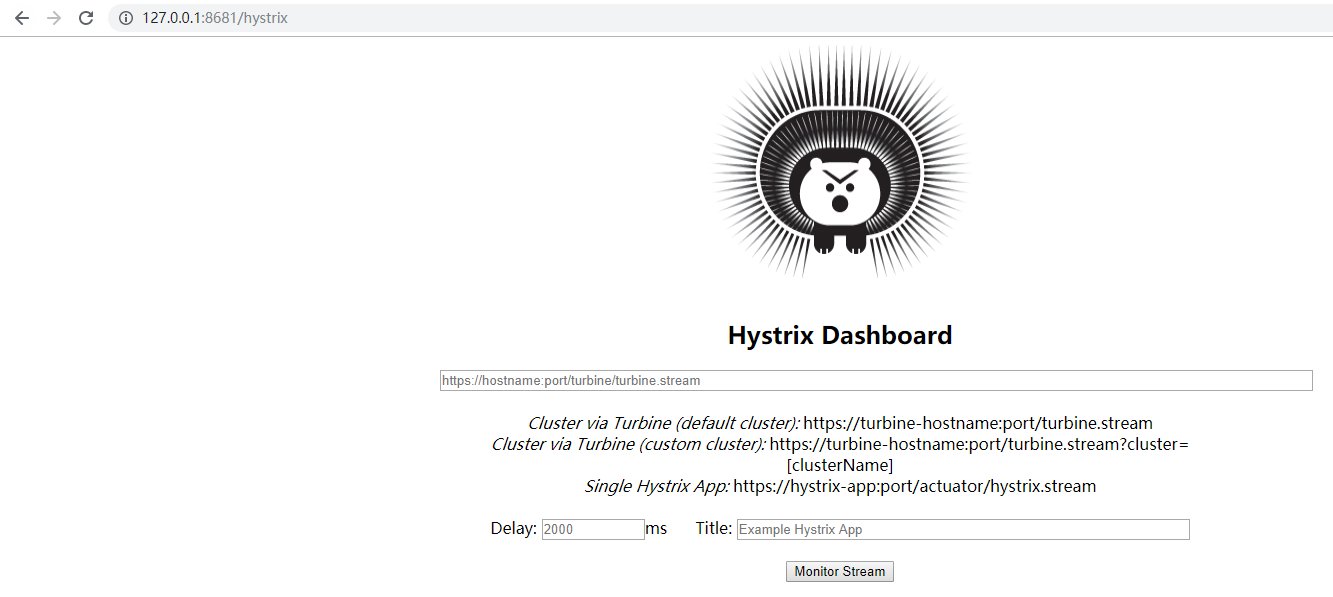
按照提示输入:http://127.0.0.1:8681/turbine.stream。点击Monitor Stream。效果如下
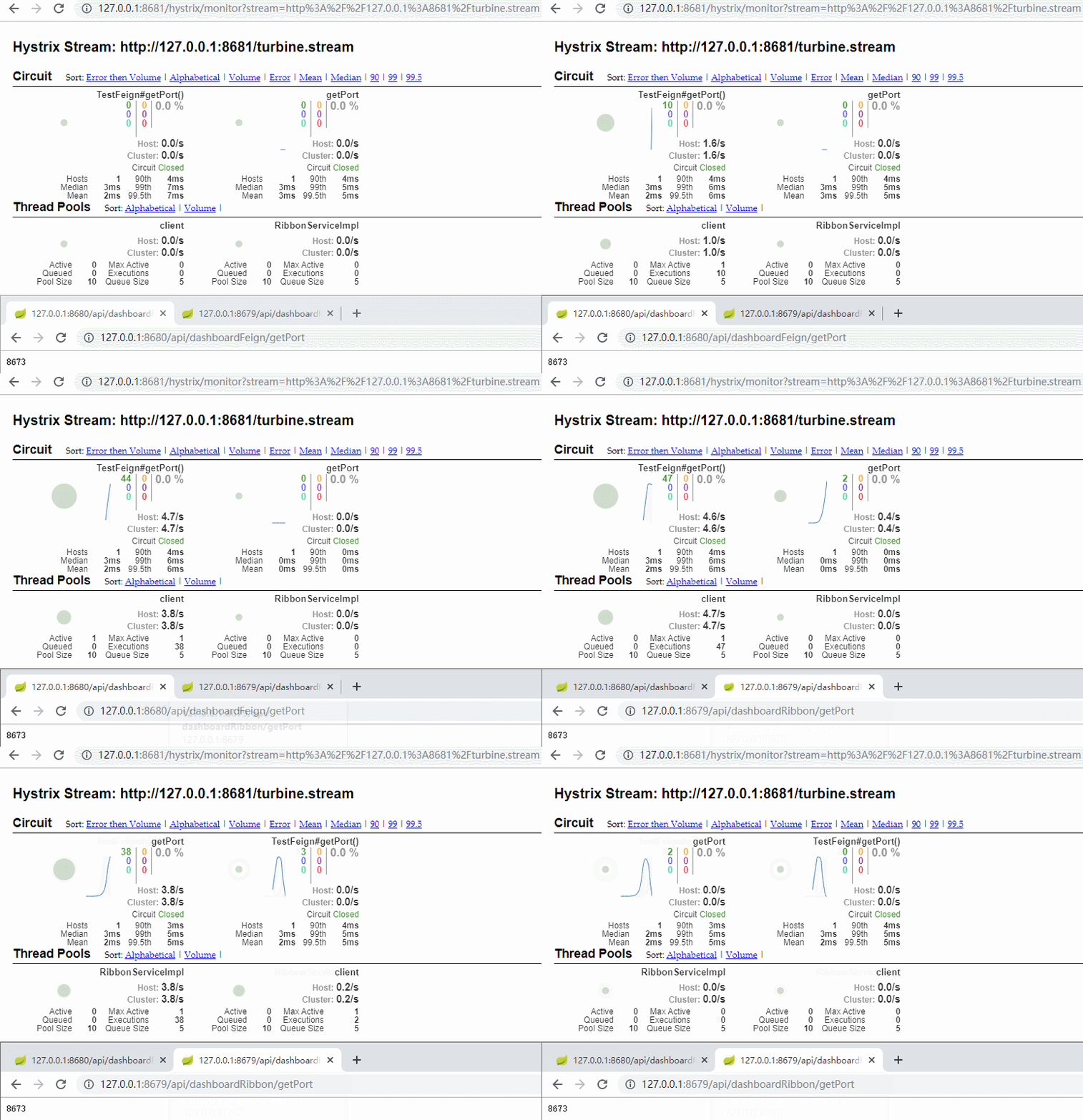
八、源码地址:https://github.com/lilin409546297/spring-cloud/tree/master/hystrix
Spring-Cloud之Hystrix熔断器-5的更多相关文章
- spring cloud 的hystrix 熔断器 和feign 调用的使用
1, 添加依赖 <dependency> <groupId>org.springframework.cloud</groupId> <artifactId&g ...
- Spring Cloud中Hystrix、Ribbon及Feign的熔断关系是什么?
导读 今天和大家聊一聊在Spring Cloud微服务框架实践中,比较核心但是又很容易把人搞得稀里糊涂的一个问题,那就是在Spring Cloud中Hystrix.Ribbon以及Feign它们三者之 ...
- Spring Cloud中Hystrix 线程隔离导致ThreadLocal数据丢失问题分析
最近spring boot项目中由于使用了spring cloud 的hystrix 导致了threadLocal中数据丢失,其实具体也没有使用hystrix,但是显示的把他打开了,导致了此问题. 导 ...
- Spring Cloud断路器Hystrix
在微服务架构中,存在着那么多的服务单元,若一个单元出现故障,就会因依赖关系形成故障蔓延,最终导致整个系统的瘫痪,这样的架构相较传统架构就更加的不稳定.为了解决这样的问题,因此产生了断路器模式. 什么是 ...
- Spring Cloud之Hystrix服务保护框架
服务保护利器 微服务高可用技术 大型复杂的分布式系统中,高可用相关的技术架构非常重要. 高可用架构非常重要的一个环节,就是如何将分布式系统中的各个服务打造成高可用的服务,从而足以应对分布式系统环境中的 ...
- Spring Cloud 之 Hystrix.
一.概述 在微服务架构中,我们将系统拆分成了很多服务单元,各单元的应用间通过服务注册与订阅的方式互相依赖.由于每个单元都在不同的进程中运行,依赖通过远程调用的方式执行,这样就有可能因为网络原因或是依 ...
- Spring Cloud 学习--Hystrix应用
上一篇介绍了Hystrix基本功能和单独使用的方式,今天继续学习如何将Hystrix融入SpringCloud组件中去. 在Ribbon上使用熔断器 在 pom.xml 文件中引入 hystrix 的 ...
- 笔记:Spring Cloud Feign Hystrix 配置
在 Spring Cloud Feign 中,除了引入了用户客户端负载均衡的 Spring Cloud Ribbon 之外,还引入了服务保护与容错的工具 Hystrix,默认情况下,Spring Cl ...
- 架构师系列文:通过Spring Cloud组件Hystrix合并请求
在前文里,我们讲述了通过Hystrix进行容错处理的方式,这里我们将讲述通过Hystrix合并请求的方式 哪怕一个URL请求调用的功能再简单,Web应用服务都至少会开启一个线程来提供服务,换句话说,有 ...
- 从零开始学spring cloud(十一) -------- hystrix监控
一.官方文档阅读 服务启动后,可以通过/health和hystrix.stream查看效果,实际上,访问上述两个地址,会出现404,这是因为spring boot版本的问题, 我在这里使用的sprin ...
随机推荐
- 使用grpc C++功能
grpc c++开发需要安装相关工具以及框架才能进行开发. rz 远程上传文件 本地开发环境搭建: 1.编译相关工具 pkg-config autoconf automake Libtool shto ...
- Dubbo自定义Filter统一处理异常
Dubbo版本:2.7 使用自定义Filter注意事项 1.自定义名称不能和默认Filter相同,否则可能不生效 2.只用定义Filter类和META-INF下的文本文件,不用添加配置,@Activa ...
- hbuilderx - 常用快捷键操作
常用的操作有(缺少一个快捷键,就是选中行) 1. ctrl+/ 注释代码 2. ctrl+y 恢复撤销 3. ctrl+x 剪切 4. ctrl+z 撤销 5. ctrl+c 复制 6. ctrl+p ...
- 【转】Android 破解视频App去除广告功能详解及解决办法总结
Android 破解视频App去除广告功能 作为一个屌丝程序猿也有追剧的时候,但是当打开视频app的时候,那些超长的广告已经让我这个屌丝无法忍受了,作为一个程序猿看视频还要出现广告那就是打我脸,但是我 ...
- Chrome提示:"请停用以开发者模式运行的扩展程序"的解决办法
操作步骤 1.开始 -> 运行 -> 输入gpedit.msc -> 回车确定打开计算机本地组策略编辑器(通过Win + R快捷键可以快速打开运行),如图所示: 2.在打开的本地组策 ...
- Python爬虫实例项目
WechatSogou [1]- 微信公众号爬虫.基于搜狗微信搜索的微信公众号爬虫接口,可以扩展成基于搜狗搜索的爬虫,返回结果是列表,每一项均是公众号具体信息字典. DouBanSpider [2]- ...
- 在 Alpine Linux 中安装 bash shell
如何在我的 Alpine Linux LXD(Linux容器)虚拟机(VM)中安装 bash shell? Alpine Linux 自带 BusyBox 工具.它被评为“嵌入式 Linux 的瑞士军 ...
- zz 勵志貼,成功是努力加对的方向
5-6年工作经验程序员初进大厂,如何适应工作? 李苦李 李苦李 华为 架构师 318 人赞同了该回答 泻药! 与题主背景非常相似. 本人毕业8年+,普通二本,学历不突出,非计算机专业. 唯一不同的 ...
- C++11 并发编程库
C++11 并发编程 C++11 新标准中引入了几个头文件来支持多线程编程,他们分别是: <atomic>:该头文主要声明了两个类, std::atomic 和 std::atomic_f ...
- TensorFlow 8 bit模型量化
本文基本参考自这篇文章:8-Bit Quantization and TensorFlow Lite: Speeding up mobile inference with low precision ...