
结合Poi实现可读取Excel的文件选择对话框
第一步:ApachePoi的jar包导全,不全会出现异常。
第二步:写就完事了:此例为读取特定模板的excel,仅供参考,根据实际需求改写。
import java.awt.Container;
import java.awt.Dimension;
import java.awt.event.ActionEvent;
import java.awt.event.ActionListener;
import java.io.BufferedReader;
import java.io.File;
import java.io.FileInputStream;
import java.io.FileNotFoundException;
import java.io.FileOutputStream;
import java.io.IOException;
import java.io.InputStream;
import java.io.InputStreamReader;
import java.io.UnsupportedEncodingException;
import javax.swing.JFileChooser;
import javax.swing.JFrame;
import javax.swing.JLabel;
import javax.swing.JPanel;
import javax.swing.JScrollPane;
import javax.swing.JTextArea;
import javax.swing.WindowConstants;
import javax.swing.filechooser.FileFilter;
import org.apache.poi.ss.usermodel.Cell;
import org.apache.poi.ss.usermodel.Row;
import org.apache.poi.ss.usermodel.Sheet;
import org.apache.poi.ss.usermodel.Workbook;
import org.apache.poi.xssf.usermodel.XSSFWorkbook;
private JLabel label = null;
private JTextArea textarea = null;
private JFileChooser fileChooser = null;
f = new JFrame("FileChooser Example");
Container contentPane = f.getContentPane();
textarea = new JTextArea();
JScrollPane scrollPane = new JScrollPane(textarea);
scrollPane.setPreferredSize(new Dimension(350, 300));
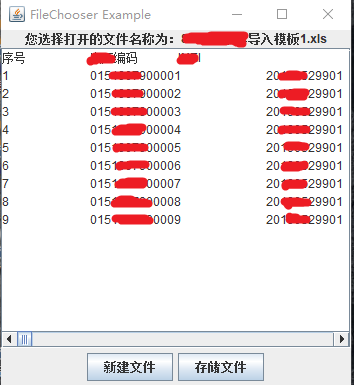
JButton b1 = new JButton("新建文件");
b1.addActionListener(this);
JButton b2 = new JButton("存储文件");
b2.addActionListener(this);
panel.add(b1);
panel.add(b2);
contentPane.add(scrollPane, BorderLayout.CENTER);
contentPane.add(panel, BorderLayout.SOUTH);
f.setVisible(true);
f.setDefaultCloseOperation(WindowConstants.HIDE_ON_CLOSE);//按x不会退出程序
}
new FileChooserUtils2();
}
File file = null;
int result;
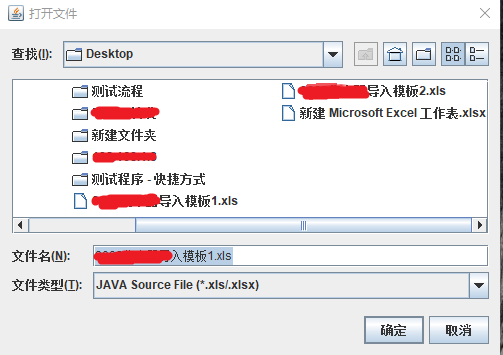
fileChooser.setApproveButtonText("确定");
fileChooser.setDialogTitle("打开文件");
fileChooser.addChoosableFileFilter(new JAVAFileFilter("xls", "xlsx")); //加载过滤器
fileChooser.addChoosableFileFilter(new JAVAFileFilter("java"));
result = fileChooser.showOpenDialog(f);
textarea.setText("");
if (result == JFileChooser.APPROVE_OPTION) {
file = fileChooser.getSelectedFile();
label.setText("您选择打开的文件名称为:" + file.getName());
} else if (result == JFileChooser.CANCEL_OPTION) {
label.setText("您没有选择任何文件");
}
String extension="";
int index = file.toString().lastIndexOf('.');
if (index > 0 && index < file.toString().length() - 1) {
extension = file.toString().substring(index + 1).toLowerCase();
}
if("xls".equals(extension)||"xlsx".equals(extension)) {
readExcel(file.toString());
}else {
readNoExcel(file.toString());
}
if (e.getActionCommand().equals("存储文件")) {
result = fileChooser.showSaveDialog(f);
file = null;
file = fileChooser.getSelectedFile();
label.setText("您选择存储的文件名称为:" + file.getName());
} else if (result == JFileChooser.CANCEL_OPTION) {
label.setText("您没有选择任何文件");
}
try {
fileOutStream = new FileOutputStream(file);
} catch (FileNotFoundException e2) {
label.setText("File Not Found");
return;
}
fileOutStream.write(content.getBytes());
} catch (IOException e2) {
label.setText("写入文件错误");
} finally {
try {
if (fileOutStream != null)
fileOutStream.close();
} catch (IOException e3) {
}
}
private void readNoExcel(String file) {
FileInputStream fileInStream = null;
InputStreamReader isr = null;
BufferedReader reader = null;
if (file != null) {
try {
fileInStream = new FileInputStream(file);
isr = new InputStreamReader(fileInStream, "UTF-8");
reader = new BufferedReader(isr);
} catch (FileNotFoundException e2) {
label.setText("File Not Found");
return;
} catch (UnsupportedEncodingException e3) {
label.setText("File Not Found");
return;
}
while ((readStr = reader.readLine()) != null) {
textarea.append(readStr + "\n");
}
} catch (IOException e2) {
label.setText("写入文件错误");
} finally {
try {
if (fileInStream != null)
fileInStream.close();
} catch (IOException e3) {
}
}
private void readExcel(String fileName) {
Workbook workbook = null;
Row row = null;
//获取Excel文档
workbook = getWorkbook(fileName);
//获取Excel文档的第一个sheet页
Sheet sheet = workbook.getSheetAt(0);
//获取文档中已保存数据的行数
int rowNum = sheet.getPhysicalNumberOfRows();
//获取第三行
row = sheet.getRow(2); //实现的是读取特定模板的excel,根据需求修改。
int colnum=5;
for (int i = 2; i < rowNum; i++) {
row = sheet.getRow(i);
if (null != row)
{
//获取当前行已保存数据的最大列数
colnum = row.getPhysicalNumberOfCells();
for (int j = 0; j < colnum; j++) {
Cell cell = row.getCell(j);
textarea.append(getValueFromCell(cell)+" ");
if(j==colnum-1) {
textarea.append("\n");
}
}
}
}
}
Workbook workbook = null;
String suffix = fileName.substring(fileName.lastIndexOf(".") + 1);
InputStream in = null;
try {
in = new FileInputStream(fileName);
if ("xls".equals(suffix))
{
workbook = new HSSFWorkbook(in);
}
else if ("xlsx".equals(suffix))
{
workbook = new XSSFWorkbook(in);
}
} catch (FileNotFoundException e) {
e.printStackTrace();
} catch (IOException e) {
e.printStackTrace();
}
return workbook;
}
private static String getValueFromCell(Cell cell) {//获取单元格的值ֵ
String value = null;
if (null == cell)
{
return "";
}
//判断cell类型
switch(cell.getCellType()){
case NUMERIC:{
value = ""+(int)cell.getNumericCellValue();
break;
}
case STRING:{
value = cell.getStringCellValue();
break;
}
default:
value = "";
}
return value;
}
}
String ext;
String ext2;
this.ext = ext;
}
this.ext = ext;
this.ext2 = ext2;
}
if (file.isDirectory())
return true;
int index = fileName.lastIndexOf('.');
if (index > 0 && index < fileName.length() - 1) {
String extension = fileName.substring(index + 1).toLowerCase();
if (extension.equals(ext) || extension.equals(ext2))
return true;
}
return false;
}
if (ext.equals("java"))
return "JAVA Source File (*.java)";
if (ext.equals("xls") && ext2.equals("xlsx"))
return "JAVA Source File (*.xls/.xlsx)";
return "";
}
}
结合Poi实现可读取Excel的文件选择对话框的更多相关文章
- Java小知识----POI事件模式读取Excel 2007
一.知识背景 1.读取excel的方法选择问题 java中读excel中的时间,我们通常用POI去解析,在使用new HSSFWorkbook(NEW FileInputStream(excelFil ...
- 前端读取Excel报表文件 js-xlsx
1.http://www.cnblogs.com/imwtr/p/6001480.html (前端读取Excel报表文件) 2.https://github.com/SheetJS/js-xlsx
- python读取Excel表格文件
python读取Excel表格文件,例如获取这个文件的数据 python读取Excel表格文件,需要如下步骤: 1.安装Excel读取数据的库-----xlrd 直接pip install xlrd安 ...
- 利用JFileChooser实现文件选择对话框
简单的文件选择对话框: package mypackage;/** * 打开文件和存储文件 */import java.awt.BorderLayout;import java.awt.Contain ...
- VBScript - 弹出“文件选择对话框”方法大全!
本文记录,VBScript 中,各种打开 "文件选择对话框" 的方法. 实现方法-1 (mshta.exe): 首先,我们要实现的就是,弹出上面的这个"文件选择对话框&q ...
- 文件选择对话框:CFileDialog
程序如下: CString FilePathName; //文件名参数定义 CFileDialog Dlg(TRUE,NULL,NULL, ...
- NX二次开发-UFUN文件选择对话框UF_UI_create_filebox
NX11+VS2013 #include <uf.h> #include <uf_ui.h> UF_initialize(); //文件选择对话框 char sPromptSt ...
- 使用Apache下poi创建和读取excel文件
一:使用apache下poi创建excel文档 @Test /* * 使用Apache poi创建excel文件 */ public void testCreateExcel() { // 1:创建一 ...
- POI原生导入读取EXCEL
好久没用 最近项目有冲突 所以又用到了这个 谁知道以后还会不会用 先记下来吧 直接扔项目里 调方法就OK 了. 记录一下....不想再写类似这样的东西了 import org.apache.poi.h ...
随机推荐
- Python List reverse() 与list[::-1]
reverse() https://www.runoob.com/python/att-list-reverse.html list[::-1] https://blog.csdn.net/usern ...
- spring data jpa 使用JPQL的方式查询
用Spring Data JPA提供的查询方法已经可以解决大部分的应用场景,但是对于某些业务来说,我们还需要灵活的构造查询条件,这时就可以使用@Query注解,结合JPQL的语句方式完成查询 @Que ...
- [Java Performance] 线程及同步的性能之线程池/ThreadPoolExecutors/ForkJoinPool
线程池和ThreadPoolExecutors 虽然在程序中可以直接使用Thread类型来进行线程操作,但是更多的情况是使用线程池,尤其是在Java EE应用服务器中,一般会使用若干个线程池来处理 ...
- Javascript生成器函数
function* 这种声明方式(function关键字后跟一个星号)会定义一个生成器函数 (generator function),它返回一个Generator 对象 示例: function* g ...
- Nodejs入门级基础+实战
这篇随笔将会按序记录如下内容: NodeJs 简介 安装 NodeJs HTTP 模块.URL 模块 CommonJs 和 Nodejs 中自定义模块 NodeJs FS 模块 利用 HTTP 模块 ...
- js函数方法
/** * call()和apply * 这两个方法都是函数对象的方法,需要通过函数对象来调用 * 当对函数调用call()和apply()都会调用函数执行 * 在调用call()和apply()可以 ...
- 记录java ftp下载图片只有96KB的问题
public InputStream downloadFile(String path) { if(StringUtils.isBlank(path)) { return null; } connne ...
- 将arcEngine9.3和dev9.2.4开发的项目升级成arcObject10.2和dev15.1.3过程中遇到的问题和解决
好久没碰.net了,arcgis更是感觉都忘干净了,今天将arcEngine9.3和dev9.2.4开发的一个项目升级成arcObject10.2和dev15.1.3过程中遇到了一系问题,留个笔记,留 ...
- aarch64 架构 交叉编译 tcpdump
1. 下载 tcpdump 源码 地址 :http://www.tcpdump.org/ (4.9.2) tcpdump 依赖 libpcap 源码 地址 : http://www.tcpdu ...
- 关于PCB的Mark点
关于PCB的Mark PCB板子做好后,需要贴装元器件,现在元器件的贴装都是通过机器来完成的(SMT).SMT中会用到mark点. 一.什么是Mark点 Mark点也叫基准点或者光学定位点,为贴装工艺 ...