
使用Vue前端框架实现知乎日报app
这是:主页代码
<template>

    <view class="content">

        <view class="uni-list">

            <!--这是图片轮播的-->

             <swiper :indicator-dots="true"  :autoplay="true" :interval="3000" :duration="500">

                <swiper-item v-for="item in top_stories " :key="item" @tap="openinfo" :data-newsid="item.id">

                <image :src="item.images" style="width: 100%;"></image>

                </swiper-item>

            </swiper>

            <text>今日热闻</text>

            <!--这是列表信息-->

            <view class="uni-list-cell" hover-class="uni-list-cell-hover" v-for="(item,index) in list" :key="index" @tap="openinfo"

             :data-newsid="item.id">

                <view class="uni-media-list">

                    <image class="uni-media-list-logo" :src="item.images"></image>

                    <view class="uni-media-list-body">

                        <view class="uni-media-list-text-top">{{item.title}}</view>

                    </view>

                </view>

            </view>

        </view>

    </view>

</template>

<script>

    export default {

        data() {

            return {

                list: [],

                top_stories: []

            };

        },

        onLoad: function() {

            uni.request({

                url: 'https://news-at.zhihu.com/api/4/news/latest',

                method: 'GET',

                success: res => {

                    this.list = res.data.stories;

                    this.top_stories = res.data.stories;

                },

                fail: () => {},

                complete: () => {}

            });

        },

        methods: {

            openinfo(e) {

                var newsid = e.currentTarget.dataset.newsid;

                uni.navigateTo({

                    url: '../info/info?newsid=' + newsid,

                });

            },

        }

    }

</script>

<style>

    .uni-media-list-body {

        height: auto;

    }

    .uni-media-list-text-top {

        line-height: 1.6em;

    }

</style>
这是:跳转后页面主题的信息
<template>

    <view class="content">

        <view><image class="uni-media-list-logo" :src="imgage" style="width: 400px;height: 400px;"></image></view>

        <view class="title">{{title}}</view>

        <view class="art-content">

            <rich-text class="richText"  :nodes="strings"></rich-text>

        </view>

    </view>

</template>

<script>

    export default {

        data(){

            return{

                title:'',

                strings:'',

                imgage:''

            }

        },

        onLoad:function(e){

            uni.request({

                url: 'http://news-at.zhihu.com/api/2/news/'+e.newsid,

                method: 'GET',

                data: {},

                success: res => {

                    this.title=res.data.title;

                    // 替换中文双引号

                    this.strings=res.data.body.replace("type=“text/javascript”",'type="text/javascript"');

                    this.imgage=res.data.image;

                },

                fail: () => {},

                complete: () => {}

            });

        }

    }

</script>

<style>

.content{padding: 10upx 2%; width: 96;flex-wrap: wrap;}

.title{line-height: 2em;font-weight: 700;font-size: 38upx;}

.art-content{line-height: 2e}

.uni-media-list-logo{width: 400px;height: 400px;}

</style>
图片演示:
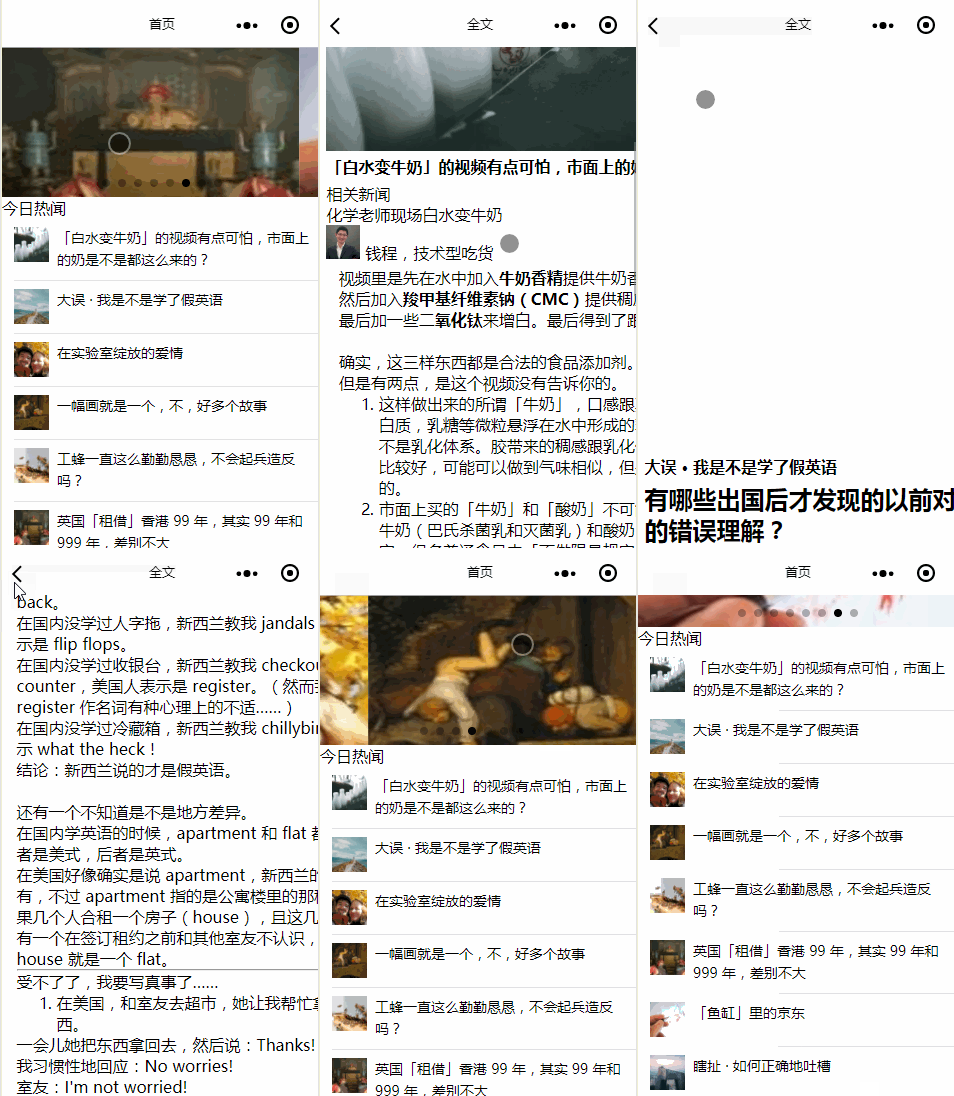
资源地址:https://github.com/nongzihong/uni_app_zhihuribao
使用Vue前端框架实现知乎日报app的更多相关文章
- vue 前端框架 目录
vue 前端框架 目录 vue-目录 ES6基础语法 vue基础语法 Vue.js的组件化思想 —上 Vue.js的组件化思想 —下 Vue + Vue-Router结合开发 SublimeSer ...
- 4.VUE前端框架学习记录四:Vue组件化编码2
VUE前端框架学习记录四:Vue组件化编码2文字信息没办法描述清楚,主要看编码Demo里面,有附带完整的代码下载地址,有需要的同学到脑图里面自取.脑图地址http://naotu.baidu.com/ ...
- 3.VUE前端框架学习记录三:Vue组件化编码1
VUE前端框架学习记录三:Vue组件化编码1文字信息没办法描述清楚,主要看编码Demo里面,有附带完整的代码下载地址,有需要的同学到脑图里面自取.脑图地址http://naotu.baidu.com/ ...
- 2.VUE前端框架学习记录二
VUE前端框架学习记录二:Vue核心基础2(完结)文字信息没办法描述清楚,主要看编码实战里面,有附带有一个完整可用的Html页面,有需要的同学到脑图里面自取.脑图地址http://naotu.baid ...
- 1.VUE前端框架学习记录一
VUE前端框架学习记录一文字信息没办法描述清楚,主要看编码实战里面,有附带有一个完整可用的Html页面,有需要的同学到脑图里面自取.脑图地址http://naotu.baidu.com/file/f0 ...
- vue 前端框架
什么是vue.js 1.vue是目前最火的一个前端框架,react 是最流行的前端框架(react除了开发网站,还可以开发手机APP,vue语法也是可以进行手机app开发的,需要借助于weex) 2. ...
- 开发基于vue前端框架下的系统的UI自动化,记录总结踩的坑
在使用了pytest完成了一个系统的UI自动化后,因为系统的前端框架,是 基于VUE写的,这就让我编写脚本的时候踩了些坑. 无法用JS 修改标签属性,从而进行的操作 比如上传图片,我们的上传是这样子的 ...
- 自动化测试平台(Vue前端框架安装配置)
Vue简介: 通俗的来说Vue是前端框架,用来写html的框架,可轻量级也可不轻量级 Vue特性: 绑定性,响应性,实时性,组件性 安装软件以及控件: 控件库:element-ui node.js ( ...
- Vue前端框架基础+Element的使用
前置内容: AJAX基础+Axios快速入门+JSON使用 目录 1.VUE 1.1 概述 1.2 快速入门 1.3 Vue指令 1.3.1 v-bind & v-model 指令 1.3.2 ...
随机推荐
- 通过yum安装maven
安装maven wget http://repos.fedorapeople.org/repos/dchen/apache-maven/epel-apache-maven.repo -O /etc/y ...
- HTTP常用状态码详解
HTTP状态码: HTTP定义遵循一条规则:所有状态码的第一个数字代表了响应的状态.1表示消息:2表示成功:3表示重定向:4表示请求错误:5.6表示服务器错误.如下图: 1xx: 这一类型的状态码,代 ...
- 在eclipse中创建第一个java应用程序,并在控制台输出“hello world”。
package com.fs.test; public class HelloWorld { public void aMethod() { } public static void main(Str ...
- 微信小程序环境搭建(本地,测试,生产)
1.本地 官网文档链接:https://cloud.tencent.com/document/product/619/11442#.E6.9C.AC.E5.9C.B0.E5.A6.82.E4.BD.9 ...
- String转int,int转String
String转int 1) int i = Integer.parseInt([String]); int i = Integer.parseInt([String],[int radix]); 2 ...
- redis、rabitmq对比
redis.rabitmq对比 原文地址 简要介绍 RabbitMQ RabbitMQ是实现AMQP(高级消息队列协议)的消息中间件的一种,最初起源于金融系统,用于在分布式系统中存储转发消息,在易用性 ...
- WebView获取title更改
[self.titleLabel setText:[self.webVIew stringByEvaluatingJavaScriptFromString:@"document.title& ...
- 2019-11-29-Roslyn-打包自定义的文件到-NuGet-包
title author date CreateTime categories Roslyn 打包自定义的文件到 NuGet 包 lindexi 2019-11-29 08:23:21 +0800 2 ...
- mybatis返回map结果集
今天突发奇想,想用mybatis返回一个map结果集,结果我就整了一下午,不过终于解决了 1.如果你确定返回的数据只有一条,你可以这样整 xml中: <select id="searc ...
- PAT Basic 1071 小赌怡情 (15 分)
常言道“小赌怡情”.这是一个很简单的小游戏:首先由计算机给出第一个整数:然后玩家下注赌第二个整数将会比第一个数大还是小:玩家下注 t 个筹码后,计算机给出第二个数.若玩家猜对了,则系统奖励玩家 t 个 ...