
spring-boot整合Cxf的webservice案例
1.运行环境
开发工具:intellij idea
JDK版本:1.8
项目管理工具:Maven 4.0.0
2.Maven Plugin管理
 <?xml version="1.0" encoding="UTF-8"?>

 <project xmlns="http://maven.apache.org/POM/4.0.0"

          xmlns:xsi="http://www.w3.org/2001/XMLSchema-instance"

          xsi:schemaLocation="http://maven.apache.org/POM/4.0.0 http://maven.apache.org/xsd/maven-4.0.0.xsd">

     <modelVersion>4.0.0</modelVersion>

     <groupId>spring-boot-ws</groupId>

     <artifactId>spring-boot-ws</artifactId>

     <version>1.0-SNAPSHOT</version>

     <parent>

         <groupId>org.springframework.boot</groupId>

         <artifactId>spring-boot-starter-parent</artifactId>

         <version>1.5.6.RELEASE</version>

     </parent>

     <dependencies>

         <dependency>

             <groupId>org.springframework.boot</groupId>

             <artifactId>spring-boot-starter-web</artifactId>

         </dependency>

         <!-- CXF webservice -->

         <dependency>

             <groupId>org.apache.cxf</groupId>

             <artifactId>cxf-spring-boot-starter-jaxws</artifactId>

             <version>3.1.11</version>

         </dependency>

     </dependencies>

 </project>
3.WebService方法创建
 package com.goku.demo.controller;

 import org.springframework.stereotype.Component;

 import javax.jws.WebMethod;

 import javax.jws.WebParam;

 import javax.jws.WebService;

 /**

  * Created by nbfujx on 2017/11/27.

  */

 @Component

 @WebService(serviceName = "ExampleService"

         ,targetNamespace="http://controller.demo.goku.com/")

 public class ExampleController {

     @WebMethod

     public String echo(@WebParam(name = "para") String para) {

     return "hello"+para;

     }

 }
4.CxfConfig配置编写
 package com.goku.demo.config;

 import com.goku.demo.controller.ExampleController;

 import org.apache.cxf.Bus;

 import org.apache.cxf.jaxws.EndpointImpl;

 import org.springframework.beans.factory.annotation.Autowired;

 import org.springframework.context.annotation.Bean;

 import org.springframework.context.annotation.Configuration;

 import javax.xml.ws.Endpoint;

 /**

  * Created by nbfujx on 2017/11/27.

  */

 @Configuration

 public class CxfConfig {

     @Autowired

     private Bus bus;

     @Autowired

     private ExampleController examplecontroller;

     @Bean

     public Endpoint endpoint() {

         EndpointImpl endpoint = new EndpointImpl(bus,examplecontroller);

         endpoint.publish("/ExampleService");//接口发布在 /NetbarServices 目录下

         return endpoint;

     }

 }
5.WsApplication启动类编写
 package com.goku.demo;

 import org.springframework.boot.SpringApplication;

 import org.springframework.boot.autoconfigure.SpringBootApplication;

 import org.springframework.boot.web.servlet.ServletComponentScan;

 /**

  * Created by nbfujx on 2017/10/19.

  */

 // Spring Boot 应用的标识

 @SpringBootApplication

 @ServletComponentScan

 public class WsApplication {

     public static void main(String[] args) {

         // 程序启动入口

         // 启动嵌入式的 Tomcat 并初始化 Spring 环境及其各 Spring 组件

         SpringApplication.run(WsApplication.class,args);

     }

 }
6.Cxf客户端编写
 package test.com.goku.demo.client;

 import org.apache.cxf.endpoint.Client;

 import org.apache.cxf.jaxws.JaxWsProxyFactoryBean;

 import org.apache.cxf.jaxws.endpoint.dynamic.JaxWsDynamicClientFactory;

 import com.goku.demo.controller.ExampleController;

 /**

  * Created by nbfujx on 2017/11/27.

  */

 public class CxfClient {

     public static void main(String[] args) {

         echo();

     }

     public static void echo() {

         // 创建动态客户端

         JaxWsDynamicClientFactory dcf = JaxWsDynamicClientFactory.newInstance();

         Client client = dcf.createClient("http://localhost:8080/services/ExampleService?wsdl");

         Object[] objects = new Object[0];

         try {

             objects = client.invoke("echo", "str");

             System.out.println("echo:" + objects[0]);

         } catch (java.lang.Exception e) {

             e.printStackTrace();

         }

     }

 }
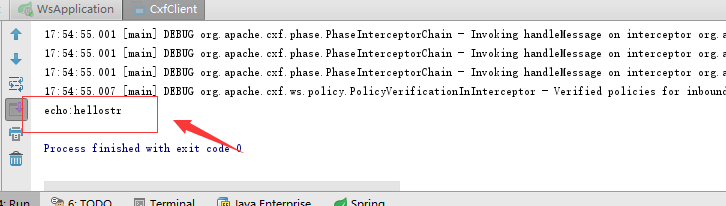
7.查看测试结果
先启动cxf服务端,再进行客户端调阅
8.GITHUB地址
https://github.com/nbfujx/springBoot-learn-demo/tree/master/spring-boot-ws
待续
spring-boot整合Cxf的webservice案例的更多相关文章
- Spring boot 整合CXF webservice 遇到的问题及解决
将WebService的WSDL生成的代码的命令: wsimport -p com -s . com http://localhost:8080/service/user?wsdl Spring bo ...
- Spring Boot 整合 Thymeleaf 完整 Web 案例
Thymeleaf 是一种模板语言.那模板语言或模板引擎是什么?常见的模板语言都包含以下几个概念:数据(Data).模板(Template).模板引擎(Template Engine)和结果文档(Re ...
- Spring Boot 使用 CXF 调用 WebService 服务
上一张我们讲到 Spring Boot 开发 WebService 服务,本章研究基于 CXF 调用 WebService.另外本来想写一篇 xfire 作为 client 端来调用 webservi ...
- Spring Boot 整合 Elasticsearch,实现 function score query 权重分查询
摘要: 原创出处 www.bysocket.com 「泥瓦匠BYSocket 」欢迎转载,保留摘要,谢谢! 『 预见未来最好的方式就是亲手创造未来 – <史蒂夫·乔布斯传> 』 运行环境: ...
- Spring Boot 整合 Fisco Bcos(区块链)
简介 FISCO BCOS是由国内企业主导研发.对外开源.安全可控的企业级金融联盟链底层平台,由金链盟开源工作组协作打造,并于2017年正式对外开源. 目前,成熟的区块链的平台不少,之所以选择FISC ...
- Spring Kafka和Spring Boot整合实现消息发送与消费简单案例
本文主要分享下Spring Boot和Spring Kafka如何配置整合,实现发送和接收来自Spring Kafka的消息. 先前我已经分享了Kafka的基本介绍与集群环境搭建方法.关于Kafka的 ...
- SpringBoot2.1.6 整合CXF 实现Webservice
SpringBoot2.1.6 整合CXF 实现Webservice 前言 最近LZ产品需要对接公司内部通讯工具,采用的是Webservice接口.产品框架用的SpringBoot2.1.6,于是采用 ...
- Spring Boot(十四):spring boot整合shiro-登录认证和权限管理
Spring Boot(十四):spring boot整合shiro-登录认证和权限管理 使用Spring Boot集成Apache Shiro.安全应该是互联网公司的一道生命线,几乎任何的公司都会涉 ...
- SpringMVC4整合CXF发布WebService
SpringMVC4整合CXF发布WebService版本:SpringMVC 4.1.6,CXF 3.1.0项目管理:apache-maven-3.3.3 pom.xml <project x ...
随机推荐
- Aliyun mysql配置 远程访问 10038
环境 centos7.2 mysql5.7 网上搜了好多的文章,有的说在/etc/my.cnf 注释掉bind-address = 127.0.0.1 ,也开启了3306端口的防火墙,也添加了远 ...
- Hadoop(2): Blocks存储管理及读写
1. Replication: 因为每个HDFS被部署在是低成本的商业硬件上(low cost commodity hardware),所以为了有更佳的Fault Tolerance,HDFS将每个B ...
- Support Vector Machine(3):Soft Margin 平衡之美
很多材料上面讲道“引入Soft Margin的原因是因为数据线性不可分”,个人认为有些错误,其实再难以被分解的数据,如果我们用很复杂的弯弯绕曲线去做,还是可以被分解,并且映射到高维空间后认为其线性可分 ...
- centOS7挂在windows移动硬盘方法
1,http://www.tuxera.com/community/open-source-ntfs-3g/ 下载ntfs-3g_ntfsprogs-2016.2.22这个压缩包,可用wget和浏览器 ...
- HTML5-autio、video视频音频
完整版视屏web播放器: 基本autio和ideo介绍 <!DOCTYPE html> <html lang="en"> <head> < ...
- AC自动机题单
AC自动机题目 真的超级感谢xzy 真的帮到我很多 题单 [X] [luogu3808][模板]AC自动机(简单版) https://www.luogu.org/problemnew/show/P38 ...
- 好用的for循环与range
for循环 # for 变量 in 可迭代对象: # pass s = "1234567890" for each in s: # 遍历字符串 print(each) # 1 2 ...
- javascript:变量声明&&赋值的提升和函数声明&&定义的提升在不同情况下的表现
console.log(a); //undefined console.log(show); //函数的定义 show(); //aaa123 var a = 1; function ...
- jq鼠标移入移除
ele.on({ mouseover : function(){ } , mouseout : function(){ } })
- JS面向对象——动态原型模型、寄生构造模型
动态原型模型 组合使用构造函数模型和原型模型,使得OO语言程序员在看到独立的构造函数和原型时很困惑.动态原型模型致力于解决该问题,它把所有的信息封装在构造函数中,通过在构造函数中初始化原型(仅在必要情 ...