
ActiveMQ消息中间件Producer和Consumer
ActiveMQ消息中间件Producer和Consumer
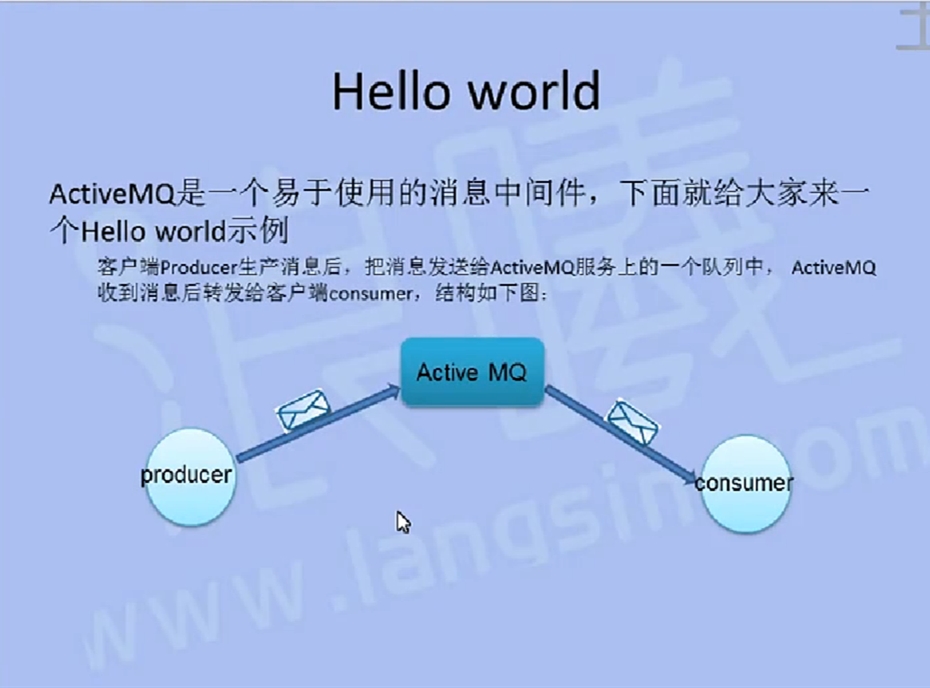
生产者代码:
|
1
2
3
4
5
6
7
8
9
10
11
12
13
14
15
16
17
18
19
20
21
22
23
24
25
26
27
28
29
30
31
32
33
34
35
36
37
38
39
40
41
42
43
44
45
46
47
48
49
50
51
52
53
54
55
56
57
58
59
60
61
62
63
64
65
66
67
68
69
70
71
72
73
|
package com.java1234.activemq;import javax.jms.Connection;import javax.jms.ConnectionFactory;import javax.jms.Destination;import javax.jms.JMSException;import javax.jms.MessageProducer;import javax.jms.Session;import javax.jms.TextMessage;import org.apache.activemq.ActiveMQConnection;import org.apache.activemq.ActiveMQConnectionFactory;/** * 消息生产者 * @author Administrator * */public class JMSProducer { private static final String USERNAME=ActiveMQConnection.DEFAULT_USER; // 默认的连接用户名 private static final String PASSWORD=ActiveMQConnection.DEFAULT_PASSWORD; // 默认的连接密码 private static final String BROKEURL=ActiveMQConnection.DEFAULT_BROKER_URL; // 默认的连接地址 private static final int SENDNUM=10; // 发送的消息数量 public static void main(String[] args) { ConnectionFactory connectionFactory; // 连接工厂 Connection connection = null; // 连接 Session session; // 会话 接受或者发送消息的线程 Destination destination; // 消息的目的地 MessageProducer messageProducer; // 消息生产者 // 实例化连接工厂 connectionFactory=new ActiveMQConnectionFactory(JMSProducer.USERNAME, JMSProducer.PASSWORD, JMSProducer.BROKEURL); try { connection=connectionFactory.createConnection(); // 通过连接工厂获取连接 connection.start(); // 启动连接 session=connection.createSession(Boolean.TRUE, Session.AUTO_ACKNOWLEDGE); // 创建Session destination=session.createQueue("FirstQueue1"); // 创建消息队列 messageProducer=session.createProducer(destination); // 创建消息生产者 sendMessage(session, messageProducer); // 发送消息 session.commit(); } catch (Exception e) { // TODO Auto-generated catch block e.printStackTrace(); } finally{ if(connection!=null){ try { connection.close(); } catch (JMSException e) { // TODO Auto-generated catch block e.printStackTrace(); } } } } /** * 发送消息 * @param session * @param messageProducer * @throws Exception */ public static void sendMessage(Session session,MessageProducer messageProducer)throws Exception{ for(int i=0;i<JMSProducer.SENDNUM;i++){ TextMessage message=session.createTextMessage("ActiveMQ 发送的消息"+i); System.out.println("发送消息:"+"ActiveMQ 发送的消息"+i); messageProducer.send(message); } }} |
消费者分两种:
1.主动接受消息receive()
|
1
2
3
4
5
6
7
8
9
10
11
12
13
14
15
16
17
18
19
20
21
22
23
24
25
26
27
28
29
30
31
32
33
34
35
36
37
38
39
40
41
42
43
44
45
46
47
48
49
50
51
52
53
54
|
package com.java1234.activemq;import javax.jms.Connection;import javax.jms.ConnectionFactory;import javax.jms.Destination;import javax.jms.JMSException;import javax.jms.MessageConsumer;import javax.jms.Session;import javax.jms.TextMessage;import org.apache.activemq.ActiveMQConnection;import org.apache.activemq.ActiveMQConnectionFactory;/** * 消息消费者 * @author Administrator * */public class JMSConsumer { private static final String USERNAME=ActiveMQConnection.DEFAULT_USER; // 默认的连接用户名 private static final String PASSWORD=ActiveMQConnection.DEFAULT_PASSWORD; // 默认的连接密码 private static final String BROKEURL=ActiveMQConnection.DEFAULT_BROKER_URL; // 默认的连接地址 public static void main(String[] args) { ConnectionFactory connectionFactory; // 连接工厂 Connection connection = null; // 连接 Session session; // 会话 接受或者发送消息的线程 Destination destination; // 消息的目的地 MessageConsumer messageConsumer; // 消息的消费者 // 实例化连接工厂 connectionFactory=new ActiveMQConnectionFactory(JMSConsumer.USERNAME, JMSConsumer.PASSWORD, JMSConsumer.BROKEURL); try { connection=connectionFactory.createConnection(); // 通过连接工厂获取连接 connection.start(); // 启动连接 session=connection.createSession(Boolean.FALSE, Session.AUTO_ACKNOWLEDGE); // 创建Session destination=session.createQueue("FirstQueue1"); // 创建连接的消息队列 messageConsumer=session.createConsumer(destination); // 创建消息消费者 while(true){ TextMessage textMessage=(TextMessage)messageConsumer.receive(100000); if(textMessage!=null){ System.out.println("收到的消息:"+textMessage.getText()); }else{ break; } } } catch (JMSException e) { // TODO Auto-generated catch block e.printStackTrace(); } }} |
2.使用listener被动监听消息(非阻塞的)(观察者模式)
Listener代码
|
1
2
3
4
5
6
7
8
9
10
11
12
13
14
15
16
17
18
19
20
21
22
23
24
25
26
|
package com.java1234.activemq;import javax.jms.JMSException;import javax.jms.Message;import javax.jms.MessageListener;import javax.jms.TextMessage;/** * 消息监听 * @author Administrator * */public class Listener implements MessageListener{ @Override public void onMessage(Message message) { // TODO Auto-generated method stub try { System.out.println("收到的消息:"+((TextMessage)message).getText()); } catch (JMSException e) { // TODO Auto-generated catch block e.printStackTrace(); } }} |
|
1
2
3
4
5
6
7
8
9
10
11
12
13
14
15
16
17
18
19
20
21
22
23
24
25
26
27
28
29
30
31
32
33
34
35
36
37
38
39
40
41
42
43
44
45
46
47
|
package com.java1234.activemq;import javax.jms.Connection;import javax.jms.ConnectionFactory;import javax.jms.Destination;import javax.jms.JMSException;import javax.jms.MessageConsumer;import javax.jms.Session;import javax.jms.TextMessage;import org.apache.activemq.ActiveMQConnection;import org.apache.activemq.ActiveMQConnectionFactory;/** * 消息消费者 * @author Administrator * */public class JMSConsumer2 { private static final String USERNAME=ActiveMQConnection.DEFAULT_USER; // 默认的连接用户名 private static final String PASSWORD=ActiveMQConnection.DEFAULT_PASSWORD; // 默认的连接密码 private static final String BROKEURL=ActiveMQConnection.DEFAULT_BROKER_URL; // 默认的连接地址 public static void main(String[] args) { ConnectionFactory connectionFactory; // 连接工厂 Connection connection = null; // 连接 Session session; // 会话 接受或者发送消息的线程 Destination destination; // 消息的目的地 MessageConsumer messageConsumer; // 消息的消费者 // 实例化连接工厂 connectionFactory=new ActiveMQConnectionFactory(JMSConsumer2.USERNAME, JMSConsumer2.PASSWORD, JMSConsumer2.BROKEURL); try { connection=connectionFactory.createConnection(); // 通过连接工厂获取连接 connection.start(); // 启动连接 session=connection.createSession(Boolean.FALSE, Session.AUTO_ACKNOWLEDGE); // 创建Session destination=session.createQueue("FirstQueue1"); // 创建连接的消息队列 messageConsumer=session.createConsumer(destination); // 创建消息消费者 messageConsumer.setMessageListener(new Listener()); // 注册消息监听 } catch (JMSException e) { // TODO Auto-generated catch block e.printStackTrace(); } }} |
如果想主动的去接受消息,而不用异步消息监听的话,把consumer.setMessageListener(this)改为Message message = consumer.receive(),手动去调用MessageConsumer的receive方法即可。
参考文章:
ActiveMQ消息中间件Producer和Consumer的更多相关文章
- 分布式--ActiveMQ 消息中间件(一) https://www.jianshu.com/p/8b9bfe865e38
1. ActiveMQ 1). ActiveMQ ActiveMQ是Apache所提供的一个开源的消息系统,完全采用Java来实现,因此,它能很好地支持J2EE提出的JMS(Java Message ...
- spring boot整合activemq消息中间件
spring boot整合activemq消息中间件 <project xmlns="http://maven.apache.org/POM/4.0.0" xmlns:xsi ...
- Apache Kafka - KIP-42: Add Producer and Consumer Interceptors
kafka 0.10.0.0 released Interceptors的概念应该来自flume 参考,http://blog.csdn.net/xiao_jun_0820/article/det ...
- python编写producer、consumer
自主producer.consumer 首先在不同的终端,分别开启两个consumer,保证groupid一致 ]# python consumer_kafka.py 执行一次producer ]# ...
- Java泛型 PECS(Producer Extends, Consumer Super)
本文转载自ImportNew,原文链接 Java 泛型: 什么是PECS(Producer Extends, Consumer Super) PECS指“Producer Extends,Consum ...
- 生产者和消费者模型producer and consumer(单线程下实现高并发)
#1.生产者和消费者模型producer and consumer modelimport timedef producer(): ret = [] for i in range(2): time.s ...
- ActiveMQ消息中间件的作用以及应用场景
ActiveMQ消息中间件的作用以及应用场景 一.ActiveMQ简介 ActiveMQ是Apache出品,最流行的,能力强劲的开源消息总线.ActiveMQ是一个完全支持JMS1.1和J2EE1.4 ...
- 如何创建Kafka客户端:Avro Producer和Consumer Client
1.目标 - Kafka客户端 在本文的Kafka客户端中,我们将学习如何使用Kafka API 创建Apache Kafka客户端.有几种方法可以创建Kafka客户端,例如最多一次,至少一次,以及一 ...
- Kafka-JavaAPI(Producer And Consumer)
Kafka--JAVA API(Producer和Consumer) Kafka 版本2.11-0.9.0.0 producer package com.yzy.spark.kafka; import ...
随机推荐
- 【优化】Java开发中注意内存问题,影响JVM
1. 尽量在合适的场合使用单例 使用单例可以减轻加载的负担,缩短加载的时间,提高加载的效率,但并不是所有地方都适用于单例,简单来说,单例主要适用于以下三个方面: 第一,控制资源的使用,通过线程同步来控 ...
- pgrep,pidof工具的使用
博客pgrep,pidof工具的使用 最灵活:ps 选项 | 其它命令 按预定义的模式:pgreppgrep [options] pattern-u uid: effective user,生效者-U ...
- shell脚本学习(6)awk 编排字段
awk能取出文本字段重新编排 1 awk的用法 awk ‘program’ [file] 2 其中program 可以写成 ‘parrtern {action}’ pattern 或 actio ...
- filebeat配置详解
从input读取事件源,经过相应解析和处理之后,从output输出到目标存储库(elasticsearch或其他).输入可以从Log.Syslog.Stdin.Redis.UDP.Docker.TCP ...
- 10.15 sed 命令实践
在n行前插入 [root@wen data]# sed '2i 106,dandan,CSO' person.txt101,oldboy,CEO106,dandan,CSO102,zhangyao,C ...
- paper 149:Deep Learning 学习笔记(一)
1. 直接上手篇 台湾李宏毅教授写的,<1天搞懂深度学习> slideshare的链接: http://www.slideshare.net/tw_dsconf/ss-62245351? ...
- webBrowser强制在本窗口打开,禁止在新窗口打开
有时需要用WebBrowser加载URL,来实现某些功能.而这时,我们就不希望所打开的页面中的链接,在新窗口中打开,因为这样的话,实际上是用系统默认的浏览器打开了,从而脱离了你的WebBrowser, ...
- Python 进阶_迭代器 & 列表解析
目录 目录 迭代器 iter 内建的迭代器生成函数 迭代器在 for 循环中 迭代器与字典 迭代器与文件 创建迭代器对象 创建迭代对象并实现委托迭代 迭代器的多次迭代 列表解析 列表解析的样例 列表解 ...
- phpStorm debug
1.重点注意(重要) 如果是wamp,那么请通过wamp打开php.ini文件,不要自己去找php文件夹下的php.ini,这是两个不同的文件 2.开始配置php.ini zend_extension ...
- swoole webSocket 聊天室示例
swoole1.7.9增加了内置的WebSocket服务器支持,通过几行PHP代码就可以写出一个异步非阻塞多进程的WebSocket服务器. 基于swoole websocket的用户上下线通知,在线 ...