
redis源码分析之数据结构:跳跃表
跳跃表是一种随机化的数据结构,在查找、插入和删除这些字典操作上,其效率可比拟于平衡二叉树(如红黑树),大多数操作只需要O(log n)平均时间,但它的代码以及原理更简单。
和链表、字典等数据结构被广泛地应用在Redis内部不同,Redis只在两个地方用到了跳跃表,一个是实现有序集合键,另一个是在集群结点中用作内部数据结构。除此之外,跳跃表在Redis里面没有其他用途。
/* ZSETs use a specialized version of Skiplists */

typedef struct zskiplistNode {

    robj *obj;

    double score;

    struct zskiplistNode *backward;

    struct zskiplistLevel {

        struct zskiplistNode *forward;

        unsigned int span;//代表该节点在每层到下一个节点所跨越的节点长度

    } level[];

} zskiplistNode;

typedef struct zskiplist {

    struct zskiplistNode *header, *tail;

    unsigned long length;

    int level;

} zskiplist;
obj是该结点的成员对象指针,score是该对象的分值,是一个浮点数,跳跃表中的所有结点,都是根据score从小到大来排序的。
同一个跳跃表中,各个结点保存的成员对象必须是唯一的,但是多个结点保存的分值却可以是相同的:分值相同的结点将按照成员对象的字典顺序从小到大进行排序。
level数组是一个柔性数组成员,它可以包含多个元素,每个元素都包含一个层指针(level[i].forward),指向该结点在本层的后继结点。该指针用于从表头向表尾方向访问结点。可以通过这些层指针来加快访问结点的速度。
每次创建一个新跳跃表结点的时候,程序都根据幂次定律(power law,越大的数出现的概率越小)随机生成一个介于1和32之间的值作为level数组的大小,这个大小就是该结点包含的层数。
Redis中的跳跃表,与普通跳跃表的区别之一,就是包含了层跨度(level[i].span)的概念。
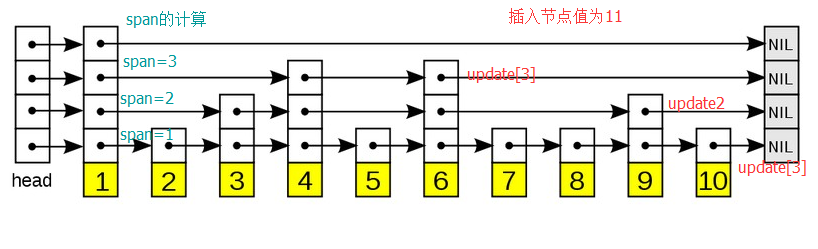
层跨度用于记录本层当前结点到下一个 结点之间的距离,举个例子,如下图的跳跃表:节点1在第0层的下一个节点是2,span=1;在第1层的下一个节点是3,span=2;在第2层的下一个节点是4,span=3;所以计算的节点在每层的跨度以跨越第0层上的节点数量为准。如果新节点的level要比整个表的level低,导致update[i].level[i]在本层的下一个节点为null的,循环结束后对此类节点的span++,所以此类节点的span代表的是到第0层最后一个节点的距离
插入节点的算法如图,先找到在每层的插入位置,并保存在update数组中,同时将头节点到该位置的跨度累加,保存在rank数组中。最后计算随机高度,在每层插入节点。
zskiplistNode *zslCreateNode(int level, double score, robj *obj) {

    zskiplistNode *zn = zmalloc(sizeof(*zn)+level*sizeof(struct zskiplistLevel));

    zn->score = score;

    zn->obj = obj;

    return zn;

}

zskiplist *zslCreate(void) {

    int j;

    zskiplist *zsl;

    zsl = zmalloc(sizeof(*zsl));

    zsl->level = ;

    zsl->length = ;

    zsl->header = zslCreateNode(ZSKIPLIST_MAXLEVEL,,NULL);

    for (j = ; j < ZSKIPLIST_MAXLEVEL; j++) {

        zsl->header->level[j].forward = NULL;

        zsl->header->level[j].span = ;

    }

    zsl->header->backward = NULL;

    zsl->tail = NULL;

    return zsl;

}/* Returns a random level for the new skiplist node we are going to create.

 * The return value of this function is between 1 and ZSKIPLIST_MAXLEVEL

 * (both inclusive), with a powerlaw-alike distribution where higher

 * levels are less likely to be returned. */

int zslRandomLevel(void) {

    int level = ;

    while ((random()&0xFFFF) < (ZSKIPLIST_P * 0xFFFF))

        level += ;

    return (level<ZSKIPLIST_MAXLEVEL) ? level : ZSKIPLIST_MAXLEVEL;

}

zskiplistNode *zslInsert(zskiplist *zsl, double score, robj *obj) {

    zskiplistNode *update[ZSKIPLIST_MAXLEVEL], *x;

    unsigned int rank[ZSKIPLIST_MAXLEVEL];

    int i, level;

    redisAssert(!isnan(score));

    x = zsl->header;

    for (i = zsl->level-; i >= ; i--) {

        /* store rank that is crossed to reach the insert position */

        rank[i] = i == (zsl->level-) ?  : rank[i+];

        while (x->level[i].forward &&

            (x->level[i].forward->score < score ||

                (x->level[i].forward->score == score &&

                compareStringObjects(x->level[i].forward->obj,obj) < ))) {

            rank[i] += x->level[i].span;//累加本层从头节点到插入位置节点的跨度综合

            x = x->level[i].forward;

        }

        update[i] = x;//得到每层的插入位置节点

    }

    /* we assume the key is not already inside, since we allow duplicated

     * scores, and the re-insertion of score and redis object should never

     * happen since the caller of zslInsert() should test in the hash table

     * if the element is already inside or not. */

    level = zslRandomLevel();

    if (level > zsl->level) {

        for (i = zsl->level; i < level; i++) {

            rank[i] = ;

            update[i] = zsl->header;

            update[i]->level[i].span = zsl->length;

        }

        zsl->level = level;

    }

    x = zslCreateNode(level,score,obj);

    for (i = ; i < level; i++) {

        x->level[i].forward = update[i]->level[i].forward;

        update[i]->level[i].forward = x;

        /* update span covered by update[i] as x is inserted here */

        x->level[i].span = update[i]->level[i].span - (rank[] - rank[i]);//update[i]->level[i].span - 0层和i层的update[i]之间的距离

        update[i]->level[i].span = (rank[] - rank[i]) + ;//新增一个节点在后面,所以跨度加一

    }

    /* increment span for untouched levels */

    for (i = level; i < zsl->level; i++) {//如果新节点的层数小于表的level,将updata[i]->level[i]的span++

        update[i]->level[i].span++;

    }

    x->backward = (update[] == zsl->header) ? NULL : update[];

    if (x->level[].forward)

        x->level[].forward->backward = x;

    else

        zsl->tail = x;

    zsl->length++;

    return x;

}
redis源码分析之数据结构:跳跃表的更多相关文章
- Redis源码分析-底层数据结构盘点
前段时间翻看了Redis的源代码(C语言版本,Git地址:https://github.com/antirez/redis), 过了一遍Redis数据结构,包括SDS.ADList.dict.ints ...
- Redis源码解析:05跳跃表
一:基本概念 跳跃表是一种随机化的数据结构,在查找.插入和删除这些字典操作上,其效率可比拟于平衡二叉树(如红黑树),大多数操作只需要O(log n)平均时间,但它的代码以及原理更简单.跳跃表的定义如下 ...
- redis源码分析之数据结构--dictionary
本文不讲hash算法,而主要是分析redis中的dict数据结构的特性--分步rehash. 首先看下数据结构:dict代表数据字典,每个数据字典有两个哈希表dictht,哈希表采用链式存储. typ ...
- Redis源码分析:serverCron - redis源码笔记
[redis源码分析]http://blog.csdn.net/column/details/redis-source.html Redis源代码重要目录 dict.c:也是很重要的两个文件,主要 ...
- redis源码分析之事务Transaction(下)
接着上一篇,这篇文章分析一下redis事务操作中multi,exec,discard三个核心命令. 原文地址:http://www.jianshu.com/p/e22615586595 看本篇文章前需 ...
- redis源码分析之发布订阅(pub/sub)
redis算是缓存界的老大哥了,最近做的事情对redis依赖较多,使用了里面的发布订阅功能,事务功能以及SortedSet等数据结构,后面准备好好学习总结一下redis的一些知识点. 原文地址:htt ...
- redis源码分析之事务Transaction(上)
这周学习了一下redis事务功能的实现原理,本来是想用一篇文章进行总结的,写完以后发现这块内容比较多,而且多个命令之间又互相依赖,放在一篇文章里一方面篇幅会比较大,另一方面文章组织结构会比较乱,不容易 ...
- redis源码分析之有序集SortedSet
有序集SortedSet算是redis中一个很有特色的数据结构,通过这篇文章来总结一下这块知识点. 原文地址:http://www.jianshu.com/p/75ca5a359f9f 一.有序集So ...
- Redis源码分析(dict)
源码版本:redis-4.0.1 源码位置: dict.h:dictEntry.dictht.dict等数据结构定义. dict.c:创建.插入.查找等功能实现. 一.dict 简介 dict (di ...
随机推荐
- MySQL快速清空表数据
truncate table 可以不删除表的情况下,快速情况表数据
- 架构师成长之路5.1-Saltstack安装及入门
点击架构师成长之路 架构师成长之路5.1-Saltstack安装及入门 (安装.配置.启动) 配置管理工具: Pupper:1. 采用ruby编程语言:2. 安装环境相对较复杂:3.不支持远程执行,需 ...
- 10 Zabbix4.4.1系统告警“Zabbix server is not running”
点击返回:自学Zabbix之路 点击返回:自学Zabbix4.0之路 点击返回:自学zabbix集锦 Zabbix4.4.1系统告警“Zabbix server is not running” 第一步 ...
- 使用 SignalR 实现推送功能
百度搜索:使用 SignalR 实现推送功能
- zencart网站上线前,邮件模板默认网址修改
涉及到的文件 includes\languages\语言包\模板\email_extras.php 后台\includes\languages\语言包\email_extras.php 后台\incl ...
- 多线程(二)Object类方法、线程的操作sleep(),join(),interrupt(),yield()
四.Object类简介 Object类是所有类的超类,之所以放在线程部分是因为其方法很多是和线程有关的.比如以下三个: wait()方法.wait(long timeout)和wait(long ti ...
- Gym - 102082G What Goes Up Must Come Down (树状数组+贪心)
题意:有一个长度为n的序列,你每次可以选择两个相邻的元素交换,求把这个序列排成单峰序列的最少交换次数. 方法一:将元素按数值从大到小排序(保存原来的位置),把最大的插在中间,剩下的依次往两边放,依次考 ...
- 微信小程序轮播图的制作与跳转
<!--轮播图 --> <view class='swiperBanner'> <swiper indicator-dots='{{indicatorDots}}' au ...
- Nginx动静分离经典案例配置
随着Nginx高性能Web服务器大量被使用,目前Nginx最新稳定版为1.2.6,张宴兄在实际应用中大量使用Nginx,并分享Nginx高性能Web服务器知识,使得Nginx在国内也是飞速的发展.那今 ...
- dirname命令和basename命令
dirname返回文件所在目录路径,而basename则相反,去掉路径返回最后的文件名. direname: 用途 从给定的包含绝对路径的文件名中去除文件名(非目录的部分),然后返回剩下的路径(目录的 ...