
activemq高可用
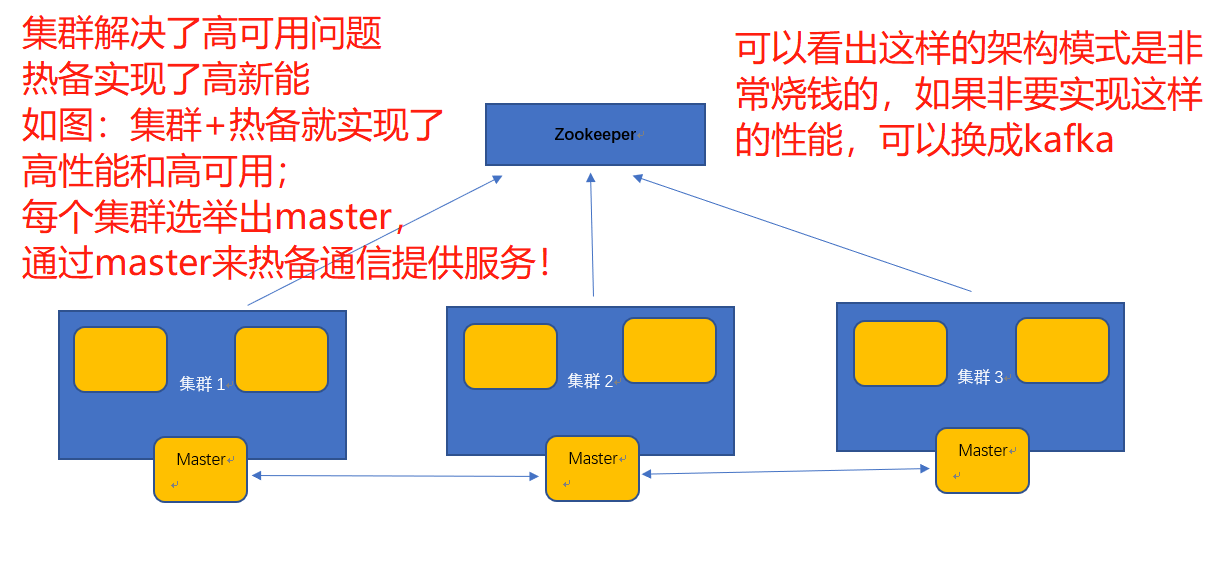
这里是基于 zookeeper 选举方式实现的集群配置,服务器过半数才可提供服务,所以是2n+1台这里以三台为例。
只有master节点能提供服务,slave节点无法提供服务,只有当master节点挂了,slave重新选举出的主节点才能提供服务(灰色部分都是默认配置文件)
<!--
Licensed to the Apache Software Foundation (ASF) under one or more
contributor license agreements. See the NOTICE file distributed with
this work for additional information regarding copyright ownership.
The ASF licenses this file to You under the Apache License, Version 2.0
(the "License"); you may not use this file except in compliance with
the License. You may obtain a copy of the License at
http://www.apache.org/licenses/LICENSE-2.0
Unless required by applicable law or agreed to in writing, software
distributed under the License is distributed on an "AS IS" BASIS,
WITHOUT WARRANTIES OR CONDITIONS OF ANY KIND, either express or implied.
See the License for the specific language governing permissions and
limitations under the License.
-->
<!-- START SNIPPET: example -->
<beans
xmlns="http://www.springframework.org/schema/beans"
xmlns:xsi="http://www.w3.org/2001/XMLSchema-instance"
xsi:schemaLocation="http://www.springframework.org/schema/beans http://www.springframework.org/schema/beans/spring-beans.xsd
http://activemq.apache.org/schema/core http://activemq.apache.org/schema/core/activemq-core.xsd">
<!-- Allows us to use system properties as variables in this configuration file -->
<bean class="org.springframework.beans.factory.config.PropertyPlaceholderConfigurer">
<property name="locations">
<value>file:${activemq.conf}/credentials.properties</value>
</property>
</bean>
<!-- Allows accessing the server log -->
<bean id="logQuery" class="io.fabric8.insight.log.log4j.Log4jLogQuery"
lazy-init="false" scope="singleton"
init-method="start" destroy-method="stop">
</bean>
<!--
The <broker> element is used to configure the ActiveMQ broker.
-->
<broker xmlns="http://activemq.apache.org/schema/core" brokerName="localhost" dataDirectory="${activemq.data}">
<destinationPolicy>
<policyMap>
<policyEntries>
<policyEntry topic=">" >
<!-- The constantPendingMessageLimitStrategy is used to prevent
slow topic consumers to block producers and affect other consumers
by limiting the number of messages that are retained
For more information, see:
http://activemq.apache.org/slow-consumer-handling.html
-->
<pendingMessageLimitStrategy>
<constantPendingMessageLimitStrategy limit="1000"/>
</pendingMessageLimitStrategy>
</policyEntry>
</policyEntries>
</policyMap>
</destinationPolicy>
<!--
The managementContext is used to configure how ActiveMQ is exposed in
JMX. By default, ActiveMQ uses the MBean server that is started by
the JVM. For more information, see:
http://activemq.apache.org/jmx.html
-->
<managementContext>
<managementContext createConnector="false"/>
</managementContext>
<!--
Configure message persistence for the broker. The default persistence
mechanism is the KahaDB store (identified by the kahaDB tag).
For more information, see:
http://activemq.apache.org/persistence.html
-->
<!--
使用zookeeper作集群配置
将默认的kahadb持久化方式注释掉,替换为leveldb
replicas = 机器总数/2+1 例如3台机器至少需要2台存活,7台至少需要4台存活
bind 集群数据同步的端口(自定义只要不与本机服务器其他端口冲突即可)
zkAddress zk地址,集群可以逗号隔开 ip1:2181,ip2:2181,ip3:2181
hostname 本机ip
zkPath mq注册在zk的临时节点位子
所以我们在部署集群的时候,只需要改hostname就好了,其他地方都一样!
-->
<persistenceAdapter>
<!--<kahaDB directory="${activemq.data}/kahadb"/>-->
<replicatedLevelDB directory="${activemq.data}/levelDB"
replicas="2"
bind="tcp://0.0.0.0:61615"
zkAddress="10.97.47.96:2181"
hostname="192.168.5.6"
zkPath="/activemq/leveldb"/>
</persistenceAdapter>
<!--
The systemUsage controls the maximum amount of space the broker will
use before disabling caching and/or slowing down producers. For more information, see:
http://activemq.apache.org/producer-flow-control.html
-->
<systemUsage>
<systemUsage>
<memoryUsage>
<memoryUsage percentOfJvmHeap="70" />
</memoryUsage>
<storeUsage>
<storeUsage limit="100 gb"/>
</storeUsage>
<tempUsage>
<tempUsage limit="50 gb"/>
</tempUsage>
</systemUsage>
</systemUsage>
<!--
The transport connectors expose ActiveMQ over a given protocol to
clients and other brokers. For more information, see: http://activemq.apache.org/configuring-transports.html
-->
<transportConnectors>
<!-- DOS protection, limit concurrent connections to 1000 and frame size to 100MB -->
<transportConnector name="openwire" uri="tcp://0.0.0.0:61616?maximumConnections=1000&wireFormat.maxFrameSize=104857600"/>
<transportConnector name="amqp" uri="amqp://0.0.0.0:5672?maximumConnections=1000&wireFormat.maxFrameSize=104857600"/>
<transportConnector name="stomp" uri="stomp://0.0.0.0:61613?maximumConnections=1000&wireFormat.maxFrameSize=104857600"/>
<transportConnector name="mqtt" uri="mqtt://0.0.0.0:1883?maximumConnections=1000&wireFormat.maxFrameSize=104857600"/>
<transportConnector name="ws" uri="ws://0.0.0.0:61614?maximumConnections=1000&wireFormat.maxFrameSize=104857600"/>
</transportConnectors>
<!-- destroy the spring context on shutdown to stop jetty -->
<shutdownHooks>
<bean xmlns="http://www.springframework.org/schema/beans" class="org.apache.activemq.hooks.SpringContextHook" />
</shutdownHooks>
</broker>
<!--
Enable web consoles, REST and Ajax APIs and demos
The web consoles requires by default login, you can disable this in the jetty.xml file
Take a look at ${ACTIVEMQ_HOME}/conf/jetty.xml for more details
-->
<import resource="jetty.xml"/>
</beans>
<!-- END SNIPPET: example -->
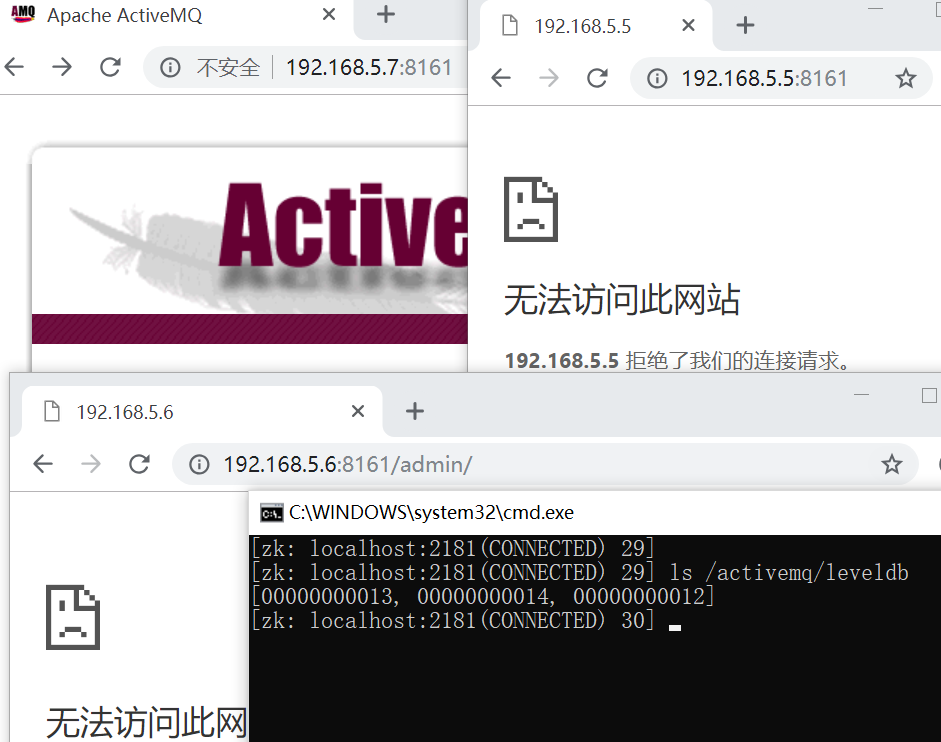
测试:可以看到3台服务器都注册到了zk上,且只有master能提供服务!
高可用 + 高性能的解决方案
activemq高可用的更多相关文章
- ActiveMQ 高可用集群安装、配置(ZooKeeper + LevelDB)
ActiveMQ 高可用集群安装.配置(ZooKeeper + LevelDB) 1.ActiveMQ 集群部署规划: 环境: JDK7 版本:ActiveMQ 5.11.1 ZooKeeper 集群 ...
- Dubbo入门到精通学习笔记(十四):ActiveMQ集群的安装、配置、高可用测试,ActiveMQ高可用+负载均衡集群的安装、配置、高可用测试
文章目录 ActiveMQ 高可用集群安装.配置.高可用测试( ZooKeeper + LevelDB) ActiveMQ高可用+负载均衡集群的安装.配置.高可用测试 准备 正式开始 ActiveMQ ...
- 消息中间件-ActiveMQ高可用集群和持久化机制
1.修改active.mq的xml文件 2.延时.调度消息 package com.study.mq.b1_message; import org.apache.activemq.ActiveMQCo ...
- 从头开始搭建一个Spring boot+ActiveMQ高可用分布式环境
*:first-child { margin-top: 0 !important; } body > *:last-child { margin-bottom: 0 !important; } ...
- 基于zookeeper(集群)+LevelDB的ActiveMq高可用集群安装、配置、测试
一. zookeeper安装(集群):http://www.cnblogs.com/wangfajun/p/8692117.html √ 二. ActiveMq配置: 1. ActiveMq集群部署 ...
- JMS之——ActiveMQ 高可用与负载均衡集群安装、配置(ZooKeeper + LevelDB + Static discovery)
一.说明 从 ActiveMQ 5.9 开始, ActiveMQ 的集群实现方式取消了传统的 Master-Slave 方式,增加了基于ZooKeeper + LevelDB 的 Master-Sla ...
- JMS之——ActiveMQ高可用+负载均衡集群
一.高可用集群 从ActiveMQ5.9开始,ActiveMQ的集群实现方式取消了传统的Master-Slave方式,增加了基于ZooKeeper+LevelDB的Master-Slave实现方式,其 ...
- zookeeper+activemq高可用集群搭建
一.准备工作: 准备三台机器:192.168.35.111192.168.35.112192.168.35.113 二.搭建zookeeper 三台机器上均要搭建zookeeper服务// 下载zoo ...
- ActiveMQ实现负载均衡+高可用部署方案
一.架构和技术介绍 1.简介 ActiveMQ 是Apache出品,最流行的,能力强劲的开源消息总线.完全支持JMS1.1和J2EE 1.4规范的JMS Provider实现 2.activemq的特 ...
随机推荐
- jquery lt选择器 语法
jquery lt选择器 语法 作用::lt 选择器选取带有小于指定 index 值的元素.index 值从 0 开始.经常与其他元素/选择器一起使用,来选择指定的组中特定序号之前的元素(如上面的例子 ...
- mysql COUNT()函数 语法
mysql COUNT()函数 语法 作用:返回匹配指定条件的行数.博智达直线电机平台 语法:SELECT COUNT(*) FROM table_name mysql COUNT()函数 示例 // ...
- Spring Boot教程(二十二)使用Swagger2构建强大的RESTful API文档(1)
由于Spring Boot能够快速开发.便捷部署等特性,相信有很大一部分Spring Boot的用户会用来构建RESTful API.而我们构建RESTful API的目的通常都是由于多终端的原因,这 ...
- zay大爷的神仙题目 D1T1-大美江湖
在前几天的时候,千古神犇zay(吊打zhx那个)出了一套神仙题目,所以我得来分析分析QWQ 先补个网易云链接QWQ 毕竟是T1嘛,还算是比较简单的,那道题,读完题目就发现是个中等模拟(猪国杀算大模拟的 ...
- docker中 devicemapper驱动挂载容器镜像文件
详解docker中容器devicemapper设备的挂载流程
- day68—angularJS学习笔记之-过滤器
转行学开发,代码100天——2018-05-23 今天学习angularJS的过滤器的使用. angular中的常用过滤器用来修改数据格式,主要有以下几类: 1.大写,| uppercase 2.小写 ...
- OpenStack Placement Project
目录 文章目录 目录 背景 Placement 简介 基本概念 数据模型解析 Command Line Placement Web Application 的实现与分析 Placement 在启动虚拟 ...
- C# 导出Excel文件 所导出文件打开时提示“Excel文件格式与扩展名指定格式不一致”
Microsoft.Office.Interop.Excel.Application xlApp = new Microsoft.Office.Interop.Excel.Application(); ...
- mysql数据库delete数据时不支持表别名!!!
mysql数据库delete数据时不支持表别名!!! mysql delete时候 提示语法错误!如下sql: 去掉 表别名的时候: 正确的写法例如: DELETE FROM COMMENTS_REP ...
- malloc和cmalloc
void *malloc(size_t size); 分配内存,但不会初始化,未使用内存不一定是0: void *calloc(size_t numElements,size_t sizeOfElem ...