
httpscan 爬虫式的网段Web主机发现小工具
httpscan是一个扫描指定网段的Web主机的小工具。和端口扫描器不一样,httpscan是以爬虫的方式进行Web主机发现,因此相对来说不容易被防火墙拦截。
httpscan会返回IP http状态码 Web容器版本 以及网站标题。
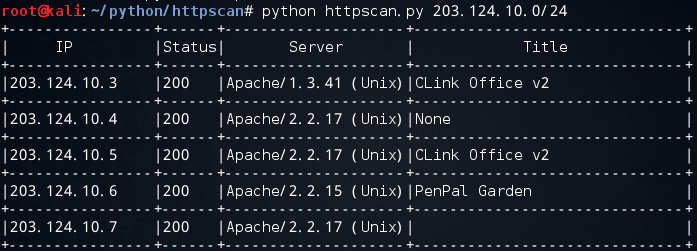
Usage:./httpscan IP/CIDR –t threads
Example:./httpscan.py 10.20.30.0/24 –t 10
项目地址:https://github.com/zer0h/httpscan
部分代码:
#!/usr/bin/env python

#coding:utf-8

# Author: Zeroh

import re

import sys

import Queue

import threading

import optparse

import requests

from IPy import IP

printLock = threading.Semaphore(1)  #lock Screen print

TimeOut = 5  #request timeout

#User-Agent

header = {'User-Agent' : 'Mozilla/5.0 (Windows NT 6.1; WOW64) AppleWebKit/537.36 (KHTML, like Gecko) Chrome/44.0.2403.125 Safari/537.36','Connection':'close'}

class scan():

  def __init__(self,cidr,threads_num):

    self.threads_num = threads_num

    self.cidr = IP(cidr)

    #build ip queue

    self.IPs = Queue.Queue()

    for ip in self.cidr:

      ip = str(ip)

      self.IPs.put(ip)

  def request(self):

    with threading.Lock():

      while self.IPs.qsize() > 0:

        ip = self.IPs.get()

        try:

          r = requests.Session().get('http://'+str(ip),headers=header,timeout=TimeOut)

          status = r.status_code

          title = re.search(r'<title>(.*)</title>', r.text) #get the title

          if title:

            title = title.group(1).strip().strip("\r").strip("\n")[:30]

          else:

            title = "None"

          banner = ''

          try:

            banner += r.headers['Server'][:20] #get the server banner

          except:pass

          printLock.acquire()

          print "|%-16s|%-6s|%-20s|%-30s|" % (ip,status,banner,title)

          print "+----------------+------+--------------------+------------------------------+"

          #Save log

          with open("./log/"+self.cidr.strNormal(3)+".log",'a') as f:

            f.write(ip+"\n")

        except Exception,e:

          printLock.acquire()

        finally:

          printLock.release()

  #Multi thread

  def run(self):

    for i in range(self.threads_num):

      t = threading.Thread(target=self.request)

      t.start()

if __name__ == "__main__":

  parser = optparse.OptionParser("Usage: %prog [options] target")

  parser.add_option("-t", "--thread", dest = "threads_num",

    default = 1, type = "int",

    help = "[optional]number of  theads,default=10")

  (options, args) = parser.parse_args()

  if len(args) < 1:

    parser.print_help()

    sys.exit(0)

  print "+----------------+------+--------------------+------------------------------+"

  print "|     IP         |Status|       Server       |            Title             |"

  print "+----------------+------+--------------------+------------------------------+"

  s = scan(cidr=args[0],threads_num=options.threads_num)

  s.run()
来源:http://www.rootat.net/2016/03/29/httpscan/
httpscan 爬虫式的网段Web主机发现小工具的更多相关文章
- 新手篇丨Python任意网段Web端口信息探测工具
你学习Python的目的是什么?是想写爬虫爬取数据(数据.图片等内容),还是想自写自动化的小工具,又或是作为一个新手小白单纯的欣赏这门语言呢? 今天i春秋分享的是一篇关于多线程工具的文章,工具使用效率 ...
- Python任意网段Web端口信息探测工具
此篇关于多线程工具的文章,非常适合新手学习,工具效率也挺高的,代码也比较完善,如题. 本文作者:i春秋签约作家——Aedoo 0×00 前言 笔者前一段时间发布了原创文章,“[Python黑客] Py ...
- Web压力测试小工具:webbench、http_load、Siege、ab
webbench 安装 下载地址:http://home.tiscali.cz/~cz210552/distfiles/webbench-1.5.tar.gz 或者 http://soft.vpser ...
- web图片转换小工具制作
HTML <!DOCTYPE html> <html> <head> <meta charset="UTF-8"> <titl ...
- 前端学HTTP之Web主机托管
前面的话 对内容资源的存储.协调以及管理的职责统称为Web主机托管.主机托管是Web服务器的主要功能之一.保存并提供内容,记录对内容的访问以及管理内容都离不开服务器.如果不想自行管理服务器所需的软硬件 ...
- asp.net core 系列 16 Web主机 IWebHostBuilder
一.概述 在asp.net core中,Host主机负责应用程序启动和生存期管理.host主机包括Web 主机(IWebHostBuilder)和通用主机(IHostBuilder).Web 主机是适 ...
- (15)ASP.NET Core Web主机(IWebHostBuilder)
1.前言 ASP.NET Core应用程序可以配置和启动主机(Host).主机负责应用程序启动和生存期管理,配置服务器和请求处理管道.主机还可以设置日志记录.依赖关系注入和配置.而host主机又包括W ...
- Nmap强大在哪之主机发现
1.概述 博主前段时间刚入坑渗透测试,随着学习的深入,越来越发现Nmap简直无所不能.今天先从主机发现功能入手分析. 2.Nmap主机发现 nmap --help #nmap帮助 3.参数分析 3.1 ...
- 工程师技术(三):独立Web站点的快速部署、虚拟Web主机的部署、配置网页内容访问、使用自定Web根目录、配置安全Web服务、部署并测试WSGI站点
一.独立Web站点的快速部署 目标: 本例要求为 http://server0.example.com 配置Web站点,要求如下: 1> 从http://classroom/pub/materi ...
随机推荐
- python字符串 常用函数 格式化字符串 字符串替换 制表符 换行符 删除空白 国际货币格式
# 字符串常用函数# 转大写print('bmw'.upper()) # BMW# 转小写print('BMW'.lower()) # bmw# 首字母大写print('how aae you ?'. ...
- 如何遍历div里面的文本内容,用each方法,
如何遍历div里面的文本内容,然后进行匹配传来的数据,进行选中div,并进行CSS样式处理, for(i = 0; i< $(".itemMenuRowBox").child ...
- neo4j 初探
neo4j 初探 参考 转载:http://shomy.top/2018/06/08/neo4j-start/ 近期需要处理图数据,考察后打算使用neo4j, 相比其他一些图数据库,neo4j开源,跨 ...
- webstorm 打开后目录结构不完整
问题: webstorm自动生成的配置文件.idea/modules.xml损坏了,其实是我把这个.idea目录整个删了 解决方法: 1.删除本地目录历史 点击close Project(若是打开多个 ...
- python 快速排序实现
# -*- coding: utf-8 -*- def quicksort(array): # 基线条件:为空或只包含一个元素的数组是"有序"的 if len(array) < ...
- mailto - 简单多媒体邮件发送程序
SYNOPSIS mailto [-a] [-c] [-s] [recipient name(s)] DESCRIPTION mailto 程序是一个用于发送MIME格式的多媒体邮件(MIME格式是 ...
- vector存放结构体数据的2种方法
如果要在Vector容器中存放结构体类型的变量,经常见到两种存放方式. 方式一:放入这个结构体类型变量的副本. 方式二:放入指向这个结构体类型变量的指针. 假设结构体类型变量是这样的, typedef ...
- Centos7.5 mysql5.7.26二进制安装方式
1 yum安装所需相关依赖包. yum -y install gcc-c++ yum -y install zlib zlib-devel pcre pcre-devel yum -y inst ...
- bzoj3754 Tree之最小方差树 最小生成树+推性质
题目传送门 https://lydsy.com/JudgeOnline/problem.php?id=3754 题解 感觉这个思路挺神仙的. 后悔没有好好观察题目的数据范围,一直把 \(n\) 和 \ ...
- C++ GUI Qt4学习笔记03
C++ GUI Qt4学习笔记03 qtc++spreadsheet文档工具resources 本章介绍创建Spreadsheet应用程序的主窗口 1.子类化QMainWindow 通过子类化QM ...