
PostgreSQL 同步复制(1master+2standby)
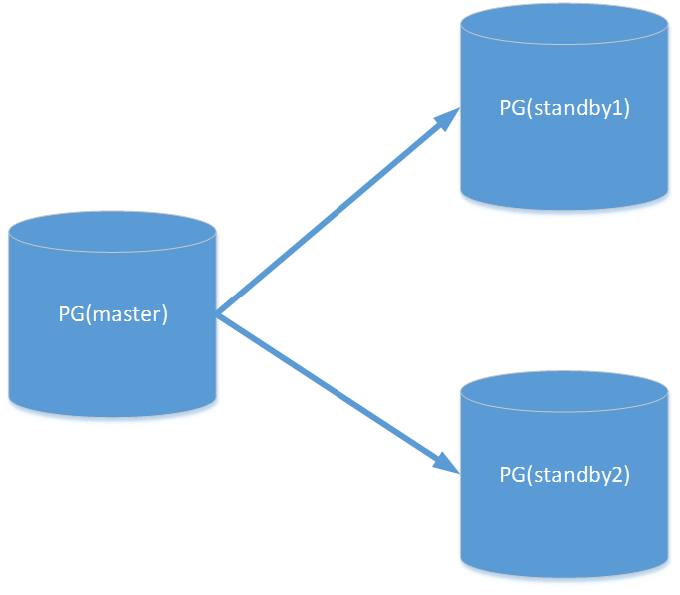
OS: Red Hat Enterprise Linux Server release 6.5 (Santiago)
PostgreSQL: postgresql-9.4.5.tar.bz2
master: 192.168.0.106
slave1: 192.168.0.108
slave2: 192.168.0.112
useradd -U postgres -p postgres
主备节点时钟同步:
/usr/sbin/ntpdate asia.pool.ntp.org && /sbin/hwclock –systohc
给机器分别命名:node1,node2,node3
第一台机器命名为node1
2.2.1 修改/etc/sysconfig/network中的hostname
vi /etc/sysconfig/network
HOSTNAME=node1 #修改localhost.localdomain为node1
2.2.2 修改/etc/hosts文件
vi /etc/hosts
127.0.0.1 node1 localhost #修改localhost.localdomain为node1
shutdown -r now #最后,重启服务器即可
第二台机器命名为node2
2.2.3 修改/etc/sysconfig/network中的hostname
vi /etc/sysconfig/network
HOSTNAME=node2 #修改localhost.localdomain为node2
2.2.4 修改/etc/hosts文件
vi /etc/hosts
127.0.0.1 node2 localhost #修改localhost.localdomain为node2
shutdown -r now #最后,重启服务器即可。
第三台机器命名为node2
2.2.3 修改/etc/sysconfig/network中的hostname
vi /etc/sysconfig/network
HOSTNAME=node2 #修改localhost.localdomain为node3
2.2.4 修改/etc/hosts文件
vi /etc/hosts
127.0.0.1 node2 localhost #修改localhost.localdomain为node3
shutdown -r now #最后,重启服务器即可。
OS资源调整
时区调整: (如果已经调好同步不需要做)
vi
/etc/sysconfig/clock
ZONE="Asia/Shanghai"
UTC=false
ARC=false
vi
/etc/sysconfig/i18n
LANG="en_US.UTF-8"
vi /etc/sysctl.conf
kernel.shmmni = 4096
kernel.sem = 50100
64128000 50100 1280
fs.file-max = 7672460
net.ipv4.ip_local_port_range
= 9000 65000
net.core.rmem_default
= 1048576
net.core.rmem_max =
4194304
net.core.wmem_default
= 262144
net.core.wmem_max =
1048576
net.ipv4.tcp_tw_recycle = 1
net.ipv4.tcp_max_syn_backlog
= 4096
net.core.netdev_max_backlog
= 10000
vm.overcommit_memory
= 0
net.ipv4.ip_conntrack_max
= 655360
fs.aio-max-nr =
1048576
net.ipv4.tcp_timestamps = 0
使文件修改生效
sysctl –p
vi
/etc/security/limits.conf
* soft nofile 131072
* hard nofile 131072
* soft nproc 131072
* hard nproc 131072
* soft core unlimited
* hard core unlimited
* soft memlock
50000000
* hard memlock 50000000
vi
/etc/sysconfig/selinux
SELINUX=disabled
setenforce 0
三台机器安装PG
yum -y install lrzsz sysstat e4fsprogs ntp readline-devel zlib zlib-devel
openssl openssl-devel pam-devel libxml2-devel libxslt-devel python-devel
tcl-devel gcc make flex bison
tar jxvf postgresql-9.4.5.tar.bz2
cd postgresql-9.4.5
./configure --prefix=/usr/local/pg945/
gmake world
gmake install-world
初始化主库master node1
[postgres@node1 pg945]$
mkdir data
[postgres@node1 data]$ chmod
0700 /usr/local/pg945/data/
[postgres@node1 pg945]$ cd
../bin/
[postgres@node1 bin]$
./initdb -E UTF8 --locale=C -D ../data/ -U
postgres –W postgres
配置主库
postgresql.conf
listen_addresses = '*'
port = 5432
max_connections = 100
# WRITE AHEAD LOG
wal_level = hot_standby
fsync = on
synchronous_commit = on
full_page_writes = on
wal_log_hints = on
# - Archiving –
archive_mode = on
archive_command = 'cd .'
max_wal_senders = 10
# - Master Server -
synchronous_standby_names =
'node2,node3'
# - Standby Servers –
hot_standby = on
recovery文件
[postgres@node1 postgresql]$ pwd
/usr/local/pg945/share/postgresql
[postgres@node1 postgresql]$ ls
conversion_create.sql pg_hba.conf.sample postgres.bki postgres.shdescription snowball_create.sql timezone
extension pg_ident.conf.sample postgres.description psqlrc.sample sql_features.txt timezonesets
information_schema.sql pg_service.conf.sample postgresql.conf.sample recovery.conf.sample system_views.sql tsearch_data
[postgres@node1 postgresql]$ cp recovery.conf.sample /usr/local/pg945/data/recovery.done
[postgres@node1 data]$ vim recovery.done
recovery_target_timeline = 'latest'
standby_mode = on
primary_conninfo = 'host=192.168.0.108 port=5432 user=postgres password=postgres application_name=node1'
pg_hba.conf文件
[postgres@node1 data]$ vim pg_hba.conf
host all all 192.168.0.106/32 trust
host all all 192.168.0.108/32 trust
host all all 192.168.0.112/32 trust
host replication postgres 192.168.0.108/32 trust
host replication postgres 192.168.0.112/32 trust
host replication postgres 192.168.0.106/32 trust
启动主库
pg_ctl –D ../data start
对master 做基础备份pg_basebackup 到standby1 standby2
standby1
[postgres@node2 pg945]$ mkdir data
[postgres@node2 data]$ chmod 0700 /usr/local/pg945/data/
[postgres@node2 bin]$
./pg_basebackup -h 192.168.0.106 -P -Fp -Xs -v -p 5432 -U postgres -D
/usr/local/pg945/data/
transaction log start point:
0/5000028 on timeline 1
pg_basebackup: starting
background WAL receiver
20952/20952 kB (100%), 1/1
tablespace
transaction log end point:
0/50000F0
pg_basebackup: waiting for
background process to finish streaming ...
pg_basebackup: base backup
completed
[postgres@node2 data]$ mv
recovery.done recovery.conf
recovery_target_timeline =
'latest'
standby_mode = on
primary_conninfo =
'host=192.168.0.106 port=5432 user=postgres password=postgres
application_name=node2'
[postgres@node2 bin]$
./pg_ctl -D ../data/ start
server starting
[postgres@node2 bin]$
LOG: database system was interrupted;
last known up at 2015-12-28 14:40:16 CST
LOG: entering standby mode
LOG: redo starts at 0/A000060
LOG: consistent recovery state reached at
0/A000128
LOG: database system is ready to accept read only
connections
LOG: started streaming WAL from primary at
0/B000000 on timeline 1
standby2
[postgres@node3 pg945]$ mkdir data
[postgres@node3 data]$ chmod 0700 /usr/local/pg945/data/
[postgres@node3 bin]$
./pg_basebackup -h 192.168.0.106 -P -Fp -Xs -v -p 5432 -U postgres -D
/usr/local/pg945/data/
transaction log start point:
0/5000028 on timeline 1
pg_basebackup: starting
background WAL receiver
20952/20952 kB (100%), 1/1
tablespace
transaction log end point:
0/50000F0
pg_basebackup: waiting for
background process to finish streaming ...
pg_basebackup: base backup
completed
[postgres@node3 data]$ mv
recovery.done recovery.conf
recovery_target_timeline =
'latest'
standby_mode = on
primary_conninfo =
'host=192.168.0.106 port=5432 user=postgres password=postgres
application_name=node3'
[postgres@node3 bin]$
./pg_ctl -D ../data/ start
server starting
[postgres@node3 bin]$
LOG: database system was interrupted;
last known up at 2015-12-28 14:41:01 CST
LOG: entering standby mode
LOG: redo starts at 0/C000060
LOG: consistent recovery state reached at
0/C000128
LOG: database system is ready to accept read only
connections
LOG: started streaming WAL from primary at
0/D000000 on timeline 1
测试
master
[postgres@node1 bin]$ ./psql
psql (9.4.5)
Type "help" for
help.
postgres=# LOG: standby "node2" is now the
synchronous standby with priority 1
postgres=# \d
No relations found.
postgres=# create database
test_db;
CREATE DATABASE
postgres=# \c test_db
You are now connected to
database "test_db" as user "postgres".
test_db=# create table
test_tb(id int);
CREATE TABLE
test_db=# insert into
test_tb values (1),(2),(3);
INSERT 0 3
test_db=# select * from
test_tb ;
id
----
1
2
3
(3 rows)
standby1
[postgres@node2 bin]$ ./psql
psql (9.4.5)
Type "help" for
help.
postgres=# \l
List of
databases
Name
| Owner | Encoding | Collate
| Ctype |
Access privileges
-----------+----------+----------+-------------+-------------+-----------------------
postgres
| postgres | UTF8 |
en_US.UTF-8 | en_US.UTF-8 |
template0 | postgres | UTF8 | en_US.UTF-8 | en_US.UTF-8 |
=c/postgres +
| | | | | postgres=CTc/postgres
template1 | postgres | UTF8 | en_US.UTF-8 | en_US.UTF-8 |
=c/postgres +
| |
| | | postgres=CTc/postgres
test_db
| postgres | UTF8 |
en_US.UTF-8 | en_US.UTF-8 |
(4 rows)
postgres=# \c test_db
You are now connected to
database "test_db" as user "postgres".
test_db=# \d
List of relations
Schema |
Name | Type |
Owner
--------+---------+-------+----------
public | test_tb | table | postgres
(1 row)
test_db=# select * from
test_tb ;
id
----
1
2
3
(3 rows)
standby2
[postgres@node3 bin]$ ./psql
psql (9.4.5)
Type "help" for
help.
postgres=# \l
List of
databases
Name
| Owner | Encoding | Collate
| Ctype |
Access privileges
-----------+----------+----------+-------------+-------------+-----------------------
postgres
| postgres | UTF8 |
en_US.UTF-8 | en_US.UTF-8 |
template0 | postgres | UTF8 | en_US.UTF-8 | en_US.UTF-8 |
=c/postgres +
| | | | | postgres=CTc/postgres
template1 | postgres | UTF8 | en_US.UTF-8 | en_US.UTF-8 |
=c/postgres +
| | | | | postgres=CTc/postgres
test_db
| postgres | UTF8 |
en_US.UTF-8 | en_US.UTF-8 |
(4 rows)
postgres=# \c test_db
You are now connected to
database "test_db" as user "postgres".
test_db=# \d
List of relations
Schema |
Name | Type |
Owner
--------+---------+-------+----------
public | test_tb | table | postgres
(1 row)
test_db=# select * from
test_tb ;
id
----
1
2
3
(3 rows)
异步复制:
主库:postgresql.conf(由于是复制的主备的postgresql.conf一样)
synchronous_commit= off
synchronous_standby_name= ' '为空
备库:recovery.conf
primary_conninfo连接串中没有 application_name参数
PostgreSQL 同步复制(1master+2standby)的更多相关文章
- PostgreSQL同步复制搭建
摘要: PostgreSQL同步复制搭建 一.初始化master节点 1. 安装PostgreSQL 2. 初始化db initdb -D /data/pg940_data 二.配置master节点 ...
- PostgreSQL单机、同步复制、异步复制性能测试对比
测试环境: •测试机:PC •内存:8GB •CPU:Intel(R) Core(TM) i5-3450 3.10GHz •硬盘:HDD •数据量:20GB •测试工具:pgbench •Postgr ...
- PostgreSQL Replication之第五章 设置同步复制(1)
到目前为止,我们已经处理了基于文件的复制(或日志传送)和简单的基于流复制的设置.在两种情况中,在master上事务被提交之后,数据被提交,由slave接收.在master提交和slave实际上完全地接 ...
- PostgreSQL Replication之第五章 设置同步复制(3)
5.3 冗余和停止复制 谈到同步复制,有一个现象一定不能被遗漏.想象一下,我们有一个同步复制的双节点集群.如果slave故障会发生什么?答案是master不能容易地区分慢slave和故障slave,因 ...
- PostgreSQL Replication之第五章 设置同步复制(2)
5.2 理解实际影响和性能 在本章中,我们已经讨论了实际影响以及性能影响.但是,有什么好的理论性的例子吗?让我们做一个简单的基准测试,看看复制是怎么做的.我们做这样的测试来为您显示各种耐久性的级别不只 ...
- Centos7.5部署MySQL5.7基于GTID主从复制+并行复制+半同步复制+读写分离(ProxySQL) 环境- 运维笔记 (完整版)
之前已经详细介绍了Mysql基于GTID主从复制的概念,原理和配置,下面整体记录下MySQL5.7基于GTID主从复制+并行复制+增强半同步复制+读写分离环境的实现过程,以便加深对mysql新特性GT ...
- PostgreSQL同步方案
Windows下Postgre SQL数据库通过Slony-I实现数据库双机同步备份 - 数据库其他综合 - 红黑联盟 postgresql同步流复制的Hot Standby - CSDN博客 使 ...
- PostgreSQL+pgpool-II复制方案
目录 PostgreSQL+pgpool-II复制方案 1. Pgpool-II介绍 2. pgpool-II安装 2.1 安装pgpool-II yum源,并安装pgpool-II 2.2 添加Pg ...
- PostgreSQL逻辑复制使用记录
之前逻辑复制刚刚出来的时候就使用过,但是没有进行整理,这次一个项目需要逻辑复制的自动迁移,再次拾起逻辑复制. 在此之前有两个疑问: 1)同一个表,既有流复制,又有逻辑复制,这样数据会有两份吗? --不 ...
随机推荐
- SET ? DECLARE
http://dev.mysql.com/doc/refman/5.7/en/declare-local-variable.html http://dev.mysql.com/doc/refman/5 ...
- C#编程总结(四)多线程应用(进度条的编程问题)——转自http://www.cnblogs.com/yank/p/3232955.html
多线程应用 多线程应用很广泛,简单总结了一下: 1)不阻断主线程,实现即时响应,由后台线程完成特定操作2)多个线程,完成同类任务,提高并发性能3)一个任务有多个独立的步骤,多个线程并发执行各子任务,提 ...
- Redis学习笔记(7)-事务
package cn.com; import java.util.List; import redis.clients.jedis.Jedis; import redis.clients.jedis. ...
- 在大数据中,关于native包的编译步骤
一.问题的由来: 二.解决问题的方法(所有的操作在root下完成): 1.前期需要的环境,下面的已经在伪分布式中配置好,不再重复 配置好jdk 配置好hadoop 2.上传还需要包 apache-ma ...
- zepto源码--fragment--学习笔记
文档片段fragment函数默认传递三个参数: html文档片段字符串 name标签 properties额外添加的属性 函数内部实现过程: var dom, nodes, container; 中间 ...
- NSURLConnection同步与异步请求 问题
NSURLConnection目前有两个异步请求方法,异步请求中其中一个是代理.一个同步方法.有前辈已经详细介绍,见:http://blog.csdn.net/xyz_lmn/article/deta ...
- Sort---hdu5884(优先队列+二分)
题目链接:http://acm.hdu.edu.cn/showproblem.php?pid=5884 题意:有n个有序序列,每个序列有ai个元素,现在有一个程序每次可以归并最多k个序列,最终把所有的 ...
- 关于lnmp下搭thinkPHP无法找到指定静态页面
我在lnmp 下架了一个thinkPHP框架,非常奇怪,在环境都配置好后,我在url里输入localhost:10007/index.php/member/login,正常来说应该显示login.ht ...
- DelayQueue
1.结构 使用的是PriorityQueue来作为底层的存储 元素需要实现Delayed接口,该接口继承了comparable接口 DelayQueue的队头元素是根据comparable排在队首的元 ...
- Extjs4 获取到前一天的日期
Extjs4 获取到前一天的日期 Extjs官方示例 Ext.Date add( date, interval, value ) : Date Provides a convenient method ...