
ExtJS笔记4 容器与布局(Layouts and Containers)
The layout system is one of the most powerful parts of Ext JS. It handles the sizing and positioning of every Component in your application. This guide covers the basics of how to get started with layouts.
布局系统是 Ext JS 的最强大的部分之一。它可以处理您的应用程序中的每个组件的大小和定位。本指南介绍了如何进行布局的基础知识。
Containers
An Ext JS application UI is made up of Components (See the Components Guide for more on Components. A Container is a special type of Component that can contain other Components. A typical Ext JS application is made up of several layers of nested Components
Ext JS 程序所谓的 UI, 是由组件 Component 组成的(参见《组件指南》。容器 Container 是一种特殊类型的组件,它可以包含其他组件。一个典型的 Ext JS 的应用程序是由不同的组件嵌套而成。
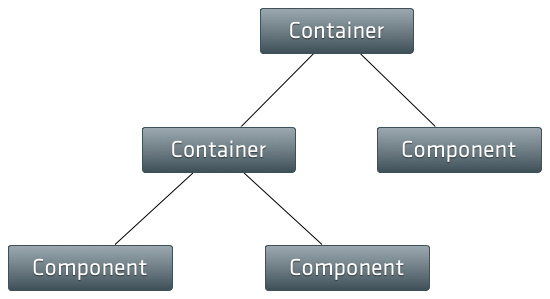
The most commonly used Container is Panel. Let's take a look at how being a Container allows a Panel to contain other Components:
最常用的容器是面板 Panel。让我们看看如何一个面板是如何作为容器来包含其他组件的:
Ext.create('Ext.panel.Panel', {

    renderTo: Ext.getBody(),

    width: ,

    height: ,

    title: 'Container Panel',

    items: [

        {

            xtype: 'panel',

            title: 'Child Panel 1',

            height: ,

            width: '75%'

        },

        {

            xtype: 'panel',

            title: 'Child Panel 2',

            height: ,

            width: '75%'

        }

    ]

});
We just created a Panel that renders itself to the document body, and we used the items config to add two child Panels to our Container Panel.
我们刚刚创建了一个渲染到 document.body 的面板 Panel,并且使用 items 配置项来添加两个子面板,属于面板容器(Container Panel)下的子面板。
Layouts
Every Container has a Layout that manages the sizing and positioning of its child Components. In this section we're going to discuss how to configure a Container to use a specific type of Layout, and how the layout system keeps everything in sync.
每个容器都有一个布局管理器专门调整容器其子组件的大小和定位。在本节中,我们将讨论如何为一个容器来配置特定类型的布局,以及布局系统如何做到保持一切的同步。
Using Layouts
In the above example we did not specify a layout for the Container Panel. Notice how the child Panels are laid out one after the other, just as normal block elements would be in the DOM. This happens because the default layout for all Containers is Auto Layout. Auto Layout does not specify any special positioning or sizing rules for child elements. Let's assume, for example, we want our two child Panels to be positioned side by side, and to each take up exactly 50% of the width of the Container - we can use a Column Layout simply by providing a layout config on the Container:
在上面的例子中,我们没有为面板容器(Container Panel)指派的布局。请注意子面板都是一个挨着一个布局的,就像正常 DOM 中的块元素将那样子。这是因为所有容器的默认布局是自动布局(Auto Layout)。自动布局不指定任何特殊的定位或子元素的大小规则。假如我们希望两个子面板并排定位,各子面板的宽度为容器宽度的 50%——我们可以在容器身上的 layout 配置项处指定一个“列布局 Column Layout ”的方式。
Ext.create('Ext.panel.Panel', {

    renderTo: Ext.getBody(),

    width: ,

    height: ,

    title: 'Container Panel',

    layout: 'column',

    items: [

        {

            xtype: 'panel',

            title: 'Child Panel 1',

            height: ,

            columnWidth: 0.5

        },

        {

            xtype: 'panel',

            title: 'Child Panel 2',

            height: ,

            columnWidth: 0.5

        }

    ]

});
Ext JS comes with a full set of layouts out of the box and can accomodate almost any type of layout you can imagine. See the Layout Browser to get an idea of what's possible.
Ext JS 的全套布局不但简单易用,而且数量众多,几乎囊括所有类型的布局。请参阅布局的例子,说不定有什么新的想法来着。
How the layout system works
A Container's Layout is responsible for the initial positioning and sizing of all of the Container's children. Internally the framework calls the Container'sdoLayout method which triggers the Layout to calculate the correct sizes and positions for all of the Container's children and update the DOM. ThedoLayout method is fully recursive, so any of the Container's children will have their doLayout method called as well. This continues until the bottom of the Component hierarchy is reached. You typically will not have to ever call doLayout() in your application code since the framework should handle it for you.
一个容器的布局指的是初始定位问题和容器所有子项的大小问题。框架内部会调用容器的 doLayout 方法执行布局的工序,为所有子项计算正确的大小尺寸和位置,并且更新 DOM。doLayout 方法是完全递归的,所以容器下的任何子项其 doLayout 方法也会被调用。一直持续到组件层次结构结束为止。你通常不会在程序代码中调用 doLayout(),因为该框架相应为你处理的。
A re-layout is triggered when the Container is resized, or when child Component items are added or removed. Normally we can just rely on the framework to handle updating the layout for us, but sometimes we want to prevent the framework from automatically laying out so we can batch multiple operations together and then manually trigger a layout when we're done. To do this we use the suspendLayout flag on the Container to prevent it from laying out while we perform our operations that would normally trigger a layout (adding or removing items for example). When we're done all we have to do is turn thesuspendLayout flag off and manually trigger a layout by calling the Container's doLayout method:
当容器大小变化时,就需要重新进行布局,或添加或删除子组件项目时候,也需要重新布局。通常,我们可以依赖于框架来为我们处理布局的更新,但有时我们要防止框架自动布局,以便我们可以批量地处理多个操作,最后才手动地执行布局的动作。通常我们的某些操作,就是需要这样,具体说,就是在触发布局之前(例如添加或删除子项),先对容器 suspendLayout 标记,就可以防止它执行布局了。而当我们完成所有我们要做的事情后,打开刚关闭的 suspendLayout 标志然后手动执行布局,也就是通过调用容器的 doLayout 方法:
var containerPanel = Ext.create('Ext.panel.Panel', {

    renderTo: Ext.getBody(),

    width: ,

    height: ,

    title: 'Container Panel',

    layout: 'column',

    suspendLayout: true // Suspend automatic layouts while we do several different things that could trigger a layout on their own

});

// Add a couple of child items.  We could add these both at the same time by passing an array to add(),

// but lets pretend we needed to add them separately for some reason.

containerPanel.add({

    xtype: 'panel',

    title: 'Child Panel 1',

    height: ,

    columnWidth: 0.5

});

containerPanel.add({

    xtype: 'panel',

    title: 'Child Panel 2',

    height: ,

    columnWidth: 0.5

});

// Turn the suspendLayout flag off.

containerPanel.suspendLayout = false;

// Trigger a layout.

containerPanel.doLayout();
Component Layout
Just like a Container's Layout defines how a Container sizes and positions its Component items, a Component also has a Layout which defines how it sizes and positions its internal child items. Component layouts are configured using the componentLayout config option. Generally, you will not need to use this configuration unless you are writing a custom Component since all of the provided Components which need their internal elements sized and positioned come with their own layout managers. Most Components use Auto Layout, but more complex Components will require a custom component layout (for example a Panel that has a header, footer, and toolbars).
就像一个容器的布局去定义容器的大小和及其个组件项的定位那样,组件 Component 也有一布局调整其内部的子项的大小和位置。组件布局通过 componentLayou t配置项来定义布局。一般来说,你不再需要使用这种配置,除非你正在编写一个自定义的组件,因为所提供的组件其内部元素需要通过自己的布局管理器来调整大小和定位问题。于是大多数组件都使用自动布局(Auto Layout),但更复杂些的组件则需要一个自定义组件的布局(例如面板的头部 header、脚部 footer 和工具栏 toolbar)。
ExtJS笔记4 容器与布局(Layouts and Containers)的更多相关文章
- ExtJS笔记5 Components
参考 :http://blog.csdn.net/zhangxin09/article/details/6914882 An Ext JS application's UI is made up of ...
- WPF笔记(2.7 文字布局)——Layout
原文:WPF笔记(2.7 文字布局)--Layout 这一节介绍的是文字布局的几个控件:1.TextBlock 最基本的文字控件可以配置5个Font属性.TextWraping属性,&quo ...
- 5.bootstrap练习笔记-巨幕和流体布局
bootstrap练习笔记-巨幕和流体布局 1.在bootstrap中 .jumbotron可以设置巨幕效果 2.div.jumnotron自动设置一个黑色的巨幕效果 3.div.container ...
- extJs学习基础 容器的介绍
Viewport: 一个专门的容器用于可视应用领域(浏览器窗口). Viewport渲染自身到网页的documet body区域, 并自动将自己调整到适合浏览器窗口的大小,在窗口大小发生改变时自动适应 ...
- ExtJS笔记 Form
A Form Panel is nothing more than a basic Panel with form handling abilities added. Form Panels can ...
- Android用户界面布局(layouts)
Android用户界面布局(layouts) 备注:view理解为视图 一个布局定义了用户界面的可视结构,比如activity的UI或是APP widget的UI,我们可以用下面两种方式来声明布局: ...
- BootStrap入门教程 (一) :手脚架Scaffolding(全局样式(Global Style),格网系统(Grid System),流式格网(Fluid grid System),自定义(Customing),布局(Layouts))
2011年,twitter的“一小撮”工程师为了提高他们内部的分析和管理能力,用业余时间为他们的产品构建了一套易用.优雅.灵活.可扩展的前端工具集--BootStrap.Bootstrap由MARK ...
- 谈谈Ext JS的组件——容器与布局
概述 在页面中,比较棘手的地方就是布局.而要实现布局,就得有能维护布局的容器.可以说,在我试过和使用过的Javascript框架中,Ext JS的布局是做得最棒的一个,而这得益于它强大的容器类和丰富的 ...
- 【学习笔记】响应式布局的常用解决方案(媒体查询、百分比、rem、和vw/vh)
原文转载:https://blog.csdn.net/sinat_17775997/article/details/81020417 一.媒体查询 不同物理分辨率的设备,在还原设计稿时,css中设置的 ...
随机推荐
- CI中写原生SQL(封装查询)
封装查询 封装,通过让系统为你组装各个查询语句,能够简化你的查询语法.参加下面的范例: $sql = "SELECT * FROM some_table WHERE id = ? AND s ...
- 微信支付v3发布到iis时的证书问题(转)
本文纯粹转载(原地址:微信支付v3发布到iis时的证书问题 ) 一开始报“出现了内部错误” 解决方法是 方法一 var cer = new X509Certificate(certpath, pass ...
- UML中的关联关系
UML中的关联关系其内在意思就是has a 如图: 相对于依赖关系,关联关系在代码中有所体现.上图中的关联关系在代码中体现为 其中water 中将Climate作为其中的属性. 当然,关 ...
- IOS项目自动构建
# Sets the target folders and the final framework product. # 如果工程名称和Framework的Target名称不一样的话,要自定义FMKN ...
- IIS上发布WCF发布服务,访问不到
1 环境是IIS7,发布WCF发布服务,访问不到. 一种原因站点自动生成“程序应用池”和站点的Framwork版本不一致. 解决的办法:新建一个“程序应用池”,然后站点指向这个新建的“程序应用池”
- BZOJ 1029: [JSOI2007]建筑抢修 堆+贪心
1029: [JSOI2007]建筑抢修 Description 小刚在玩JSOI提供的一个称之为“建筑抢修”的电脑游戏:经过了一场激烈的战斗,T部落消灭了所有z部落的入侵者.但是T部落的基地里已经有 ...
- Xamarin Android开发实战(上册)大学霸内部资料
Xamarin Android开发实战(上册)大学霸内部资料 试读文档下载地址:http://pan.baidu.com/s/1jGEHhhO 密码:vcfm 介绍: 本教程是国内唯一的Xamar ...
- Codeforces Round #295 (Div. 2)
水 A. Pangram /* 水题 */ #include <cstdio> #include <iostream> #include <algorithm> # ...
- 递推DP URAL 1081 Binary Lexicographic Sequence
题目传送门 题意:问第k个长度为n的01串是什么(不能有相邻的1) 分析:dp[i][0/1] 表示前i个,当前第i个放1或0的方案数,先预处理计算,dp[i][1]只能有dp[i-1][0]转移过来 ...
- 详解Adorner Layer(zz)
首先,千万不要觉得Adorner离你很远,因为最简单的WPF界面也会用到Adorner.在WPF中,下面的几个很常见的功能,都是用Adorner实现的. 1. 光标(caret) 2. ...