
SSH——基于BaseDao和BaseAction实现用户登录
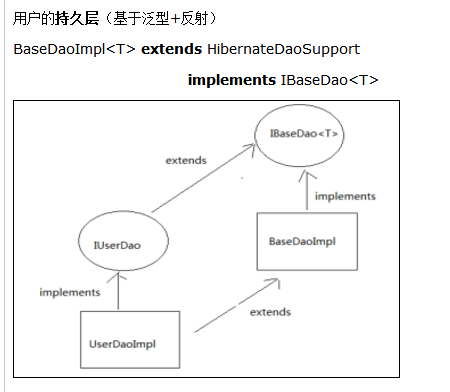

基于BaseDao和BaseAction实现用户登录
1. 首先修改login.jsp页面,点击登录按钮,提交表单
 <a onclick="document.forms[0].submit()" id="loginform:j_id19" name="loginform:j_id19">

    <span id="loginform:loginBtn" class="btn btn-login"
     style="margin-top:-36px;">登录</span>
  </a>
2. 在UserAction中提供login方法
@Resource

    private IUserService userService;

    // 通过属性驱动接收验证码

    private String checkcode;

    public void setCheckcode(String checkcode) {

        this.checkcode = checkcode;

    }

    /**

     * 用户登录

     */

    public String login(){

        ValueStack valueStack =ActionContext.getContext().getValueStack();

        //生成的验证码

        String key =(String) ServletActionContext.getRequest().getSession().getAttribute("key");

        //判断输入的验证码是否正确

        if(StringUtils.isNotBlank(checkcode)&&checkcode.equals(key)){

            //验证码正确

            User user =userService.login(model);

            if(user!=null){

                //登录成功,将User放入session域,跳转到系统首页

                ServletActionContext.getRequest().getSession().setAttribute("loginUser", user);

                return "home";

            }else{

                //登录失败,设置错误提示信息,跳转到登录页面

                this.addActionError(this.getText("loginError"));

                return "login";

            }

        }else{

            //验证码错误,设置错误提示信息,跳转到登录页面

            this.addActionError(this.getText("validateCodeError"));

            return "login";

        }

    }
3. 提供UserService类
//注入dao

        @Autowired

        private IUserDao userDao;

        @Override

        public User login(User model) {

            String username=model.getUsername();

            String password=model.getPassword(); //明文

            password=MD5Utils.md5(password);   //MD5加密

            return userDao.findByUsernameAndPassword(username, password);

        }
4. 在UserDao中扩展方法,根据用户名和密码查询用户
    @Override

    public User findByUsernameAndPassword(String username, String password) {

        String hql="FROM User u WHERE u.username = ? AND u.password = ?";

        List<User> list=this.getHibernateTemplate().find(hql, username,password);

        if(list != null && list.size()>0){

            return list.get(0);

        }

        return null;

    }
5. 在struts.xml中注册国际化文件,能够在登录失败时按照UserAction中的login方法提示错误信息
 <!-- 注册国际化文件 -->

    <constant name="struts.custom.i18n.resources" value="message" />

在login.jsp页面中使用struts2提供的标签展示错误提示信息
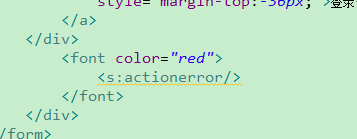
login表单:
           <form id="loginform" name="loginform" method="post" class="niceform"

                    action="${pageContext.request.contextPath }/userAction_login.action">

                    <div id="idInputLine" class="loginFormIpt showPlaceholder"

                        style="margin-top: 5px;">

                        <input id="loginform:idInput" type="text" name="username"

                            class="loginFormTdIpt" maxlength="50" />

                        <label for="idInput" class="placeholder" id="idPlaceholder">帐号:</label>

                    </div>

                    <div class="forgetPwdLine"></div>

                    <div id="pwdInputLine" class="loginFormIpt showPlaceholder">

                        <input id="loginform:pwdInput" class="loginFormTdIpt" type="password"

                            name="password" value="" />

                        <label for="pwdInput" class="placeholder" id="pwdPlaceholder">密码:</label>

                    </div>

                    <div class="loginFormIpt loginFormIptWiotTh"

                        style="margin-top:58px;">

                        <div id="codeInputLine" class="loginFormIpt showPlaceholder"

                            style="margin-left:0px;margin-top:-40px;width:50px;">

                            <input id="loginform:codeInput" class="loginFormTdIpt" type="text"

                                name="checkcode" title="请输入验证码" />

                            <img id="loginform:vCode" src="${pageContext.request.contextPath }/validatecode.jsp"

                                onclick="javascript:document.getElementById('loginform:vCode').src='${pageContext.request.contextPath }/validatecode.jsp?'+Math.random();" />

                        </div>

                        <a onclick="document.forms[0].submit()" id="loginform:j_id19" name="loginform:j_id19">

                        <span

                            id="loginform:loginBtn" class="btn btn-login"

                            style="margin-top:-36px;">登录</span>

                        </a>

                    </div>

                    <div>

                        <font color="red">

                            <s:actionerror/>

                        </font>

                    </div>

                </form>
SSH——基于BaseDao和BaseAction实现用户登录的更多相关文章
- ssh框架的小实例(用户登录)
刚学SSH框架写一个小实例,以便以后查看: 本案例简单的实现一个用户登录: 数据库方面就不写了,自己领悟吧!哈哈(根据user.hbm.xml文件就知道了) 我们一般可以创建下面几个包,什么意思呢,自 ...
- 基于Redis位图实现系统用户登录统计
项目需求,试着写了一个简单登录统计,基本功能都实现了,日志数据量小.具体性能没有进行测试~ 记录下开发过程与代码,留着以后改进! 1. 需求 1. 实现记录用户哪天进行了登录,每天只记录是否登录过,重 ...
- 基于Servlet的MVC模式用户登录实例
关于MVC模式的简单解释 M Model,模型层,例如登录实例中,用于处理登录操作的类: V View,视图层,用于展示以及与用户交互.使用html.js.css.jsp.jQuery等前端技术实现: ...
- Java SSH框架系列:用户登录模块的设计与实现思路
1.简介用户登录模块,指的是根据用户输入的用户名和密码,对用户的身份进行验证等.如果用户没有登录,用户就无法访问其他的一些jsp页面,甚至是action都不能访问.二.简单设计及实现本程序是基于Jav ...
- 解决root用户ssh配置无密码登陆/hadoop用户照仿可以实现相同功能:hadoop用户登录并且把命令的所有root换成home/hadoop
http://inuyasha1027.blog.51cto.com/4003695/1132896/ 主机ip:192.168.163.100(hostname: node0) ssh无密码登陆的远 ...
- linux下怎么查看ssh的用户登录日志
linux下登录日志在下面的目录里: cd /var/log 查看ssh用户的登录日志: less secure linux日志管理: 1. 日志简介 日志对于安全来说,非常重要,他记录了系统每天发生 ...
- linux查看ssh用户登录日志与操作日志
linux查看ssh用户登录日志与操作日志 2013-11-01转载 ssh用户登录日志 linux下登录日志在下面的目录里: 代码如下 复制代码 cd /var/log 查看ssh用户的登录日 ...
- 基于jwt的用户登录认证
最近在app的开发过程中,做了一个基于token的用户登录认证,使用vue+node+mongoDB进行的开发,前来总结一下. token认证流程: 1:用户输入用户名和密码,进行登录操作,发送登录信 ...
- 【SSH学习笔记】用Struts2实现简单的用户登录
准备阶段 在使用学习Struts2的时候首先要下载相应的架包 Struts2资源下载 这里建议下载第一个,在struts-2.5.14.1-all.zip里有很多实用的东西,不仅有架包还有官方为开发者 ...
随机推荐
- 好的web前端是如何拿到30万年薪的?
2018年前端开发不再像过去几年里新技术框架层出不穷,而是各种组件,模块,很多东西都有痕迹可寻,技术都在原来的基础上有了革新和沉淀. 前端招聘方面也在紧跟技术发展,大量“滥竽充数”的速成开发者开始失去 ...
- 20、Django实战第20天:课程详情页
1.把course-detail.html复制到templates目录下 2.编辑course-detail.html,分析页面,继承base.html 3.编辑courses.views .... ...
- ASP.NET Core 2.2 基础知识(十六) SignalR 概述
我一直觉得学习的最好方法就是先让程序能够正常运行,才去学习他的原理,剖析他的细节. 就好像这个图: 所以,我们先跟着官方文档,创建一个 SignalR 应用: https://docs.microso ...
- 和java面试不得不说的故事
一直都没有想到,可以有机会可以面试他人,很感谢现在的公司,给我不少的机会可以尝试从不同方面尝试一些工作,在入职现公司之前也作为面试者参加过不少面试,不过还好,面试通过率都还好,大部分是待遇谈不拢.现在 ...
- BZOJ 1112 [POI2008]砖块Klo(可持久化线段树)
[题目链接] http://www.lydsy.com/JudgeOnline/problem.php?id=1112 [题目大意] 给出一个数列,对于一个操作,你可以对一个数+1,或者一个数-1, ...
- 【2-SAT】URAL - 2089 - Experienced coach
题意:给出n对点a,b 要求从没对点中选出一个,且最终选出的点n个数不能存在相同的.输入数据满足每种数最多出现3次,最少出现1次 思路:第i对点的编号2*i, 2*i+1, 因为每个数最多出现3 ...
- 【树套树】bzoj3110 [Zjoi2013]K大数查询
题解很多,实现起来以外地简洁.内层的区间线段树上用了标记永久化. #include<cstdio> using namespace std; #define N 50001 struct ...
- 【Treap模板详细注释】BZOJ3224-普通平衡树
模板题:D错因见注释 #include<iostream> #include<cstdio> #include<cstring> #include<algor ...
- [SHOI2014]信号增幅仪
题目大意: 平面直角坐标系中散落着n个点,一个椭圆的长半轴在对于x轴逆时针旋转α度的角度上,且长半轴是短半轴的k倍. 问短半轴至少要多长才能覆盖所有的点? 思路: 首先把坐标顺时针旋转α度,然后把所有 ...
- [OpenJudge8462][序列DP]大盗阿福
大盗阿福 总时间限制: 1000ms 内存限制: 65536kB [描述] 阿福是一名经验丰富的大盗.趁着月黑风高,阿福打算今晚洗劫一条街上的店铺. 这条街上一共有 N 家店铺,每家店中都有一些现金. ...