
JS图片赖加载例子
 <!DOCTYPE html>

 <html lang="en">

 <head>

     <meta charset="UTF-8">

     <meta name="viewport" content="width=device-width,initial-scale=1,maximum-scale=1,minimum-scale=1,user-scalable=no">

     <title>图片赖加载2017-10-17</title>

     <style type="text/css">

         *{padding: 0;margin: 0}

         img{width: 100%;display: block;}

     </style>

 </head>

 <body>

     <div class="lazy-img">

         <img class="jsLoadImg" src="https://h5.quanchepin.com/templates/images/loadImg.png" data-src="https://a-ssl.duitang.com/uploads/item/201210/24/20121024113044_vkmru.jpeg">

         <img class="jsLoadImg" src="https://h5.quanchepin.com/templates/images/loadImg.png" data-src="http://img01.sogoucdn.com/app/a/100540002/422283.jpg">

         <img class="jsLoadImg" src="https://h5.quanchepin.com/templates/images/loadImg.png" data-src="http://dl.bizhi.sogou.com/images/2013/08/09/357253.jpg">

         <img class="jsLoadImg" src="https://h5.quanchepin.com/templates/images/loadImg.png" data-src="http://img01.sogoucdn.com/app/a/100540002/422289.jpg">

         <img class="jsLoadImg" src="https://h5.quanchepin.com/templates/images/loadImg.png" data-src="http://dl.bizhi.sogou.com/images/2015/05/29/1184364.jpg">

         <img class="jsLoadImg" src="https://h5.quanchepin.com/templates/images/loadImg.png" data-src="http://dl.bizhi.sogou.com/images/2015/01/27/1063571.jpg">

         <img class="jsLoadImg" src="https://h5.quanchepin.com/templates/images/loadImg.png" data-src="http://dl.bizhi.sogou.com/images/2014/07/16/733793.jpg">

         <img class="jsLoadImg" src="https://h5.quanchepin.com/templates/images/loadImg.png" data-src="http://dl.bizhi.sogou.com/images/2014/11/11/957398.jpg">

         <img class="jsLoadImg" src="https://h5.quanchepin.com/templates/images/loadImg.png" data-src="http://img.bizhi.sogou.com/images/2013/09/22/387997.jpg">

         <img class="jsLoadImg" src="https://h5.quanchepin.com/templates/images/loadImg.png" data-src="http://img.bizhi.sogou.com/images/2015/04/28/1159147.jpg">

         <img class="jsLoadImg" src="https://h5.quanchepin.com/templates/images/loadImg.png" data-src="http://dl.bizhi.sogou.com/images/2015/06/01/1186941.jpg">

         <img class="jsLoadImg" src="https://h5.quanchepin.com/templates/images/loadImg.png" data-src="http://dl.bizhi.sogou.com/images/2013/07/19/348659.jpg">

         <img class="jsLoadImg" src="https://h5.quanchepin.com/templates/images/loadImg.png" data-src="http://dl.bizhi.sogou.com/images/2013/07/19/348291.jpg">

     </div>

 <!-- <script src="http://apps.bdimg.com/libs/jquery/2.1.4/jquery.min.js"></script> -->

 <script type="text/javascript">

     // 图片赖加载js代码

     window.Echo=(function(window,document,undefined){'use strict';var store=[],offset,throttle,poll;var _inView=function(el){var coords=el.getBoundingClientRect();return((coords.top>=0&&coords.left>=0&&coords.top)<=(window.innerHeight||document.documentElement.clientHeight)+parseInt(offset));};var _pollImages=function(){for(var i=store.length;i--;){var self=store[i];if(_inView(self)){self.src=self.getAttribute('data-src');store.splice(i,1);}}};var _throttle=function(){clearTimeout(poll);poll=setTimeout(_pollImages,throttle);};var init=function(obj){var nodes=document.querySelectorAll('[data-src]');var opts=obj||{};offset=opts.offset||0;throttle=opts.throttle||250;for(var i=0;i<nodes.length;i++){store.push(nodes[i]);}_throttle();if(document.addEventListener){window.addEventListener('scroll',_throttle,false);}else{window.attachEvent('onscroll',_throttle);}};return{init:init,render:_throttle};})(window,document);

     Echo.init({

         offset: 100,//离可视区域多少像素的图片可以被加载

         throttle: 0,//图片延时多少毫秒加载

         els: '.jsLoadImg',

         elP: '.lazy-img',

         dataSrc: 'data-src'

     });

 </script>

 </body>

 </html>
原理是把真实的图片路径放在data-src里面,先加载src里面的小图片,等页面滚动到相应的位置,就把data-src的内容赋给src。
主要代码是“图片赖加载js代码”,然后调用传参数,跟使用jquery插件一样,只不过这里不需要jquery。
效果如下:
1、没有赖加载的时候要加载13M
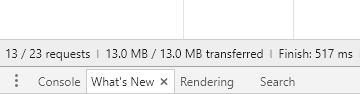
2、有赖加载的时候只需先加载2.6M

因为我这里用的图片很多都是在不同的域名下的,所以它们可以同时加载,如果图片都是在同一域名下的效果更佳明显。
JS图片赖加载例子的更多相关文章
- js图片实时加载
浏览大型网站,特别是图片比较多的图片,如大型的电商网站,你会发现处了第一屏外,往下滚动的时候图片才加载出来,没必要一开始加载就要把全部图片加载出来,这样子打开网面的速度得到了很好提高.以下是笔者目前所 ...
- js图片未加载完显示loading效果
<html> <title>js图片未加载完显示loading效果</title> <body> <style> img{float:lef ...
- JS图片预加载插件
在开发H5项目中有时候会遇到要加载大量图片的情况,利用预加载技术可以提高用户浏览时的体验. 1)概念:懒加载也叫延迟加载:JS图片延迟加载,延迟加载图片或符合某些条件时才加载某些图片.预加载:提前加载 ...
- js图片预加载
图片预加载有大体有几种方式 1.html标签或css加载图片. 显而易见我们使用img标签或者通过标签的background-image属性都可以实现图片的预加载.但是为了避免初次载入过多图片影响体验 ...
- JS图片懒加载
简介 当页面图片太多时,加载速度就会很慢.尤其是用2G/3G/4G访问页面,不仅页面慢,而且还会用掉很多流量.图片懒加载的原理就是将页面内所有需要加载的图片全部换成一张默认的图片(一般尺寸很小),只有 ...
- js 图片懒加载
图片懒加载(图片出现在可视区域再加载) 兼容性:兼容目前流行的全部浏览器,包括:兼容到IE6) 使用方法: 引入相应的js文件<script src="js/lazy.js" ...
- js图片预加载与延迟加载
图片预加载的机制原理:就是提前加载出图片来,给前端的服务器有一定的压力. 图片延迟加载的原理:为了缓解前端服务器的压力,延缓加载图片,符合条件的时候再加载图片,当然不符合的条件就不加载图片. 预加载 ...
- js图片预加载后触发操作
为了使得图片加载完,再触发回调函数,需进行图片预加载处理 function loadImage(url, callback) { var img = new Image(); img.src = ur ...
- js图片预加载以及延迟加载
当我们需要做图片轮播的时候,如果让图片提前下载到本地,用浏览器缓存起来,我们可以用Image对象: function preLoadImg(){ var img=new Image(); img.sr ...
随机推荐
- javascript阻止事件冒泡的方法
有的时候我们需要实现这样的功能: 点击某个蒙版,该蒙版消失,但是如果点击蒙版上的某个元素,希望蒙版不消失,这就需要用到阻止事件的冒泡了 html: <div id="outer&quo ...
- AJAX中success函数的执行顺序
1,问题,在上图中,数据传输正常,但是一直输出为空的p,再输出66, 2,原因,默认开启了异步加载, 3,解决方法,开启同步,或者在success中添加函数.
- tornado 01 路由、输入与输出
tornado 01 路由.输入与输出 一.安装tornado pyvip@Vip:~$ workon py3env #安装python3的虚拟环境 (py3env) pyvip@Vip:~$ pip ...
- C++_标准模板库STL概念介绍2-泛型编程
有了之前使用STL的经验后,接下来讨论泛型编程及其底层的理念: 首先我们知道STL只是泛型编程的一种: 而面向对象的编程方式关注的是编程的数据方面: 而泛型编程关注的是算法: 但是,他们之间的一个重要 ...
- LeetCode936. Stamping The Sequence
一.题面 You want to form a target string of lowercase letters. At the beginning, your sequence is targe ...
- HDU_1846 Brave Game 【巴什博弈】
题目: 十年前读大学的时候,中国每年都要从国外引进一些电影大片,其中有一部电影就叫<勇敢者的游戏>(英文名称:Zathura),一直到现在,我依然对于电影中的部分电脑特技印象深刻. 今天, ...
- VBS映射网络驱动器 映射网络驱动器
Dim objNetwork Set objNetwork = CreateObject("Wscript.Network") if objNetwork.EnumNetworkD ...
- 将M个客服随机分配给N个客户
class AllocUser { //客户多于客服 public static void Test() { var customers = new List<Customer>() { ...
- PhpExcel中文帮助手册|PhpExcel使用方法 ( 后面有部分没有显示出来 可以编辑中看到!!)
下面是总结的几个使用方法 include 'PHPExcel.php'; include 'PHPExcel/Writer/Excel2007.php'; //或者include 'PHPExcel/ ...
- PIE SDK符号选择器
1. 功能简介 符号选择器可以根据不同的需求进行改变图层的符号形状以及颜色,下面基于PIE SDK介绍如何使用符号选择器. 2. 功能实现说明 2.1. 实现思路及原理说明 第一步 加载图层 第二步 ...