
Solr安全控制,开启基本身份验证
前言:请各大网友尊重本人原创知识分享,谨记本人博客:南国以南i
背景:solr默认安装没带权限控制,每次进入页面直接操作都有点裸奔的感觉。
一、SolrCloud集群模式
说明:要使用基本身份验证您必须先创建一个security.json文件,对于基本身份验证,security.json文件必须有一个authentication部分,它定义用于身份验证的类。可以在创建文件时添加用户名和密码(例如:sha256(password+salt) hash),或者可以稍后使用基本验证API添加。
1.示例security.json显示了如下所示的显示两个部分:
{

"authentication":{ 【1】

   "blockUnknown": true, 【2】

   "class":"solr.BasicAuthPlugin",

   "credentials":{"solr":"IV0EHq1OnNrj6gvRCwvFwTrZ1+z1oBbnQdiVC3otuq0= Ndd7LKvVBAaZIF0QAVi1ekCfAJXr1GGfLtRUXhgrF8c="} 【3】

},

"authorization":{

   "class":"solr.RuleBasedAuthorizationPlugin",

   "permissions":[{"name":"security-edit",

      "role":"admin"}], 【4】

   "user-role":{"solr":"admin"} 【5】

}

}

以下的解释对应于上述的序号:

1.启用基本身份验证和基于规则的授权插件。

2.参数 "blockUnknown": true 表示不允许未经身份验证的请求通过。

3.已定义了一个名为 "solr" 的用户,其中有密码 "SolrRocks"。

4."admin" 角色已定义,并且具有编辑安全设置的权限。

5."solr" 用户已被定义为 "admin" 角色。
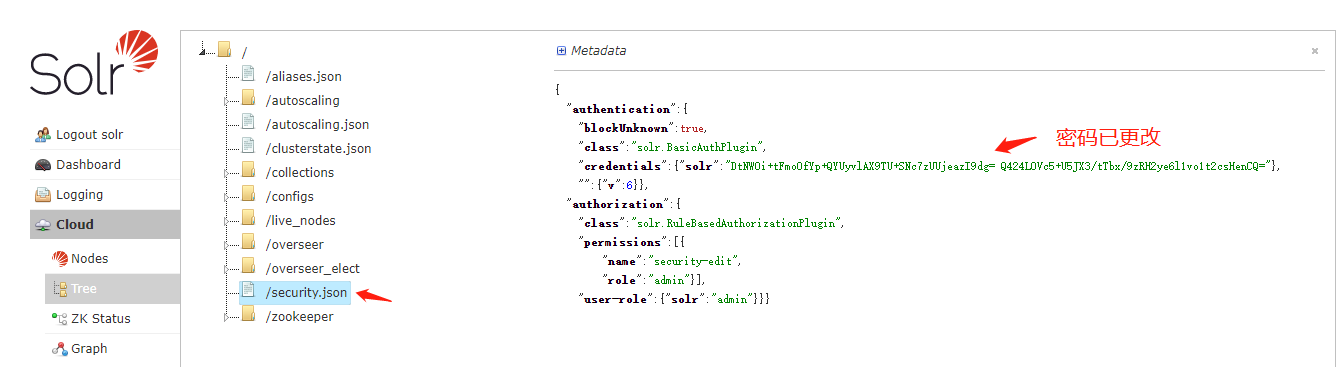
SolrCloud模式必须上传security.json到ZooKeeper。首先登入ZooKeeper终端,输入示例命令(内json字段已在上述说明)
#进入ZooKeeper终端

./zkCli.sh


#修改ZooKeeper内security.josn节点文件

set /security.json '{"authentication":{"blockUnknown":true,"class":"solr.BasicAuthPlugin","credentials":{"solr":"IV0EHq1OnNrj6gvRCwvFwTrZ1+z1oBbnQdiVC3otuq0= Ndd7LKvVBAaZIF0QAVi1ekCfAJXr1GGfLtRUXhgrF8c="}},"authorization":{"class":"solr.RuleBasedAuthorizationPlugin","permissions":[{"name":"security-edit","role":"admin"}],"user-role":{"solr":"admin"}}}'
2.重启solr访问,此时solr必须输入用户名和密码进行登入验证,这里配置了用户名密码是:solr:SolrRocks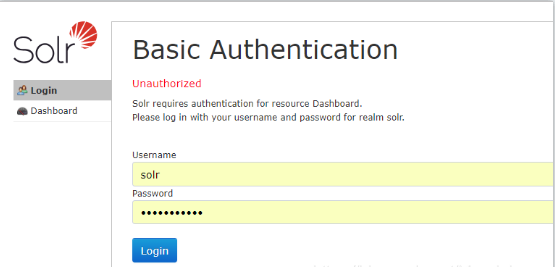
3.solr用户管理Api
#新增或修改密码(如果用户名存在,就修改密码,否则就创建用户)

curl --user solr:SolrRocks http://localhost:8983/api/cluster/security/authentication -H 'Content-type:application/json' -d '{"set-user": {"solr":"solr","tom":"tom"}}'

#删除用户

curl --user solr:SolrRocks http://localhost:8983/api/cluster/security/authentication -H 'Content-type:application/json' -d '{"delete-user": ["tom"]}'
二、Solr单机部署模式
1.修改tomcat/conf/tomcat-user.xml配置,添加用户名、密码
<?xml version='1.0' encoding='utf-8'?>

<!--

  Licensed to the Apache Software Foundation (ASF) under one or more

  contributor license agreements.  See the NOTICE file distributed with

  this work for additional information regarding copyright ownership.

  The ASF licenses this file to You under the Apache License, Version 2.0

  (the "License"); you may not use this file except in compliance with

  the License.  You may obtain a copy of the License at

      http://www.apache.org/licenses/LICENSE-2.0

  Unless required by applicable law or agreed to in writing, software

  distributed under the License is distributed on an "AS IS" BASIS,

  WITHOUT WARRANTIES OR CONDITIONS OF ANY KIND, either express or implied.

  See the License for the specific language governing permissions and

  limitations under the License.

-->

<tomcat-users>

<!--

  NOTE:  By default, no user is included in the "manager-gui" role required

  to operate the "/manager/html" web application.  If you wish to use this app,

  you must define such a user - the username and password are arbitrary.

-->

<!--

  NOTE:  The sample user and role entries below are wrapped in a comment

  and thus are ignored when reading this file. Do not forget to remove

  <!.. ..> that surrounds them.

  <role rolename="tomcat"/>

  <role rolename="role1"/>

  <user username="tomcat" password="tomcat" roles="tomcat"/>

  <user username="both" password="tomcat" roles="tomcat,role1"/>

  <user username="role1" password="tomcat" roles="role1"/>

-->

<!-- 用户名:solr、密码:solr、roles:用户级别-->

<user username="solr" password="solr" roles="admin,manager"/>

</tomcat-users>
2.修改tomcat/webapps/solr/WEB-INF/web.xml配置,在最后增加下面代码
<security-constraint>

    <web-resource-collection>

        <web-resource-name>Restrict access to Solr admin</web-resource-name>

        <url-pattern>/admin/*</url-pattern>

        <http-method>DELETE</http-method>

        <http-method>GET</http-method>

        <http-method>POST</http-method>

        <http-method>PUT</http-method>

    </web-resource-collection>

    <auth-constraint>

        <role-name>manager</role-name>

    </auth-constraint>

    <user-data-constraint>

        <transport-guarantee>NONE</transport-guarantee>

    </user-data-constraint>

</security-constraint>

<login-config>

        <auth-method>BASIC</auth-method>

        <realm-name>default</realm-name>

</login-config>
3.重启solr访问,此时solr必须输入用户名和密码进行登入验证,这里配置了用户名密码是:solr:solr

我是南国以南i记录点滴每天成长一点点,学习是永无止境的!转载请附原文链接!!!
Solr安全控制,开启基本身份验证的更多相关文章
- 使用 OpenSSL 为 Nginx 创建自签名证书 并开启客户端身份验证
本文章默认读者了解Openssl,CA,网站证书相关知识,直接实战!配置完成后,浏览器会显示"安全的HTTPS"连接.不会像其他文章那样,是红色警告的证书提示. 准备环境 笔者使用 ...
- 证明你是你——快速开启Windows Azure多重身份验证
中国版Windows Azure的多重身份验证(Multi-Factor Authentication)功能已经开放.这个功能说白了就是要“证明你是你”.目前可以支持以下几种验证方式: 手机,短信验证 ...
- 部署开启了Kerberos身份验证的大数据平台集群外客户端
转载请注明出处 :http://www.cnblogs.com/xiaodf/ 本文档主要用于说明,如何在集群外节点上,部署大数据平台的客户端,此大数据平台已经开启了Kerberos身份验证.通过客户 ...
- 关于WEB Service&WCF&WebApi实现身份验证之WebApi篇
之前先后总结并发表了关于WEB Service.WCF身份验证相关文章,如下: 关于WEB Service&WCF&WebApi实现身份验证之WEB Service篇. 关于WEB S ...
- MVC启动windows身份验证时初次访问特别慢
最近做了一个关于MVC的项目,刚开始往服务器上面部署时,没有开启windows身份验证,等开发基本收尾时候,将验证开启时,第一次打开的时候需要将近15s的访问时间,别说用户受不了,自己都受不了了. 对 ...
- C# 实现身份验证之WebApi篇
今天再来总结关于如何实现WebApi的身份验证,以完成该系列所有文章,WebApi常见的实现方式有:FORM身份验证.集成WINDOWS验证.Basic基础认证.Digest摘要认证 第一种:FOR ...
- vs如何在Windows身份验证下调试Web项目
vs做的Web项目发布到IIS站点后,通常我们还希望利用vs来调试代码.如果Web在IIS中设置成了Windows身份验证,那么我们如何在vs调试的时候,也同样采用Windows身份认证进行调试呢? ...
- 利用SharePoint项目改造的Web项目问题——Windows身份验证
最近领导交给一个项目:改造现有的SharePoint项目.UI层是做好的,只需要把实现的所有接口方法重新实现一遍,改造成Web版的实现方式. 现在要做基于Windows身份认证的登陆: 配置IIS—— ...
- windows版本 MongoDB副本集搭建及开启身份验证
------------恢复内容开始------------ ------------恢复内容开始------------ MongoDB副本集搭建 我搭建的是一个主节点,两个副节点 构建目录结构如下 ...
- SQLSERVER误删除了Windows登录用户验证方式使用Windows身份验证的解决方法
SQLSERVER误删Windows登录用户验证方式使用Windows身份验证的解决方法 今天看到这篇文章:没有了SA密码,无法Windows集成身份登录,DBA怎么办? 想起来之前着急哥问我的一个问 ...
随机推荐
- 【Azure App Service for Container】记一次拉取镜像失败的特殊情况
问题描述 使用Azure App Service For Container 拉取 应用镜像,发现拉取失败. 错误消息: "Image pull failed since Inspect i ...
- 苏宁基于 AI 和图技术的智能监控体系的建设
汤泳,苏宁科技集团智能监控与运维产研中心总监,中国商业联合会智库顾问,致力于海量数据分析.基于深度学习的时间序列分析与预测.自然语言处理和图神经网络的研究.在应用实践中,通过基于 AI 的方式不断完善 ...
- 聊聊图数据库和图数据库的小知识 Vol.02
2010 年前后,对于社交媒体网络研究的兴起带动了图计算的大规模应用. 2000 年前后热门的是 信息检索 和 分析 ,主要是 Google 的带动,以及 Amazon 的 e-commerce 所用 ...
- 谈谈在incubator-dolphinscheduler 中为啥不能及时看到python任务输出的print日志
一.incubator-dolphinscheduler 中如何获取shell类型的节点或者python类型的节点任务的日志 1.在org.apache.dolphinscheduler.server ...
- 使用 Docker 部署 Next Terminal 轻量级堡垒机
1)Next Terminal 介绍 官网:https://next-terminal.typesafe.cn/ GitHub:https://github.com/dushixiang/next-t ...
- roadmap - json格式的 思维导图
roadmap - json格式的 思维导图 前端路线图 http://www.bitcountrys.com/frontend.html https://gitee.com/ironman1987/ ...
- manjaro安装微信deepin-wine-wechat后启动不了
直接将主目录下载的 .deepinwine 删除! 随后,点击图标,重新安装!
- python queue join task_done的概念及实例解析
一 概念 Queue.task_done() 在完成一项工作之后,Queue.task_done()函数向任务已经完成的队列发送一个信号 Queue.join() 实际上意味着等到队列为空,再执行别的 ...
- 华为sound x智能音箱初体验
外观颜值 在这个网红遍地的年代,好看的皮囊是那么的重要.很多东西,买与不买,只是你在电脑的橱上看它一眼.颜值对一个消费电子产品来说,在这个虚拟的互联网世界中是那么的重要.sound x的初次看来, ...
- Android 获取设备的CPU型号和设备型号
原文: Android 获取设备的CPU型号和设备型号-Stars-One的杂货小窝 之前整的项目的总结信息,可能不太全,凑合着用吧,代码在最下面一节 CPU型号数据 华为: ro.mediatek. ...