
【技术实战】Vue技术实战【一】
需求实战一
组件来源
- ant-design-vue
- Button 按钮
- Progress 进度条
效果展示
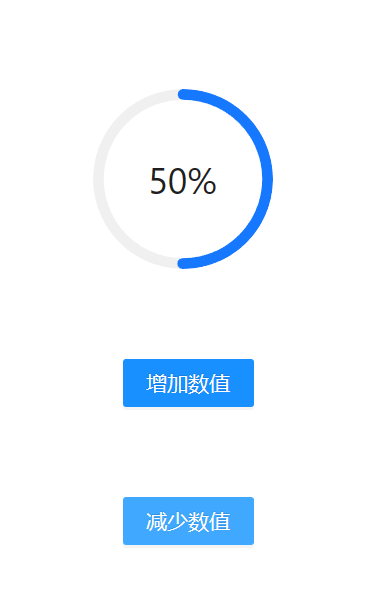
代码展示
<template>

    <ARow>

        <ACol>

            <div style="padding:30px">    <a-progress type="circle" :percent="number" />

            </div>

            <div style="padding:30px 0 30px 50px">    <a-button type="primary" @click="addNumber">增加数值</a-button>

            </div>

                <div style="padding:30px 0 30px 50px">

                <a-button type="primary" @click="minNumber">增加数值</a-button>

                </div>

        </ACol>

    </ARow>

</template>

<script setup lang="ts">

const number=ref(80);

const addNumber = () => {

number.value=number.value+10;

};

const minNumber = () => {

number.value=number.value-10;

};

</script>
代码解读
需求实战二
组件来源
- ant-design-vue
- Button 按钮
- Progress 进度条
- Slider 滑动输入条
- Space 间距
效果展示

代码展示
<template>

    <ARow style="display: flex; justify-content: center; align-items: center; ">

    <ACol >

            <div style="display: flex; justify-content: center; align-items: center; padding: 30px 0;">

                    <a-progress type="circle" :percent="number" />

                </div>

            <div style="display: flex; justify-content: center; align-items: center; padding: 30px 0;">

                <div style="padding:0 10px 0 0">

                <a-button type="primary" @click="addNumber">增加百分之十</a-button>

                </div>

                <div style="padding:0 0 0 10px">

                <a-button type="primary" @click="minNumber">减少百分之十</a-button>

                </div>

            </div>

            <div style="padding: 30px 0;">

                    <a-slider id="test" v-model:value="number" :disabled="disabled" />

                </div>

            <div style="display: flex; justify-content: center; align-items: center; padding: 30px 0;">

            <a-space :size="number">

                <a-button type="primary">Button</a-button>

                <a-button type="primary">Button</a-button>

                <a-button type="primary">Button</a-button>

                <a-button type="primary">Button</a-button>

            </a-space>

            </div>

        </ACol>

    </ARow>

</template>

<script setup lang="ts">

const number=ref(80);

const disabled=ref(false);

const addNumber = () => {

number.value=number.value+10;

};

const minNumber = () => {

number.value=number.value-10;

};

</script>
代码解读
需求实战三
组件来源
- JS代码
效果展示
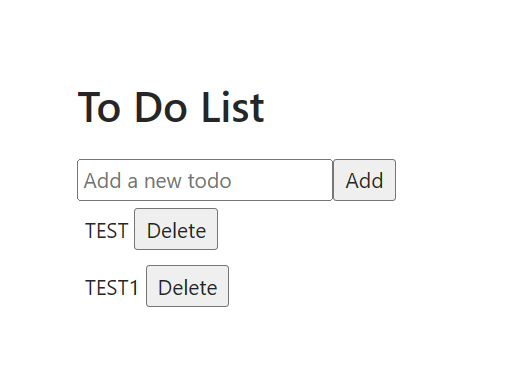
代码展示
<template>

    <div>

        <h1>To Do List</h1>

        <input v-model="newTodo" placeholder="Add a new todo" />

        <button @click="addTodo">Add</button>

        <ul>

            <li style="padding:5px" v-for="(todo, index) in todos" :key="index">

                {{ todo }}

                <button @click="deleteTodo(index)">Delete</button>

            </li>

        </ul>

    </div>

</template>

<script setup lang="ts">

const todos = ref<string[]>([]);

const newTodo = ref<string>('');

const addTodo = () => {

    if (newTodo.value !== '') {

        todos.value.push(newTodo.value);

        newTodo.value = '';

    }

};

const deleteTodo = (index: number) => {

    todos.value.splice(index, 1);

};

</script>
需求实战四
组件来源
- ant-design-vue
- Button 按钮
- Input 输入框
代码解读
效果展示
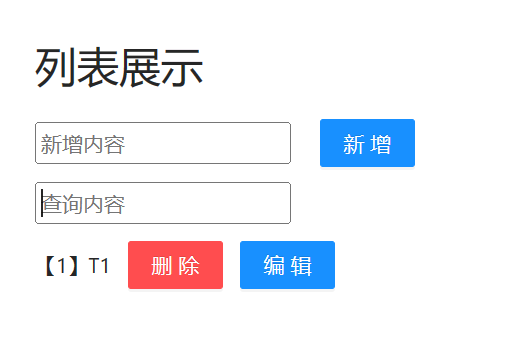
代码展示
<template>
<div>
<h1>列表展示</h1>
<input v-model="newTodo" placeholder="新增内容" />
   
<a-button type="primary" @click="addTodo">新增</a-button>
<div style="padding:10px 0 0 0">
<input v-model="searchQuery" placeholder="查询内容" />
<ul>
<li style="padding:5px 0 0 0; display: flex; align-items: center;" v-for="(todo, index) in filteredTodos" :key="index">
{{"【"+(index+1)+"】"+ todo }}   
<a-button type="primary" danger @click="deleteTodo(index)">删除</a-button>
   
<a-button type="primary" @click="editTodo(index)">编辑</a-button>
<br>
<br>
</li>
</ul>
</div>
</div>
</template>
<script setup lang="ts">
const todos = ref<string[]>([]);
const newTodo = ref<string>('');
const searchQuery = ref<string>('');
const addTodo = () => {
if (newTodo.value !== '') {
todos.value.push(newTodo.value);
newTodo.value = '';
}
};
const deleteTodo = (index: number) => {
todos.value.splice(index, 1);
};
const editTodo = (index: number) => {
const newContent = prompt("Enter new content:");
if (newContent !== null) {
todos.value[index] = newContent;
}
};
const filteredTodos = computed(() => {
return todos.value.filter(todo => {
return todo.toLowerCase().includes(searchQuery.value.toLowerCase());
});
});
</script>代码解读
【技术实战】Vue技术实战【一】的更多相关文章
- Vue应用框架整合与实战--Vue技术生态圈篇
实用框架以及工具 UI组件 开发框架 实用库 服务端 辅助工具 应用实例 Demo示例 UI组件 Element-UI ★13489 - 饿了么出品的Vue2的web UI工具套件 Vux ★8133 ...
- 躬身入局,干货分享,2023年春招后端技术岗(Python)面试实战教程,Offer今始为君发
早春二月,研发倍忙,杂花生树,群鸥竟飞.为什么?因为春季招聘,无论是应届生,还是职场老鸟,都在摩拳擦掌,秣马厉兵,准备在面试场上一较身手,既分高下,也决Offer,本次我们打响春招第一炮,躬身入局,让 ...
- 深度解析SDN——利益、战略、技术、实践(实战派专家力作,业内众多专家推荐)
深度解析SDN——利益.战略.技术.实践(实战派专家力作,业内众多专家推荐) 张卫峰 编 ISBN 978-7-121-21821-7 2013年11月出版 定价:59.00元 232页 16开 ...
- 基于TC技术的网络流量控制实战
本文转载在:http://server.it168.com/a2010/0426/878/000000878406.shtml 基于TC技术的网络流量控制实战 650) this.width=650; ...
- 超级干货:动态防御WAF技术原理及编程实战!
本文带给大家的内容是动态防御WAF的技术原理及编程实战. 将通过介绍ShareWAF的核心技术点,向大家展示动态防御的优势.实现思路,并以编程实战的方式向大家展示如何在WAF产品开发过程中应用动态防御 ...
- 简读《ASP.NET Core技术内幕与项目实战》之3:配置
特别说明:1.本系列内容主要基于杨中科老师的书籍<ASP.NET Core技术内幕与项目实战>及配套的B站视频视频教程,同时会增加极少部分的小知识点2.本系列教程主要目的是提炼知识点,追求 ...
- 快读《ASP.NET Core技术内幕与项目实战》EFCore2.5:集合查询原理揭秘(IQueryable和IEnumerable)
本节内容,涉及4.6(P116-P130).主要NuGet包:如前述章节 一.LINQ和EFCore的集合查询扩展方法的区别 1.LINQ和EFCore中的集合查询扩展方法,虽然命名和使用完全一样,都 ...
- 快读《ASP.NET Core技术内幕与项目实战》WebApi3.1:WebApi最佳实践
本节内容,涉及到6.1-6.6(P155-182),以WebApi说明为主.主要NuGet包:无 一.创建WebApi的最佳实践,综合了RPC和Restful两种风格的特点 1 //定义Person类 ...
- 《ASP.NET Core技术内幕与项目实战》精简集-目录
本系列是杨中科2022年最新作品<ASP.NET Core技术内幕与项目实战>及B站配套视频(强插点赞)的精简集,是一个读书笔记.总结和提炼了主要知识点,遵守代码优先原则,以利于快速复习和 ...
- 从开发一款基于Vue技术栈的全栈热重载生产环境脚手架,我学到了什么
浏览文章前 这一期,我分享给大家三点看源码的小技巧,这也是从别的大佬那总结的. 被反复使用的代码 这样的代码是一个软件的重点函数,一个大神的写法有很多精华值得学习. 穿越时间的代码 如果一段代码10年 ...
随机推荐
- Font 'STSong-Light' with 'UniGB-UCS2-H' is not recognized. 问题解决方法
先说结论,这是由于itext和asian版本不一致造成的. 如果你的需求仅仅是生成pdf,则使用解决办法1,如果需求有导出word则使用解决办法2 解决办法1: 将pom文件的com.lowagie ...
- 打开conda环境报错:UnicodeDecodeError: ‘gbk‘ codec can‘t decode byte 0x9a in position 317: illegal multibyt
解决打开conda环境报错:UnicodeDecodeError: 'gbk' codec can't decode byte 0x9a in position 317: illegal multib ...
- Prism Sample 17-BasicRegionNavigation
本例是基础的导航应用 在窗口中布局了2个按钮,一个区域 <DockPanel LastChildFill="True"> <StackPanel Orientat ...
- Prism Sample 11-UsingDelegateCommands
本例的知识点,全在ViewModel中,看代码: 1 public class MainWindowViewModel : BindableBase 2 { 3 private bool _isEna ...
- 2023-04-04:使用 Golang 和 ffmpeg-go 库实现 demuxing_decoding.c,轻松掌握音视频分离解码技巧。
2023-04-04:使用 Golang 和 ffmpeg-go 库实现 demuxing_decoding.c,轻松掌握音视频分离解码技巧. 答案2023-04-05: 使用github/moonf ...
- 2023-01-15:销售员。编写一个SQL查询,报告没有任何与名为 “RED” 的公司相关的订单的所有销售人员的姓名。以 任意顺序 返回结果表。 DROP TABLE IF EXISTS `com
2023-01-15:销售员.编写一个SQL查询,报告没有任何与名为 "RED" 的公司相关的订单的所有销售人员的姓名.以 任意顺序 返回结果表. DROP TABLE IF EX ...
- 2021-06-19:交错字符串。 有三个字符串s1,s2,s3。判断s3是否由s1和s2交错组成的。比如s1=“abc“,s2=“123“,s3=“12ab3c“,应该返回true,因为s3去掉12
2021-06-19:交错字符串. 有三个字符串s1,s2,s3.判断s3是否由s1和s2交错组成的.比如s1="abc",s2="123",s3=" ...
- 常用设计模式之.Net示例代码合集
每一次初学者粉丝朋友,在后台向我咨询编程问题,我除了给他们指导学习路线,我都会建议他们学完基础知识后,一定要要注重编程规范,学习设计模式,修炼内功. 虽然说很多程序员,他们日常主要工作是CRUD,但是 ...
- pages.json 文件:pages 节点
pages uni-app 通过 pages 节点配置应用由哪些页面组成,pages 节点接收一个数组,数组每个项都是一个对象,其属性值如下: 属性 类型 默认值 描述 path String 配 ...
- 二次封装Element UI Table实现动态列
开发中是否会遇见在一个页面中加载的table的列是不固定的,列名需要根据后台数据而动态加载:so element ui 的table 已经不再满足需求,我们得在他的基础上再次封装 增加 refacto ...