
.net项目在linux平台的CI流程(基于Jenkins+mono+jexus)
内容较多,主要分为以下4方面内容:
- Jenkins的安装部署(centos 7+)
- .net在linux平台CI流程所需的插件管理&配置
- Jenkins配置连接Gitlab(也可使用对应插件连接SVN,TFS作为源码仓库)
- 基于Jenkins的CI流程构建
Jenkins安装部署
- 下载[Jenkins最新版];
- 在服务器上jenkins.war所在目录建立脚本:start-jenkins.sh:
#!/bin/bash
JENKINS_ROOT=/opt/jenkins
export JENKINS_HOME=$JENKINS_ROOT/jenkins_home
nohup java -jar $JENKINS_ROOT/jenkins.war --httpPort= > jenkins.log >& &
- 修改脚本执行权限:
chmod a+x start-jenkins.sh
- 执行脚本:
/bin/bash start-jenkins.sh
- 访问服务器地址(测试服务器地址,脚本指定端口):
http://10.200.XX.XX:8000
.net在linux平台CI流程所需的插件管理&配置
Jenkins在当前开发环境下所需要的插件列表如下:
- Docker相关插件
- CloudBees Docker Build and Publish plugin (This plugin provides the ability to build projects with a Dockerfile, and publish the resultant tagged image (repo) to the docker registry.)
- Docker plugin (This plugin allows slaves to be dynamically provisioned using Docker.)
- docker-build-step (This plugin allows to add various Docker commands into you job as a build step.)
- CaaS插件
- Kubernates plugin (This plugin allows slaves to be dynamically provisioned on multiple Docker hosts using Kubernetes.)
- Building插件
- Git plugin
- Nuget plugin
- MSBuild
- Gitlab Connector
- Gitlab Hook Plugin
- GitLab Plugin
Jenkins配置连接Gitlab
- 在jenkins服务器上新生成SSH key
- 通过以下指令检查服务器是否已经存在SSH Key:
cat ~/.ssh/id_rsa.pub
- 如果没有Key,则通过以下指令新生成一个Key:
ssh-keygen -t rsa -C "jiakai@gridsum.com"
- 通过刚才的指令: cat ~/.ssh/id_rsa.pub 获得生成的Key(公钥部分)
- 在生成Key对应的账户个人"Profile Settings"下的"SSH Keys"标签下,新增这个Key, 新增的Title直接设置为账户名即可
- 完成后在"Your SSH Keys"下可以看到新增的SSH Key公钥信息
基于Jenkins的CI流程构建

Jenkins内部的各流程说明如下:
- 测试项目目录结构如下图:
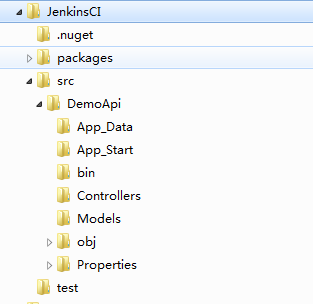
- Source Copy
- 该过程对应Jenkins工作项中的"源码管理"工作区,在该工作区中选中"Git",配置Repository URL及上一步已经添加好的Credential即可,并制定需要编译的分支,比如"master"分支;
- 该流程配置完毕后,可保存工作项,然后"立即构建",正确的话将在Jenkins工作区目录的~/workspace/${JobName}/路径下,查看到从制定的Git Repository上拉取的源码;
- Nuget还原包
- Nuget还原包依赖nuget.exe(需要mono),下载nuget.exe(这里我下载的是2.8.6版本),拷贝至Jenkins服务器的Jenkins运行目录下的.nuget文件夹;
- 在Nuget还原工作项的"Execute shell"中,使用nuget.exe还原包即可:
mono ../../.nuget/nuget.exe restore ${solution file path(.sln)} - 注:nuget2.5版本缺少必要的操作(restore),不可用。
- 在执行过程可能报以下错误:
WARNING: Error: TrustFailure (The authentication or decryption has failed.)
WARNING: Error: TrustFailure (The authentication or decryption has failed.)
WARNING: Error: TrustFailure (The authentication or decryption has failed.)
WARNING: Error: TrustFailure (The authentication or decryption has failed.)
WARNING: Error: TrustFailure (The authentication or decryption has failed.)
需要引入秘钥证书至machine store(注意不要引入到user store):
mozroots --import --machine --sync
certmgr -ssl -m https://go.microsoft.com
certmgr -ssl -m https://nugetgallery.blob.core.windows.net
certmgr -ssl -m https://nuget.org
- mono编译包
- 安装mono后(以安装路径/usr/mono为例),重启 jenkins,查看jenkins系统设置中的环境变量,其中的PATH变量,并确保mono的bin目录已经在PATH环境变量之中:

然后直接调用xbuild编译项目:
xbuild TestApi.sln
- [可选步骤]将编译后的文件形成发布文件,例如:
# Get the deploy files Ready
if [ ! -x ./deploy ] ;then
mkdir deploy
else
rm ./deploy/* -rf
fi
cp ./src/DemoApi/bin ./deploy/bin -Rf
cp ./src/DemoApi/packages.config ./deploy/packages.config -f
cp ./src/DemoApi/Web.config ./deploy/Web.config -f
cp ./src/DemoApi/Global.asax ./deploy/Global.asax -f
- 构建Docker镜像所需的Dockerfile
- 由于我们这里需要在jexus中部署我们的demo api,因此采用公司docker源中的jexus服务器V3版镜像:
if [ -f ./Dockerfile ] ;then
rm ./Dockerfile -f
fi
cat > ./Dockerfile <<EOF
FROM .xxx.xxx.xxx:/library/mono-jexus:v3
COPY ./deploy /data
CMD /usr/jexus/jws start && /usr/sbin/sshd -D
EOF
- 由于我们这里需要在jexus中部署我们的demo api,因此采用公司docker源中的jexus服务器V3版镜像:
- 打包Docker镜像并推送至公司的Docker源
- 这里我们用到CloudBees Docker Build and Publish plugin这个插件
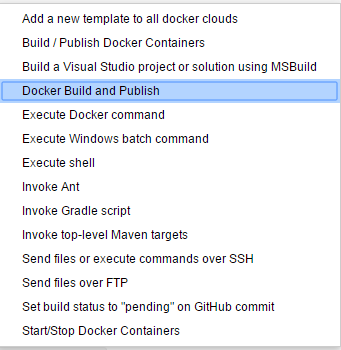
- 按照如下图所示的配置

- 在“高级设置”中,勾选"Skip tag as latest","Force Pull",并且,如果Dockerfile不在默认(./)目录,还需要在“Dockerfile Path”中指定Dockerfile的具体位置:

- 删除过期的Docker镜像
在成功生成新版本的镜像之后,需要删除(或untag)之前版本的镜像:
#Untag the expired images except the newest image id
#Init the parameters
IMG_NAME=demoapi
IMG_URL=/gridsum/ld/demoapi
(docker images | grep ${IMG_NAME} | awk '{print $2}') >.version
#Delete expired images
count=
maxnum=$(wc -l .version | awk '{print $1}')
 ] ;then
sort .version | while read line
do
if [ $count -lt $maxnum ] ;then
    docker rmi $IMG_URL:$line
    let count=count+
fi
done
fi
#Clean the parameters
unset IMG_NAME
unset IMG_URL
rm .version -f
- 建立项目对应的RC文件,注意在RC中指定的Docker镜像版本为本次build的镜像版本:
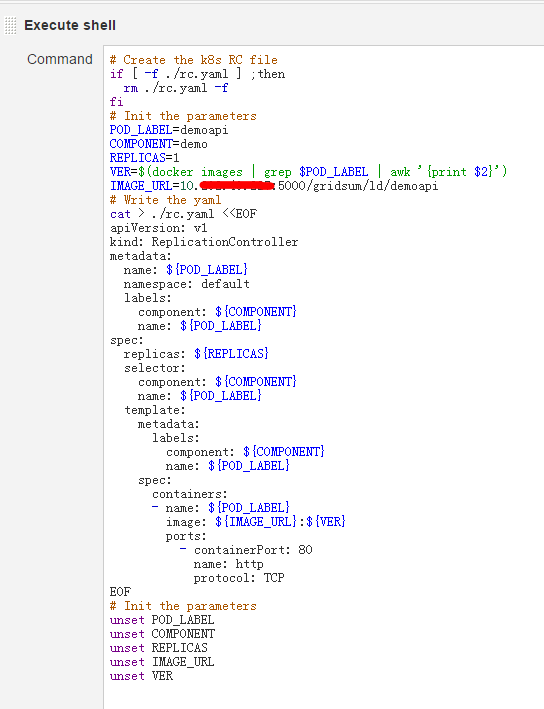
- 启动新的容器:
# Delete the existed rc by kubectl
#NEED to redrect stderr into null or the BUILD process will be FAILED if there IS a RC running
/opt/jenkins/kube/kubectl -s http://10.200.xx.xx:8080 delete rc demoapi 2>/dev/null
#Create the k8s rc by kubectl
/opt/jenkins/kube/kubectl -s http://10.200.xx.xx:8080 create -f ./rc.yaml
- 容器对应的服务最好手动建立,因为服务是常态化的,一般不随源代码版本更迭发生变化,因此服务的创建可以实现创建好;
- 最后对已发布的服务进行简单的功能测试,通过curl即可:

.net项目在linux平台的CI流程(基于Jenkins+mono+jexus)的更多相关文章
- 转:sock_ev——linux平台socket事件框架(基于数据报的测试程序) .
上一篇已经做过注释,这一篇直接上代码 /******************************************************************************** ...
- 转:sock_ev——linux平台socket事件框架(基于字节流的测试程序) .
原文:http://blog.csdn.net/gdutliuyun827/article/details/8257186 由于工作与学习的需要,写了一个socket的事件处理框架,在公司写的已经使用 ...
- 转载~Linux 平台下阅读源码的工具
Linux 平台下阅读源码的工具 前言 看源代码是一个程序员必须经历的事情,也是可以提升能力的一个捷径.个人认为: 要完全掌握一个软件的方法只有阅读源码在Windows下有sourceinsight这 ...
- CentOS安装gitlab,gerrit,jenkins并配置ci流程
CentOS安装gitlab,gerrit,jenkins并配置ci流程 By Wenbin juandx@163.com 2016/4/9 这是我参考了网上很多的文档,配置了这三个软件在一个机器上, ...
- 基于Linux平台的libpcap源码分析和优化
目录 1..... libpcap简介... 1 2..... libpcap捕包过程... 2 2.1 数据包基本捕包流程... 2 2.2 libpcap捕包过程... ...
- Linux平台延时之sleep、usleep、nanosleep、select比较
Linux平台延时之sleep.usleep.nanosleep.select比较 标签: 嵌入式thread线程cpu多线程 2015-05-05 15:28 369人阅读 评论(0) 收藏 举报 ...
- VS2010下创建的VB.NET项目打包发布安装包的流程
VS2010下创建的VB.NET项目打包发布安装包的流程 参考:http://blog.csdn.net/liuyanlinglanq/article/details/8609675 关于relea ...
- 服务端技术进阶(一)web项目的部署(发布)流程
web项目的部署(发布)流程 在myeclipse下新建web工程abc.系统设置默认如下: 项目保存位置:workspace目录\abc.Source文件夹:src,保存所有的java类文件(.ja ...
- Linux平台安装MongoDB及使用Docker安装MongoDB
一.Linux平台安装MongoDB MongoDB 提供了 linux 各发行版本 64 位的安装包,你可以在官网下载安装包. 下载地址:https://www.mongodb.com/downlo ...
随机推荐
- OC 单例模式
OC 单例模式 概念 单例模式是一种常用的软件设计模式.在它的核心结构中只包含一个被称为单例的特殊类.通过单例模式可以保证系统中一个类只有一个实例而且该实例易于外界访问,从而方便对实例个数的控制并节约 ...
- CYQ.Data 数据层框架 CYQ.Data 数据框架 使用篇四 MAction 增删改
本篇内容概要 本篇继续上一篇内容,本节介绍所有增删改的相关操作. 1:添加数据 Insert方法 2:删除数据 Delete方法 3:更新数据 Update方法 一:添加操作 方法原型: public ...
- SQLite学习笔记(九)&&pager模块
概述 通过上一篇文章的分析,我们知道了pager模块在整个sqlite中所处的位置.它是sqlite的核心模块,充当了多种重要角色.作为一个事务管理器,它通过并发控制和故障恢复实现事务的ACID特性, ...
- IP数据报首部解析
IP数据报首部的格式,普通20字节. 4位版本号:当前4--IPv4. 4首部长度:首部长度 8位服务类型TOS: 3bits(优先权)+ 4bits(类型--最小延迟+最大吞吐量+最高可靠性+最小费 ...
- SQL Server 2008 R2——用CTE进行递归计算求解累计值
=================================版权声明================================= 版权声明:原创文章 谢绝转载 请通过右侧公告中的“联系邮 ...
- CSS/CSS3常用样式小结
1.强制文本单行显示: white-space:nowrap; 多行文本最后省略号: display: -webkit-box; -webkit-line-clamp:2; overflow: hid ...
- POJ3398Perfect Service[树形DP 树的最大独立集变形]
Perfect Service Time Limit: 2000MS Memory Limit: 65536K Total Submissions: 1518 Accepted: 733 De ...
- UVALive - 4108 SKYLINE[线段树]
UVALive - 4108 SKYLINE Time Limit: 3000MS 64bit IO Format: %lld & %llu Submit Status uDebug ...
- Spring中的JDK动态代理
Spring中的JDK动态代理 在JDK1.3以后提供了动态代理的技术,允许开发者在运行期创建接口的代理实例.在Sun刚推出动态代理时,还很难想象它有多大的实际用途,现在动态代理是实现AOP的绝好底层 ...
- CDN缓存机制
CDN也叫内容分发网络,是一个经策略性部署的整体系统,包括分布式储存.负载均衡.网络请求的重定向和内容管理4个要件.而其中内容管理和全局的网络流量管理是CDN的核心所在.通过用户就进行和服务器负载的判 ...