
Finder Error code -36 “访达” 错误代码-36
导致这个问题的原因是你的iCloud (iCloud和iCloud Drive是不一样的) 快满了。 如果你想解决这个问题,有以下三个方法:
1、多买苹果iCloud。(是的,苹果现在太恶心了。但这是最简单的方法。)
2、在关闭 iCloud Drive之前,将数据复制/移出 iCloud Drive文件夹,Parallels Desktop 虚拟操作系统是最简单的方法。 Mac root 用户无法将数据移出 iCloud Drive文件夹
3、关闭iCloud Drive。(但是,如果您单击错误的按钮,您会丢失计算机中的大量数据,并且无法从iCloud Drive找回它们,或者再次从iCloud Drive下载它们非常慢,这可能会非常危险 很难。尤其是当你关闭 iCloud Drive时,MacOS 会要求你保留一份副本(保存在~/iCloud Drive (Archive)文件夹中),并且会将数据上传到 iCloud Drive,上传速度很慢。如果按错按钮取消,就会丢失数据。)
最重要的是,这一切麻烦都是因为Apple希望你继续使用iCoud并购买iCloud而引起的。
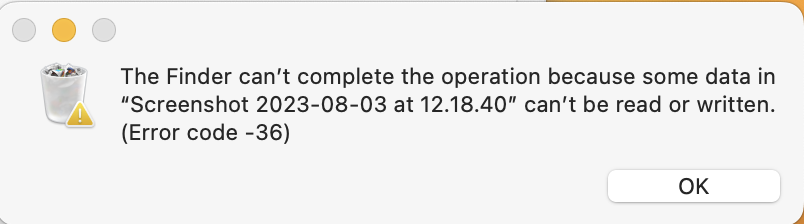
“访达”不能完成该操作,因为不能读取或写入“”中的某些数据。 (错误代码-36)
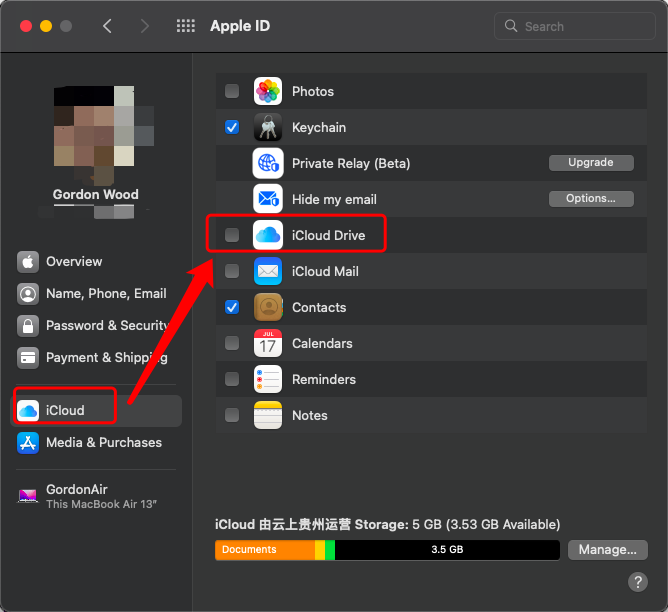
Because your iCloud (iCloud and iCloud Drive is different) is almont full. If you want to fix this problem, there are 3 ways:
- buy more apple iCloud.(Yes, Apple is so disgusting now. But this is easist way.)
- Parallels Desktop Virtual OS is the easist way copy/move the data out iCloud Drive folders before you close the iCloud Drive. Mac root user can't move the data out iCloud Drive folders.
- close the iCloud Drive.( But this could be very dangerouse if you click the wrong button, you lose a lot of data in your computer, and you can not find them back from the iCloud Drive, or download them from the iCloud Drive again is very slow and difficult. Especially when you close the iCloud Drive, MacOS will ask you to keep a copy (save in~/iCloud Drive (Archive) folder), and it will upload the data to the iCloud, uploading is very slow. If you cancel it in the wrong button, you will lose the data. )
Above all, all this trouble is caused from Apple want to you keep using iCoud and buy iCloud.
https://discussions.apple.com/thread/255043358?answerId=260116750022
Finder Error code -36 “访达” 错误代码-36的更多相关文章
- Mac实用技巧之:访达/Finder
更多Mac实用技巧系列文章请访问我的博客:Mac实用技巧系列文章 Finder就相当于windows XP系统的『我的电脑』或win7/win10系统里的『计算机』(打开后叫资源管理器),find是查 ...
- Android为TV端助力 MediaPlayer 错误代码(error code)总结 转载
public static final int MEDIA_ERROR_IO Added in API level 17 File or network related operation error ...
- 工控随笔_16_西门子_S7-200.Smart软件安装兼容性说明和错误代码:error code hr=0x80070430
现在西门子的软件是更新换代太快了,前几年还是Step 7 Micro/Win,后来又出了S7-200 Smart PLC,理所当然的编程调试软件也水涨船高,出了新的Step 7 Micro/Win ...
- Error Code: 1414. OUT or INOUT argument 2 for routine company.new_procedure is not a variable or NEW
1.错误描述 16:27:36 call new_procedure(20150112,1) Error Code: 1414. OUT or INOUT argument 2 for routine ...
- COM Error Code(HRESULT)部分摘录
Return value/code Description 0x00030200 STG_S_CONVERTED The underlying file was converted to compou ...
- 【解决】查询无法完成,因为其包含的查找列数已超过管理员强制实施的查找列阈值。Error code=0x80070093; Error source=Groove
前因: 修改了SharePoint Server 2013 下面的文档库的名称,原先2个汉字,现在8个汉字.结果,SkyDrive Pro 就无法同步了,无论是停止重新同步还是手动填写进行同步都不可以 ...
- win8.1中安装sql2014 0x800F0906 【 Error while enabling Windows feature : NetFx3, Error Code : -2146498298 】
安装sql2012 需要安装net3.5 没有的话 安装不成功 Error while enabling Windows feature : NetFx3, Error Code : -214649 ...
- Error Code: 1318. Incorrect number of arguments for PROCEDURE company.new_procedure; expected 2, got
1.错误叙述性说明 20:27:34 call new_procedure(20150112) Error Code: 1318. Incorrect number of arguments for ...
- ORA-00600: internal error code, arguments: [kgl-no-mutex-held]
一.环境 windows oracle 11.2.0.4 RAC 二.问题现象 1.连接数据库后,无法查询 2.报错信息:ORA-00600: internal error code, argumen ...
- loadrunner12: Error -27492: "HttpSendRequest" failed, Windows error code=8
这个问题我在网上看到有这样的解释:1.timeout时间超时设置问题2.Run-Time Settings -> Preferences -> Advanced. 确定此选项未被选中:&q ...
随机推荐
- Harbor 简要安装说明
Harbor 简要安装说明 下载最新的离线安装文件 链接:https://pan.baidu.com/s/1ZEjgnI3YmhsdVOm7h7SWcQ 提取码:GSNB 复制这段内容后打开百度网盘手 ...
- 结论&定理大全
定理 1:包含 \(0\) 与 \(2^k-1\) 的按位与或空间和 \(k\) 个点的有传递性的有向图形成双射 证明: 空间->传递闭包:对于任意两个位 \(i,j\),若某个数包含 \(i\ ...
- 火狐谷歌浏览器去掉input type=number时控件的方法
html 默认:<input type="number" /></br> 处理:<input type="number" clas ...
- Gin 框架之Cookie与Session
目录 一.Cookie和Session的由来 二.Cookie简介 1. 什么是Cookie 2. Cookie规范 3. 安全性 4. Cookie 关键配置 三.Session简介 1. 什么是S ...
- word 常用设置
目录 目录 关闭 Word 句首字母自动大写功能 1 Word 生成目录 1 Word 快速调整标题级别 1 Word 关闭句首字母自动大写功能 参考:https://zhuanlan.zhihu.c ...
- Python 多线程实现爬取图片
前阵子网上看到有人写爬取妹子图的派森代码,于是乎我也想写一个教程,很多教程都是调用的第三方模块,今天就使用原生库来爬,并且扩展实现了图片鉴定,图片去重等操作,经过了爬站验证,稳如老狗,我已经爬了几万张 ...
- C/C++ x64 Inline Hook 代码封装
Hook 技术常被叫做挂钩技术,挂钩技术其实早在DOS时代就已经存在了,该技术是Windows系统用于替代DOS中断机制的具体实现,钩子的含义就是在程序还没有调用系统函数之前,钩子捕获调用消息并获得控 ...
- C/C++ 通过CRC32实现反破解
我们可以通过使用CRC32算法计算出程序的CRC字节,并将其写入到PE文件的空缺位置,这样当程序再次运行时,来检测这个标志,是否与计算出来的标志一致,来决定是否运行程序,一旦程序被打补丁,其crc32 ...
- 月薪10K码农,跳槽到40K架构师,技术学习路线图汇总
作者:小傅哥 博客:https://bugstack.cn 沉淀.分享.成长,让自己和他人都能有所收获! 一.介绍 Hey there! Roadmap to becoming a web devel ...
- Docker从认识到实践再到底层原理(二-1)|容器技术发展史+虚拟化容器概念和简介
前言 那么这里博主先安利一些干货满满的专栏了! 首先是博主的高质量博客的汇总,这个专栏里面的博客,都是博主最最用心写的一部分,干货满满,希望对大家有帮助. 高质量博客汇总 然后就是博主最近最花时间的一 ...