
Eclipse使用xdoclet1.2.3 生成hibernate配置文件和映射文件
用ant和xdoclet生成hibernate配置文件可以为我们省去很多配置的操作,废话不多说,直接给栗子:
测试环境:
eclipse:Eclipse Java EE IDE for Web Developers 4.6.0
ant:eclipse自带ant,无需下载配置
xdoclet:xdoclet-1.2.3
hibernate:hibernate-distribution-3.3.2.GA-dist + hibernate-annotations-3.4.0.GA(由于是老版本所以是有两个的)
1,、配置xdoclet
首先解压下载好的xdoclet1.2.3:
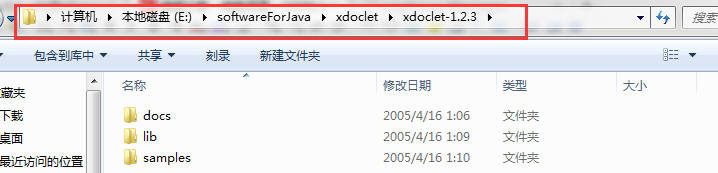
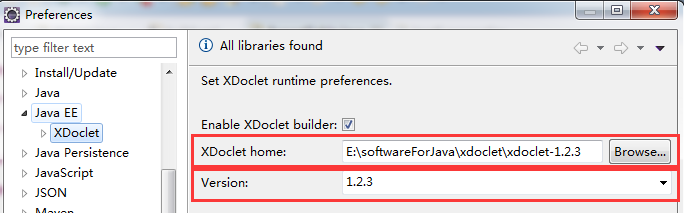
打开eclipse,进入window》preferences》javaEE》XDoclet,选择xdoclet版本 Version:1.2.3(自带ant只支持1.2.1-1.2.3)和XDoclet Home:点击浏览选择刚才安装的xdoclet根路径,这里是:E:\softwareForJava\xdoclet\xdoclet-1.2.3 ,点击OK,如下图
2.示例程序
创建一个java project:xdocletTest。
在工程上右键添加一个名为build.xml的文件
在工程上右键添加一个名为lib的文件夹,把hibernate依赖的jar包及mysql驱动jar包都放到lib文件夹下
两个实体类一个为Group(组),一个为(User)
为了更好的显示日志信息,添加log4j.properties文件到src路径下
(1)配置实体类
User.java
- package com.xdoclet.model;
- /**
- * @hibernate.class
- * table="t_user"
- * @author welcome
- */
- public class User {
- private String userId;
- private String userName;
- private Group group;
- /**
- * @hibernate.id column="userId"
- * generator-class="assigned"
- */
- public String getUserId() {
- return userId;
- }
- public void setUserId(String userId) {
- this.userId = userId;
- }
- /**
- * @hibernate.property
- */
- public String getUserName() {
- return userName;
- }
- public void setUserName(String userName) {
- this.userName = userName;
- }
- /**
- * @hibernate.many-to-one
- * column="groupId"
- * cascade="all"
- * class="com.xdoclet.model.Group"
- * @param group
- */
- public Group getGroup() {
- return group;
- }
- public void setGroup(Group group) {
- this.group = group;
- }
- }
Group.java
- package com.xdoclet.model;
- import java.util.Set;
- /**
- * @hibernate.class
- * table="t_group"
- * @author welcome
- */
- public class Group {
- private String groupId;
- private String groupName;
- private Set userSets;
- /**
- * @hibernate.id
- * column="groupId"
- * generator-class="assigned"
- * @return
- */
- public String getGroupId() {
- return groupId;
- }
- public void setGroupId(String groupId) {
- this.groupId = groupId;
- }
- /**
- * @hibernate.property
- * column="groupName"
- * @return
- */
- public String getGroupName() {
- return groupName;
- }
- public void setGroupName(String groupName) {
- this.groupName = groupName;
- }
- /**
- * @hibernate.set inverse="true"
- * @hibernate.collection-key column="groupId"
- * @hibernate.collection-one-to-many
- * class="com.xdoclet.model.User"
- * @return
- */
- public Set getUserSets() {
- return userSets;
- }
- public void setUserSets(Set userSets) {
- this.userSets = userSets;
- }
- }
注意:实体类中的注解是xdoclet的,可以去查看xdoclet关于hibernate的相关文档http://xdoclet.sourceforge.net/xdoclet/tags/hibernate-tags.html
(2)log4j.properties配置文件
- #All level less than INFO will be logged
- log4j.rootLogger=INFO,A1
- #A1 is the output device
- log4j.appender.A1=org.apache.log4j.FileAppender
- log4j.appender.A1.File=e:/log4j.htm
- #use html layout
- log4j.appender.A1.layout=org.apache.log4j.HTMLLayout
此文件会将日志信息记录为html格式的文件,然后输出到E盘下。
(3)build.xml
- <span style="font-size:14px;"><?xml version="1.0" encoding="GBK"?>
- <project name="使用xdoclet映射hibernate" basedir=".">
- <!-- 定义源文件目录变量 -->
- <property name="src.dir" value="${basedir}/src" />
- <!-- 定义xdoclet的目录 -->
- <property name="xdoclet.home" value="E:\softwareForJava\xdoclet\xdoclet-1.2.3">
- </property>
- <!-- 定义构建路径 -->
- <path id="xdoclet.classpath">
- <fileset dir="${xdoclet.home}/lib">
- <include name="*.jar" />
- </fileset>
- </path>
- <path id="lib.classpath">
- <fileset dir="${xdoclet.home}/lib">
- <include name="**/*.jar" />
- </fileset>
- <fileset dir="${basedir}/lib">
- <include name="**/*.jar" />
- </fileset>
- </path>
- <!-- 生成Hibernate的映射文件 -->
- <target name="生成Hibernate的映射文件" unless="hibernatedoclet.unnecessary" description="Generate Hibernate mapping files">
- <taskdef name="hibernatedoclet" classname="xdoclet.modules.hibernate.HibernateDocletTask" classpathref="xdoclet.classpath" />
- <hibernatedoclet destdir="${src.dir}" mergedir="${src.dir}" excludedtags="@version,@author,@todo,@see" verbose="false">
- <fileset dir="${src.dir}">
- <include name="com/xdoclet/model/*.java" />
- </fileset>
- <hibernate version="3.0" />
- </hibernatedoclet>
- </target>
- <!-- 生成Hibernate配置文件 -->
- <target name="生成Hibernate配置文件" depends="生成Hibernate的映射文件">
- <taskdef name="hibernatedoclet" classname="xdoclet.modules.hibernate.HibernateDocletTask" classpathref="xdoclet.classpath" />
- <hibernatedoclet destdir="${src.dir}">
- <fileset dir="${src.dir}">
- <include name="com/xdoclet/model/*.java" />
- </fileset>
- <hibernatecfg destdir="${src.dir}" version="3.0" hbm2ddl="create-update" jdbcUrl="jdbc:mysql://localhost:3306/oa" driver="com.mysql.jdbc.Driver" username="root" password="123456" dialect="org.hibernate.dialect.MySQL5Dialect" showSql="true">
- <otherProperty name="hbm2ddl" value="create-update" />
- <otherProperty name="format_sql" value="true" />
- </hibernatecfg>
- </hibernatedoclet>
- </target>
- <!-- 导出数据库表结构 -->
- <target name="导出数据库表结构" depends="生成Hibernate配置文件">
- <taskdef name="schemaexport" classname="org.hibernate.tool.hbm2ddl.SchemaExportTask" classpathref="lib.classpath" />
- <property name="hibernate.dialect" value="org.hibernate.dialect.MySQL5Dialect" />
- <property name="hibernate.format_sql" value="true" />
- <property name="hibernate.use_sql_comments" value="true" />
- <schemaexport output="schema-export.sql" quiet="no" text="yes" drop="no" delimiter=";">
- <fileset dir="${basedir}/src">
- <include name="com/xdoclet/model/*.hbm.xml" />
- </fileset>
- </schemaexport>
- </target>
- </project></span>
这里需要注意的是这两个元素
<otherProperty name="hbm2ddl" value="create-update" />
<otherProperty name="format_sql" value="true" />
在xdoclet1.0.4以后的版本中hbm2ddl需要以额外的方式来设置,之前我按照1.0.4版本中的方式去设置,此属性死活不会出现在hibernate.cfg.xml中,最后得知这是xdoclet的一个bug。(第一个我玩了大半天。。。)
(4)ExportTable.java (生成数据库表结构)
- package com.xdoclet.export;
- import org.hibernate.cfg.Configuration;
- import org.hibernate.tool.hbm2ddl.SchemaExport;
- public class ExportTable {
- public static void main(String[] args) {
- Configuration configuration=new Configuration().configure("hibernate.cfg.xml");
- SchemaExport export=new SchemaExport(configuration);
- export.create(true, true);
- }
- }
此处需要导入hibernate的jar包和MySQL驱动包
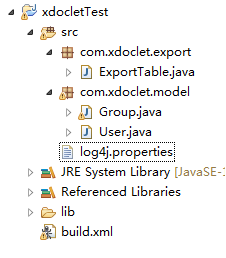
最后你看到的项目结构应该是这样的:
3.生成配置文件
打开mysql,创建一个名为oa的数据库
在eclipse中运行ant:点window->show view->ant,添加我们的ant脚本到eclipse的ant视图中,右键ant视图空白处或者点击下图位置添加构建脚本:

选择build.xml文件,在”导出数据库表结构“上点击run as ant
此时控制台输出:
- Buildfile: E:"JAR"jbpm"jbpm-4.3"workspace"xdoclet"build.xml
- 生成Hibernate的映射文件:
- [hibernatedoclet] (XDocletMain.start 47 ) Running <hibernate/>
- [hibernatedoclet] Generating mapping file for com.xdoclet.model.Group.
- [hibernatedoclet] com.xdoclet.model.Group
- [hibernatedoclet] Generating mapping file for com.xdoclet.model.User.
- [hibernatedoclet] com.xdoclet.model.User
- 生成Hibernate配置文件:
- [hibernatedoclet] addOtherProperty(): name=null, null
- [hibernatedoclet] addOtherProperty(): name=null, null
- [hibernatedoclet] (XDocletMain.start 47 ) Running <hibernatecfg/>
- [hibernatedoclet] Generating hibernate.cfg.xml configuration file
- 导出数据库表结构:
- [schemaexport] (cfg.Environment 500 ) Hibernate 3.2.0
- [schemaexport] (cfg.Environment 533 ) hibernate.properties not found
- [schemaexport] (cfg.Environment 667 ) Bytecode provider name : cglib
- [schemaexport] (cfg.Environment 584 ) using JDK 1.4 java.sql.Timestamp handling
- [schemaexport] (cfg.Configuration 274 ) Reading mappings from file: E:"JAR"jbpm"jbpm-4.3"workspace"xdoclet"src"com"xdoclet"model"Group.hbm.xml
- [schemaexport] (cfg.HbmBinder 300 ) Mapping class: com.xdoclet.model.Group -> t_group
- [schemaexport] (cfg.Configuration 274 ) Reading mappings from file: E:"JAR"jbpm"jbpm-4.3"workspace"xdoclet"src"com"xdoclet"model"User.hbm.xml
- [schemaexport] (cfg.HbmBinder 300 ) Mapping class: com.xdoclet.model.User -> t_user
- [schemaexport] (dialect.Dialect 141 ) Using dialect: org.hibernate.dialect.MySQL5Dialect
- [schemaexport] (cfg.HbmBinder 2375) Mapping collection: com.xdoclet.model.Group.userSets -> t_user
- [schemaexport] (hbm2ddl.SchemaExport 154 ) Running hbm2ddl schema export
- [schemaexport] (hbm2ddl.SchemaExport 174 ) writing generated schema to file: E:"JAR"jbpm"jbpm-4.3"workspace"xdoclet"schema-export.sql
- [schemaexport]
- [schemaexport] alter table t_user
- [schemaexport] drop
- [schemaexport] foreign key FKCB63CCB6CEAB0634;
- [schemaexport]
- [schemaexport] drop table if exists t_group;
- [schemaexport]
- [schemaexport] drop table if exists t_user;
- [schemaexport]
- [schemaexport] create table t_group (
- [schemaexport] groupId varchar(255) not null,
- [schemaexport] groupName varchar(255),
- [schemaexport] primary key (groupId)
- [schemaexport] );
- [schemaexport]
- [schemaexport] create table t_user (
- [schemaexport] userId varchar(255) not null,
- [schemaexport] userName varchar(255),
- [schemaexport] groupId varchar(255),
- [schemaexport] primary key (userId)
- [schemaexport] );
- [schemaexport]
- [schemaexport] alter table t_user
- [schemaexport] add index FKCB63CCB6CEAB0634 (groupId),
- [schemaexport] add constraint FKCB63CCB6CEAB0634
- [schemaexport] foreign key (groupId)
- [schemaexport] references t_group (groupId);
- [schemaexport] (hbm2ddl.SchemaExport 196 ) schema export complete
- BUILD SUCCESSFUL
- Total time: 1 second
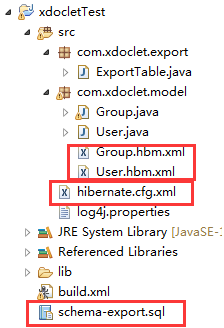
此时再刷新工程目录,就会发现已经生成了hibernate的配置文件和映射文件,而且sql 脚本竟然也生成了!最后如下:
再运行ExportTable.java(运行之前要先build path导入hibernate的jar包和MySQL驱动jar包),就生成了数据库表结构了,赶紧打开MySQL看一下吧!
源文件百度云下载:
屠龙宝刀,点击就送》》链接:http://pan.baidu.com/s/1hs2W5q0 密码:x2hp
参考: http://www.blogjava.net/sxyx2008/archive/2010/09/30/333554.html
Eclipse使用xdoclet1.2.3 生成hibernate配置文件和映射文件的更多相关文章
- Java IDE 编辑器 --- IntelliJ IDEA 进阶篇 生成 hibernate 实体与映射文件
原文:转:Java IDE 编辑器 --- IntelliJ IDEA 进阶篇 生成 hibernate 实体与映射文件 2011-04-30 12:50 很多人不知道怎么用 IntelliJ IDE ...
- Hibernate 配置文件与映射文件 总结
hibernate是一个彻底的ORM(Object Relational Mapping,对象关系映射)开源框架. 一.Hibernate配置文件详解 Hibernate配置文件有两种形式:XML与p ...
- Hibernate配置文件和映射文件详解
Hibernate是一个彻底的ORM(Object Relational Mapping,对象关系映射)开源框架. 我们先看一下官方文档所给出的,Hibernate 体系结构的高层视图: 其中PO=P ...
- Hibernate配置文件与映射文件的创建
1. config文件的创建: 内容: <?xml version="1.0" encoding="UTF-8"?><!DOCTYPE hib ...
- Eclipse使用hibernate插件反向生成实体类和映射文件
一般dao层的开发是这样的,先进行数据库的设计,什么E-R图之类的那些,然后选择一款数据库产品,建好表.最后反向生成Java实体和映射文件,这样可以保证一致性和便捷性. 如果用myeclipse,逆向 ...
- Xdoclet + Ant自动生成Hibernate配置文件
在使用Hibernate的时候,过多的Hibernate配置文件是一个让人头疼的问题.最近接触了Xdoclet这个工具.它实际上就是一个自动代码生成的工具,Xdoclet不能单独运行,必须搭配其他工具 ...
- Xdoclet + Ant自己主动生成Hibernate配置文件
在使用Hibernate的时候,过多的Hibernate配置文件是一个让人头疼的问题. 近期接触了Xdoclet这个工具. 它实际上就是一个自己主动代码生成的工具.Xdoclet不能单独执行,必须搭配 ...
- Mybatis第六篇【配置文件和映射文件再解读、占位符、主键生成与获取、Mapper代理】
配置文件和映射文件再解读 映射文件 在mapper.xml文件中配置很多的sql语句,执行每个sql语句时,封装为MappedStatement对象,mapper.xml以statement为单位管理 ...
- IBatisNet -- 保护你的配置文件及映射文件信息
通常情况下我们在使用IBatisNet的时候,配置文件和映射文件都是暴露在外的,如果能进入到服务器,那么你的程序的操作数据库的SQL语句,数据库连接字符串等信息都将很轻松的被看到,这样是很危险的.然而 ...
随机推荐
- UVA-12166 Equilibrium Mobile(二叉树)
题目大意:改变二叉树上的权值,使树平衡,问最少该几个值. 题目分析:不会做,查的题解.有条奇妙的性质:如果将第d层权值为w的节点为基准做改动,则整棵树的总重量为w<<d,即w*2^d.仔细 ...
- hdu——过山车(二分图,匈牙利算法)
过山车 Time Limit: 1000/1000 MS (Java/Others) Memory Limit: 32768/32768 K (Java/Others)Total Submiss ...
- 更新.xsd后,rdlc 数据源更新不了
- webpack实现修改代码实时刷新浏览器
webpack例子:https://github.com/Aquarius1993/webpackDemo 1. 需要全局和项目安装webpack和webpack-dev-server npm ins ...
- 故障处理:磁盘扩容出错:e2fsck: Bad magic number in super-block while trying to open /dev/vdb1
按照阿里云官网教程对云服务器进行磁盘扩容,使用fdisk重新分区,最后使用e2fsck和resize2fs来完成文件系统层面的扩容 在执行“e2fsck -f /dev/vdb1”命令时报错,如果你的 ...
- linux网络监控_网速测试
Linux下查看网络即时网速 1.sar命令(一般般) sar -n DEV 1 100 1代表一秒统计并显示一次 100代表统计一百次 sar在sysstat包 2.使用ntop图形工具(没详细用过 ...
- Mysql基本操作(远程登陆,启动,停止,重启,授权)
1.查看mysql版本 方法一:status; 方法二:select version(); 2.Mysql启动.停止.重启常用命令 a.启动方式 1.使用 service 启动: [root@loca ...
- 戴尔 Latiteude E7240 i7-4600U
一.鲁大师各项数据 二.内存条 三.电池损耗 四.跑分
- 重新学习之spring第三个程序,整合struts2+spring
第一步:导入Struts2jar包+springIOC的jar包和Aop的Jar包 第二步:建立applicationContext.xml文件+struts.xml文件+web.xml文件 web. ...
- 转-Vue.js2.0从入门到放弃---入门实例(一)
http://blog.csdn.net/u013182762/article/details/53021374 标签: Vue.jsVue.js 2.0Vue.js入门实例Vue.js 2.0教程 ...