
JavaScript 高级之面向对象
1. 对象属性及方法
- 创建对象的方式
<script>

    //创建对象的方式一

    var obj = {};

    //创建对象的方式一

    var obj = new Object();

</script>
- 挂载在对象上的变量叫对象的属性;挂载在对象上的函数叫对象的方法
    obj.name = "David";

    obj.say = function () {

        alert(this.name)

    }

    obj.say();
2. 创建对象的发展
- 普通创建模式
    var obj1 = new Object();

    obj1.name = "David";

    obj1.say = function () {

        alert(this.name)

    }

    obj1.say();

    var obj2 = new Object();

    obj2.name = "Mike";

    obj2.say = function () {

        alert(this.name)

    }

    obj2.say();
- 工厂模式
    function create(name,age){

        var obj = new Object();

        obj.name = name;

        obj.age = age;

        obj.say = function () {

            alert("姓名:"+ this.name + "年龄:" + this.age);

        }

        return obj;

    }

    var obj1 = create("David",22);

    obj1.say();

    var obj2 = create("Mike",18);

    obj2.say();
- 构造函数模式
- obj1.say != obj2.say,同样的方法占用了两块内存
    function create(name,age){

        obj.name = name;

        obj.age = age;

        obj.say = function () {

            alert("姓名:"+ this.name + "年龄:" + this.age);

        }

    }

    var obj1 = new create("David",22);

    obj1.say();

    var obj2 = new create("Mike",18);

    obj2.say();
- 原型模式
- obj1.say = obj2.say,同样的方法占用了一块内存,即两个对象共用了一个方法
- 不同的属性放在构造函数里,相同的方法放在原型对象上
- 原型对象也是对象
    function create(name,age) {

        obj.name = name;

        obj.age = age;

    }

    create.prototype.say = function () {

        alert("姓名:"+ this.name + "年龄:" + this.age);

    }

    var obj1 = new create("David",22);

    obj1.say();

    var obj2 = new create("Mike",18);

    obj2.say();
3. 实现tab选项卡
- 面向过程实现tab选项卡
css代码
        #big div{

            border: 1px solid #000;

            width: 200px;

            height: 200px;

            display: none;

        }

        #big .block{

            display: block;

        }

        input.active{

            background-color: red;

        }
html代码
<div id = "big">

    <input type = "button" value ="选项一" class = "active"/>

    <input type = "button" value = "选项二"/>

    <input type = "button" value = "选项三"/>

    <div class = "block">我是内容一</div>

    <div>我是内容二</div>

    <div>我是内容三</div>

</div>
js代码
    window.onload = function(){

        var big = document.getElementById("big");

        var inputs = big.getElementsByTagName("input");

        var divs = big.getElementsByTagName("div");

        for(var i = 0;i < inputs.length;i++){

            inputs[i].index = i;

            inputs[i].onclick = function(){

                for(var j = 0;j < inputs.length;j++){

                    inputs[j].className = "";

                    divs[j].className = "";

                }

                this.className = "active";

                divs[this.index].className = "block";

            }

        }

    }
- 面向对象实现tab选项卡
css代码
        #big1 div,#big2 div{

            width: 200px;

            height: 200px;

            display: none;

            border: 1px solid #000;

        }

        #big1 .block,#big2 .block{

            display: block;

        }

        input.active{

            background-color: red;

        }
html代码
<div id = "big1">

    <input type = "button" value = "选项一" class = "active"/>

    <input type = "button" value = "选项二"/>

    <input type = "button" value = "选项三"/>

    <div class = "block">我是内容一</div>

    <div>我是内容二</div>

    <div>我是内容三</div>

</div>

<div id="big2">

    <input type = "button" value = "选项一" class = "active"/>

    <input type = "button" value = "选项二"/>

    <input type = "button" value = "选项三"/>

    <div class = "block">我是内容一</div>

    <div>我是内容二</div>

    <div>我是内容三</div>

</div>
js代码
    window.onload = function(){

        var tab1 = new Tab("big1");

        var tab2 = new Tab("big2");

    }

    function Tab(id){

        var big = document.getElementById(id);

        this.inputs = big.getElementsByTagName("input");

        this.divs = big.getElementsByTagName("div");

        var that = this;

        for(var i = 0;i < this.inputs.length;i++){

            this.inputs[i].index = i;

            this.inputs[i].onclick = function(){

                that.show(this);

            }

        }

    }

    Tab.prototype.show = function(obtn){

        for(var j = 0;j < this.inputs.length;j++){

            this.inputs[j].className = "";

            this.divs[j].className = "";

        }

        obtn.className = "active";

        this.divs[obtn.index].className = "block";

    }
4. 引用
- 引用赋值
    // 引用赋值,共用一块内存空间

    var arr1 = [1,2,3,4];

    var arr2 = [];

    for(var i = 0;i < arr1.length;i++){

        arr2[i] = arr1[i];

    }

    arr2.push(5);
- 继承基本语法
- 继承属性
- function A(){ this.color = "black"; } A.prototype.show = function(){ alert("Hello!"); } function B(){ A.call(this); } var b = new B(); console.log(b.color);//通过callnew出来的b有color属性
- 继承方法
    function A(){

        this.color = "black";

    }

    A.prototype.show = function(){

        alert("Hello!");

    }

    function B(){

        A.call(this);

    }

    for(var i in A.prototype){

        B.prototype[i] = A.prototype[i];

    }

    var b = new B();

    b.show();
- 拖拽案例
html代码
<div id = "box" style="width: 200px;height: 200px;background-color: red;position: absolute;">

</div>
- 原生js实现拖拽
  window.onload = function(){

        var box = document.getElementById("box");

        box.onmousedown = function(event){//鼠标按下事件

            var ev = event||window.event;

            var divX = ev.clientX - box.offsetLeft;

            var divY = ev.clientY - box.offsetTop;

            document.onmousemove = function(event){//鼠标移动事件

                var ev = event || window.event;

                box.style.left = ev.clientX - divX + "px";

                box.style.top = ev.clientY - divY + "px";

            }

            document.onmouseup = function(){//鼠标抬起事件

                document.onmouseup = null;

                document.onmousemove = null;

            }

        }

    }
- 面向对象实现拖拽
   window.onload = function(){

        new Drag("box");

    }

    function Drag(id){

        this.divX = null;

        this.divY = null;

        this.box = document.getElementById(id);

        var that = this;

        this.box.onmousedown = function(event){

           that.down(event);

        }

    }

    Drag.prototype.down = function(){

        var ev = event||window.event;

        this.divX = ev.clientX - this.box.offsetLeft;

        this.divY = ev.clientY - this.box.offsetTop;

        var that = this;

        document.onmousemove = function(event){

            that.move(event);

        }

        document.onmouseup = function(){

            that.up();

        }

    }

    Drag.prototype.move = function(){

        var ev = event||window.event;

        this.box.style.left = ev.clientX - this.divX + "px";

        this.box.style.top = ev.clientY - this.divY + "px";

    }

    Drag.prototype.up = function(){

        document.onmouseup = null;

        document.onmousemove = null;

    }
- 继承实现拖拽
html代码
<div id = "box1" style = " width: 200px;height: 200px;background-color: red; position: absolute;">

</div>

<div id = "box2" style = "width: 200px;height: 200px;background-color: red;position: absolute;">

</div>
js代码
window.onload = function(){

    new Drag("box1");

    new LimitDrag("box2");

}

function Drag(id){

    this.divX = null;

    this.divY = null;

    this.box = document.getElementById(id);

    var that = this;

    this.box.onmousedown = function(event){

        that.down(event);

    }

}

Drag.prototype.down = function(){

    var ev = event||window.event;

    this.divX = ev.clientX - this.box.offsetLeft;

    this.divY = ev.clientY - this.box.offsetTop;

    var that = this;

    document.onmousemove = function(event){

        that.move(event);

    }

    document.onmouseup = function(){

        that.up();

    }

}

Drag.prototype.move = function(){

    var ev = event||window.event;

    this.box.style.left = ev.clientX - this.divX + "px";

    this.box.style.top = ev.clientY - this.divY + "px";

}

Drag.prototype.up = function(){

    document.onmouseup = null;

    document.onmousemove = null;

}

function LimitDrag(id){

    Drag.call(this,id);

}

for(var i in Drag.prototype){

    LimitDrag.prototype[i] = Drag.prototype[i];

}

LimitDrag.prototype.move = function(event){

    var ev = event||window.event;

    var posX = event.clientX - this.divX;

    var posY = event.clientY - this.divY;

    if(posX < 0){

        posX = 0;

    }

    if(posX > document.documentElement.clientWidth - this.box.offsetWidth){

        posX = document.documentElement.clientWidth - this.box.offsetWidth;

    }

    if(posY < 0){

        posY = 0;

    }

    if(posY > document.documentElement.clientHeight - this.box.offsetHeight){

        posY = document.documentElement.clientHeight - this.box.offsetHeight;

    }

    this.box.style.left = posX + "px";

    this.box.style.top = posY + "px";

}
5. 原型链
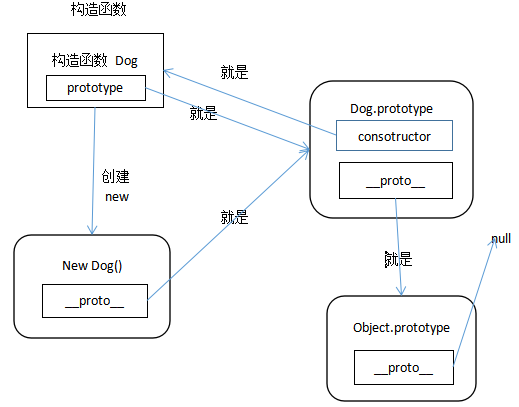
JavaScript 高级之面向对象的更多相关文章
- javascript高级特性(面向对象)
javascript高级特性(面向对象): * 面向对象: * 面向对象和面向过程的区别: * 面向对象:人就是对象,年龄\性别就是属性,出生\上学\结婚就是方法. * 面向过程:人出生.上学.工作. ...
- Javascript高级程序设计——面向对象小结
ECMAScript支持面向对象编程,对象可以在代码执行时创建,具有动态扩展性而非严格意义上的实体. 创建对象方法: 工厂模式:简单的函数创建引用类型 构造函数模式:可以创建自定义引用类型,可以想创建 ...
- Javascript高级程序设计——面向对象之理解对象
在面向对象语言中都有类的概念,通过类来创建具有属性和方法的对象.而ECMAScript中没有类的概念,ECMAScript中定义了对象:无需属性的集合,其属性值可以包含基本值.对象.或者函数. 在Ja ...
- JavaScript高级与面向对象
对象:任何事物都可以看作是对象. 1.面向对象与面向过程的概念 面向过程:凡是自己亲力亲为,自己按部就班的解决现有问题. 面向对象:自己充当一个指挥者的角色,指挥更加专业的对象帮我解决问题. 联系:面 ...
- 2020/06/06 JavaScript高级程序设计 面向对象的程序设计
ECMAScript虽然是一种面向对象的语言,但是他没有类的概念.所以他的对象也与其他语言中的对象有所不同. ECMA-262定义对象:一组没有特定顺序的值. 6.1 理解对象 创建对象的方法: 1. ...
- Javascript高级程序设计——面向对象之实现继承
原型链: 构造函数中都有一个prototype属性指针,这个指针指向原型对象,而创建的实例也有指向这个原型对象的指针__proto__.当实例查找方法时先在实例上找,找不到再通过__proto__到原 ...
- Javascript高级程序设计——面向对象之创建对象
对象创建方法: 工厂方法 构造函数模式 原型模式 组合构造函数和原型模式 寄生构造函数模式 问题构造函数模式 工厂模式: function Person(name, age){ var obj = n ...
- Javascript高级篇-面向对象的特性
一.创建对象 1.1初始化器 var any={ name:"some", age:10, action:function(){ alert(this.name+":&q ...
- javascript高级特性
01_javascript相关内容02_函数_Arguments对象03_函数_变量的作用域04_函数_特殊函数05_闭包_作用域链&闭包06_闭包_循环中的闭包07_对象_定义普通对象08_ ...
随机推荐
- ios开发UI篇—UISlider
概述 UISlider用于从连续范围的值中选择单个值的控件. 当您移动滑块的大拇指时,会将其更新后的值传递给附加的任何动作.滑块的外观是可配置的; 您可以对曲目和大拇指进行着色,并提供出现在滑块末端的 ...
- iOS 11.4.1 正式版越狱
在 2018 年 Electra 最新能支持到 11.3.1 越狱,很长的一段时间 11.4 只能支持 Beta 版本,临近春节给了我们一个大礼物,终于支持 iOS 11.4-11.4.1,目前 iO ...
- HTML5纯Web前端也能开发直播,不用开发服务器(使用face2face)
前段时间转载了某位大神的一篇文章,开发Web版一对一远程直播教室只需30分钟 - 使用face2face网络教室.非常有意思.看起来非常简单,但作为一名前端开发人员来说,还是有难度.因为要开发服务器端 ...
- Angular4 自制华容道拼图(可以升级难度、关卡、更换图片)
前端工程师新手一枚,之前一直做些小设计,以及静态页面的编写工作.刚刚接触 Angular 没有多久,四个月前对于 js 也只是会写 alert 之流,现在进步算是很大,下面是自制的华容道拼图(可以升级 ...
- javascript json对象操作(基本增删改查)
/** * Json对象操作,增删改查 * * @author lellansin * @blog www.lellansin.com * @version 0.1 * * 解决一些常见的问题 * g ...
- 课时9.HTML发展史(了解)
这个图片里的时间不用都记住,只需要记住一些特殊的,1993年,1995年(在W3C接手以后,才有了真正意义上的标准),1999年这几个时间 WHATWG的目的是推广HTML的标准,HTML5是浏览器厂 ...
- MQTT入门2 -- “Error: Invalid password hash for user nick.”和“Connection Refused: not authorised.”
原文地址:https://www.cnblogs.com/NickQ/p/9277315.html 问题描述: 搭建好mosqitto环境后,利用无密码验证方式,成功通过测试. 但修改配置文件将匿名访 ...
- PHP-学习笔记-进阶
PHP-学习笔记-进阶 PHP类和对象之定义类的方法 访问控制的关键字代表的意义为: public:公开的 protected:受保护的 private:私有的 我们可以这样定义方法: class C ...
- MongoDB分片介绍
本文简单介绍MongoDB的分片功能,对分片进行了概述,具体的功能详解,后续文章会陆续推出 分片是把数据分配到多个服务器上的一种方式,MongoDB使用分片实现大数据部署以及高吞吐操作. 大数据以及高 ...
- IDEA新建Web项目
file->New project->输入项目名(例如这里输入HelloWeb) 选择JDK为合适版本->next ->finish即可 在新建的项目HelloWorld上右击 ...