
java 基础 --- servlet
问题 :
- servlet 这个类是有什么作用
概述
servlet 是个接口,这个接口的作用是规范了接收请求的处理类。而最终的实现交给了 servlet 容器去实现。
servlet 接口
接口方法如下 :
public interface Servlet {

    void init(ServletConfig var1) throws ServletException;

    ServletConfig getServletConfig();

    void service(ServletRequest var1, ServletResponse var2) throws ServletException, IOException;

    String getServletInfo();

    void destroy();

}
其中最重要的是 service , init , destory 方法了。
servlet 与 Tomcat 的关系
Servlet运行于支持Java的应用服务器中。从原理上讲,Servlet可以响应任何类型的请求,但绝大多数情况下Servlet只用来扩展基于HTTP协议的Web服务器。
由容器来封装请求到 servlet 中,由容器来管理 servlet 。 下面一图可以看到容器处理请求时和 servlet 的交互。
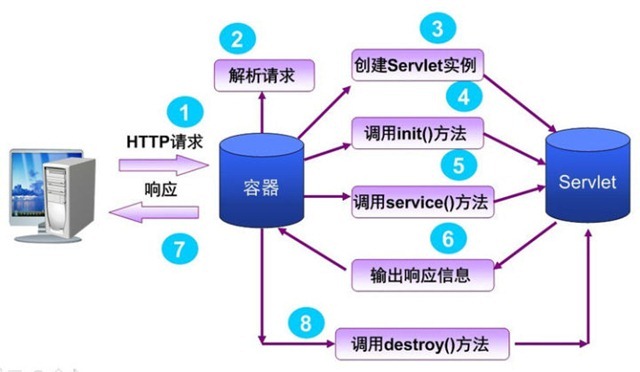
Tomcat 管理 servlet
Tomcat 与 servlet 的交互可以看这一篇文章。
As managed components, servlets have a life cycle, which begins when the managing container loads the servlet class, usually in response to a request, and ends when the container closes the servlet by calling the "destroy" method. All the servlet's activity between these two points is considered part of its life cycle.
The lifecycle of a typical servlet running on Tomcat might look something like this:
- Tomcat receives a request from a client through one of its connectors.
- Tomcat maps this request to the appropriate Engine for processing. These Engines are contained within other elements, such as Hosts and Servers, which limit the scope of Tomcat's search for the correct Engine.
- Once the request has been mapped to the appropriate servlet, Tomcat checks to see if that servlet class has been loaded. If it has not, Tomcat compiles the servlet into Java bytecode, which is executable by the JVM, and creates an instance of the servlet.
- Tomcat initializes the servlet by calling its init method. The servlet includes code that is able to read Tomcat configuration files and act accordingly, as well as declare any resources it might need, so that Tomcat can create them in an orderly, managed fashion.
- Once the servlet has been initialized, Tomcat can call the servlet's service method to process the request, which will be returned as a response.
- During the servlet's lifecycle, Tomcat and the servlet can communicate through the use of listener classes, which monitor the servlet for a variety of state changes. Tomcat can retrieve and store these state changes in a variety of ways, and allow other servlets access to them, allowing state to be maintained and accessed by various components of a given context across the span of a single or multiple user sessions. An example of this functionality in action is an e-commerce application that remembers what the user has added to their cart and is able to pass this data to a checkout process.
- Tomcat calls the servlet's destroy method to smoothly remove the servlet. This action is triggered either by a state change that is being listened for, or by an external command delivered to Tomcat to undeploy the servlet's Context or shut down the server.
上面这段引用加了下划线,简述了大概的过程,同时黄体字表示的是 servlet 接口中定义的方法。结合上面接口的方法方便我们理解整个过程。
补充
redirect 和 forward 的区别
根据转发方式的不同,可以区分为直接请求转发(Forward)和间接请求转发(Redirect).那么两者的区别是什么呢?
Forward和Redirect代表了两种请求转发方式:直接转发和间接转发。对应到代码里,分别是RequestDispatcher类的forward()方法和HttpServletResponse类的sendRedirect()方法。
对于直接方式(forward),客户端浏览器只发出一次请求,Servlet把请求转发给Servlet、HTML、JSP或其它信息资源,由第2个信息资源响应该请求,两个信息资源共享同一个request对象。
对于间接方式(redirect),服务器端在响应第一次请求的时候,让浏览器再向另外一个URL发出请求,从而达到转发的目的。它本质上是 两次HTTP请求,对应两个request对象。
forward 可以直接的访问/WEB-INF里的内容(Spring MVC 内容),而redirect就不能了,再接触一点/WEB-INF的知识点就能更好的了解forward与redirect
总结
- servlet 是个接口规范,具体的实现在服务器(servlet容器)中,文章还介绍了 servlet 与 Tomcat 的交互
- forward 和 redirect 表示两种请求转发的方法,前者为直接转发,前后信息共享一个request , 相当于一个 http 请求。而 redirect 为间接转发,前后信息共为两个不同的request ,相当于两个 http 请求。
参考资料
java 基础 --- servlet的更多相关文章
- Java基础——Servlet
什么是Servlet Servlet是Java Web的三大组件之一,它属于动态资源.Servlet的作用是处理请求,服务器会把接收到的请求交给Servlet来处理,在Servlet中通常需要: l ...
- Java基础——Servlet(一)
在学习Servlet之前,需要首先学习一些关联性的知识. 一.动态网页程序 动态网页:它是网页中的偏功能性的部分也是最重要的部分.它不是我们平时所看见的页面特效,展示的效果.而是,一种交互行为.比如, ...
- Java基础——Servlet(八)文件上传下载
一.简单的文件上传常见的组件Smartupload , Apache 的 commons FileUploadSmartupload上传的步骤: 1.初始化上传上下文 2.准备上传 3.保存文件 &l ...
- Java基础——Servlet(七)过滤器&监听器 相关
一.过滤器简介 Filter 位于客户端和请求资源之间,请求的资源可以是 Servlet Jsp html (img,javascript,css)等.用于拦截浏览器发给服务器的请求(Request) ...
- Java基础——Servlet(五)
哈哈哈...学习Servlet学了半个多月,因为中间有比较灰心的时候,有几天是啥都不学了的状态,看了好几部励志的电影.呃~还是得继续吧.本来计划是好好夯实这里的基础,结果在网找到了介绍比较全面的视频, ...
- Java基础——Servlet(三)
还在学习Servlet,觉得这里的知识点蛮多的.还要继续努力,加油. 拿韩老师的话激励一下自己,共勉.韩老师说,“成功其实也不难,只要树立一个目标,不需要你是一个很强的人,不需要你很高智商,不需要你是 ...
- Java基础——Servlet(六)分页相关
前面写了Servlet(一)到(五),主要是在网上搜罗的视频.对分页这块还是不太清楚.于是有找到一些视频,重新学习了一下.主要是对分页的认识和设计思路.也是为了方便我以后回忆一下.. 一.分页常识 p ...
- Java基础——Servlet(四)
最近一直在学习Servlet,真的有烦躁,一下子要创建好几个文件,服务端.客户端.html页面....学习进度蛮慢的,很容易失掉信心.当学习到cookie时,发现有好多实现是在我们日常生活中可以会遇得 ...
- Java基础——Servlet(二)
好久没有写博客了,最近有在学习.可能是遇到瓶颈了,学到Servlet这里觉得有些吃力.前几天已经学完一遍了,但是学完之后觉得还是很迷茫.去知乎和百度上搜索,遇到的都是一些概念之类的讲解.核心的介绍说, ...
随机推荐
- C博客第01次作业---顺序,分支结构
1.本章学习总结 1.1 思维导图 1.2本章学习体会及代码量学习体会 1.2.1学习体会 经过了这一周的学习,从一开始对C语言一无所知,到现在能够写出基本的代码,感到非常开心. 学习C语言也并非想象 ...
- Delphi XE7的安卓程序如何调用JAVA的JAR,使用JAVA的类?
本文使用工具和全部源码下载: http://download.csdn.net/detail/sunylat/8190765 为什么我们要在Delphi XE7的安卓程序调用JAVA的JAR,使用JA ...
- Help Jimmy(动态规划)
点击打开链接 Help Jimmy Time Limit: 1000MS Memory Limit: 10000K Total Submissions: 12168 Accepted: 402 ...
- “全栈2019”Java多线程第十七章:同步锁详解
难度 初级 学习时间 10分钟 适合人群 零基础 开发语言 Java 开发环境 JDK v11 IntelliJ IDEA v2018.3 文章原文链接 "全栈2019"Java多 ...
- jmeter—解决响应乱码问题
问题: 当响应数据或响应页面没有设置编码时,jmeter会按照jmeter.properties文件中,sampleresult.default.encoding 设置的格式解析默认ISO-88 ...
- (三)SSO之CAS框架单点退出,退出到CAS登录界面
应需求的改变.CAS自定义登录页面不安全,不再使用,于是我一下子回到了原点,在linux上部署上了没有加自定义登陆界面的CAS,接下来开始修改CAS自己默认的登录界面为我们的界面. 一下子修改成功是根 ...
- [Bootstrap-Table] 中的事件用例
[Bootstrap-Table] 中的事件 -------------------------------------------------- <div class="alert ...
- 从一个bug谈谈psqlodbc游标的一点认识
本文源于最近修正的一个关于psqlodbc的bug,该bug在近期的psqlodbc的git上也有人提交了修正. 关于该bug的修正代码可以看这里: https://git.postgresql.or ...
- 在eclipse中,用maven创建web项目
备注:该文档是之前学习时,根据网上其他童鞋的经验自己测试后梳理,如有侵权,请勿怪,感谢! 1.在eclipse中用maven创建项目,右键new>>Maven Project 2.点击ne ...
- Objective-C Associated Objects 的实现原理
我们知道,在 Objective-C 中可以通过 Category 给一个现有的类添加属性,但是却不能添加实例变量,这似乎成为了 Objective-C 的一个明显短板.然而值得庆幸的是,我们可以通过 ...