
Application.idle方法
Application.Idle()方法表示:当应用程序处于空闲状态时执行相应代码。
示例程序
1、界面设计:一个简单的Lable控件
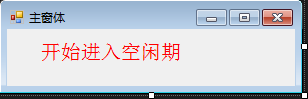
2、代码
using System;

using System.Collections.Generic;

using System.ComponentModel;

using System.Data;

using System.Drawing;

using System.Linq;

using System.Text;

using System.Threading.Tasks;

using System.Windows.Forms;

using System.IO;

namespace ApplicationIdleDemo

{

    public partial class Form1 : Form

    {

        public Form1()

        {

            InitializeComponent();

        }

        public System.Timers.Timer timer;

        private void Form1_Load(object sender, EventArgs e)

        {

            InitTimer();

            InitRefresh();

            Refresh();

        }

        /// <summary>

        /// 初始化Timer控件

        /// </summary>

        private void InitTimer()

        {

            timer = new System.Timers.Timer();

            //到达定时时间的时候执行的事件

            timer.Elapsed += new System.Timers.ElapsedEventHandler(TimeUp);

            //设置是执行一次(false) 还是一直执行(true)

            timer.AutoReset = true;

            //是否执行System.Timers.Timer.Elapsed事件

            timer.Enabled = true;

            //启动

            timer.Start();

        }

        /// <summary>

        /// 定时到点执行的事件

        /// </summary>

        /// <param name="sender"></param>

        /// <param name="e"></param>

        public void TimeUp(object sender, System.Timers.ElapsedEventArgs e)

        {

            Refresh();

        }

        private void Refresh()

        {

            this.lbl_idle.Text = "进入空闲期";

            string strPath = Application.StartupPath + @"test.txt";

            using (StreamWriter sw = new StreamWriter(strPath, true))

            {

                sw.WriteLine("开始进入空闲期,当前时间:" + DateTime.Now);

                sw.Close();

            }

        }

        private void InitRefresh()

        {

            //设定IDLE自动结束

            Application.Idle += new EventHandler(OnApplicationIdle);

            //设定消息过滤

            FormMessageFilter MessageFilter = new FormMessageFilter();

            MessageFilter.ApplicationActive += new EventHandler(OnApplicationActive);

            Application.AddMessageFilter(MessageFilter);

        }

        /// <summary>

        /// 程序进入空闲时期时会一直执行此事件

        /// </summary>

        /// <param name="sender"></param>

        /// <param name="e"></param>

        private void OnApplicationIdle(object sender, EventArgs e)

        {

            if (timer != null)

                timer.Start();

        }

        /// <summary>

        /// 当键盘及鼠标事件,关闭timer

        /// </summary>

        /// <param name="sender"></param>

        /// <param name="e"></param>

        private void OnApplicationActive(object sender, EventArgs e)

        {

            if (timer != null)

            {

                timer.Stop();

                EndIdle();

            }

        }

        private void EndIdle()

        {

            this.lbl_idle.Text = "结束空闲期,进入活动期";

            string strPath = Application.StartupPath + @"test.txt";

            using (StreamWriter sw = new StreamWriter(strPath,true))

            {

                sw.WriteLine("开始进入活动期,当前时间:" + DateTime.Now);

                sw.Close();

            }

        }

    }

    public class FormMessageFilter : IMessageFilter

    {

        public event EventHandler ApplicationActive;

        /// <summary>

        /// 只要是按键盘及鼠标便会引发事件

        /// 因为是为了监视键盘及鼠标,所以均return false;

        /// return ture:会把输入的值清除

        /// 0x100 /* WM_KEYDOWN

        /// 0x101 /* WM_KEYUP

        /// 0x200 /* WM_MOUSEMOVE

        /// 0x201 /* WM_LBUTTONDOWN

        /// 0x202 /* WM_LBUTTONUP

        /// 0x203 /* WM_LBUTTONDBLCLK

        /// 0x204 /* WM_RBUTTONDOWN

        /// 0x205 /* WM_RBUTTONUP

        /// 0x206 /* WM_RBUTTONDBLCLK

        /// 0x20a /* WM_MOUSEWHEEL

        /// </summary>

        public bool PreFilterMessage(ref Message m)

        {

            if (m.Msg == 0x100 || m.Msg == 0x101 || (m.Msg > 0x199 && m.Msg < 0x207) || m.Msg == 0x20a)

            {

                if (ApplicationActive != null)

                {

                    ApplicationActive(this, new EventArgs());

                }

            }

            return false;

        }

    }

}
Application.idle方法的更多相关文章
- 使用Application.GetResourceStream方法加载资源时得到的总是null
我们可以预先把程序中用到的资源,如图片,音乐等放入项目中,打包进XAP文档,需要的时候从中调用.下面就说说具体实现方法. 第一步,把数据存进项目. 1.右键点击项目名称-添加-新建文件夹(英文版请自行 ...
- WinForm中Application.Idle事件用法
Application.Idle 事件 描述:当应用程序完成处理并即将进入空闲状态时发生.如果您有必须执行的任务在线程变为空闲之前,请将它们附加到此事件. public partial class F ...
- Unity iOS打开AppStore评星页面,浅谈Application.OpenURL()方法。
http://fairwoodgame.com/blog/?p=38 Unity iOS打开AppStore评星页面,浅谈Application.OpenURL()方法. Posted in Uni ...
- android结束进程、退出application的方法
1.finish()方法 finish是Activity的类,仅仅针对Activity,当调用finish()时,只是将活动推向后台,并没有立即释放内存,活动的资源并没有被清理:调用finish()方 ...
- Android中Application全局方法(变量)的调用
Application和Actovotu,Service一样是android框架的一个系统组件,当android程序启动时系统会创建一个 application对象,用来存储系统的一些信息.通常我们是 ...
- struts2 action中获取request session application的方法
共四种方式: 其中前两种得到的是Map<String,Object> 后两种得到的才是真正的request对象 而Map就是把request对象中的属性取出做成了键值对而已. [方法一] ...
- sql sever 2012重装数据库时,出现cannot find one or more components, Please reinstall the application.解决方法
错误原因: 由于我将SQL数据库做了删除,重装.在删除的过程中,不小心删除了某个SQL的插件,导致了这种问题的出现. 当我们去操作工具时,也会提示以上错误. 解决办法: 1)去控制面板--所有控制面板 ...
- Application.Exit()结束程序,但线程还在的解决方法。
出现此情况大多原因是使用了多线程编程,或者你所调用的dll使用了多线程.我们知道,一般情况下的线程执行完指定的任务之后是会关闭了的,但是如果对于一些循环类线程,或者忘记关掉的线程时,这个时候就需要我们 ...
- Application.Exit()结束程序,但线程还在的解决方法
转自:http://bbs.51cto.com/thread-970057-1.html 出现此情况大多原因是使用了多线程编程,或者你所调用的dll使用了多线程. 我们知道,一般情况下的线程执行完指 ...
随机推荐
- Http Analyzer Std V3.3.1.140 汉化补丁
http://www.cnblogs.com/nicch/archive/2008/08/30/ha_httpanalyzerstdv3.html Http Analyzer Std V3.3.1.1 ...
- PO_员工主管审批模式详解(设定)
2014-06-03 Created By BaoXinjian
- Solutions for the Maximum Subsequence Sum Problem
The maximum subarray problem is the task of finding the contiguous subarray within a one-dimensional ...
- 关于c语言内存分配,malloc,free,和段错误,内存泄露
1. C语言的函数malloc和free (1) 函数malloc和free在头文件<stdlib.h>中的原型及参数 void * malloc(size_t size ...
- 基于KWIC 的keyword匹配算法(管道+过滤器模式下实现)
以下是基于KWIC 的keyword匹配算法(管道+过滤器模式下实现) 关键部分的管道+过滤器 软件体系下的实现, 在非常多的keyword搜索平台都使用了这一 循环移位+排序输出的 keyword匹 ...
- JabRef中添加中文文献出现乱码 解决方法
JabRef中添加中文文献出现乱码 解决方法 问题描述 JaBRef是一款开源的文献管理软件,主要用来管理bibtex格式的参考文献,可以与LATEX配合使用,方便论文参考文献的使用.文献管理 ...
- 集群瓶颈:磁盘IO必读
首先需要知道什么是IO: IO是输入输出接口阅读本文章可以带着下面问题1.集群的瓶颈为什么IO?2.你对IO了解多少? 这里面只说个人观点:当我们面临集群作战的时候,我们所希望的是即读即得.可是面对大 ...
- js+json用表格实现简单网站左侧导航
闲暇之余,制作一用表格实现的简单的网站导航条,分享给大家.这里的数据基于json格式,学习json的朋友可以参考下. 调用很简单,只要将数据组织成json格式即可:格式如下: window.onlo ...
- ubuntu root权限
ubuntu-kylin@ubuntu-kylin:~$ sudo passwd root 输入新的 UNIX 密码: 重新输入新的 UNIX 密码: passwd:已成功更新密码 ubuntu-ky ...
- zabbix监控某个普通端口
linux下端口和服务是对应的. 先创建一个模板:configureation-->templates然后点create templates按钮: 如果没有组可以新建个组:app 查看新建的te ...