
dubbo学习笔记:快速搭建
搭建一个简单的dubbo服务
参考地址:
dubbo官网:http://dubbo.apache.org/zh-cn/docs/user/references/registry/zookeeper.html
博客:http://www.cnblogs.com/lighten/p/6828026.html
以上两个教程经实践发现都有部分谬误,本教程做了一定更正
1.简介
dubbo是一个分布式服务框架,由阿里巴巴的工程师开发,致力于提供高性能和透明化的RPC远程服务调用。可惜的是该项目在2012年之后就没有再更新了,之后由当当基于dubbo开发了dubbox。这里对dubbo的入门构建进行简单的介绍。不涉及dubbo的运行机制,只是搭建过程,方便学习者快速构建项目,运行、熟悉该框架。
dubbo提供了两种构建项目的方法:
- 通过Spring容器快速构建,其中还有注解的方式;
- 通过直接使用API(不推荐)。以下对其一一说明。
2.spring配置的形式
1.导入maven依赖
<!--如果引入的是2.6.2以下版本,xml文件头引入的xsd地址会报错-->

<dependency>

    <groupId>com.alibaba</groupId>

    <artifactId>dubbo</artifactId>

    <version>2.6.3</version>

    <exclusions>

        <exclusion>

            <!-- 排除传递spring依赖 -->

            <artifactId>spring</artifactId>

            <groupId>org.springframework</groupId>

        </exclusion>

    </exclusions>

</dependency>

<!--下面分别是两种不同的zookeeper客户端实现,选择一种就好-->

<dependency>

     <groupId>com.101tec</groupId>

     <artifactId>zkclient</artifactId>

     <version>0.4</version>

 </dependency>

<dependency>

	<groupId>org.apache.curator</groupId>

	<artifactId>curator-framework</artifactId>

	<version>2.12.0</version>

</dependency>

<!--后期可能还会用到如下zookeeper客户端jar包依赖,但是目前这个demo不引入也没有问题-->

<dependency>

    <groupId>org.apache.zookeeper</groupId>

    <artifactId>zookeeper</artifactId>

    <version>3.3.3</version>

</dependency>

<!--spring配置方式,自然需要spring相关的依赖-->

<dependency>

    <groupId>org.springframework</groupId>

    <artifactId>spring-context</artifactId>

    <version>3.2.17.RELEASE</version>

    <exclusions>

        <exclusion>

            <groupId>commons-logging</groupId>

            <artifactId>commons-logging</artifactId>

        </exclusion>

    </exclusions>

</dependency>

<dependency>

    <groupId>commons-logging</groupId>

    <artifactId>commons-logging</artifactId>

    <version>1.2</version>

</dependency>

<!--打印日志相关-->

<dependency>

    <groupId>org.slf4j</groupId>

    <artifactId>slf4j-log4j12</artifactId>

    <version>1.6.4</version>

</dependency>
zkclient和curator
curator和zkclient分别为两种不同的zookeeper实现,两者使用的同时都需要开启先zookeeper注册中心的服务端。(关于如何下载配置并启动zookeeper服务端,参考win10环境下搭建zookeeper伪集群)
在本项目中,它默认是使用了curator实现的,要改成zkclient实现,需要在<dubbo:registry address="zookeeper://127.0.0.1:2181/" client="zkclient" />标签中加入 client="zkclient",并换成zkclient的依赖。
(在dubbo官网中称2.5以上的dubbo版本默认使用zookeeper实现,但是实测结果却相反)
2.定义服务接口(对提供方和调用方都可见)
package dubboXml;

public interface DemoService {

    String sayHello(String name);

}
3.服务提供方配置
实现服务接口
package dubboXml;

public class DemoServiceImpl implements DemoService{

    public String sayHello(String name) {

        return "Hello " + name;

    }

}
spring配置
<?xml version="1.0" encoding="UTF-8"?>

<beans xmlns="http://www.springframework.org/schema/beans"

       xmlns:xsi="http://www.w3.org/2001/XMLSchema-instance"

       xmlns:dubbo="http://dubbo.apache.org/schema/dubbo"

       xsi:schemaLocation="http://www.springframework.org/schema/beans

       http://www.springframework.org/schema/beans/spring-beans-4.3.xsd

       http://dubbo.apache.org/schema/dubbo

       http://dubbo.apache.org/schema/dubbo/dubbo.xsd">

    <!-- 提供方应用信息,用于计算依赖关系 -->

    <dubbo:application name="hello-world-app"  />

    <!-- 使用zookeeper注册中心暴露服务地址 -->

    <dubbo:registry address="zookeeper://127.0.0.1:2181" client="zkclient" />

    <!-- 用dubbo协议在20880端口暴露服务 -->

    <dubbo:protocol name="dubbo" port="20880" />

    <!-- 声明需要暴露的服务接口 -->

    <dubbo:service interface="dubboXml.DemoService" ref="demoService" />

    <!-- 和本地bean一样实现服务 -->

    <bean id="demoService" class="dubboXml.DemoServiceImpl" />

</beans>
读取配置,提供服务
package dubboXml;

import org.springframework.context.support.ClassPathXmlApplicationContext;

public class Provider {

    public static void main(String[] args) throws Exception {

        ClassPathXmlApplicationContext context = new ClassPathXmlApplicationContext(new String[] {"provider.xml"});

        context.start();

        System.in.read(); // 按任意键退出

    }

}
4.服务调用方配置
spring配置
<?xml version="1.0" encoding="UTF-8"?>

<beans xmlns="http://www.springframework.org/schema/beans"

       xmlns:xsi="http://www.w3.org/2001/XMLSchema-instance"

       xmlns:dubbo="http://dubbo.apache.org/schema/dubbo"

       xsi:schemaLocation="http://www.springframework.org/schema/beans

               http://www.springframework.org/schema/beans/spring-beans-4.3.xsd

               http://dubbo.apache.org/schema/dubbo

               http://dubbo.apache.org/schema/dubbo/dubbo.xsd">

    <!-- 消费方应用名,用于计算依赖关系,不是匹配条件,不要与提供方一样 -->

    <dubbo:application name="consumer-of-helloworld-app"  />

    <!-- 使用zookeeper注册中心暴露发现服务地址 -->

    <dubbo:registry address="zookeeper://127.0.0.1:2181" />

    <!-- 生成远程服务代理,可以和本地bean一样使用demoService -->

    <dubbo:reference id="demoService" interface="dubboXml.DemoService" />

</beans>
读取配置,调用服务
package dubboXml;

import org.springframework.context.support.ClassPathXmlApplicationContext;

public class Consumer {

    public static void main(String[] args) throws Exception {

        ClassPathXmlApplicationContext context = new ClassPathXmlApplicationContext(new String[] {"consumer.xml"});

        context.start();

        DemoService demoService = (DemoService)context.getBean("demoService"); // 获取远程服务代理

        String hello = demoService.sayHello("nihao"); // 执行远程方法

        System.out.println( hello ); // 显示调用结果

    }

}
最终结果:
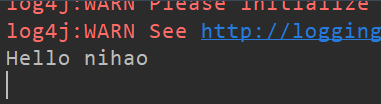
5.其他说明
- 如果涉及传输对象,那么被传输的对象类应该实现serializable接口。因为对象远程传输是以二进制的形式进行的,那么在传输之前需要实现序列化。
- 我的demo地址:demoXml
我的目录结构:
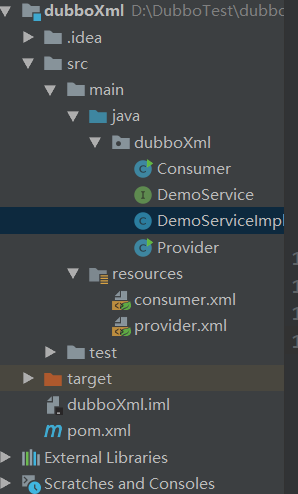
3.注解配置的方式
maven配置同上。
1.服务接口和传输对象
服务接口
package com.common.server;

import java.util.List;

public interface DemoService {

    public String greet(String name);

    public List<User> getUsers();

}
传输对象:实现序列化接口
package com.common.server;

import java.io.Serializable;

public class User implements Serializable {

    private static final long serialVersionUID = 1L;

    private String name;

    private int age;

    private String sex;

    public User(String name, int age, String sex) {

        this.name = name;

        this.age = age;

        this.sex = sex;

    }

    public String getName() {

        return name;

    }

    public void setName(String name) {

        this.name = name;

    }

    public int getAge() {

        return age;

    }

    public void setAge(int age) {

        this.age = age;

    }

    public String getSex() {

        return sex;

    }

    public void setSex(String sex) {

        this.sex = sex;

    }

    @Override

    public String toString() {

        return "User [name=" + name + ", age=" + age + ", sex=" + sex + "]";

    }

}
2.服务提供方
实现接口(注意加上相应注解)
package com.provider;

import com.alibaba.dubbo.config.annotation.Service;

import com.common.server.DemoService;

import com.common.server.User;

import java.util.ArrayList;

import java.util.List;

/**

 * 实现类上打上service注解:注意,是dubbo的service注解

 */

@Service

public class DemoServiceImpl implements DemoService {

    @Override

    public String greet(String name) {

        return "Hello " + name;

    }

    @Override

    public List<User> getUsers() {

        List<User> list = new ArrayList<>();

        User user1 = new User("张三",10,"男");

        User user2 = new User("李四",11,"女");

        User user3 = new User("王五",12,"男");

        list.add(user1);

        list.add(user2);

        list.add(user3);

        return list;

    }

}
xml配置
(与全xml配置服务的方式相比,这里去掉了bean和<dubbo:service>,使用<dubbo:anotition>取代了,相当于自动扫描并暴露服务)<?xml version="1.0" encoding="UTF-8"?>
<beans xmlns="http://www.springframework.org/schema/beans"
xmlns:xsi="http://www.w3.org/2001/XMLSchema-instance"
xmlns:dubbo="http://code.alibabatech.com/schema/dubbo"
xsi:schemaLocation="http://www.springframework.org/schema/beans
http://www.springframework.org/schema/beans/spring-beans.xsd
http://code.alibabatech.com/schema/dubbo
http://code.alibabatech.com/schema/dubbo/dubbo.xsd"> <!-- 提供方应用信息,用于计算依赖关系 -->
<dubbo:application name="provider" /> <!-- 使用zookeeper注册中心暴露服务地址 -->
<dubbo:registry address="zookeeper://127.0.0.1:2181" client="zkclient" />
<!--<dubbo:registry address="N/A"/>--> <!-- 用dubbo协议在20880端口暴露服务 -->
<dubbo:protocol name="dubbo" port="20880" /> <!-- 注解实现,指向服务提供者实现类的包扫描-->
<dubbo:annotation package="com.provider" />
</beans>
开启服务提供
package com.provider;

import org.springframework.context.support.ClassPathXmlApplicationContext;

import java.io.IOException;

/**

 * 服务提供者

 */

public class Provider {

    public static void main(String[] args) throws IOException {

        ClassPathXmlApplicationContext context = new ClassPathXmlApplicationContext(new String[]{"provider.xml"});

        context.start();

        System.in.read();

    }

}
3.服务调用方
类中注入并使用远程服务代理(为什么不在加载spring文件的类中注入?因为那是入口)
package com.consumer;

import com.alibaba.dubbo.config.annotation.Reference;

import com.common.server.DemoService;

import org.springframework.stereotype.Component;

/**

 * 服务消费者:service是spring的注解

 */

@Component("anotationConsumer")

public class AnotationConsumer {

    /**

     * 远程服务代理,可以和本地bean一样使用demoService

     */

    @Reference(check = false)

    private DemoService demoService;

    public void print(){

        System.out.println(demoService.greet("张三"));

        System.out.println(demoService.getUsers());

    }

}
consumer.xml spring配置文件
<?xml version="1.0" encoding="UTF-8"?>

<beans xmlns="http://www.springframework.org/schema/beans"

       xmlns:xsi="http://www.w3.org/2001/XMLSchema-instance"

       xmlns:dubbo="http://code.alibabatech.com/schema/dubbo"

       xmlns:context="http://www.springframework.org/schema/context"

       xsi:schemaLocation="http://www.springframework.org/schema/beans

    http://www.springframework.org/schema/beans/spring-beans.xsd

    http://www.springframework.org/schema/context

    http://www.springframework.org/schema/context/spring-context-3.0.xsd

    http://code.alibabatech.com/schema/dubbo

    http://code.alibabatech.com/schema/dubbo/dubbo.xsd">

    <dubbo:application name="consumer"/>

    <dubbo:registry address="zookeeper://127.0.0.1:2181" client="zkclient" />

    <!--指向服务调用者所在的包-->

    <dubbo:annotation package="com.consumer" />

    <!-- 配置spring注解包扫描 -->

    <context:component-scan base-package="com.consumer"></context:component-scan>

</beans>
启动服务
package com.consumer;

import org.springframework.context.support.ClassPathXmlApplicationContext;

public class Consumer {

    public static void main(String[] args) {

        ClassPathXmlApplicationContext context = new ClassPathXmlApplicationContext(new String[]{"consumer.xml"});

        context.start();

        AnotationConsumer anotationConsumer = (AnotationConsumer) context.getBean("anotationConsumer");

        anotationConsumer.print();

    }

}
调用结果:

4.附加信息
- 无论是哪种配置方式,如果使用了注册中心,那么注册和调用的时候必须先开启注册中心。
- demo地址:dubboAnotation
- 还有一种api调用的形式,由于不常用所以这里没有提供教程。如果有兴趣可以查看参考帖。
dubbo学习笔记:快速搭建的更多相关文章
- Hadoop学习笔记(10) ——搭建源码学习环境
Hadoop学习笔记(10) ——搭建源码学习环境 上一章中,我们对整个hadoop的目录及源码目录有了一个初步的了解,接下来计划深入学习一下这头神象作品了.但是看代码用什么,难不成gedit?,单步 ...
- Hadoop学习笔记(4) ——搭建开发环境及编写Hello World
Hadoop学习笔记(4) ——搭建开发环境及编写Hello World 整个Hadoop是基于Java开发的,所以要开发Hadoop相应的程序就得用JAVA.在linux下开发JAVA还数eclip ...
- 学习笔记 - 快速傅里叶变换 / 大数A * B的另一种解法
转: 学习笔记 - 快速傅里叶变换 / 大数A * B的另一种解法 文章目录 前言 ~~Fast Fast TLE~~ 一.FFT是什么? 二.FFT可以干什么? 1.多项式乘法 2.大数乘法 三.F ...
- MongoDB学习笔记:快速入门
MongoDB学习笔记:快速入门 一.MongoDB 简介 MongoDB 是由C++语言编写的,是一个基于分布式文件存储的开源数据库系统.在高负载的情况下,添加更多的节点,可以保证服务器性能.M ...
- Dubbo -- 系统学习 笔记 -- 快速启动
Dubbo -- 系统学习 笔记 -- 目录 快速启动 服务提供者 服务消费者 快速启动 Dubbo采用全Spring配置方式,透明化接入应用,对应用没有任何API侵入,只需用Spring加载Dubb ...
- NuGet学习笔记3——搭建属于自己的NuGet服务器
文章导读 创建NuGetServer Web站点 发布站点到IIS 添加本地站点到包包数据源 在上一篇NuGet学习笔记(2) 使用图形化界面打包自己的类库 中讲解了如何打包自己的类库,接下来进行最重 ...
- NuGet学习笔记(3) 搭建属于自己的NuGet服务器
文章导读 创建NuGetServer Web站点 发布站点到IIS 添加本地站点到包包数据源 在上一篇NuGet学习笔记(2) 使用图形化界面打包自己的类库 中讲解了如何打包自己的类库,接下来进行最重 ...
- NuGet学习笔记(3)——搭建属于自己的NuGet服务器(转)
在上一篇NuGet学习笔记(2) 使用图形化界面打包自己的类库 中讲解了如何打包自己的类库,接下来进行最重要的一步,从零开始搭建属于自己的NuGet服务器,诚然园子里及其它很多地方已经有完全写好的Nu ...
- flink学习笔记-快速生成Flink项目
说明:本文为<Flink大数据项目实战>学习笔记,想通过视频系统学习Flink这个最火爆的大数据计算框架的同学,推荐学习课程: Flink大数据项目实战:http://t.cn/EJtKh ...
随机推荐
- WEB开发常见错误-php无法操作数据库
Ubuntu 安装phpmyadmin 和配置 ubuntu 安装 phpmyadmin 两种 : 1: apt-get 安装 然后使用 已有的虚拟主机目录建立软连接 sudo apt-g ...
- Django模板层
一:模板简介 二:模板语法值变量 三: 模板之过滤器 四: 模板之标签 五:自定义标签和过滤器 一:模板简介 def current_datetime(request): now=datetime ...
- Devexpress + wcf +ef 批量更新处理
项目结构: 1.客户端:Winform, 2.数据访问:EF4.0(从数据库生成模型-懒人必需这样) 3.DTO:直接使用EF实体 4.服务端:WCF 托管在IIS中采用basicHttp帮定(这样可 ...
- IP多播技术及其应用
随着全球互联网(Internet)的迅猛发展,上网人数正以几何级数快速增长,以因特网技术为主导的数据通信在通信业务总量中的比列迅速上升,因特网业务已成为多媒体通信业中发展最为迅速.竞争最为激烈的领域. ...
- Introduction to Razor Pages in ASP.NET Core
https://docs.microsoft.com/en-us/aspnet/core/mvc/razor-pages/ 从ASP.NET Core 2.0.0版本之后,添加了新的特性Razor p ...
- Nginx搭建后,图片存储在Tomcat上,前端无法回显图片问题
一.Nginx与Tomcat连接搭建的环境,Nginx设置了前端的访问路径为 (1)前端代码配置: root /usr/local/nginx/html; index index.html index ...
- http://www.rabbitmq.com/
什么是RabbitMQ 官网http://www.rabbitmq.com/ 1.应用程序间健壮的消息发送 2.简单易用 3.可在所有主流操作系统运行 4.支持巨量的开发者平台 5.开源和商用双重支持 ...
- mysql - json串新增字段
1.建表 -- 建表 drop table if exists ta_product2; CREATE TABLE ta_product2( id int primary key auto_incre ...
- java并发编程实战:第十章----避免活跃性危险
在安全性和活跃性之间通常存在着某种制衡 一.死锁 定义:在线程A持有锁L并想获得锁M的同时,线程B持有锁M并尝试获得锁L,线程AB均不会释放自己的锁,那么这两个线程将永远地等待下去 在数据库系统的设中 ...
- Hbase和传统数据库的区别
在说HBase之前,我想再唠叨几句.做互联网应用的哥们儿应该都清楚,互联网应用这东西,你没办法预测你的系统什么时候会被多少人访问,你面临的用户到底有多少,说不定今天你的用户还少,明天系统用户就变多了, ...