
docker阿里云镜像加速器使用
加速器使用:加快镜像下载速度
访问www.aliyun.com:

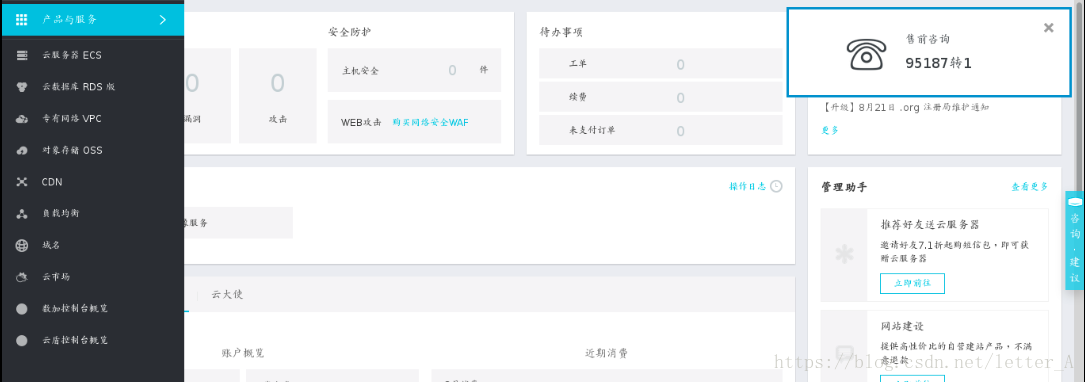
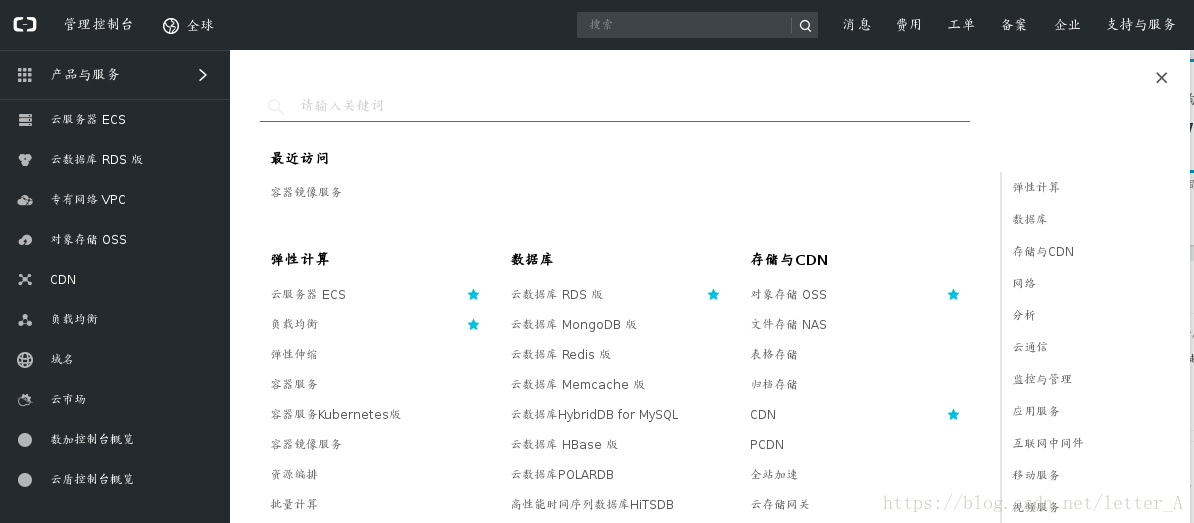
登录之后点击”控制台“,选择“产品与服务“:
选择“容器镜像服务“:
设定密码后选择“镜像加速器”:
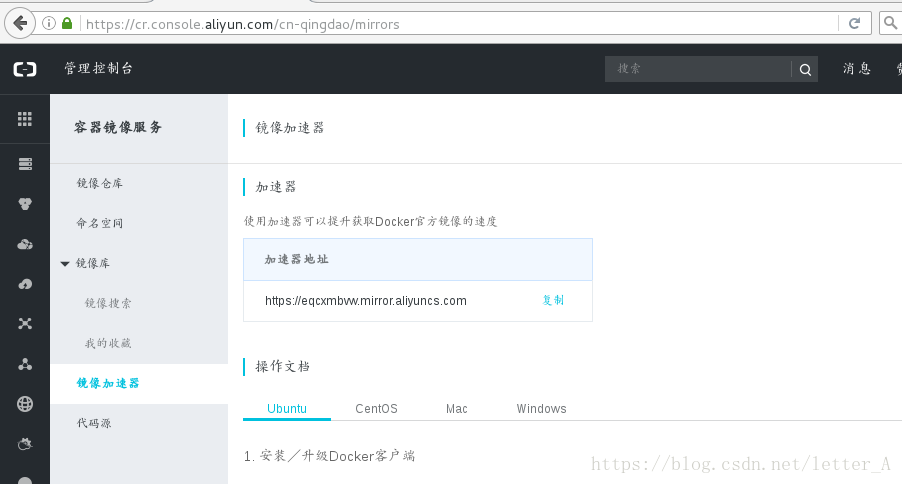
这里会有一个加速器地址: 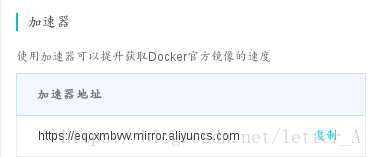
在/etc/docker目录下新建文件daemon.json将加速器地址写入:
[root@foundation17 docker]# vim daemon.json
1 {
2 "registry-mirrors": ["https://eqcxmbvw.mirror.aliyuncs.com"]
3 }
之后重启服务:
[root@foundation17 docker]# systemctl daemon-reload
[root@foundation17 docker]# systemctl restart docker
搜索docker镜像,如果能搜到表示加速器搭建成功:
[root@foundation17 docker]# docker search nginxNAME DESCRIPTION STARS OFFICIAL AUTOMATEDnginx Official build of Nginx. 9307 [OK] jwilder/nginx-proxy Automated Nginx reverse proxy for docker c... 1385 [OK]richarvey/nginx-php-fpm Container running Nginx + PHP-FPM capable ... 609 [OK]jrcs/letsencrypt-nginx-proxy-companion LetsEncrypt container to use with nginx as... 396 [OK]kong Open-source Microservice & API Management ... 215 [OK] webdevops/php-nginx Nginx with PHP-FPM 111
通过docker pull指令获取所需要的镜像,这样使用加速器下载镜像就比直接在官网下载快多了:
[root@foundation17 docker]# docker pull nginx
Using default tag: latest
latest: Pulling from library/nginx
be8881be8156: Downloading [> ] 224.9 kB/22.49 MB
32d9726baeef: Downloading [> ] 222.1 kB/22.14 MB
87e5e6f71297: Download complete
镜像使用:以nginx为例
下载好镜像之后将镜像导入本地docker仓库并运行:
[root@foundation17 docker]# docker load -i nginx.tar
cdb3f9544e4c: Loading layer [==================================================>] 58.44 MB/58.44 MB
a8c4aeeaa045: Loading layer [==================================================>] 54.24 MB/54.24 MB
08d25fa0442e: Loading layer [==================================================>] 3.584 kB/3.584 kB
Loaded image: nginx:latest
[root@foundation17 docker]# docker run -d --name vm2 nginx
8aff7c1c564bfa154e7d70d721cc730397b4ca058da7810fc65dbec75ab21e24
查看nginx所使用的ip地址:
[root@foundation17 docker]# docker inspect vm2
功访问:
这种情况下新建的nginx首页文件需要复制到nginx默认发布目录下,每次更新都要重新复制比较麻烦:
root@foundation17 docker]# docker cp index.html vm2:/usr/share/nginx/html/
为了能够将更改的首页文件即时刷新到nginx服务端,需要新建目录并挂载到nginx的默认发布目录下,挂载时候需要重新开启nginx服务,所以需要先删除原来的nginx服务:
[root@foundation17 web]# docker rm -f vm2
vm2
或者不删除,重新开启一个nginx服务进程,但这个进程的ip就不再是172.17.0.2了,访问时要访问新的ip。
新建目录并挂载到nginx默认发布目录:
[root@foundation17 docker]# mkdir /tmp/docker/web -p
[root@foundation17 web]# docker run -d --name vm4 -v /tmp/docker/web/:/usr/share/nginx/html nginx
053b9a24cf3d2431d9e5b7913f5575520c7c7849ca732c3ebf7d228e69e14d55
在/tmp/docker/web目录下新建index.html首页文件,就可以即时刷新到nginx服务端了:

docker阿里云镜像加速器使用的更多相关文章
- docker 阿里云镜像加速器
传送门:阿里云镜像地址 Ubuntu/CentOS 安装/升级你的Docker客户端 推荐安装1..0以上版本的Docker客户端,参考文档 docker-ce 如何配置镜像加速器 针对Docker客 ...
- Docker阿里云镜像加速器 for CentOS 7
CentOS 7 CentOS使用配置方式略微复杂,需要先将默认的配置文件复制出来 /lib/systemd/system/docker.service -> /etc/systemd/syst ...
- docker添加阿里云镜像加速器
.docker添加阿里云镜像加速器 https://blog.csdn.net/chenjin_chenjin/article/details/86674521 .配置阿里云加速器 阿里云会根据账号生 ...
- Docker安装及阿里云镜像加速器配置
Docker安装 Windows系统安装就不用说了,因为Docker是开源的,所以,直接去官网:https://www.docker.com/下载安装包安装就行了 其实,Linux系统安装也很简单,照 ...
- Docker配置阿里云镜像加速器及开启远程连接
适用于CentOS-7版本 mkdir /etc/docker vim /etc/docker/deamon.json 添加以下内容配置镜像 { "registry-mirrors" ...
- 附001.Docker阿里云Registry加速器配置
一 安装配置docker 1.1 安装docker 见<002.docker版本及安装>. 1.2 配置国内阿里云加速器 见<002.docker版本及安装>. 二 配置阿里云 ...
- Docker阿里云镜像加速
登录阿里云docker registry sudo docker login --username=zhangsan@163.com registry.cn-hangzhou.aliyuncs.com ...
- Docker 阿里云镜像加速
1.进入阿里云镜像加速页面: https://cr.console.aliyun.com/#/accelerator 2.修改/etc/docker/daemon.json文件配置,没有则新建: ? ...
- Docker阿里云镜像存储服务
阿里云镜像服务地址 https://cr.console.aliyun.com/cn-beijing/instances/repositories 免费免费免费 登陆之后可以免费创建,仓库.地址大 ...
随机推荐
- jquery获得/修改html标签
1.添加 meta$("head").append('<meta http-equiv="content-type" content="text ...
- CentOS 6.5网络配置静态IP地址
打开VMvare,并进入虚拟机 2 输入用户名,按回车键,再输入密码,登录系统 3 进行网络配置前,需要确认几个事情: 1. 网络适配器模式是否为NAT模式 右键虚拟机,或者点击VMvare菜单栏中的 ...
- Java 设计模式系列(七)桥接模式
Java 设计模式系列(七)桥接模式 桥接模式(Bridge)是一种结构型设计模式.Bridge 模式基于类的最小设计原则,通过使用封装.聚合及继承等行为让不同的类承担不同的职责.它的主要特点是把抽象 ...
- 20155230 2016-2017-2 《Java程序设计》第七周学习总结
20155230 2016-2017-2 <Java程序设计>第6周学习总结 教材学习内容总结 世界时:在1972年引入UTC之前,GMT与UT是相同的 格林威治标准时间(GMT),现已不 ...
- C++ 类 & 对象-C++ 内联函数-C++ this 指针-C++ 类的静态成员
C++ 内联函数 C++ 内联函数是通常与类一起使用.如果一个函数是内联的,那么在编译时,编译器会把该函数的代码副本放置在每个调用该函数的地方. 对内联函数进行任何修改,都需要重新编译函数的所有客户端 ...
- struct pollfd
struct pollfd 2010年04月15日 星期四 下午 03:59 int poll (struct pollfd *fds, size_t nfds , int timeout); str ...
- Spring 框架简介
Spring 是一个开源框架,是为了解决企业应用程序开发复杂性而创建的.框架的主要优势之一就是其分层架构,分层架构允许您选择使用哪一个组件,同时为 J2EE 应用程序开发提供集成的框架. 在这篇由三部 ...
- Objective-C 学习笔记(二) 函数
Objective-C 函数 定义一个方法 在Objective-C编程的方法定义的一般形式如下: - (return_type) method_name:( argumentType1 )argum ...
- 关于easyui展示慢的Debug
同事开发的软件系统采用Easyui做的前台界面,当业务变得比较复杂之后,展示效果就变得很慢,于是我开始了原因的排查,现在已经找到了具体的原因,所以拿出来与大家一起分享调试过程. 既然调试的是前端,那么 ...
- Npoi将excel数据导入到sqlserver数据库
/// <summary> /// 将excel导入到datatable /// </summary> /// <param name="filePath&qu ...