
机器学习理论之SVM
支持向量机系列
(1) 算法理论理解
http://blog.pluskid.org/?page_id=683
手把手教你实现SVM算法(一)
(2) 算法应用
算法应用----python 实现实例,线性分割二维平面数据
工具: python 以及numpy matplot sklearn
sklearn的svm的介绍以及一些实例
http://scikit-learn.org/stable/modules/generated/sklearn.svm.SVC.html
# coding: utf-8

#1 sklearn简单例子

from sklearn import svm

X = [[2, 0], [1, 1], [2,3]]

y = [0, 0, 1]

clf = svm.SVC(kernel = 'linear')

clf.fit(X, y)

print(clf)

# get support vectors

print(clf.support_vectors_)

# get indices of support vectors

print(clf.support_)

# get number of support vectors for each class

print(clf.n_support_)

# coding: utf-8

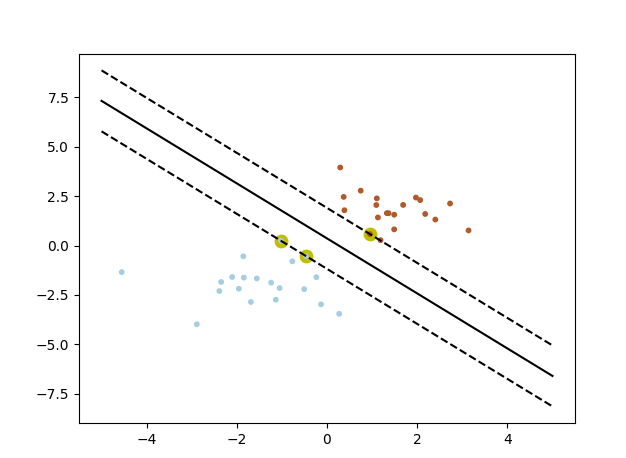
#2 sklearn画出决定界限

print(__doc__)

import numpy as np

import pylab as pl

from sklearn import svm

# we create 40 separable points

np.random.seed(0)

#随机数据

X = np.r_[np.random.randn(20, 2) - [2, 2], np.random.randn(20, 2) + [2, 2]]

#数据标签

label = [0] * 20 + [1] * 20

print(label)

# fit the model

clf = svm.SVC(kernel='linear')

clf.fit(X, label)

# get the separating hyperplane

w = clf.coef_[0]

a = -w[0] / w[1]

wb = clf.intercept_[0]

print( "w: ", w)

print( "a: ", a)

print("wb: ", wb)

#超平面方程求解

# w[0] * x + w[1] * y + wb = 0

# y = (-w[0] / w[1]) * x - wb / w[1]

xx = np.linspace(-5, 5)

yy = a * xx - (clf.intercept_[0]) / w[1]

#支撑平面求解

# plot the parallels to the separating hyperplane that pass through the

# support vectors

# y = a * x + b

spoint = clf.support_vectors_[0]#获取分类为0的支持向量点

# x = spoint[0] y = spoint[1]; spoint[1] = a * spoint[0] = b

yy_down = a * xx + (spoint[1] - a * spoint[0])

spoint = clf.support_vectors_[-1]#获取分类为1的支持向量点

yy_up = a * xx + (spoint[1] - a * spoint[0])

# print( " xx: ", xx)

# print( " yy: ", yy)

print( "support_vectors_: ", clf.support_vectors_)

print( "clf.coef_: ", clf.coef_)

# In scikit-learn coef_ attribute holds the vectors of the separating hyperplanes for linear models. It has shape (n_classes, n_features) if n_classes > 1 (multi-class one-vs-all) and (1, n_features) for binary classification.

#

# In this toy binary classification example, n_features == 2, hence w = coef_[0] is the vector orthogonal to the hyperplane (the hyperplane is fully defined by it + the intercept).

#

# To plot this hyperplane in the 2D case (any hyperplane of a 2D plane is a 1D line), we want to find a f as in y = f(x) = a.x + b. In this case a is the slope of the line and can be computed by a = -w[0] / w[1].

#分割平面

# plot the line, the points, and the nearest vectors to the plane

pl.plot(xx, yy, 'k-')

pl.plot(xx, yy_down, 'k--')

pl.plot(xx, yy_up, 'k--')

#支持向量点 黄色粗笔

pl.scatter(clf.support_vectors_[:, 0], clf.support_vectors_[:, 1], s=80, c='y', cmap=pl.cm.Paired)

#数据点

pl.scatter(X[:, 0], X[:, 1], s = 10, c=label, cmap=pl.cm.Paired)

pl.axis('tight')

pl.show()
(3) 人脸识别实例
"""

===================================================

Faces recognition example using eigenfaces and SVMs

===================================================

The dataset used in this example is a preprocessed excerpt of the

"Labeled Faces in the Wild", aka LFW_:

  http://vis-www.cs.umass.edu/lfw/lfw-funneled.tgz (233MB)

.. _LFW: http://vis-www.cs.umass.edu/lfw/

Expected results for the top 5 most represented people in the dataset:

================== ============ ======= ========== =======

                   precision    recall  f1-score   support

================== ============ ======= ========== =======

     Ariel Sharon       0.67      0.92      0.77        13

     Colin Powell       0.75      0.78      0.76        60

  Donald Rumsfeld       0.78      0.67      0.72        27

    George W Bush       0.86      0.86      0.86       146

Gerhard Schroeder       0.76      0.76      0.76        25

      Hugo Chavez       0.67      0.67      0.67        15

       Tony Blair       0.81      0.69      0.75        36

      avg / total       0.80      0.80      0.80       322

================== ============ ======= ========== =======

"""

from __future__ import print_function

from time import time

import logging

import matplotlib.pyplot as plt

from sklearn.model_selection import train_test_split

from sklearn.model_selection import GridSearchCV

from sklearn.datasets import fetch_lfw_people

from sklearn.metrics import classification_report

from sklearn.metrics import confusion_matrix

from sklearn.decomposition import PCA

from sklearn.svm import SVC

print(__doc__)

# Display progress logs on stdout

logging.basicConfig(level=logging.INFO, format='%(asctime)s %(message)s')

# #############################################################################

# Download the data, if not already on disk and load it as numpy arrays

lfw_people = fetch_lfw_people(min_faces_per_person=70, resize=0.4)

# introspect the images arrays to find the shapes (for plotting)

n_samples, h, w = lfw_people.images.shape

# for machine learning we use the 2 data directly (as relative pixel

# positions info is ignored by this model)

X = lfw_people.data

n_features = X.shape[1]

# the label to predict is the id of the person

y = lfw_people.target

target_names = lfw_people.target_names

n_classes = target_names.shape[0]

print("Total dataset size:")

print("n_samples: %d" % n_samples)

print("n_features: %d" % n_features)

print("n_classes: %d" % n_classes)

# #############################################################################

# Split into a training set and a test set using a stratified k fold

# split into a training and testing set

X_train, X_test, y_train, y_test = train_test_split(

    X, y, test_size=0.25, random_state=42)

# #############################################################################

# Compute a PCA (eigenfaces) on the face dataset (treated as unlabeled

# dataset): unsupervised feature extraction / dimensionality reduction

n_components = 150

print("Extracting the top %d eigenfaces from %d faces"

      % (n_components, X_train.shape[0]))

t0 = time()

pca = PCA(n_components=n_components, svd_solver='randomized',

          whiten=True).fit(X_train)

print("done in %0.3fs" % (time() - t0))

eigenfaces = pca.components_.reshape((n_components, h, w))

print("Projecting the input data on the eigenfaces orthonormal basis")

t0 = time()

X_train_pca = pca.transform(X_train)

X_test_pca = pca.transform(X_test)

print("done in %0.3fs" % (time() - t0))

# #############################################################################

# Train a SVM classification model

print("Fitting the classifier to the training set")

t0 = time()

param_grid = {'C': [1e3, 5e3, 1e4, 5e4, 1e5],

              'gamma': [0.0001, 0.0005, 0.001, 0.005, 0.01, 0.1], }

clf = GridSearchCV(SVC(kernel='rbf', class_weight='balanced'), param_grid)

clf = clf.fit(X_train_pca, y_train)

print("done in %0.3fs" % (time() - t0))

print("Best estimator found by grid search:")

print(clf.best_estimator_)

# #############################################################################

# Quantitative evaluation of the model quality on the test set

print("Predicting people's names on the test set")

t0 = time()

y_pred = clf.predict(X_test_pca)

print("done in %0.3fs" % (time() - t0))

print(classification_report(y_test, y_pred, target_names=target_names))

print(confusion_matrix(y_test, y_pred, labels=range(n_classes)))

# #############################################################################

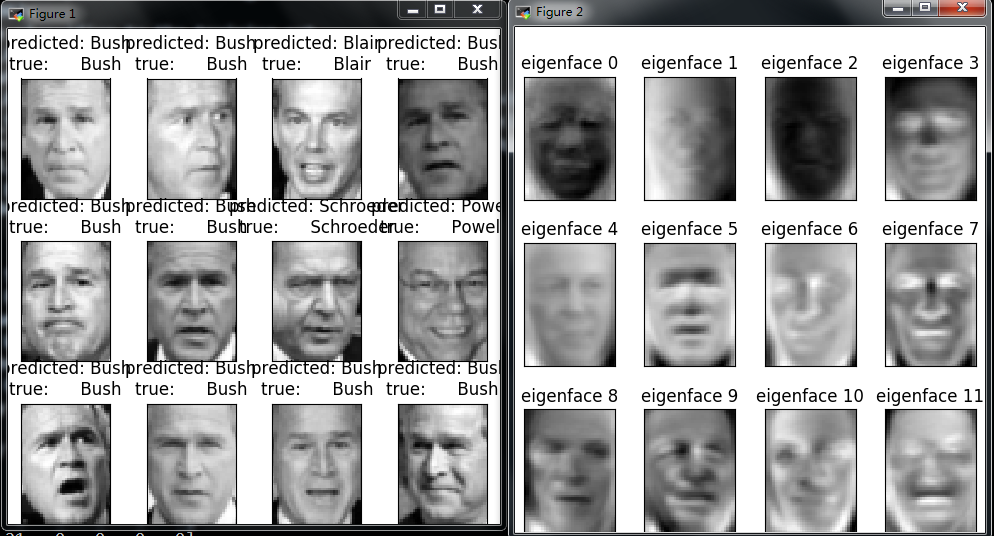
# Qualitative evaluation of the predictions using matplotlib

def plot_gallery(images, titles, h, w, n_row=3, n_col=4):

    """Helper function to plot a gallery of portraits"""

    plt.figure(figsize=(1.8 * n_col, 2.4 * n_row))

    plt.subplots_adjust(bottom=0, left=.01, right=.99, top=.90, hspace=.35)

    for i in range(n_row * n_col):

        plt.subplot(n_row, n_col, i + 1)

        plt.imshow(images[i].reshape((h, w)), cmap=plt.cm.gray)

        plt.title(titles[i], size=12)

        plt.xticks(())

        plt.yticks(())

# plot the result of the prediction on a portion of the test set

def title(y_pred, y_test, target_names, i):

    pred_name = target_names[y_pred[i]].rsplit(' ', 1)[-1]

    true_name = target_names[y_test[i]].rsplit(' ', 1)[-1]

    return 'predicted: %s\ntrue:      %s' % (pred_name, true_name)

prediction_titles = [title(y_pred, y_test, target_names, i)

                     for i in range(y_pred.shape[0])]

plot_gallery(X_test, prediction_titles, h, w)

# plot the gallery of the most significative eigenfaces

eigenface_titles = ["eigenface %d" % i for i in range(eigenfaces.shape[0])]

plot_gallery(eigenfaces, eigenface_titles, h, w)

plt.show()
out
===================================================
Faces recognition example using eigenfaces and SVMs
===================================================
The dataset used in this example is a preprocessed excerpt of the
"Labeled Faces in the Wild", aka LFW_:
http://vis-www.cs.umass.edu/lfw/lfw-funneled.tgz (233MB)
.. _LFW: http://vis-www.cs.umass.edu/lfw/
Expected results for the top 5 most represented people in the dataset:
================== ============ ======= ========== =======
precision recall f1-score support
================== ============ ======= ========== =======
Ariel Sharon 0.67 0.92 0.77 13
Colin Powell 0.75 0.78 0.76 60
Donald Rumsfeld 0.78 0.67 0.72 27
George W Bush 0.86 0.86 0.86 146
Gerhard Schroeder 0.76 0.76 0.76 25
Hugo Chavez 0.67 0.67 0.67 15
Tony Blair 0.81 0.69 0.75 36
avg / total 0.80 0.80 0.80 322
================== ============ ======= ========== =======
Total dataset size:
n_samples: 1288
n_features: 1850
n_classes: 7
Extracting the top 150 eigenfaces from 966 faces
done in 0.080s
Projecting the input data on the eigenfaces orthonormal basis
done in 0.007s
Fitting the classifier to the training set
done in 22.160s
Best estimator found by grid search:
SVC(C=1000.0, cache_size=200, class_weight='balanced', coef0=0.0,
decision_function_shape='ovr', degree=3, gamma=0.001, kernel='rbf',
max_iter=-1, probability=False, random_state=None, shrinking=True,
tol=0.001, verbose=False)
Predicting people's names on the test set
done in 0.047s
precision recall f1-score support
Ariel Sharon 0.53 0.62 0.57 13
Colin Powell 0.76 0.88 0.82 60
Donald Rumsfeld 0.74 0.74 0.74 27
George W Bush 0.93 0.88 0.91 146
Gerhard Schroeder 0.80 0.80 0.80 25
Hugo Chavez 0.69 0.60 0.64 15
Tony Blair 0.88 0.81 0.84 36
avg / total 0.84 0.83 0.83 322
[[ 8 2 2 1 0 0 0]
[ 2 53 2 2 0 1 0]
[ 4 0 20 2 0 1 0]
[ 1 10 1 129 3 1 1]
[ 0 2 0 1 20 1 1]
[ 0 1 0 1 2 9 2]
[ 0 2 2 3 0 0 29]]
机器学习理论之SVM的更多相关文章
- 机器学习理论提升方法AdaBoost算法第一卷
AdaBoost算法内容来自<统计学习与方法>李航,<机器学习>周志华,以及<机器学习实战>Peter HarringTon,相互学习,不足之处请大家多多指教! 提 ...
- 机器学习理论与实战(十)K均值聚类和二分K均值聚类
接下来就要说下无监督机器学习方法,所谓无监督机器学习前面也说过,就是没有标签的情况,对样本数据进行聚类分析.关联性分析等.主要包括K均值聚类(K-means clustering)和关联分析,这两大类 ...
- 机器学习理论知识部分--偏差方差平衡(bias-variance tradeoff)
摘要: 1.常见问题 1.1 什么是偏差与方差? 1.2 为什么会产生过拟合,有哪些方法可以预防或克服过拟合? 2.模型选择例子 3.特征选择例子 4.特征工程与数据预处理例子 内容: 1.常见问题 ...
- 机器学习理论与实战(十一)关联规则分析Apriori
<机器学习实战>的最后的两个算法对我来说有点陌生,但学过后感觉蛮好玩,了解了一般的商品数据关联分析和搜索引擎智能提示的工作原理.先来看看关联分析(association analysis) ...
- 【机器学习理论】换底公式--以e,2,10为底的对数关系转化
我们在推导机器学习公式时,常常会用到各种各样的对数,但是奇怪的是--我们往往会忽略对数的底数是谁,不管是2,e,10等. 原因在于,lnx,log2x,log10x,之间是存在常数倍关系. 回顾学过的 ...
- [机器学习理论] 降维算法PCA、SVD(部分内容,有待更新)
几个概念 正交矩阵 在矩阵论中,正交矩阵(orthogonal matrix)是一个方块矩阵,其元素为实数,而且行向量与列向量皆为正交的单位向量,使得该矩阵的转置矩阵为其逆矩阵: 其中,为单位矩阵. ...
- 【机器学习理论】概率论与数理统计--假设检验,卡方检验,t检验,F检验,方差分析
显著性水平α与P值: 1.显著性水平是估计总体参数落在某一区间内,可能犯错误的概率,用α表示. 显著性是对差异的程度而言的,是在进行假设检验前确定的一个可允许作为判断界限的小概率标准. 2.P值是用来 ...
- spark机器学习从0到1支持向量机SVM(五)
分类 分类旨在将项目分为不同类别. 最常见的分类类型是二元分类,其中有两类,通常分别为正数和负数. 如果有两个以上的类别,则称为多类分类. spark.mllib支持两种线性分类方法:线性支持 ...
- 对SVM的个人理解
对SVM的个人理解 之前以为SVM很强大很神秘,自己了解了之后发现原理并不难,不过,“大师的功力在于将idea使用数学定义它,使用物理描述它”,这一点在看SVM的数学部分的时候已经深刻的体会到了,最小 ...
随机推荐
- javascript怎么禁用浏览器后退按钮
1. <script language="JavaScript"> javascript:window.history.forward(1); </scri ...
- 读书笔记5基于matplotlib画图
一.导入需要的模块 import numpy as np import matplotlib.pyplot as plt import seaborn as sns import scipy.stat ...
- Vuejs搜索下拉框
<!DOCTYPE html> <html lang="en"> <head> <meta charset="UTF-8&quo ...
- 成员函数的重载&&隐藏&&覆盖
/* *成员函数的重载,覆盖,隐藏 *重载: *1.同样的范围(在同一个类中) *2.函数名同样 *3.參数不同 *4.virtualkeyword可有可无 *覆盖是指派生类覆盖基类的函数,特征是: ...
- Swift语言 简明基础 代码演示样例
开发环境: Mac.Xcode6.0 下面内容均可创建ios common line项目来測试 1.Hello World演示样例 使用xcode创建新的common line项目,查看主文件main ...
- 每日英语:Mooncake Austerity Hits China's Mid-Autumn Festival
First baijiu, then red carpets, and now mooncakes. For Chinese government officials, the list of tab ...
- 【Java】代理模式,静态代理和动态代理(基于JDK或CGLib)
当我们需要在一个方法之前或之后添加一段逻辑时,自然会想到使用代理类.代理类帮我们代理了实际类的调用,然后可以在实际调用之前和之后添加一些逻辑,从而不浸入实际类. 拓展:由于代理类能在实际类调用之前和之 ...
- solr中时区处理
solr.in.sh中的最后 # By default the start script uses UTC; override the timezone if needed SOLR_TIMEZONE ...
- 基于python的接口测试框架设计(一)连接数据库
基于python的接口测试框架设计(一)连接数据库 首先是连接数据库的操作,最好是单独写在一个模块里, 然后便于方便的调用,基于把connection连接放在__init__()方法里 然后分别定义D ...
- maven jetty指定端口启动
eclipse里修改 Goals值 Tomcat -Dmaven.tomcat.port=8080 tomcat:run Jetty -Djetty.port=8081 jetty:run