
django-生成随机验证码
pip3 install pillowpip3 install pillow
基本使用
 from PIL import Image            #导入模块

 img=Image.new(mode="RGB",size=(120,40),color="yellow")

 f=open("validCode.png","wb")

 img.save(f,"png")

 with open("validCode.png","rb") as f:

     data=f.read()

return HttpResponse(data)from PIL import Image #导入模块
img=Image.new(mode="RGB",size=(120,40),color="yellow")
f=open("validCode.png","wb")
img.save(f,"png")
with open("validCode.png","rb") as f:
data=f.read()
return HttpResponse(data)
img = Image.new(mode='RGB', size=(120, 30), color=(255, 255, 255))img = Image.new(mode='RGB', size=(120, 30), color=(255, 255, 255))
 img=Image.new(mode="RGB",size=(120,40),color="yellow")

 draw=ImageDraw.Draw(img,mode='RGB')

 draw.point([100,100],fill=255,255,255)

 #第一个参数:表示坐标

#第二个参数:表示颜色img=Image.new(mode="RGB",size=(120,40),color="yellow")
draw=ImageDraw.Draw(img,mode='RGB')
draw.point([100,100],fill=255,255,255)
#第一个参数:表示坐标
#第二个参数:表示颜色
draw.line((100,100,300,100), fill=(255, 255, 255))

#第一个表示起始坐标和结束坐标

#第二个参数:表示颜色draw.line((100,100,300,100), fill=(255, 255, 255))
#第一个表示起始坐标和结束坐标
#第二个参数:表示颜色
img = Image.new(mode='RGB', size=(120, 30), color=(255, 255, 255))

draw = ImageDraw.Draw(img, mode='RGB')

draw.arc((100,100,300,300),0,90,fill="red")

# 第一个参数:表示起始坐标和结束坐标(圆要画在其中间)

# 第二个参数:表示开始角度

# 第三个参数:表示结束角度

# 第四个参数:表示颜色img = Image.new(mode='RGB', size=(120, 30), color=(255, 255, 255))
draw = ImageDraw.Draw(img, mode='RGB')
draw.arc((100,100,300,300),0,90,fill="red")
# 第一个参数:表示起始坐标和结束坐标(圆要画在其中间)
# 第二个参数:表示开始角度
# 第三个参数:表示结束角度
# 第四个参数:表示颜色
draw.text([0,0],'python',"red")

# 第一个参数:表示起始坐标

# 第二个参数:表示写入内容

# 第三个参数:表示颜色draw.text([0,0],'python',"red")
# 第一个参数:表示起始坐标
# 第二个参数:表示写入内容
# 第三个参数:表示颜色
验证码的几种使用方式
#方式一

    #通过静态文件的目录来定位路径

    import os

    path = os.path.join(settings.BASE_DIR,"static","img","ss.jpg")  #BASE_DIR表示settings的上一级目录的上一级目录

    with open(path,"rb") as f:

        data=f.read()

#方式二

    from PIL import Image         #导入PIL模块

    img=Image.new(mode="RGB",size=(120,40),color="yellow")   #创建画笔

    f=open("validCode.png","wb")                     #保存在本地

    img.save(f,"png")

    with open("validCode.png","rb") as f:            #进行读取

        data=f.read()

    return HttpResponse(data)                        #然后返回给前端

'''

缺点:

    会在服务端的根目录下产生一个文件,我们不应该让它产生文件

'''

#方式三

'''

把文件读到内存中去

'''

    from io import BytesIO

    from PIL import Image

    img=Image.new(mode="RGB",size=(120,40),color="blue")

    f=BytesIO()

    img.save(f,"png")

    data=f.getvalue()

    return HttpResponse(data)

#方式四

 '''

 随机产生验证码

 '''

#        def text(self, xy, text, fill=None, font=None, anchor=None,*args, **kwargs):

 from io import BytesIO                 #把内容保存到内存中

 import random

    from PIL import Image,ImageDraw,ImageFont      #导入图画,画笔,字体

    img = Image.new(mode="RGB", size=(120, 40), color=(random.randint(0,255),random.randint(0,255),random.randint(0,255)))

    draw=ImageDraw.Draw(img,"RGB")

    font=ImageFont.truetype("blog/static/font/kumo.ttf",25)

    def fandomColor():

        '''

        生成随机颜色

        :return:

        '''

        random.randint(0, 255), random.randint(0, 255), random.randint(0, 255)

    valid_list=[]

    for i in range(5):

        random_num=str(random.randint(0,9))

        random_lower_zimu=chr(random.randint(65,90))

        random_upper_zimu=chr(random.randint(97,122))

        random_char=random.choice([random_num,random_lower_zimu,random_upper_zimu])

        draw.text([5+i*24,10],random_char,(fandomColor()),font=font)

        valid_list.append(random_char)

    for i in range(100):

        draw.point([random.randint(0, 5+i*24), random.randint(0,5+i*24 )], fill=fandomColor())

    f=BytesIO()

    img.save(f,"png")

    data=f.getvalue()

    valid_str="".join(valid_list)

    print(valid_str)

    request.session["keepValidCode"]=valid_str

    return HttpResponse(data)
#方式一
#通过静态文件的目录来定位路径
import os
path = os.path.join(settings.BASE_DIR,"static","img","ss.jpg") #BASE_DIR表示settings的上一级目录的上一级目录
with open(path,"rb") as f:
data=f.read()
#方式二
from PIL import Image #导入PIL模块
img=Image.new(mode="RGB",size=(120,40),color="yellow") #创建画笔
f=open("validCode.png","wb") #保存在本地
img.save(f,"png")
with open("validCode.png","rb") as f: #进行读取
data=f.read()
return HttpResponse(data) #然后返回给前端
'''
缺点:
会在服务端的根目录下产生一个文件,我们不应该让它产生文件
'''
#方式三
'''
把文件读到内存中去
'''
from io import BytesIO
from PIL import Image
img=Image.new(mode="RGB",size=(120,40),color="blue")
f=BytesIO()
img.save(f,"png")
data=f.getvalue()
return HttpResponse(data)
#方式四
'''
随机产生验证码
'''
# def text(self, xy, text, fill=None, font=None, anchor=None,*args, **kwargs):
from io import BytesIO #把内容保存到内存中
import random
from PIL import Image,ImageDraw,ImageFont #导入图画,画笔,字体
img = Image.new(mode="RGB", size=(120, 40), color=(random.randint(0,255),random.randint(0,255),random.randint(0,255)))
draw=ImageDraw.Draw(img,"RGB")
font=ImageFont.truetype("blog/static/font/kumo.ttf",25)
def fandomColor():
'''
生成随机颜色
:return:
'''
random.randint(0, 255), random.randint(0, 255), random.randint(0, 255)
valid_list=[]
for i in range(5):
random_num=str(random.randint(0,9))
random_lower_zimu=chr(random.randint(65,90))
random_upper_zimu=chr(random.randint(97,122))
random_char=random.choice([random_num,random_lower_zimu,random_upper_zimu])
draw.text([5+i*24,10],random_char,(fandomColor()),font=font)
valid_list.append(random_char)
for i in range(100):
draw.point([random.randint(0, 5+i*24), random.randint(0,5+i*24 )], fill=fandomColor())
f=BytesIO()
img.save(f,"png")
data=f.getvalue()
valid_str="".join(valid_list)
print(valid_str)
request.session["keepValidCode"]=valid_str
return HttpResponse(data)
验证码的局部刷新
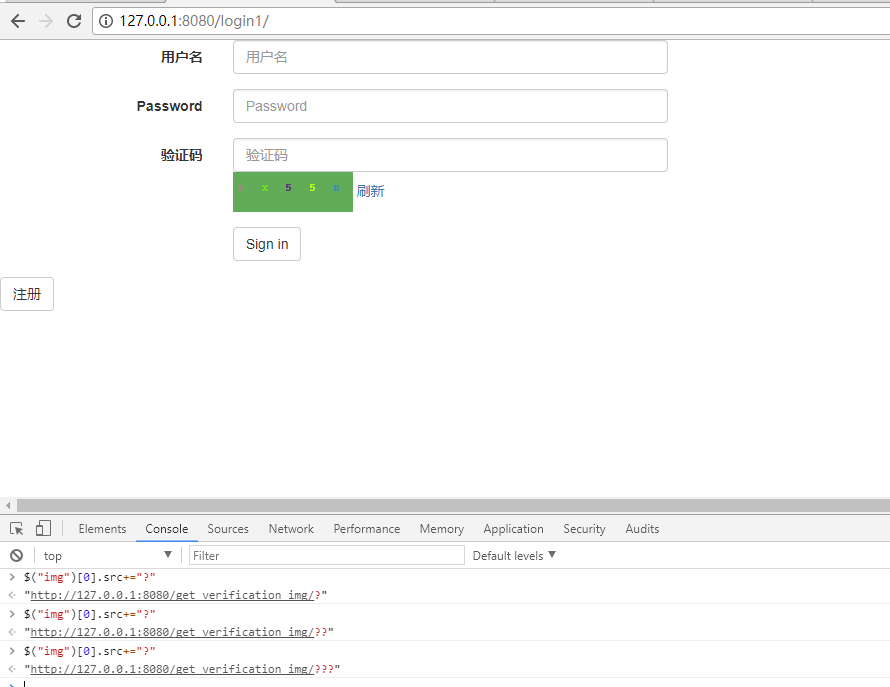
<!DOCTYPE html>

<html lang="en">

<head>

    <meta charset="UTF-8">

    <title>Title</title>

    <link rel="stylesheet" href="/static/bootstrap-3.3.7/css/bootstrap.min.css">

    <script src="/static/jquery-3.2.1.js"></script>

    <script src="/static/bootstrap-3.3.7/js/bootstrap.min.js"></script>

</head>

<body>

<form class="form-horizontal">

    {% csrf_token %}

  <div class="form-group">

    <label for="username" class="col-sm-2 control-label">用户名</label>

    <div class="col-sm-4">

      <input type="text" class="form-control" id="username" placeholder="用户名">

    </div>

  </div>

  <div class="form-group">

    <label for="inputPassword3" class="col-sm-2 control-label">Password</label>

    <div class="col-sm-4">

      <input type="password" class="form-control" id="password" placeholder="Password">

    </div>

  </div>

      <div class="form-group">

    <label for="validCode" class="col-sm-2 control-label">验证码</label>

    <div class="col-sm-4">

      <input type="text" class="form-control" id="validCode" placeholder="验证码">

      <img src="/get_verification_img/" alt="" class="valid_code_img" >

        <a class="refresh">刷新</a>

    </div>

  </div>

  <div class="form-group">

    <div class="col-sm-offset-2 col-sm-10">

      <button type="submit" class="btn btn-default signlogin">Sign in</button>

    </div>

        <div class="col-sm-offset-2 col-sm-10">

    </div>

  </div>

</form>

<script>

    $(".refresh").click(function () {

        $(".valid_code_img")[0].src+="?";

    });

    $("img").click(function () {

        $(this)[0].src+="?";

    });

</script>
x
<!DOCTYPE html>
<html lang="en">
<head>
<meta charset="UTF-8">
<title>Title</title>
<link rel="stylesheet" href="/static/bootstrap-3.3.7/css/bootstrap.min.css">
<script src="/static/jquery-3.2.1.js"></script>
<script src="/static/bootstrap-3.3.7/js/bootstrap.min.js"></script>
</head>
<body>
<form class="form-horizontal">
{% csrf_token %}
<div class="form-group">
<label for="username" class="col-sm-2 control-label">用户名</label>
<div class="col-sm-4">
<input type="text" class="form-control" id="username" placeholder="用户名">
</div>
</div>
<div class="form-group">
<label for="inputPassword3" class="col-sm-2 control-label">Password</label>
<div class="col-sm-4">
<input type="password" class="form-control" id="password" placeholder="Password">
</div>
</div>
<div class="form-group">
<label for="validCode" class="col-sm-2 control-label">验证码</label>
<div class="col-sm-4">
<input type="text" class="form-control" id="validCode" placeholder="验证码">
<img src="/get_verification_img/" alt="" class="valid_code_img" >
<a class="refresh">刷新</a>
</div>
</div>
<div class="form-group">
<div class="col-sm-offset-2 col-sm-10">
<button type="submit" class="btn btn-default signlogin">Sign in</button>
</div>
<div class="col-sm-offset-2 col-sm-10">
</div>
</div>
</form>
<script>
$(".refresh").click(function () {
$(".valid_code_img")[0].src+="?";
});
$("img").click(function () {
$(this)[0].src+="?";
});
</script>
django-生成随机验证码的更多相关文章
- Django中生成随机验证码(pillow模块的使用)
Django中生成随机验证码 1.html中a标签的设置 <img src="/get_validcode_img/" alt=""> 2.view ...
- Java生成随机验证码
package com.tg.snail.core.util; import java.awt.Color; import java.awt.Font; import java.awt.Graphic ...
- Python 生成随机验证码
Python生成随机验证码 Python生成随机验证码,需要使用PIL模块. 安装: 1 pip3 install pillow 基本使用 1. 创建图片 1 2 3 4 5 6 7 8 9 fro ...
- Python生成随机验证码
Python生成随机验证码,需要使用PIL模块. 安装: pip3 install pillow 基本使用 1.创建图片 from PIL import Image img = Image.new(m ...
- Python使用PIL模块生成随机验证码
PIL模块的安装 pip3 install pillow 生成随机验证码图片 import random from PIL import Image, ImageDraw, ImageFont fro ...
- C#生成随机验证码例子
C#生成随机验证码例子: 前端: <tr> <td width=" align="center" valign="top"> ...
- pillow实例 | 生成随机验证码
1 PIL(Python Image Library) PIL是Python进行基本图片处理的package,囊括了诸如图片的剪裁.缩放.写入文字等功能.现在,我便以生成随机验证码为例,讲述PIL的基 ...
- struts2生成随机验证码图片
之前想做一个随机验证码的功能,自己也搜索了一下别人写的代码,然后自己重新用struts2实现了一下,现在将我自己实现代码贴出来!大家有什么意见都可以指出来! 首先是生成随机验证码图片的action: ...
- python模块之PIL模块(生成随机验证码图片)
PIL简介 什么是PIL PIL:是Python Image Library的缩写,图像处理的模块.主要的类包括Image,ImageFont,ImageDraw,ImageFilter PIL的导入 ...
- C#生成随机验证码
使用YZMHelper帮助类即可 using System; using System.Web; using System.Drawing; using System.Security.Cryptog ...
随机推荐
- MVC3--View层
Razor二义性: 1,当view层中出现 邮件格式时候比如 anbylau2130@qq.com 这种情况Razor将会出现多义性 可以使用@@来转义为一个@字符, 如:<p>y ...
- vuex的简单使用
使用vuex进行组件间数据的管理 npm i vuex -S main.js import Vue from 'vue' import App from './App.vue' import stor ...
- GIS-003-在线地图下载及应用
目前在线地图有谷歌.高德.百度.Bing.soso.天地图.OpenStreet.ArcGIS Online等.在企业应用中,一般需要物理网络隔绝,就有必要下载地图数据之后模拟发布,可以选择下载谷歌影 ...
- 【RF库Collections测试】Dictionary Should Not Contain Key
Name:Dictionary Should Not Contain KeySource:Collections <test library>Arguments:[ dictionary ...
- Linux tmux 工具
基础术语: sessions :会话,一个用户登录到主机,那么就建立了一个 session,如下图1,详细参考:https://my.oschina.net/u/158589/blog/360862t ...
- C++11新特性之0——移动语义、移动构造函数和右值引用
C++引用现在分为左值引用(能取得其地址)和 右值引用(不能取得其地址).其实很好理解,左值引用中的左值一般指的是出现在等号左边的值(带名称的变量,带*号的指针等一类的数据),程序能对这样的左值进行引 ...
- php和mySQL结合使用
首先,我建立了一个名为class的表,里面有cid,cname,cnum,我想用php代码来实现这一效果,步骤如下: 1.链接数据库 mysqli_set_charset($coon,"ut ...
- 使用ASIHTTPRequest xcode编译提示找不到"libxml/HTMLparser.h"
使用ASIHTTPRequest xcode编译提示找不到"libxml/HTMLparser.h",解决方法如下: 1>.在xcode中左边选中项目的root节点,在中间编 ...
- JDBC连接oracle地址出错
1 2 3 4 5 6 7 8 9 10 11 12 13 14 15 16 17 18 19 20 21 22 23 24 25 26 27 28 29 30 31 32 33 34 35 36 3 ...
- Day05_C操作符及二进制补码计算
回顾: 1.数据类型 2.二进制(八进制,十六进制) --------------------------------------------------------- 计算机中不可以使用负号表示 ...