
Python将数据写入excel或者txt,读入csv格式或xls文件,写入csv(写一行空一行解决办法)
1.写入excel,一开始不需要自己新建一个excel,会自动生成
attribute_proba是我写入的对象
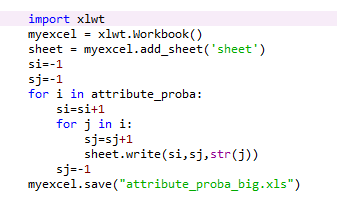
 import xlwt

    myexcel = xlwt.Workbook()

    sheet = myexcel.add_sheet('sheet')

    si=-1

    sj=-1

    for i in attribute_proba:

        si=si+1

        for j in i:

            sj=sj+1

            sheet.write(si,sj,str(j))

        sj=-1

    myexcel.save("attribute_proba_big.xls")
2.写入csv,注意要打上 newline="",否则会写一行空一行
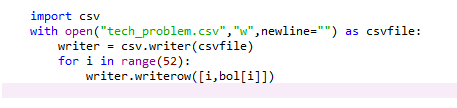
    import csv

    with open("tech_problem.csv","w",newline="") as csvfile:

        writer = csv.writer(csvfile)

        for i in range(52):

            writer.writerow([i,bol[i]])
slast的结构是有列表组成的列表
ls=[]
ls.append(number)
slast.append(ls)
可以直接写
    import csv

    with open("final.csv","w",newline="") as csvfile:

        writer = csv.writer(csvfile)

        writer.writerow(['A','B','C','D','E','F','G','H','I','J','K','L','M','N','O','P','Q','R','S','T'])

        writer.writerows(slast)
3.写入txt,一开始就需要你新建一个txt文件
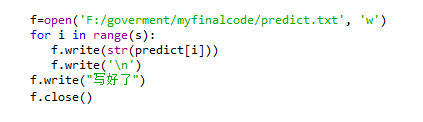
    f=open('F:/goverment/myfinalcode/predict.txt', 'w')

    for i in range(s):

       f.write(str(predict[i]))

       f.write('\n')

    f.write("写好了")

    f.close()
4.读入csv
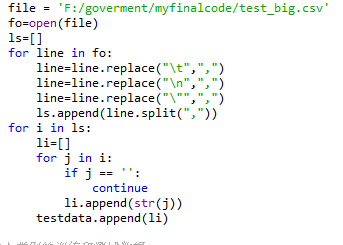
    file = 'F:/goverment/myfinalcode/test_big.csv'

    fo=open(file)

    ls=[]

    for line in fo:

        line=line.replace("\t",",")

        line=line.replace("\n",",")

        line=line.replace("\"",",")

        ls.append(line.split(","))

    for i in ls:

        li=[]

        for j in i:

            if j == '':

                continue

            li.append(str(j))

        testdata.append(li)

from pandas import read_csv

    data_set = read_csv("F:/goverment/excel operating/type_in.csv")

    data = data_set.values[:, :]

    test_data = []

    for line in data:

        ls = []

        for j in line:

            ls.append(j)

        test_data.append(ls)
5.读入xls
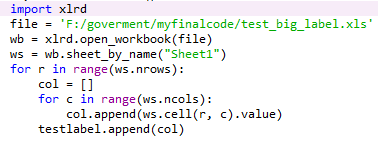
    import xlrd

    file = 'F:/goverment/myfinalcode/test_big_label.xls'

    wb = xlrd.open_workbook(file)

    ws = wb.sheet_by_name("Sheet1")

    for r in range(ws.nrows):

        col = []

        for c in range(ws.ncols):

            col.append(ws.cell(r, c).value)

        testlabel.append(col)
Python将数据写入excel或者txt,读入csv格式或xls文件,写入csv(写一行空一行解决办法)的更多相关文章
- excel批量转换为CSV格式,xls批量导出csv格式
工具/原料 excel 2013 地址链接:http://pan.baidu.com/s/1c1ZABlu 密码:d3rc 方法/步骤 首选我们把需要导出为CVS的Excel文件整理集中到 ...
- 【matlab】将matlab中数据输出保存为txt或dat格式
将matlab中数据输出保存为txt或dat格式 总结网上各大论坛,主要有三种方法. 第一种方法:save(最简单基本的) 具体的命令是:用save *.txt -ascii x x为变量 *.txt ...
- 标注工具doccano导出数据为空的解决办法
地址:https://github.com/taishan1994/doccano_export doccano_export 使用doccano标注工具同时导出实体和关系数据为空的解决办法.docc ...
- python 导出数据到excel 中,一个好用的导出数据到excel模块,XlsxWriter
最近公司有项目需要导出数据到excel,首先想到了,tablib,xlwt,xlrd,xlwings,win32com[还可以操作word],openpyxl,等模块但是 实际操作中tablib 写入 ...
- Python导出数据到Excel表格-NotImplementedError: formatting_info=True not yet implemented
在使用Python写入数据到Excel表格中时出现报错信息记录:“NotImplementedError: formatting_info=True not yet implemented” 报错分析 ...
- 导出数据库数据制成Excel和txt
引用ICSharpCode.SharpZipLib.dll 1.编写压缩和解压代码 using System; using System.Collections.Generic; using Syst ...
- KETTLE单表同步,写入EXCEL和TXT
以下操作都在5.0.1版本下进行开发,其余版本可以进行自动比对 在平时工作当中,会遇到这种情况,而且很常见.比如:1.自动生成文件TXT或者EXCEL(电信行业该需求居多),上传至某服务器:2.双方数 ...
- 文件操作ofstream,open,close,ifstream,fin,依照行来读取数据, fstream,iosin iosout,fio.seekg(),文件写入和文件读写,文件拷贝和文件
1.ofstream,open,close 写入文件 #include<iostream> #include<fstream> using namespace std; ...
- php导出数据到excel,防止身份证等数字字符格式变成科学计数的方法
而关于php的也有,但是大多都是用phpExcel导出的方法或者spreadsheet等类或者控件之类的导出方法,而我所在维护的系统却用很简单的方法,如下,网上很少有讲如何设置要导出数据的EXcel格 ...
随机推荐
- [转] sql server 跨数据库调用存储过程
A库存储过程: create PROCEDURE [dbo].[spAAAForTest] ( ) =null , ) =null ) AS BEGIN select N'A' AS a , N'B' ...
- KMP&拓展KMP
KMP算法 说明 KMP算法是一种比较高效的字符串匹配算法,可以在线性时间内求出一个串在另一个串的所有匹配位置. 解析 详解KMP 设模板串是 \(pattern\) 令 \(next[i] = ma ...
- POJ 1159 Palindrome(最长公共子序列)
http://poj.org/problem?id=1159 题意: 给出一个字符串,计算最少要插入多少个字符可以使得该串变为回文串. 思路: 计算出最长公共子序列,再用原长-LCS=所要添加的字符数 ...
- ggplot2作图详解7(完):主题(theme)设置
凡是和数据无关的图形设置内容理论上都可以归为主题类,但考虑到一些内容(如坐标轴)的特殊性,可以允许例外的情况.主题的设置相当繁琐,很容易就占用了 大量的作图时间,应尽量把这些东西简化,把注意力主要放在 ...
- 定义 S4 泛型函数
在前面的例子中,我们可以看出 S4 比 S3 更正式,因为 S4 类有类的正式定义.同样, S4 的泛型函数也更加正式.在一个关于形状的例子中,我们定义了一系列具有继承关系的 S4 类,只是继承关系的 ...
- Java中的基本数据类型及其封装类
Java中的数据类型有两种,基本数据类型和引用数据类型,引用数据类型的创建是 需要去new一个对象,该对象的内存分配在堆区,同时栈区会保存一个指向该对象的引用, 但是对于一些简单数据的创建,用new的 ...
- 设计点滴&css效果点滴
走向设计师的第一步, 做一个自由的设计师. 优秀的移动端设计的:http://www.cnblogs.com/coding4/p/6842849.html 一些好的设计图片的收藏,一些好的设计理念,一 ...
- YAML(摘录)
YAML:维基百科 一个用来表达数据序列的格式.强调以数据为中心的标记语言. 使用空白符缩进和大量依赖外观的特殊,适合编辑数据结构,配置文件. 基本格式: 缩进/区块 和内置两者格式,来表示array ...
- OAF调用JavaScript新开窗口
在OAF框架中,ORACLE标准本身并不推荐使用JS,但是仍然提供了相应的方法. String oaUrl="https://www.baidu.com/"; pageContex ...
- gdb调试libtool封装的可执行文件
http://www.gnu.org/software/libtool/manual/html_node/Debugging-executables.html 3.4 Debugging execut ...