
C#进程管理程序实现
运行效果图
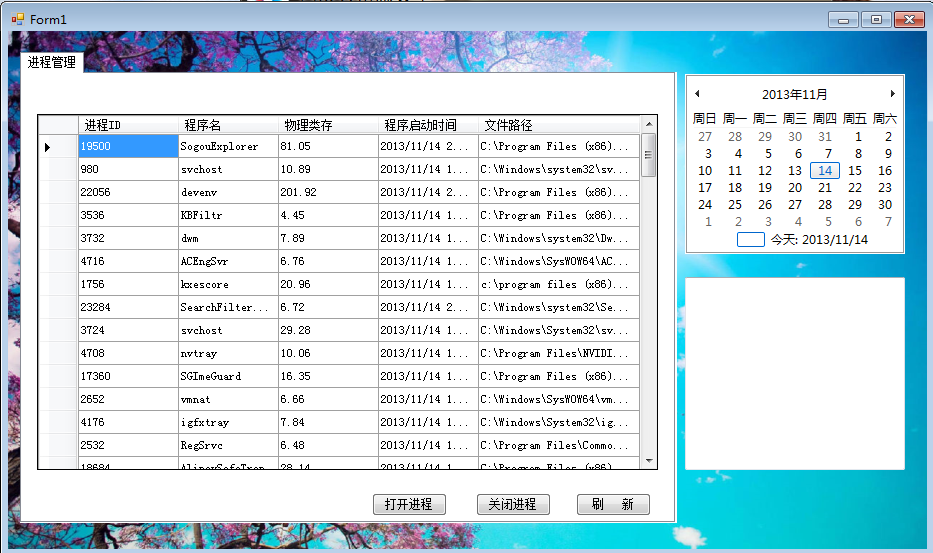
部分代码如下:
   #region  打开应用程序按钮事件处理程序

         /// <summary>

         /// 打开应用程序按钮事件处理程序

         /// </summary>

         /// <param name="sender"></param>

         /// <param name="e"></param>

         private void open_Click(object sender, EventArgs e)

         {

             OpenFileDialog fd = new OpenFileDialog();

             fd.FileName = "";

             fd.Filter = "应用程序(*.exe)|*.exe";

             fd.ShowDialog();

             if(fd.FileName!="")

             {

                 //设置启动的信息

                 ProcessStartInfo ps = new ProcessStartInfo(fd.FileName);

                 temp = new Process();

                 temp.StartInfo = ps;

                 temp.Start();

                 Thread.Sleep();

                 FreshDataGriedView();

             }

            }

 #endregion

         #region  刷新进程表方法

         /// <summary>

         ///  刷新进程表

         /// </summary>

         private void FreshDataGriedView() {

             Process[] _temp = Process.GetProcesses();

             dataGridView1.Rows.Clear();

             foreach(Process temp in _temp){

                 int newRowIndex = dataGridView1.Rows.Add();

                 DataGridViewRow newRow = dataGridView1.Rows[newRowIndex];

                 newRow.Cells[].Value=temp.Id;

                 newRow.Cells[].Value=temp.ProcessName;

                 newRow.Cells[].Value=string.Format("{0:###,##0.00}",temp.WorkingSet64/1024.0f/1024.0f);

                 try{

                 newRow.Cells[].Value=string.Format("{0}",temp.StartTime);

                 newRow.Cells[].Value=temp.MainModule.FileName;

                 }

                 catch{

                  newRow.Cells[].Value="";

                 newRow.Cells[].Value="";

                 }

             }

         }

 #endregion

         #region  刷新按钮的事件处理

         /// <summary>

         /// 刷新按钮的事件处理

         /// </summary>

         /// <param name="sender"></param>

         /// <param name="e"></param>

         private void fresh_but_Click(object sender, EventArgs e)

         {

             FreshDataGriedView();

         }

 #endregion

         #region  关闭进程按钮事件处理程序

         /// <summary>

         /// 关闭进程按钮事件处理程序

         /// </summary>

         /// <param name="sender"></param>

         /// <param name="e"></param>

         private void button1_Click(object sender, EventArgs e)

         {

             //label1.Text = process_selceted_id.ToString();

             try

             {

                 //temp.Dispose();

                 temp.CloseMainWindow();

                 FreshDataGriedView();

             }

             catch

             {

                 MessageBox.Show("请选中一个进程","错误提示",MessageBoxButtons.OK);

             }

         }

         #endregion

         //行选中的事件

         private void dataGridView1_CellMouseClick(object sender, DataGridViewCellMouseEventArgs e)

         {

             try

             {

                 //label1.Text = e.RowIndex.ToString() + "--" + dataGridView1.Rows[e.RowIndex].Cells[0].Value;

                 process_selceted_id = Convert.ToInt16(dataGridView1.Rows[e.RowIndex].Cells[].Value);

                 temp = Process.GetProcessById(process_selceted_id);

                 textbox_apand();

             }

             catch { }

         }

         //显示进程信息

         private void textbox_apand() {

             StringBuilder stringText = new StringBuilder();

             stringText.AppendLine("进程ID:" + temp.Id);

             stringText.AppendLine("进程ID:"+temp.ProcessName);

             try

             {

                 stringText.AppendLine();

                 ProcessModule m = temp.MainModule;

                 stringText.AppendLine("文件名:"+m.FileName);

                 stringText.AppendLine("版  本:"+m.FileVersionInfo.FileVersion);

                 stringText.AppendLine("描  述:"+m.FileVersionInfo.FileDescription);

                 stringText.AppendLine("语  言:"+m.FileVersionInfo.Language);

             }

             catch{

              stringText.AppendLine("无法获取信息");

             }

             this.textBox1.Text = stringText.ToString();

         }
C#进程管理程序实现的更多相关文章
- linux----------安装Supervisor是用Python开发的一套通用的进程管理程序
1.linux环境必须安装 python 2.yum install python-setuptools 3.获取supervisor包 wget https://pypi.python.org/pa ...
- 进程管理supervisor的简单说明
背景: 项目中遇到有些脚本需要通过后台进程运行,保证不被异常中断,之前都是通过nohup.&.screen来实现,带着能否做一个start/stop/restart/reload的服务启动的想 ...
- 进程管理工具Supervisor(一)简介与使用
Supervisor是用Python开发的一套client/server架构的进程管理程序,能做到开机启动,以daemon进程的方式运行程序,并可以监控进程状态等等. linux进程管理方式有传统的r ...
- Linux进程管理工具Supervisor
简述 Supervisor是用Python开发的一套通用的进程管理程序,能将一个普通的命令行进程变为后台daemon,并监控进程状态,异常退出时能自动重启. 它是通过fork/exec的方式把这些被管 ...
- supervisor进程管理的使用
介绍 Supervisor是用Python开发的一套通用的进程管理程序,能将一个普通的命令行进程变为后台daemon,并监控进程状态,异常退出时能自动重启.它是通过fork/exec的方式把这些被管理 ...
- supervisor 管理uwsgi 进程
Supervisor是用Python开发的一套通用的进程管理程序,能将一个普通的命令行进程变为后台daemon,并监控进程状态,异常退出时能自动 重启.它是通过fork/exec的方式把这些被管理的进 ...
- 守护进程与Supervisor
博客链接:http://www.cnblogs.com/zhenghongxin/p/8676565.html 消息队列处理后台任务带来的问题 在系统稍微大些的时候,我们经常会用到消息队列(实现的方式 ...
- linux学习(四) -- supervisor守护进程
supervisor是用Python开发的一套通用的进程管理程序,能将一个普通的命令行进程变为后台daemon,并监控进程状态,异常退出时能自动重启. 1.安装 apt-get install ...
- 详解Supervisor进程守护监控
Supervisor在百度百科上给的定义是超级用户,监管员.Supervisor是一个进程管理工具,当进程中断的时候Supervisor能自动重新启动它.可以运行在各种类unix的机器上,superv ...
随机推荐
- Login failed for user 'NT AUTHORITY\NETWORK SERVICE'的解决方法
1.打开SQL Server Manegement Studio 2.在 Security - logins 中 NETWORK SERVICE 3.双击该用户 Server Roles 中 勾选 ...
- android的二进制和十六进制的相互转换工具类(一):
二进制和十六进制的相互转换工具类: package com.gzcivil.utils; public class BinStr { /** * 将二进制转换成16进制 * @param buf * ...
- TFS跨版本Merge测试
原始文件Merge.txt Change Set Dev Beta #1 2014-9-25 10:49:13 ZDK 2014-9-25 10:49:13 ZDK #2 2014-9-25 10:4 ...
- hdu1238--Substrings
暴力求解 题意:求一个公共子串的最大长度,反转的公共子串存在也算. 求解思路:先找出最短的字符串进行暴力枚举.每截取一个子串后,求出它的反转字符串,然后检验这两个子字符串是否存在输入的字符串组中,每个 ...
- Linux学习之find命令
find是我们很常用的一个Linux命令,但是我们一般查找出来的并不仅仅是看看而已,还会有进一步的操作,这个时候exec的作用就显现出来了. exec解释: -exec 参数后面跟的是command ...
- Linux学习之lsof命令
lsof(list open files)是一个列出当前系统打开文件的工具.在linux环境下,任何事物都以文件的形式存在,通过文件不仅仅可以访问常规数据,还可以访问网络连接和硬件.所以如传输控制协议 ...
- linux 环境操作faq 记录
1. ubuntu adb 提示???? 找不到设备 这个问题不是一次两次了记录下,以后好找点. 问题:ubuntu下adb 不是别设备 http://blog.csdn.net/chychc/art ...
- CentOS 七 vs CentOS 6的不同
CentOS 七 vs CentOS 6的不同 CentOS 7 vs CentOS 6的不同(1)桌面系统[CentOS6] GNOME 2.x[CentOS7] GNOME 3.x(GNOME ...
- poj1969---找规律
题意:按照s型分别给数编号,给 #include <stdio.h> #include <stdlib.h> int main() { int n; while(scanf(& ...
- selector是在文件夹drawable中进行定义的xml文件。
获取Drawable对象: Resources res = mContext.getResources(); Drawable myImage = res.getDrawable(R.drawable ...