
Android ORM SQL Top 5
If you are developing an Android application, you will likely need to store data somewhere. You may choose a Cloud service (in which case, using a SyncAdapter would be a good idea), or to store your data in the embedded SQLite database. If you take the second option, you will have to decide between writing SQL queries, using a Content Provider (useful if you want to share your data with other apps), or using an ORM.
In this article, I will discuss some of the Android ORMs you may consider using in your application.
OrmLite
OrmLite is the first Android ORM that comes to my mind. However OrmLite is not an Android ORM, it’s a Java ORM with SQL databases support. It can be used anywhere Java is used, such as JDBC connections, Spring, and also Android.
It makes heavy usage of annotations, such as @DatabaseTable for each class that defines a table, or@DatabaseField for each field in the class.
A simple example of using OrmLite to define a table would be something like this:
|
1
2
3
4
5
6
7
8
9
10
11
12
13
14
15
16
17
18
19
20
21
22
23
24
25
26
27
28
29
|
@DatabaseTable(tableName = "users")public class User { @DatabaseField(id = true) private String username; @DatabaseField private String password; public User() { // ORMLite needs a no-arg constructor } public User(String username, String password) { this.username = username; this.password = password; } // Implementing getter and setter methods public String getUserame() { return this.username; } public void setName(String username) { this.username = username; } public String getPassword() { return this.password; } public void setPassword(String password) { this.password = password; }} |
OrmLite for Android is open source and you can find it on GitHub. For more information read its official documentation here.
SugarORM
SugarORM is an ORM built only for Android. It comes with an API which is both simple to learn and simple to remember. It creates necessary tables itself, gives you a simple methods of creating one-to-one and one-to-many relationships, and also simplifies CRUD by using only 3 functions, save(), delete() and find()(or findById()).
Configure your application to use SugarORM by adding these four meta-data tags to your appsAndroidManifest.xml:
|
1
2
3
4
|
<meta-data android:name="DATABASE" android:value="my_database.db" /><meta-data android:name="VERSION" android:value="1" /><meta-data android:name="QUERY_LOG" android:value="true" /><meta-data android:name="DOMAIN_PACKAGE_NAME" android:value="com.my-domain" /> |
Now you may use this ORM by extending it in the classes you need to make into tables, like this:
|
1
2
3
4
5
6
7
8
9
10
11
12
13
14
15
|
public class User extends SugarRecord<User> { String username; String password; int age; @Ignore String bio; //this will be ignored by SugarORM public User() { } public User(String username, String password,int age){ this.username = username; this.password = password; this.age = age; }} |
So adding a new user would be:
|
1
2
|
User johndoe = new User(getContext(),"john.doe","secret",19);johndoe.save(); //stores the new user into the database |
Deleting all the users of age 19 would be:
|
1
2
3
4
|
List<User> nineteens = User.find(User.class,"age = ?",new int[]{19});foreach(user in nineteens) { user.delete();} |
For more, read SugarORM’s online documentation.
GreenDAO
When it comes to performance, ‘fast’ and GreenDAO are synonymous. As stated on its website, “most entities can be inserted, updated and loaded at rates of several thousand entities per second”. If it wasn’t that good,these apps wouldn’t be using it. Compared to OrmLite, it is almost 4.5 times faster.
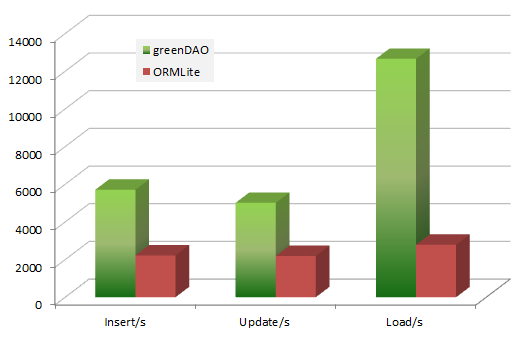
greenDAO vs OrmLite
Speaking of size, it is smaller than 100kb, so doesn’t affect APK size very much.
Follow this tutorial, which uses Android Studio to show the usage of GreenDAO in an Android application. You can view the GreenDAO source code on GitHub, and read the GreenDAO official documentation.
Active Android
Much like other ORMs, ActiveAndroid helps you store and retrieve records from SQLite without writing SQL queries.
Including ActiveAndroid in your project involves adding a jar file into the /libs folder of your Android project. As stated in the Getting started guide, you can clone the source code from GitHub and compile it using Maven. After including it, you should add these meta-data tags into your app’sAndroidManifest.xml:
|
1
2
|
<meta-data android:name="AA_DB_NAME" android:value="my_database.db" /><meta-data android:name="AA_DB_VERSION" android:value="1" /> |
After adding these tags, you can call ActiveAndroid.initialize() in your activity like this:
|
1
2
3
4
5
6
7
8
9
|
public class MyActivity extends Activity { @Override public void onCreate(Bundle savedInstanceState) { super.onCreate(savedInstanceState); ActiveAndroid.initialize(this); //rest of the app }} |
Now that the application is configured to use ActiveAndroid, you may create Models as Java classes by usingAnnotations:
|
1
2
3
4
5
6
7
8
9
10
11
12
13
14
15
16
17
18
|
@Table(name = "User")public class User extends Model { @Column(name = "username") public String username; @Column(name = "password") public String password; public User() { super(); } public User(String username,String password) { super(); this.username = username; this.password = password; }} |
This is a simple example of ActiveAndroid usage. The documentation will help you understand the usage of ActiveAndroid ORM further.
Realm
Finally Realm is a ‘yet-to-come’ ORM for Android which currently only exists. It is built on C++, and runs directly on your hardware (not interpreted) which makes it really fast. The code for iOS is open source, and you can find it on GitHub.
On the website you will find some use cases of Realm in both Objective-C and Swift, and also a Registration form to get the latest news for the Android version.
Final words
These are not the only Android ORMs on the market. Other examples are Androrm and ORMDroid.
SQL knowledge is a skill that every developer should have, but writing SQL queries is boring, especially when there are so many ORMs out there. When they make your job simpler, why not use them in the first place?
How about you? What Android ORM do you use? Comment your choice below
Android ORM SQL Top 5的更多相关文章
- 最好的5个Android ORM框架
在开发Android应用时,保存数据有这么几个方式, 一个是本地保存,一个是放在后台(提供API接口),还有一个是放在开放云服务上(如 SyncAdapter 会是一个不错的选择). 对于第一种方式, ...
- 简单实用的Android ORM框架TigerDB
TigerDB是一个简单的Android ORM框架,它能让你一句话实现数据库的增删改查,同时支持实体对象的持久化和自动映射,同时你也不必关心表结构的变化,因为它会自动检测新增字段来更新你的表结构. ...
- 最受欢迎的5个Android ORM框架
在开发Android应用时,保存数据有这么几个方式, 一个是本地保存,一个是放在后台(提供API接口),还有一个是放在开放云服务上(如 SyncAdapter 会是一个不错的选择). 对于第一种方式, ...
- SQL TOP 子句、SQL LIKE 操作符、SQL 通配符
TOP 子句 TOP 子句用于规定要返回的记录的数目. 对于拥有数千条记录的大型表来说,TOP 子句是非常有用的. 注释:并非所有的数据库系统都支持 TOP 子句. SQL Server 的语法: S ...
- Android ORM应用开发框架KJFrameForAndroid使用详解
本文将为大家介绍一款Android ORM应用开发框架KJFrameForAndroid,很多时候我们也叫它KJLibrary. KJFrameForAndroid简介 KJFrameForAndro ...
- 推荐的Android ORM框架
1. OrmLite OrmLite 不是 Android 平台专用的ORM框架,它是Java ORM.支持JDBC连接,Spring以及Android平台.语法中广泛使用了注解(Annotation ...
- Android 连接 SQL Server (jtds方式)——上
本文将介绍开发Android程序,连接SQL Server,通过第三方包jtds的方式. 如果你有同样的需求,请跟着做一遍,博主将以最详细的方式,进行介绍. 首先说明,Java.Android连接SQ ...
- SQL TOP分页
SQL TOP分页 2010-11-12 16:35:29| 分类: SQL | 标签: |字号大中小 订阅 1.分页方案一:(利用Not In和SELECT TOP分页) 语句形式: ...
- SQL TOP 子句
TOP 子句 TOP 子句用于规定要返回的记录的数目. 对于拥有数千条记录的大型表来说,TOP 子句是非常有用的. 注释:并非所有的数据库系统都支持 TOP 子句. SQL Server 的语法: S ...
随机推荐
- Silverlight学习(四) domainservice动态多条件查询
上次讲了silverlight+MVVN+EF的简单框架,能够实现简单的数据CURD,但是多条件动态的查询一直没有实现.在网上查阅了很多资料,发现自己走了很多误区,代码很难调试正确. 这次的查询是基于 ...
- HTML网页制作:[12]使用框架结构之frameset
首先,我希望在你的目录下,有4个网页,各自显示不同的内容. 如图所示: 1.html显示“火影忍者” 2.html显示“英雄联盟” 3.html显示“嵌入式开发.网页开发.安卓开发” 4.html显示 ...
- Oracle游标cursor1基础和隐式游标
--指向表行的指针,一次一行,一般向前移动 Resultset --游标永远代代表的是一行数据. /* 使用步骤 第一步:声明游标,就像是声明一个变量样. 游标的关键字就是cursor. Declar ...
- 新炬学院OCM讲师《Oracle核心技术》译作面世
对于数据库爱好者来讲,Oracle是最值得研究的数据库.学习Oracle数据库时,一本好书的引导和启发是非常必要的,毫无疑问,<Oracle核心技术>就是这样一本好书. <Oracl ...
- 【Tomcat】项目自动部署的链接重置错误
在服务器中装好的tomcat7 ,(服务器是的window server 2008) 在tomcat bin目录运行的 service.bat install 安装服务.然后,设置服务项(服务项名称: ...
- Winform子窗体刷新父窗体
调用窗体(父):Form1,被调用窗体(子):Form2方法1: 所有权法//Form1://需要有一个公共的刷新方法public void Refresh_Method(){//...} ...
- STM32学习笔记之一(初窥STM32)
怎么做好学习笔记? 答:自我感知-->学习知识-->归纳总结-->自我升华(真正属于自己的知识是,抛开书本,运用时,你还能记得的思想) 自我感知--看到知识概念,先自我感觉那应该是个 ...
- HDU 1021 - Fibonacci Again
找规律,分析让 F[N] 每一项对 3 取余的余数: 1,2,0, 2,2,1,0, 1,1,2,0, 2,2,1,0, 1,1,2,0, 2,2,1,0 ......... 显然循环了 #inclu ...
- linux 下idea 启动tomcat报JMX 1099错误解决办法
开始使用linux开发环境,在配置idea 下tomcat 启动时报错,提示错误为unable to ping server at localhost:1099. 解决办法: 修改/etc/hosts ...
- ckplayer 网页视频播放
最近做文件上传,可以上传的资源有图片,也有视频,在显示列表中点击视频播放图片(图1),需要弹出播放窗口(图2),播放视频.具体效果画面如下: 图1 图2:播放窗口 实现该功能使用的是ckplayer播 ...