
c#局域网聊天软件的实现
本软件是基于大学寝室局域网聊天的思路。c#源代码如下:
using System;
using System.Drawing;
using System.Collections;
using System.ComponentModel;
using System.Windows.Forms;
using System.Data;
using System.Threading;
using System.Net.Sockets;
using System.IO;
//Download by http://www.codefans.net
namespace SimpleChat
{
/// <summary>
/// Form1 的摘要说明。
/// </summary>
public class MainForm : System.Windows.Forms.Form
{
/// <summary>
/// 必需的设计器变量。
/// </summary>
private System.ComponentModel.Container components = null;
private Thread Listener;
private System.Windows.Forms.Label label1;
private System.Windows.Forms.RichTextBox richTextBox1;
private System.Windows.Forms.Label label2;
private System.Windows.Forms.Button button1;
private System.Windows.Forms.RichTextBox richTextBox2;
private System.Windows.Forms.Label label3;
private System.Windows.Forms.GroupBox groupBox1;
private System.Windows.Forms.TextBox IP;
private System.Windows.Forms.Label label4;
private System.Windows.Forms.TextBox NickName;
private System.Windows.Forms.GroupBox groupBox2;
private System.Windows.Forms.Splitter splitter1;
private System.Windows.Forms.GroupBox groupBox3;
private System.Windows.Forms.Splitter splitter2;
private System.Windows.Forms.Button button2;
private TcpListener TcpListener;
private Label label5;
private ComboBox comboBox1;
private Label label6;
private ComboBox comboBox2;
private Thread sends; public MainForm()
{
//
// Windows 窗体设计器支持所必需的
//
InitializeComponent(); //
// TODO: 在 InitializeComponent 调用后添加任何构造函数代码
//
} /// <summary>
/// 清理所有正在使用的资源。
/// </summary>
protected override void Dispose( bool disposing )
{
if( disposing )
{
if (components != null)
{
components.Dispose();
}
}
base.Dispose( disposing );
} #region Windows 窗体设计器生成的代码
/// <summary>
/// 设计器支持所需的方法 - 不要使用代码编辑器修改
/// 此方法的内容。
/// </summary>
private void InitializeComponent()
{
System.ComponentModel.ComponentResourceManager resources = new System.ComponentModel.ComponentResourceManager(typeof(MainForm));
this.label1 = new System.Windows.Forms.Label();
this.richTextBox1 = new System.Windows.Forms.RichTextBox();
this.label2 = new System.Windows.Forms.Label();
this.button1 = new System.Windows.Forms.Button();
this.richTextBox2 = new System.Windows.Forms.RichTextBox();
this.label3 = new System.Windows.Forms.Label();
this.groupBox1 = new System.Windows.Forms.GroupBox();
this.NickName = new System.Windows.Forms.TextBox();
this.label4 = new System.Windows.Forms.Label();
this.IP = new System.Windows.Forms.TextBox();
this.groupBox2 = new System.Windows.Forms.GroupBox();
this.splitter1 = new System.Windows.Forms.Splitter();
this.groupBox3 = new System.Windows.Forms.GroupBox();
this.label5 = new System.Windows.Forms.Label();
this.comboBox1 = new System.Windows.Forms.ComboBox();
this.splitter2 = new System.Windows.Forms.Splitter();
this.button2 = new System.Windows.Forms.Button();
this.label6 = new System.Windows.Forms.Label();
this.comboBox2 = new System.Windows.Forms.ComboBox();
this.groupBox1.SuspendLayout();
this.groupBox2.SuspendLayout();
this.groupBox3.SuspendLayout();
this.SuspendLayout();
//
// label1
//
this.label1.Location = new System.Drawing.Point(, );
this.label1.Name = "label1";
this.label1.Size = new System.Drawing.Size(, );
this.label1.TabIndex = ;
this.label1.Text = "对方IP地址:";
//
// richTextBox1
//
this.richTextBox1.BackColor = System.Drawing.SystemColors.HighlightText;
this.richTextBox1.Dock = System.Windows.Forms.DockStyle.Fill;
this.richTextBox1.ForeColor = System.Drawing.Color.FromArgb(((int)(((byte)()))), ((int)(((byte)()))), ((int)(((byte)()))));
this.richTextBox1.Location = new System.Drawing.Point(, );
this.richTextBox1.Name = "richTextBox1";
this.richTextBox1.Size = new System.Drawing.Size(, );
this.richTextBox1.TabIndex = ;
this.richTextBox1.Text = "";
//
// label2
//
this.label2.Dock = System.Windows.Forms.DockStyle.Top;
this.label2.Location = new System.Drawing.Point(, );
this.label2.Name = "label2";
this.label2.Size = new System.Drawing.Size(, );
this.label2.TabIndex = ;
this.label2.Text = "输入框:";
//
// button1
//
this.button1.Location = new System.Drawing.Point(, );
this.button1.Name = "button1";
this.button1.Size = new System.Drawing.Size(, );
this.button1.TabIndex = ;
this.button1.Text = "发送";
this.button1.Click += new System.EventHandler(this.button1_Click);
//
// richTextBox2
//
this.richTextBox2.BackColor = System.Drawing.SystemColors.HighlightText;
this.richTextBox2.Dock = System.Windows.Forms.DockStyle.Fill;
this.richTextBox2.ForeColor = System.Drawing.Color.FromArgb(((int)(((byte)()))), ((int)(((byte)()))), ((int)(((byte)()))));
this.richTextBox2.Location = new System.Drawing.Point(, );
this.richTextBox2.Name = "richTextBox2";
this.richTextBox2.Size = new System.Drawing.Size(, );
this.richTextBox2.TabIndex = ;
this.richTextBox2.Text = "";
//
// label3
//
this.label3.Dock = System.Windows.Forms.DockStyle.Top;
this.label3.Location = new System.Drawing.Point(, );
this.label3.Name = "label3";
this.label3.Size = new System.Drawing.Size(, );
this.label3.TabIndex = ;
this.label3.Text = "聊天信息:";
//
// groupBox1
//
this.groupBox1.Controls.Add(this.NickName);
this.groupBox1.Controls.Add(this.label4);
this.groupBox1.Controls.Add(this.IP);
this.groupBox1.Controls.Add(this.label1);
this.groupBox1.Dock = System.Windows.Forms.DockStyle.Top;
this.groupBox1.Location = new System.Drawing.Point(, );
this.groupBox1.Name = "groupBox1";
this.groupBox1.Size = new System.Drawing.Size(, );
this.groupBox1.TabIndex = ;
this.groupBox1.TabStop = false;
//
// NickName
//
this.NickName.Location = new System.Drawing.Point(, );
this.NickName.Name = "NickName";
this.NickName.Size = new System.Drawing.Size(, );
this.NickName.TabIndex = ;
//
// label4
//
this.label4.Location = new System.Drawing.Point(, );
this.label4.Name = "label4";
this.label4.Size = new System.Drawing.Size(, );
this.label4.TabIndex = ;
this.label4.Text = "你的昵称:";
//
// IP
//
this.IP.Location = new System.Drawing.Point(, );
this.IP.Name = "IP";
this.IP.Size = new System.Drawing.Size(, );
this.IP.TabIndex = ;
//
// groupBox2
//
this.groupBox2.Controls.Add(this.richTextBox2);
this.groupBox2.Controls.Add(this.splitter1);
this.groupBox2.Controls.Add(this.label3);
this.groupBox2.Dock = System.Windows.Forms.DockStyle.Top;
this.groupBox2.Location = new System.Drawing.Point(, );
this.groupBox2.Name = "groupBox2";
this.groupBox2.Size = new System.Drawing.Size(, );
this.groupBox2.TabIndex = ;
this.groupBox2.TabStop = false;
//
// splitter1
//
this.splitter1.Dock = System.Windows.Forms.DockStyle.Top;
this.splitter1.Location = new System.Drawing.Point(, );
this.splitter1.Name = "splitter1";
this.splitter1.Size = new System.Drawing.Size(, );
this.splitter1.TabIndex = ;
this.splitter1.TabStop = false;
//
// groupBox3
//
this.groupBox3.Controls.Add(this.label5);
this.groupBox3.Controls.Add(this.comboBox1);
this.groupBox3.Controls.Add(this.richTextBox1);
this.groupBox3.Controls.Add(this.splitter2);
this.groupBox3.Controls.Add(this.label2);
this.groupBox3.Dock = System.Windows.Forms.DockStyle.Top;
this.groupBox3.Location = new System.Drawing.Point(, );
this.groupBox3.Name = "groupBox3";
this.groupBox3.Size = new System.Drawing.Size(, );
this.groupBox3.TabIndex = ;
this.groupBox3.TabStop = false;
//
// label5
//
this.label5.AutoSize = true;
this.label5.Location = new System.Drawing.Point(, );
this.label5.Name = "label5";
this.label5.Size = new System.Drawing.Size(, );
this.label5.TabIndex = ;
this.label5.Text = "常用短语:";
//
// comboBox1
//
this.comboBox1.BackColor = System.Drawing.Color.FromArgb(((int)(((byte)()))), ((int)(((byte)()))), ((int)(((byte)()))));
this.comboBox1.Font = new System.Drawing.Font("华文新魏", 8.999999F, System.Drawing.FontStyle.Regular, System.Drawing.GraphicsUnit.Point, ((byte)()));
this.comboBox1.ForeColor = System.Drawing.Color.FromArgb(((int)(((byte)()))), ((int)(((byte)()))), ((int)(((byte)()))));
this.comboBox1.FormattingEnabled = true;
this.comboBox1.Items.AddRange(new object[] {
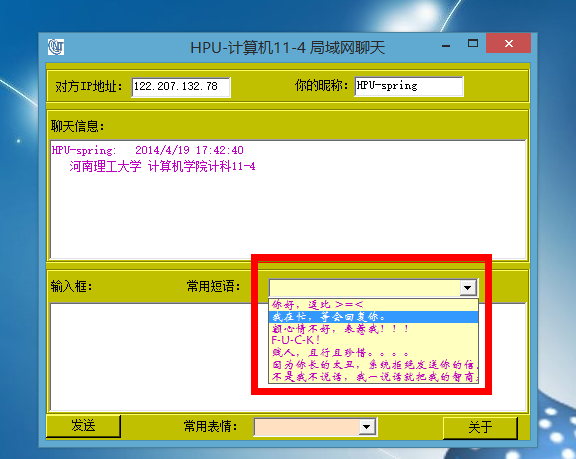
"你好,逗比 >=<",
"我在忙,等会回复你。",
"额心情不好,表惹我!!!",
"F-U-C-K !",
"贱人,且行且珍惜。。。。",
"因为你长的太丑,系统拒绝发送你的信息^-^",
"不是我不说话,我一说话就把我的智商暴露了。~(*^__^*) 嘻嘻…"});
this.comboBox1.Location = new System.Drawing.Point(, );
this.comboBox1.Name = "comboBox1";
this.comboBox1.Size = new System.Drawing.Size(, );
this.comboBox1.TabIndex = ;
this.comboBox1.SelectedIndexChanged += new System.EventHandler(this.comboBox1_SelectedIndexChanged);
//
// splitter2
//
this.splitter2.Dock = System.Windows.Forms.DockStyle.Top;
this.splitter2.Location = new System.Drawing.Point(, );
this.splitter2.Name = "splitter2";
this.splitter2.Size = new System.Drawing.Size(, );
this.splitter2.TabIndex = ;
this.splitter2.TabStop = false;
//
// button2
//
this.button2.Location = new System.Drawing.Point(, );
this.button2.Name = "button2";
this.button2.Size = new System.Drawing.Size(, );
this.button2.TabIndex = ;
this.button2.Text = "关于";
this.button2.Click += new System.EventHandler(this.button2_Click);
//
// label6
//
this.label6.AutoSize = true;
this.label6.Location = new System.Drawing.Point(, );
this.label6.Name = "label6";
this.label6.Size = new System.Drawing.Size(, );
this.label6.TabIndex = ;
this.label6.Text = "常用表情:";
//
// comboBox2
//
this.comboBox2.BackColor = System.Drawing.Color.FromArgb(((int)(((byte)()))), ((int)(((byte)()))), ((int)(((byte)()))));
this.comboBox2.ForeColor = System.Drawing.Color.FromArgb(((int)(((byte)()))), ((int)(((byte)()))), ((int)(((byte)()))));
this.comboBox2.FormattingEnabled = true;
this.comboBox2.Items.AddRange(new object[] {
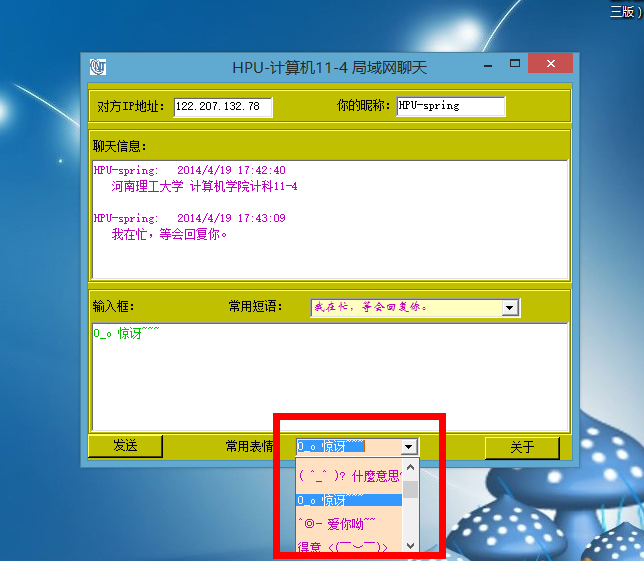
"\\^o^/ 欢呼",
"",
"*^?^* 笑,打",
"",
"::>_<:: 哭 ",
"",
"@x@ 生气",
"",
"( ^_^ )? 什麼意思??",
"",
"O_o 惊讶~~~",
"",
"^◎- 爱你呦~~",
"",
"得意 <( ̄︶ ̄)>",
"",
" 乾杯 []~( ̄▽ ̄)~*",
"",
"滿足 ( ̄ˇ ̄) ",
"",
"沒睡醒 ( ̄﹏ ̄) ",
"",
"狡猾(‵﹏′) ",
"",
"被打一巴掌 ( ̄ε(# ̄)",
" ",
"無言 ( ̄. ̄) ",
"",
"無奈 ╮( ̄▽ ̄)╭ ",
"",
"裝傻 ( ̄▽ ̄)~* ",
"",
"驚訝 (⊙ˍ⊙)",
"",
"發現( ̄. ̄)+ ",
" ",
"驚嚇 Σ( ° △ °|||)︴ ",
"",
"冷 ( ̄▽ ̄)\" ",
"",
"沒辦法 ╮(╯▽╰)╭ ",
"",
"貓咪臉 (= ̄ω ̄=) ",
"",
"疑惑 ( ̄3 ̄)a ",
"",
"阿達 ( ̄0  ̄)y ",
"",
"重創 (。_。) ",
"",
"不 (>﹏<) ",
"",
"懷疑 (→_→) ",
"",
"睏 ( ̄o ̄) . z Z ",
"",
"崇拜 m( _ _ )m ",
"",
"我想想 (ˇˍˇ) ",
"",
"生氣 <( ̄ ﹌  ̄)> "});
this.comboBox2.Location = new System.Drawing.Point(, );
this.comboBox2.Name = "comboBox2";
this.comboBox2.Size = new System.Drawing.Size(, );
this.comboBox2.TabIndex = ;
this.comboBox2.SelectedIndexChanged += new System.EventHandler(this.comboBox2_SelectedIndexChanged);
//
// MainForm
//
this.AutoScaleBaseSize = new System.Drawing.Size(, );
this.BackColor = System.Drawing.Color.FromArgb(((int)(((byte)()))), ((int)(((byte)()))), ((int)(((byte)()))));
this.ClientSize = new System.Drawing.Size(, );
this.Controls.Add(this.comboBox2);
this.Controls.Add(this.label6);
this.Controls.Add(this.button2);
this.Controls.Add(this.groupBox3);
this.Controls.Add(this.groupBox2);
this.Controls.Add(this.groupBox1);
this.Controls.Add(this.button1);
this.Icon = ((System.Drawing.Icon)(resources.GetObject("$this.Icon")));
this.MaximumSize = new System.Drawing.Size(, );
this.Name = "MainForm";
this.RightToLeftLayout = true;
this.Text = "HPU-计算机11-4 局域网聊天";
this.Closed += new System.EventHandler(this.MainForm_Closed);
this.Load += new System.EventHandler(this.MainForm_Load);
this.groupBox1.ResumeLayout(false);
this.groupBox1.PerformLayout();
this.groupBox2.ResumeLayout(false);
this.groupBox3.ResumeLayout(false);
this.groupBox3.PerformLayout();
this.ResumeLayout(false);
this.PerformLayout(); }
#endregion /// <summary>
/// 应用程序的主入口点。
/// </summary>
[STAThread]
static void Main()
{
Application.Run(new MainForm());
}
private void StartListen()
{
this.TcpListener = new TcpListener();
this.TcpListener.Start();
while( true )
{
TcpClient TcpClient = this.TcpListener.AcceptTcpClient();
NetworkStream MyStream = TcpClient.GetStream();
byte [] bytes = new byte[];
int bytesRead = MyStream.Read(bytes,,bytes.Length);
string message = System.Text.Encoding.UTF8.GetString(bytes,,bytesRead);
this.richTextBox2.Text += message + "\n";
}
} private void MainForm_Load(object sender, System.EventArgs e)
{
this.Listener = new Thread(new ThreadStart(StartListen));
this.Listener.Start();
} private void MainForm_Closed(object sender, System.EventArgs e)
{
if ( this.Listener != null )
this.Listener.Abort();
if ( this.TcpListener != null )
this.TcpListener.Stop();
} private void button1_Click(object sender, System.EventArgs e)
{
if ( sends == null || !sends.IsAlive)
{
sends = new Thread(new ThreadStart(send));
sends.Start();
}
else
MessageBox.Show("发送过快!","提示",MessageBoxButtons.OK,MessageBoxIcon.Information);
} private void button2_Click(object sender, System.EventArgs e)
{
MessageBox.Show("制作:HPU 计算机11-4 魏春生\n输入对方IP地址,只要双方都打开本程序即可聊天...\n HpuChat v1.0");
} private void send()
{
if (this.IP.Text.Length < )
{
MessageBox.Show("IP地址错误!","错误信息:",MessageBoxButtons.OK,MessageBoxIcon.Information);
return;
}
if ( this.richTextBox1.Text.Length < )
{
return;
}
try
{
string Message = this.NickName.Text + ":" + " " + DateTime.Now.ToString() + "\n" + " " + this.richTextBox1.Text + "\n";
TcpClient TcpClient = new TcpClient(this.IP.Text, );
NetworkStream tcpStream = TcpClient.GetStream();
StreamWriter stream = new StreamWriter(tcpStream);
stream.Flush();
stream.Write(Message);
stream.Close();
TcpClient.Close();
this.richTextBox2.AppendText( Message + "\n");
richTextBox1.Text = string.Empty;
}
catch ( Exception Err)
{
MessageBox.Show(Err.Message,"错误信息:",MessageBoxButtons.OK,MessageBoxIcon.Information);
}
finally
{
sends.Abort();
} } private void comboBox1_SelectedIndexChanged(object sender, EventArgs e)
{
this.richTextBox1.Text = comboBox1.SelectedItem.ToString();
} private void comboBox2_SelectedIndexChanged(object sender, EventArgs e)
{
this.richTextBox1.Text = comboBox2.SelectedItem.ToString();
}
}
}
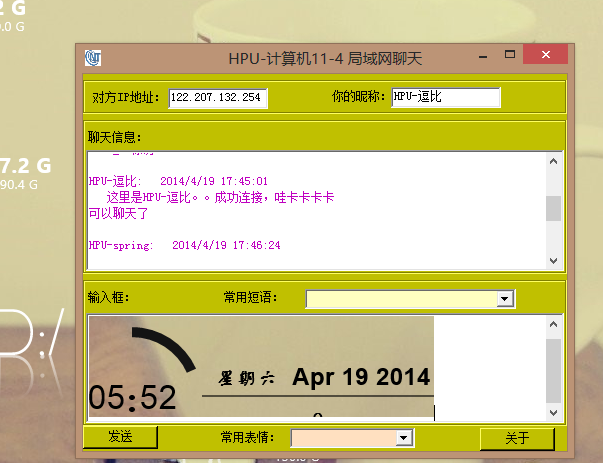
功能比较简单。只能文本聊天,没有表情。有待改善。
软件截图::::::
使用说明书地址::
c#局域网聊天软件的实现的更多相关文章
- 局域网聊天软件(winsocket)
LANChat工作整理 2013/8/22 程序实现功能: 局域网聊天软件,启动即可找到在线设备,并能够进行简单的文字聊天. 其实下面这个框图已经说明了程序的绝大部分功能原理. 核心类的程序框图 我觉 ...
- 仿QQ局域网聊天软件
1 目的 想复习一下TCP/IP协议,再结合一下以前学的Qt的知识,加上前段时间学的MySQL数据库操作,所以写了个"仿QQ局域网聊天软件"小项目,只实现了一部分功能,还没写完 ...
- “仿QQ局域网聊天软件”项目-常用编程技巧总结
1 信号槽篇 qqLogin loginDialog; QQ mainDialog; loginDialog.show(); //连接登陆窗口和主窗口 QObject::connect(&lo ...
- java 网络编程基础 UDP协议DatagramSocket,MulticastSocket 实现局域网聊天软件(Server + Client模式)
开发思路: 服务端两个Socket: UDP的DatagramSocket接收客户端消息. 广播multicastSocket 发送广播消息 客户端一个Socket: multicastSocke ...
- 基于Qt的P2P局域网聊天及文件传送软件设计
基于Qt的P2P局域网聊天及文件传送软件设计 zouxy09@qq.com http://blog.csdn.net/zouxy09 这是我的<通信网络>的课程设计作业,之 ...
- nc 局域网聊天+文件传输(netcat)
nc 局域网聊天+文件传输 nc的全程是netcat,这个工具非常好用. 有时候我们需要在局域网内传送一些文本消息或者文件的时候,通常的做法是安装一些局域网通讯软件,然后来做.其实不必要这样,使用nc ...
- 用c#写的一个局域网聊天客户端 类似小飞鸽
用c#写的一个局域网聊天客户端 类似小飞鸽 摘自: http://www.cnblogs.com/yyl8781697/archive/2012/12/07/csharp-socket-udp.htm ...
- C# 异步通信 网络聊天程序开发 局域网聊天室开发
Prepare 本文将使用一个NuGet公开的组件技术来实现一个局域网聊天程序,利用组件提供的高性能异步网络机制实现,免去了手动编写底层的困扰,易于二次开发,扩展自己的功能. 在Visual Stud ...
- 基于Android Classic Bluetooth的蓝牙聊天软件
代码地址如下:http://www.demodashi.com/demo/12133.html BluetoothChat 基于Android Classic Bluetooth的蓝牙聊天软件,目前仅 ...
随机推荐
- (a*b)%c 问题
给你两个数__int64 类型的整数 a ,b,c.问你,(a*b)%c的值是多少??我们知道: (a*b)%c = ((a%c)*(b%c))%c .不过即使这样做,在c很大的情况下,(a%c)*( ...
- js 事件小结
1,事件对象 e || window.event //ie 2, 取鼠标点击坐标 带有滚动条的 var top = document.documentElement.scrollTop | ...
- Firebug介绍及使用技巧
一.介绍 Firebug是网页浏览器Firefox下的一款开发调试工具.安装firebug后在浏览器的插件工具栏中(上方)会有一个小甲虫的图标. F12打开和关闭Firebug窗口. 二.FireBu ...
- Django学习(七) 创建第一个Django项目
如果这是你第一次使用Django,你必须进行一些初始设置.即,您将需要自动生成一些代码,建立了Django项目. 从命令行.cd进入一个目录,你想要存储您的代码,然后运行以下命令: django-ad ...
- 嵌入式系统USB CDROM虚拟光驱驱动程序开发
带U盘功能的的USB接口设备已经越来越常见了.如果能够把产品说明书或者产品设备驱动程序做成一个USB CDROM,那该多方便.假设:你已经有了USB mass storage驱动.你的任务是在此基础上 ...
- Qt之Windows资源文件(.rc文件)
简述 在Windows下使用Qt时,通常会用到Windows的资源文件 - 为exe设置信息,其中包括:文件说明.产品名称.产品版本.版权等信息... 由于是Windows平台相关的东西,Qt助手中对 ...
- POJ 2533 Longest Ordered Subsequence - from lanshui_Yang
题目大意:求一个数列的最长上升子序列(严格上升). 解题思路: 方法一:O(n^2) dp[i]:表示处理到第i个位置,序列的最长上升子序列末尾为i的长度: a[]数组存储原序列 dp[i] = ma ...
- 【转】飞凌嵌入式(Forlinx)TE/OK6410内核编译:“make: arm-none-linux-gnueabi-gcc:命令未找到”
原文网址:http://www.xuebuyuan.com/1104711.html Ubuntu10.04下编译飞凌嵌入式(Forlinx)TE/OK6410开发板提供的内核2.6.36 本以为按照 ...
- android JNI调用 execlp函数
execlp()函数 execlp函数简单的来说就是C语言中执行系统命令的函数 execlp()会从PATH 环境变量所指的目录中查找符合参数file 的文件名, ...
- Java根据年份算出所属的生肖。
一个小程序~ public String getYear(Integer year){ if(year<1900){ return "未知"; } Integer start ...