
ie11 selenium 报错org.openqa.selenium.NoSuchWindowException: Unable to get browser 处理方法
selenium + ie11运行报错
org.openqa.selenium.NoSuchWindowException: Unable to get browser (WARNING: The server did not provide any stacktrace information)
Command duration or timeout: 29 milliseconds
Build info: version: '2.48.2', revision: '41bccdd10cf2c0560f637404c2d96164b67d9d67', time: '2015-10-09 13:08:06'
System info: host: 'autotestserver', ip: '169.254.33.42', os.name: 'Windows 7', os.arch: 'x86', os.version: '6.1', java.version: '1.8.0_45'
Driver info: org.openqa.selenium.ie.InternetExplorerDriver
Capabilities [{browserAttachTimeout=0, ie.enableFullPageScreenshot=true, enablePersistentHover=true, ie.forceCreateProcessApi=false, ie.forceShellWindowsApi=false, pageLoadStrategy=normal, ignoreZoomSetting=false, ie.fileUploadDialogTimeout=3000, version=11, platform=WINDOWS, nativeEvents=true, ie.ensureCleanSession=false, elementScrollBehavior=0, ie.browserCommandLineSwitches=, requireWindowFocus=false, browserName=internet explorer, initialBrowserUrl=http://localhost:46789/, javascriptEnabled=true, ignoreProtectedModeSettings=false, enableElementCacheCleanup=true, unexpectedAlertBehaviour=dismiss}]
Session ID: 3d8e627c-f280-4eaa-8462-aacebd4d62af
at sun.reflect.NativeConstructorAccessorImpl.newInstance0(Native Method)
at sun.reflect.NativeConstructorAccessorImpl.newInstance(NativeConstructorAccessorImpl.java:62)
at sun.reflect.DelegatingConstructorAccessorImpl.newInstance(DelegatingConstructorAccessorImpl.java:45)
at java.lang.reflect.Constructor.newInstance(Constructor.java:422)
at org.openqa.selenium.remote.ErrorHandler.createThrowable(ErrorHandler.java:206)
at org.openqa.selenium.remote.ErrorHandler.throwIfResponseFailed(ErrorHandler.java:158)
at org.openqa.selenium.remote.RemoteWebDriver.execute(RemoteWebDriver.java:647)
at org.openqa.selenium.remote.RemoteWebDriver.execute(RemoteWebDriver.java:670)
at org.openqa.selenium.remote.RemoteWebDriver$RemoteNavigation.refresh(RemoteWebDriver.java:935)
at com.fc.web.CronWeb.setCronTask(CronWeb.java:71)
at com.fc.htgl.testcases.DevDemo.ffff(DevDemo.java:52)
at sun.reflect.NativeMethodAccessorImpl.invoke0(Native Method)
at sun.reflect.NativeMethodAccessorImpl.invoke(NativeMethodAccessorImpl.java:62)
at sun.reflect.DelegatingMethodAccessorImpl.invoke(DelegatingMethodAccessorImpl.java:43)
at java.lang.reflect.Method.invoke(Method.java:497)
at org.testng.internal.MethodInvocationHelper.invokeMethod(MethodInvocationHelper.java:100)
at org.testng.internal.Invoker.invokeMethod(Invoker.java:646)
at org.testng.internal.Invoker.invokeTestMethod(Invoker.java:811)
at org.testng.internal.Invoker.invokeTestMethods(Invoker.java:1137)
at org.testng.internal.TestMethodWorker.invokeTestMethods(TestMethodWorker.java:129)
at org.testng.internal.TestMethodWorker.run(TestMethodWorker.java:112)
at org.testng.TestRunner.privateRun(TestRunner.java:753)
at org.testng.TestRunner.run(TestRunner.java:607)
at org.testng.SuiteRunner.runTest(SuiteRunner.java:368)
at org.testng.SuiteRunner.runSequentially(SuiteRunner.java:363)
at org.testng.SuiteRunner.privateRun(SuiteRunner.java:321)
at org.testng.SuiteRunner.run(SuiteRunner.java:270)
at org.testng.SuiteRunnerWorker.runSuite(SuiteRunnerWorker.java:52)
at org.testng.SuiteRunnerWorker.run(SuiteRunnerWorker.java:86)
at org.testng.TestNG.runSuitesSequentially(TestNG.java:1284)
at org.testng.TestNG.runSuitesLocally(TestNG.java:1209)
at org.testng.TestNG.runSuites(TestNG.java:1124)
at org.testng.TestNG.run(TestNG.java:1096)
at org.testng.remote.AbstractRemoteTestNG.run(AbstractRemoteTestNG.java:126)
at org.testng.remote.RemoteTestNG.initAndRun(RemoteTestNG.java:137)
at org.testng.remote.RemoteTestNG.main(RemoteTestNG.java:58)
解决方法:
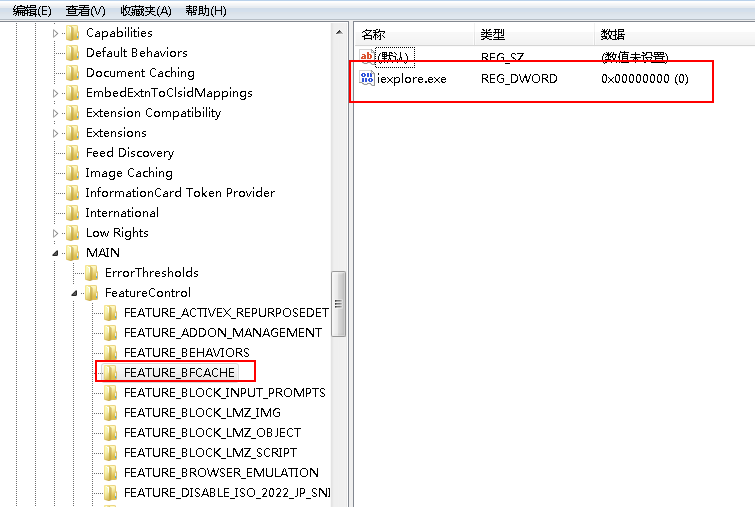
修改注册表,注册表位置:
For 32-bit Windows installations, the key you must examine in the registry editor is HKEY_LOCAL_MACHINE\SOFTWARE\Microsoft\Internet Explorer\Main\FeatureControl\FEATURE_BFCACHE.
For 64-bit Windows installations, the key is HKEY_LOCAL_MACHINE\SOFTWARE\Wow6432Node\Microsoft\Internet Explorer\Main\FeatureControl\FEATURE_BFCACHE.
Please note that the FEATURE_BFCACHE subkey may or may not be present, and should be created if it is not present.
如果项目下面没有这个项目,新建一个FEATURE_BFCACHE
Important: Inside this key, create a DWORD value named iexplore.exe with the value of 0.
新建一个DWORD 名称iexplore.exe value 值为0
ie11 selenium 报错org.openqa.selenium.NoSuchWindowException: Unable to get browser 处理方法的更多相关文章
- 报错org.openqa.selenium.WebDriverException: disconnected: unable to connect to renderer解决方法
做自动化时经常会遇到不兼容的问题,比如以下简单的脚本,主要是打开浏览器,然后最大化窗口,打开百度,输入内容搜索,代码如下: package com.gs.selenium; import org.op ...
- Python3+selenium 报错处理:“selenium.common.exceptions.NoAlertPresentException: Message: No alert is active”
一.说明 在使用python3+selenium写自动升级程序的时侯,碰到一个弹出对话框需要点击确认的场景.弹出的对话框如下图所示. 对于弹框各种资料都说通过switch_to.alert属性获取对话 ...
- selenium报错以及各解决方法
1.driver.findElement(By.name("wd")).sendKeys("selenium"); 报错:The method sendKeys ...
- python selenium 报错unknown error: cannot focus element 解决办法
登录框由于js限制,定位到元素后无法sendkey ,sendky报错如下: selenium.common.exceptions.WebDriverException: Message: unkno ...
- selenium的报错信息:selenium.common.exceptions.InvalidSelectorException: Message: invalid selector: Compound class names not permitted
报错信息:selenium.common.exceptions.InvalidSelectorException: Message: invalid selector: Compound class ...
- 解决centos7下 selenium报错--unknown error: DevToolsActivePort file doesn't exist
解决centos7下 selenium报错--unknown error: DevToolsActivePort file doesn't exist 早上在linux下用selenium启动Chro ...
- Selenium报错:StaleElementReferenceException
一个学生在操作页面跳转时遇到一个Selenium报错, 如下图所示: StaleElementReferenceException: Message: stale element reference: ...
- selenium报错汇总
selenium报错汇总 报错:[error] Could not connect to Selenium Server. Have you started the Selenium Server y ...
- selenium报错TypeError: 'FirefoxWebElement' object is not iterable
报错原因element少了s定位一组元素的方法与定位单个元素的方法类似,唯一的区别是在单词element后面多了一个s表示复数. 改为 返回结果为
随机推荐
- Android EditText的使用及值得注意的地方
Android上有很多输入法应用,每种输入法都有各自的特点,输入法多数时候是和EditText配合使用,结合我自己的亲身实践分享一下使用EditText过程中遇到的一些问题及解决方法. 设置默认输入法 ...
- Ajax提交Form表单及文件上传
刚刚申请下来的博客,写得第一篇.有点小激动,本人以前是一名工业3D设计师突然有些变故做上了JavaWeb开发: 前几天,发现了一些小问题.我在写后台管理页面时,需要上传一张图片.于是我就用很普通的Fo ...
- NS2仿真:公交车移动周期模型及性能分析
NS2仿真实验报告3 实验名称:公交车移动周期模型及性能分析 实验日期:2015年3月16日~2015年3月21日 实验报告日期:2015年3月22日 一.实验环境(网络平台,操作系统,网络拓扑图) ...
- NYOJ 10 skiing动态规划心得
这道题目,拿到手中,首先想到的是搜索,但是,后来想了想搜索不知道从哪搜起,就看了一下分类,一看属于动态规划类的,因为以前没有接触过动态规划,所以在网上搜了一下动态规划的思想,看过之后也有想到将它们到周 ...
- python复制--笔记
对象引用: >>> songs = ["Bee","Core","Love"] >>> bat = so ...
- ssh注解开发
引入需要的jar包 @Entity public class Teacher { @Id @GeneratedValue(strategy=GenerationType.IDENTITY) priva ...
- ASP.NET-FineUI开发实践-10
嵌套Grid,光棍月大放送,不藏着掖着.实在写的不好,没脸藏啊~只考虑显示排序修改什么的都不管! 话说三石官网加实例了,http://fineui.com/demo/#/demo/grid/grid_ ...
- HTML基础总结<段落>
HTML 段落 段落是通过 <p> 标签定义的. 实例 <p>This is a paragraph </p><p>This is another pa ...
- ASP.NET协作应用集成到trsids身份验证服务器的开发流程
开发Actor协同模块: (参考TRSIDS4.0 协作应用集成手册[asp.net]) ASP.Net协作应用集成到IDS之前,需要开发Actor类实现协作应用回调接口中定义的本地登录.退出.用户信 ...
- 电厂MIS,SIS简介
MIS(Management Information System)管理信息系统,主要指的是进行日常事务操作的系统,它使管理人员及时了解公司现状和各种消息,它是电力企业管理现代化的重要标志. 一个典型 ...