
ie11 selenium 报错org.openqa.selenium.NoSuchWindowException: Unable to get browser 处理方法
selenium + ie11运行报错
org.openqa.selenium.NoSuchWindowException: Unable to get browser (WARNING: The server did not provide any stacktrace information)
Command duration or timeout: 29 milliseconds
Build info: version: '2.48.2', revision: '41bccdd10cf2c0560f637404c2d96164b67d9d67', time: '2015-10-09 13:08:06'
System info: host: 'autotestserver', ip: '169.254.33.42', os.name: 'Windows 7', os.arch: 'x86', os.version: '6.1', java.version: '1.8.0_45'
Driver info: org.openqa.selenium.ie.InternetExplorerDriver
Capabilities [{browserAttachTimeout=0, ie.enableFullPageScreenshot=true, enablePersistentHover=true, ie.forceCreateProcessApi=false, ie.forceShellWindowsApi=false, pageLoadStrategy=normal, ignoreZoomSetting=false, ie.fileUploadDialogTimeout=3000, version=11, platform=WINDOWS, nativeEvents=true, ie.ensureCleanSession=false, elementScrollBehavior=0, ie.browserCommandLineSwitches=, requireWindowFocus=false, browserName=internet explorer, initialBrowserUrl=http://localhost:46789/, javascriptEnabled=true, ignoreProtectedModeSettings=false, enableElementCacheCleanup=true, unexpectedAlertBehaviour=dismiss}]
Session ID: 3d8e627c-f280-4eaa-8462-aacebd4d62af
at sun.reflect.NativeConstructorAccessorImpl.newInstance0(Native Method)
at sun.reflect.NativeConstructorAccessorImpl.newInstance(NativeConstructorAccessorImpl.java:62)
at sun.reflect.DelegatingConstructorAccessorImpl.newInstance(DelegatingConstructorAccessorImpl.java:45)
at java.lang.reflect.Constructor.newInstance(Constructor.java:422)
at org.openqa.selenium.remote.ErrorHandler.createThrowable(ErrorHandler.java:206)
at org.openqa.selenium.remote.ErrorHandler.throwIfResponseFailed(ErrorHandler.java:158)
at org.openqa.selenium.remote.RemoteWebDriver.execute(RemoteWebDriver.java:647)
at org.openqa.selenium.remote.RemoteWebDriver.execute(RemoteWebDriver.java:670)
at org.openqa.selenium.remote.RemoteWebDriver$RemoteNavigation.refresh(RemoteWebDriver.java:935)
at com.fc.web.CronWeb.setCronTask(CronWeb.java:71)
at com.fc.htgl.testcases.DevDemo.ffff(DevDemo.java:52)
at sun.reflect.NativeMethodAccessorImpl.invoke0(Native Method)
at sun.reflect.NativeMethodAccessorImpl.invoke(NativeMethodAccessorImpl.java:62)
at sun.reflect.DelegatingMethodAccessorImpl.invoke(DelegatingMethodAccessorImpl.java:43)
at java.lang.reflect.Method.invoke(Method.java:497)
at org.testng.internal.MethodInvocationHelper.invokeMethod(MethodInvocationHelper.java:100)
at org.testng.internal.Invoker.invokeMethod(Invoker.java:646)
at org.testng.internal.Invoker.invokeTestMethod(Invoker.java:811)
at org.testng.internal.Invoker.invokeTestMethods(Invoker.java:1137)
at org.testng.internal.TestMethodWorker.invokeTestMethods(TestMethodWorker.java:129)
at org.testng.internal.TestMethodWorker.run(TestMethodWorker.java:112)
at org.testng.TestRunner.privateRun(TestRunner.java:753)
at org.testng.TestRunner.run(TestRunner.java:607)
at org.testng.SuiteRunner.runTest(SuiteRunner.java:368)
at org.testng.SuiteRunner.runSequentially(SuiteRunner.java:363)
at org.testng.SuiteRunner.privateRun(SuiteRunner.java:321)
at org.testng.SuiteRunner.run(SuiteRunner.java:270)
at org.testng.SuiteRunnerWorker.runSuite(SuiteRunnerWorker.java:52)
at org.testng.SuiteRunnerWorker.run(SuiteRunnerWorker.java:86)
at org.testng.TestNG.runSuitesSequentially(TestNG.java:1284)
at org.testng.TestNG.runSuitesLocally(TestNG.java:1209)
at org.testng.TestNG.runSuites(TestNG.java:1124)
at org.testng.TestNG.run(TestNG.java:1096)
at org.testng.remote.AbstractRemoteTestNG.run(AbstractRemoteTestNG.java:126)
at org.testng.remote.RemoteTestNG.initAndRun(RemoteTestNG.java:137)
at org.testng.remote.RemoteTestNG.main(RemoteTestNG.java:58)
解决方法:
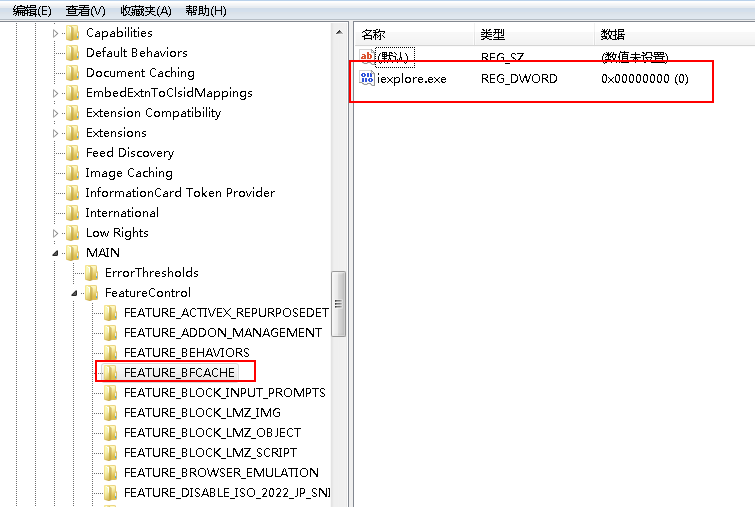
修改注册表,注册表位置:
For 32-bit Windows installations, the key you must examine in the registry editor is HKEY_LOCAL_MACHINE\SOFTWARE\Microsoft\Internet Explorer\Main\FeatureControl\FEATURE_BFCACHE.
For 64-bit Windows installations, the key is HKEY_LOCAL_MACHINE\SOFTWARE\Wow6432Node\Microsoft\Internet Explorer\Main\FeatureControl\FEATURE_BFCACHE.
Please note that the FEATURE_BFCACHE subkey may or may not be present, and should be created if it is not present.
如果项目下面没有这个项目,新建一个FEATURE_BFCACHE
Important: Inside this key, create a DWORD value named iexplore.exe with the value of 0.
新建一个DWORD 名称iexplore.exe value 值为0
ie11 selenium 报错org.openqa.selenium.NoSuchWindowException: Unable to get browser 处理方法的更多相关文章
- 报错org.openqa.selenium.WebDriverException: disconnected: unable to connect to renderer解决方法
做自动化时经常会遇到不兼容的问题,比如以下简单的脚本,主要是打开浏览器,然后最大化窗口,打开百度,输入内容搜索,代码如下: package com.gs.selenium; import org.op ...
- Python3+selenium 报错处理:“selenium.common.exceptions.NoAlertPresentException: Message: No alert is active”
一.说明 在使用python3+selenium写自动升级程序的时侯,碰到一个弹出对话框需要点击确认的场景.弹出的对话框如下图所示. 对于弹框各种资料都说通过switch_to.alert属性获取对话 ...
- selenium报错以及各解决方法
1.driver.findElement(By.name("wd")).sendKeys("selenium"); 报错:The method sendKeys ...
- python selenium 报错unknown error: cannot focus element 解决办法
登录框由于js限制,定位到元素后无法sendkey ,sendky报错如下: selenium.common.exceptions.WebDriverException: Message: unkno ...
- selenium的报错信息:selenium.common.exceptions.InvalidSelectorException: Message: invalid selector: Compound class names not permitted
报错信息:selenium.common.exceptions.InvalidSelectorException: Message: invalid selector: Compound class ...
- 解决centos7下 selenium报错--unknown error: DevToolsActivePort file doesn't exist
解决centos7下 selenium报错--unknown error: DevToolsActivePort file doesn't exist 早上在linux下用selenium启动Chro ...
- Selenium报错:StaleElementReferenceException
一个学生在操作页面跳转时遇到一个Selenium报错, 如下图所示: StaleElementReferenceException: Message: stale element reference: ...
- selenium报错汇总
selenium报错汇总 报错:[error] Could not connect to Selenium Server. Have you started the Selenium Server y ...
- selenium报错TypeError: 'FirefoxWebElement' object is not iterable
报错原因element少了s定位一组元素的方法与定位单个元素的方法类似,唯一的区别是在单词element后面多了一个s表示复数. 改为 返回结果为
随机推荐
- Java基础知识强化82:Random类概述和方法使用
1. Random类 public class Random extends Object implements Serializable: 此类的实例用于生成伪随机数流.此类使用48位种子. (1) ...
- TCP Linger的坑
昨天和同事奋战几个小时,解决了一个linger造成的bug. 现象是这样的,这是一个我从原型接手,扩充了各种功能成为可用代码的epoll实现的非阻塞socket server程序,接收大量的短连接,测 ...
- mongodb一些特性
mongodb 地理位置 mongodb schema mongodb 定时任务 mysql 也有定时任务 mongodb 读写分离 http://blog.csdn.net/sd0902/artic ...
- C#中如何获取系统环境变量等
C#中获取系统环境变量需要用到Environment 类. 其中提供了有关当前环境和平台的信息以及操作它们的方法.该类不能被继承 以下代码得到%systemdrive%的值,即“C:” string ...
- php代码结尾不要添加结尾标记
如果文件内容是纯 PHP 代码,最好在文件末尾删除 PHP 结束标记.这可以避免在 PHP 结束标记之后万一意外加入了空格或者换行符,会导致 PHP 开始输出这些空白,而脚本中此时并无输出的意图.
- Swift2.0异常处理
// 在抛出异常之前,我们需要在函数或方法的返回箭头 -> 前使用 throws 来标明将会抛出异常 func myMethodRetrunString() throws -> Strin ...
- oracle单行函数之类型转换
oracle数据类型转换:显示转换盒隐式转换 oracle自动完成转换
- C#01
C#语言 求4名同学三门成绩的平均值 using System; using System.Collections.Generic; using System.Linq; using System.T ...
- osg for android (一) 简单几何物体的加载与显示
1. 首先需要一个OSG for android的环境. (1).NDK 现在Eclipse 对NDK已经相当友好了,已经不需要另外cygwin的参与,具体可以参考 Android NDK开发篇(一) ...
- GET——token
private function get_token(){ $appid="wx4dae5d61b7f9935c"; $appSecret="24a91315a1a62a ...