
VUE 之 生命周期
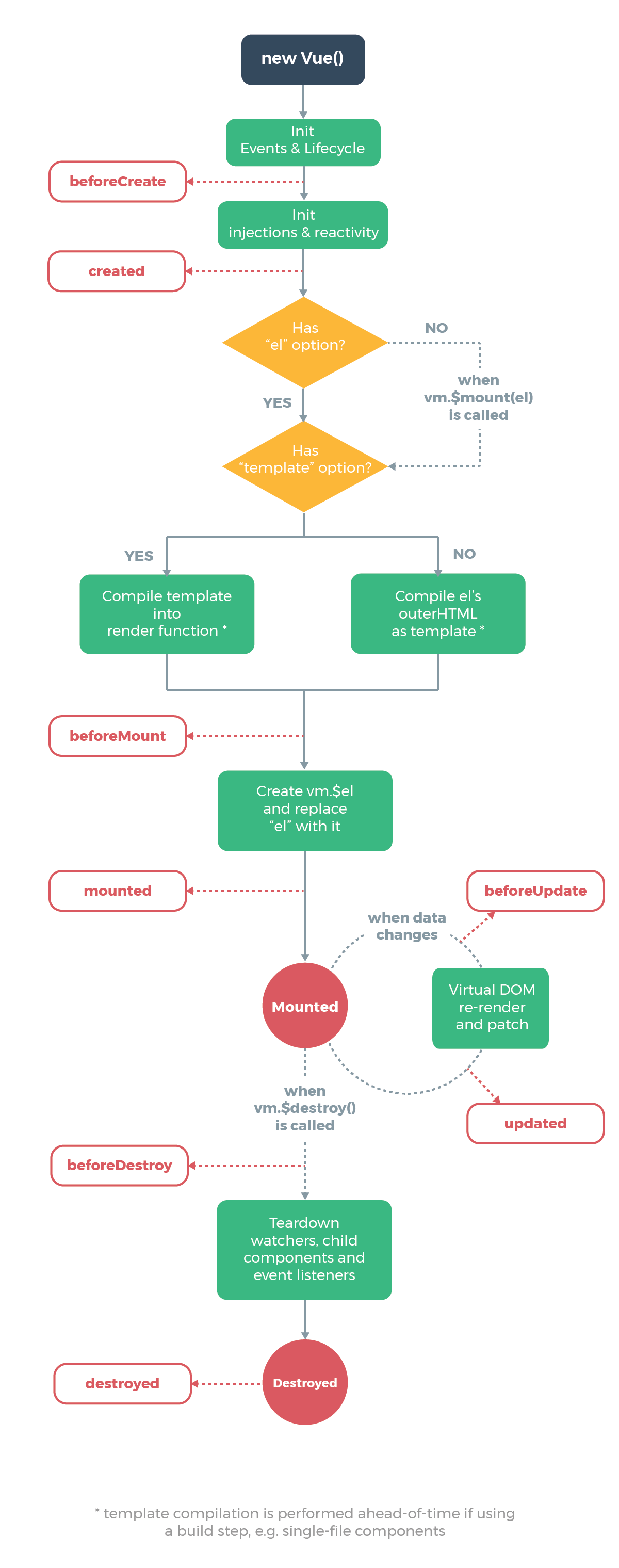
1、
Vue实例的生命周期分为8个周期
1.1
beforeCreate:在实例创建前
<div id="app">

        {{ name }}

        <button @click="myClick">点击修改数据</button>

    </div>

    <script>

        new Vue({

            el: "#app",

            data: {

                name: "maweihua",

            },

            methods: {

                init: function () {

                    console.log(this.name);

                },

                myClick: function () {

                    this.name = "Pizza";

                }

            },

            beforeCreate(){

                console.group("beforeCreate");                                            # console.group()将打印的内容放在一个组里

                console.log("el: ", this.$el);

                console.log("data: ", this.$data);

                console.log("name: ", this.name);

                console.log("init: ", this.init);

                console.log("innerHTML: ", document.getElementById("app").innerHTML);

            },

        })

    </script>

1.2、created 创建之后
<script>

        new Vue({

            el: "#app",

            data: {

                name: "maweihua",

            },

            methods: {

                init: function () {

                    console.log(this.name);

                },

                myClick: function () {

                    this.name = "Pizza";

                }

            },

            created(){

                console.group("beforeCreate");

                console.log("el: ", this.$el);

                console.log("data: ", this.$data);

                console.log("name: ", this.name);

                console.log("init: ", this.init);

                console.log("innerHTML: ", document.getElementById("app").innerHTML);

            },

        })

    </script>
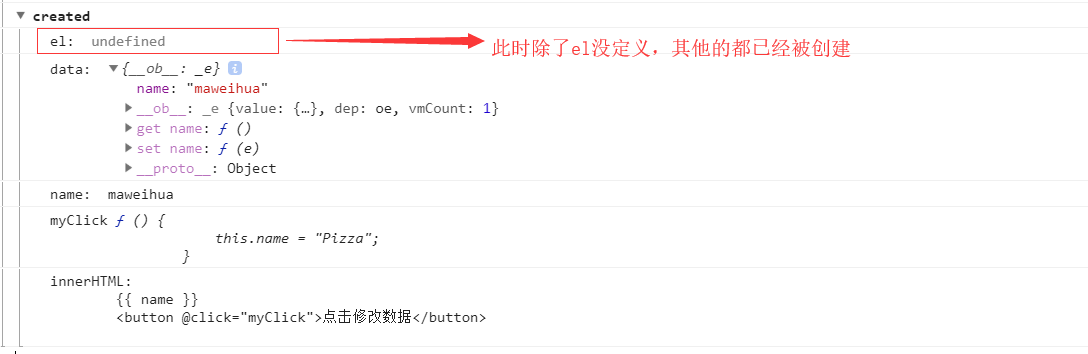
1.3 beforeMount 挂载之前
<script>

        new Vue({

            el: "#app",

            data: {

                name: "maweihua",

            },

            methods: {

                init: function () {

                    console.log(this.name);

                },

                myClick: function () {

                    this.name = "Pizza";

                }

            },

            beforeMount(){

                console.group("beforeCreate");

                console.log("el: ", this.$el);

                console.log("data: ", this.$data);

                console.log("name: ", this.name);

                console.log("init: ", this.init);

                console.log("innerHTML: ", document.getElementById("app").innerHTML);

            },

        })

    </script>

1.4 mounted 挂载之后
<script>

        new Vue({

            el: "#app",

            data: {

                name: "maweihua",

            },

            methods: {

                init: function () {

                    console.log(this.name);

                },

                myClick: function () {

                    this.name = "Pizza";

                }

            },

            mounted(){

                console.group("beforeCreate");

                console.log("el: ", this.$el);

                console.log("data: ", this.$data);

                console.log("name: ", this.name);

                console.log("init: ", this.init);

                console.log("innerHTML: ", document.getElementById("app").innerHTML);

            },

        })

    </script>
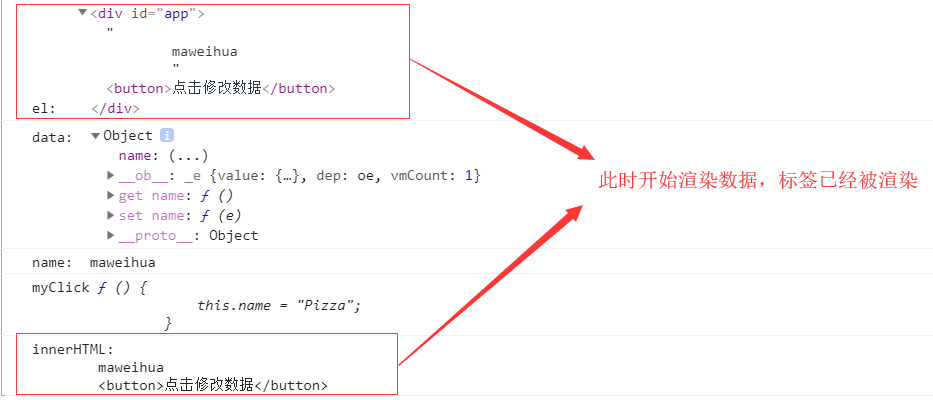
1.5 beforeUpdate 更新之前
 <script>

        new Vue({

            el: "#app",

            data: {

                name: "maweihua",

            },

            methods: {

                init: function () {

                    console.log(this.name);

                },

                myClick: function () {

                    this.name = "Pizza";

                }

            },

            beforeUpdate(){

                console.group("beforeCreate");

                console.log("el: ", this.$el);

                console.log("data: ", this.$data);

                console.log("name: ", this.name);

                console.log("init: ", this.init);

                console.log("innerHTML: ", document.getElementById("app").innerHTML);

            },

        })

    </script>
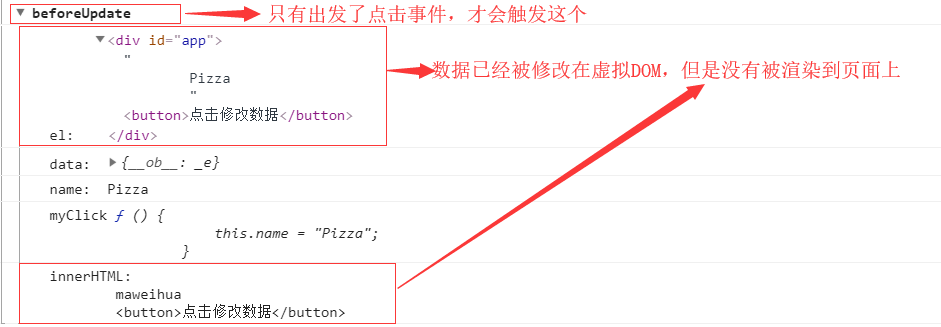
1.6 updated 更新之后
 <script>

        new Vue({

            el: "#app",

            data: {

                name: "maweihua",

            },

            methods: {

                init: function () {

                    console.log(this.name);

                },

                myClick: function () {

                    this.name = "Pizza";

                }

            },

            updated(){

                console.group("beforeCreate");

                console.log("el: ", this.$el);

                console.log("data: ", this.$data);

                console.log("name: ", this.name);

                console.log("init: ", this.init);

                console.log("innerHTML: ", document.getElementById("app").innerHTML);

            },

        })

    </script>
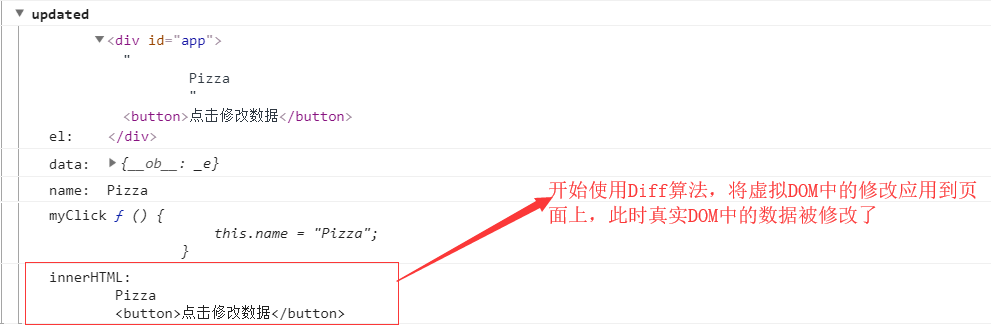
1.7 beforeDestory 销毁之前
<div id="app">

    </div>

    <script>

        let Laside = {

            template: `

                <div>

                    <h1>{{ mes }}</h1>

                </div>

            `,

            data () {

                return {

                    mes: "Hello Vue!"

                }

            },

            methods: {

                changeData: function () {

                    this.mes = "Pizza is here!";

                }

            },

            // 组件的创建和销毁对性能有影响

            beforeDestroy() {

                console.log("beforeDestroy");

                console.log("el: ", this.$el);

                console.log("data: ", this.$data);

                console.log("name: ", this.mes);

            },

        };

        let App = {

            template: `

                <div >

                    <Laside v-if="isShow"></Laside>

                    <button @click="showHide">创建消除组件</button>

                </div>

            `,

            // 判断有没有嵌套的子组件

            components: {

                "Laside": Laside,

            },

            methods: {

                showHide: function () {

                    this.isShow = !this.isShow;

                }

            },

            data () {

                return {

                    isShow: true,

                }

            }

        };

        new Vue({

            el: "#app",

            template: `<App/>`,

            components: {

                App,

            }

        })

    </script>
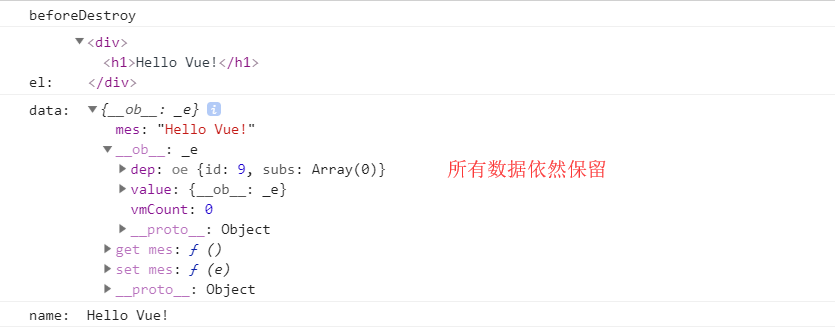
点击按钮才会触发
1.8 destoryed
<div id="app">

    </div>

    <script>

        let Laside = {

            template: `

                <div>

                    <h1>{{ mes }}</h1>

                </div>

            `,

            data () {

                return {

                    mes: "Hello Vue!"

                }

            },

            methods: {

                changeData: function () {

                    this.mes = "Pizza is here!";

                }

            },

            // 组件的创建和销毁对性能有影响

            destroyed() {

                console.log("beforeDestroy");

                console.log("el: ", this.$el);

                console.log("data: ", this.$data);

                console.log("name: ", this.mes);

            },

        };

        let App = {

            template: `

                <div >

                    <Laside v-if="isShow"></Laside>

                    <button @click="showHide">创建消除组件</button>

                </div>

            `,

            // 判断有没有嵌套的子组件

            components: {

                "Laside": Laside,

            },

            methods: {

                showHide: function () {

                    this.isShow = !this.isShow;

                }

            },

            data () {

                return {

                    isShow: true,

                }

            }

        };

        new Vue({

            el: "#app",

            template: `<App/>`,

            components: {

                App,

            }

        })

    </script>
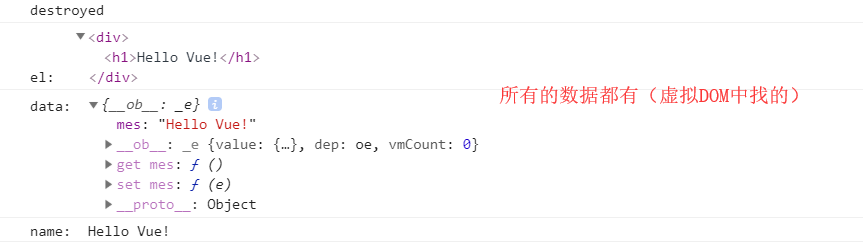
点击按钮才会触发。
由于destoryed是将数据销毁,然后重新加载整的DOM树,所以有了activated,用来将数据存储在缓存中。
1.9 activated
VUE 之 生命周期的更多相关文章
- 8.vue的生命周期
Vue实例有一个完整的生命周期,也就是从开始创建.初始化数据.编译模板.挂载Dom.渲染→更新→渲染.卸载等一系列过程,我们称这是Vue的生命周期.通俗说就是Vue实例从创建到销毁的过程,就是生命周期 ...
- 如何解释vue的生命周期才能令面试官满意?
当面试官问:"谈谈你对vue的生命周期的理解",听到这句话你是不是心里暗自窃喜:这也太容易了吧,不就是beforeCreate.created.beforeMount.mounte ...
- vue之生命周期
vue的生命周期的过程提供了我们执行自定义逻辑的机会,好好理解它的生命周期,对我们很有帮助. 1.vue实例的生命周期(vue2.0) 2.生命周期描述:(参考截图) 3.例子 window.vm = ...
- vue的生命周期的理解
Vue实例有一个完整的生命周期,也就是从开始创建.初始化数据.编译模板.挂载Dom.渲染→更新→渲染.销毁等一系列过程,我们称这是Vue的生命周期.通俗说就是Vue实例从创建到销毁的过程,就是生命周期 ...
- vue笔记-生命周期
生命周期钩子 <!DOCTYPE html> <html lang="en"> <head> <meta charset="UT ...
- vue 关于生命周期
序言: 1. vue 单组件的生命周期: 2. vue 父子组件的生命周期: 3. axios 异步请求 与 vue 的组件周期: 一.vue 每个组件的生命周期 关于每个组件的生命周期,官方文档里也 ...
- Vue:生命周期
一.什么是vue的生命周期 Vue中的生命周期是指组件从创建到销毁的一系列过程.看下面这张官方文档的图: 从图片中可以看出Vue的整个生命周期包括8个状态,按照先后顺序分别为: beforeCreat ...
- vue生命周期图示中英文版Vue实例生命周期钩子
vue生命周期图示中英文版Vue实例生命周期钩子知乎上近日有人发起了一个 “react 是不是比 vue 牛皮,为什么?” 的问题,Vue.js 作者尤雨溪12月4日正面回应了该问题.以下是尤雨溪回复 ...
- 深入理解Vue的生命周期
谈到Vue的生命周期,相信许多人并不陌生.但大部分人和我一样,只是听过而已,具体用在哪,怎么用,却不知道.我在学习vue一个多礼拜后,感觉现在还停留在初级阶段,对于mounted这个挂载还不是很清楚. ...
- vue笔记 - 生命周期第二次学习与理解
对于刚接触vue一两个月.才仅仅独立做过一两个vue项目的小白来说,以前一直自我感觉自己知道vue的生命周期, 直到前两天去面试,面试官让我说一下vue的生命周期... 其实我的心中是有那张图的,但是 ...
随机推荐
- nginx反向代理+负载均衡+https
A服务器(192.168.133.1)作为nginx代理服务器 B服务器(192.168.133.2)作为后端真实服务器 访问https://www.test.com请求从A服务器上反向代理到B服务器 ...
- hdu6069[素数筛法] 2017多校4
对于[l , r]内的每个数,根据唯一分解定理有 所以有 因为 //可根据唯一分解定理推导 所以 题目要求 就可以运用它到上述公式 (注意不能暴力对l,r内的数一个个分解算贡献 ...
- 雅礼培训 Problem B 【图论 + 贪心】
题意 A和B在树上轮流选点,记A的联通块个数为\(x\),B的联通块个数为\(y\) A使\(x - y\)最大,B使\(x - y\) 二人采取最优策略,求\(x-y\) 题解 树联通块个数 = 点 ...
- 常州模拟赛d4t1 立方体
题目描述 立方体有 6 个面,每个面上有一只奶牛,每只奶牛都有一些干草.为了训练奶牛的合作精神,它 们在玩一个游戏,每轮:所有奶牛将自己的干草分成 4 等份,分给相邻的 4 个面上的奶牛. 游戏开始, ...
- getParameter 与 getAttribute的区别
request.getAttribute():是request时设置的变量的值,用request.setAttribute("name","您自己的值");来设 ...
- tyvj 1061 Mobile Service
线性DP 本题的阶段很明显,就是完成了几个请求,但是信息不足以转移,我们还需要存储三个服务员的位置,但是三个人都存的话会T,我们发现在阶段 i 处,一定有一个服务员在 p[i] 处,所以我们可以只存另 ...
- *AtCoder Grand Contest 002F - Leftmost Ball
$n \leq 2000,k \leq 2000$,现$n$种球每种有$k$个,在一种排列中,会把每种颜色的球第一个出现的涂成第0种(不同于原来的n种)颜色,问最终会出现多少种不同的序列.膜1e9+7 ...
- Android开发把项目打包成apk-(转)
做完一个Android项目之后,如何才能把项目发布到Internet上供别人使用呢?我们需要将自己的程序打包成Android安装包文件--APK(Android Package),其后缀名为" ...
- 【Java TCP/IP Socket】深入剖析socket——TCP通信中由于底层队列填满而造成的死锁问题(含代码)
基础准备 首先需要明白数据传输的底层实现机制,在http://blog.csdn.net/ns_code/article/details/15813809这篇博客中有详细的介绍,在上面的博客中,我们提 ...
- foobar2000设置关闭按钮最小化到系统托盘
1.设置托盘选项: 2.[File]->[Preferences]->[Advanced]->[Display]->[Default User Interface]->[ ...