
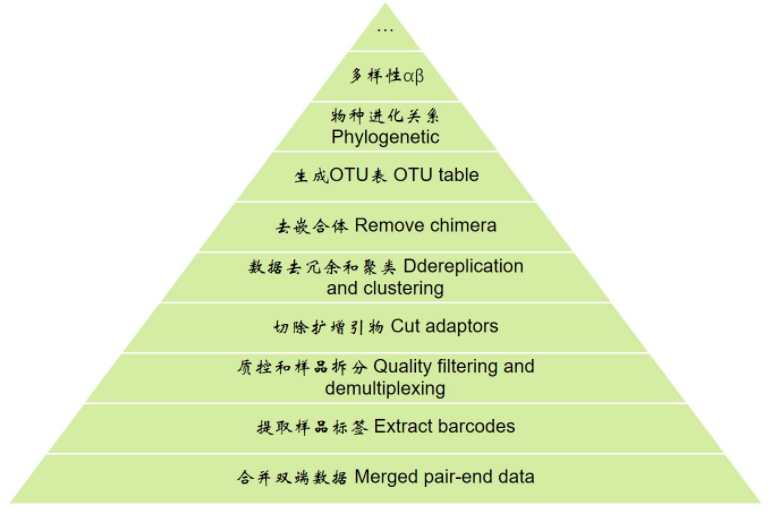
扩增子分析解读2提取barcode 质控及样品拆分 切除扩增引物
# 进入工作目录

cd example_PE250
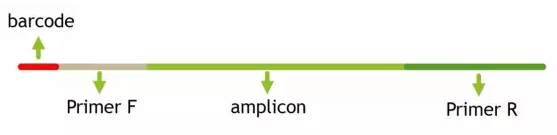
# 提取barcode

extract_barcodes.py -f temp/PE250_join/fastqjoin.join.fastq \

 -m mappingfile.txt \

 -o temp/PE250_barcode \

 -c barcode_paired_stitched --bc1_len 0 --bc2_len 6 -a --rev_comp_bc2
barcodes.fastq # 切下来的barcode,用于后续拆分样品barcodes_not_oriented.fastq # 方向不确定序列的barcode。连引物都不匹配,质量太差,建议不再使用reads1_not_oriented.fastq # 方向不确定序列的序列,可能barcode切错方向。连引物都不匹配,质量太差,不建议使用reads2_not_oriented.fastq # 空文件reads.fastq # 序列文件,与barcode对应,用于下游分析
# 质控及样品拆分

split_libraries_fastq.py -i temp/PE250_barcode/reads.fastq \

 -b temp/PE250_barcode/barcodes.fastq \

 -m mappingfile.txt \

 -o temp/PE250_split/ \

 -q 20 --max_bad_run_length 3 --min_per_read_length_fraction 0.75 --max_barcode_errors 0 --barcode_type 6
histograms.txt # 所有序列长度分布数据,可知长度范围308-488,峰值为408seqs.fna # 质控并拆分后的数据,序列按样品编号为SampleID_0/1/2/3split_library_log.txt # 日志文件,有基本统计信息和每个样品的数据量;查看可知每个样品最大数据量为110454,最小值为10189
# 下载,请尽量检查主页下载最新版源码

wget https://pypi.python.org/packages/16/e3/06b45eea35359833e7c6fac824b604f1551c2fc7ba0f2bd318d8dd883eb9/cutadapt-1.14.tar.gz

# 解压

tar xvzf cutadapt-1.14.tar.gz

# 进入程序目录

cd cutadapt-1.14/

# 安装在当前用户目录,不需管理员权限

python setup.py install --user
cutadapt -g AACMGGATTAGATACCCKG -a GGAAGGTGGGGATGACGT -e 0.15 -m 300 --discard-untrimmed temp/PE250_split/seqs.fna -o temp/PE250_P5.fa
This is cutadapt 1.14 with Python 3.6.1
Command line parameters: -g AACMGGATTAGATACCCKG -a GGAAGGTGGGGATGACGT -e 0.15 -m 300 --discard-untrimmed temp/PE250_split/seqs.fna -o temp/PE250_P5.fa
Trimming 2 adapters with at most 15.0% errors in single-end mode ...
Finished in 73.83 s (58 us/read; 1.04 M reads/minute).=== Summary ===
Total reads processed: 1,277,436
Reads with adapters: 1,277,194 (100.0%)
Reads that were too short: 8,849 (0.7%)
Reads written (passing filters): 1,268,345 (99.3%)Total basepairs processed: 522,379,897 bp
Total written (filtered): 495,607,409 bp (94.9%)=== Adapter 1 ===
Sequence: GGAAGGTGGGGATGACGT; Type: regular 3'; Length: 18; Trimmed: 202757 times.
No. of allowed errors:
0-5 bp: 0; 6-12 bp: 1; 13-18 bp: 2Bases preceding removed adapters:
A: 96.3%
C: 1.5%
G: 0.8%
T: 1.3%
none/other: 0.0%
WARNING:
The adapter is preceded by "A" extremely often.
The provided adapter sequence may be incomplete.
To fix the problem, add "A" to the beginning of the adapter sequence.Overview of removed sequences
length count expect max.err error counts
3 3 19959.9 0 3
4 4 4990.0 0 4
6 2 311.9 0 2
8 1 19.5 1 1
11 1 0.3 1 1
13 1 0.0 1 1
15 9 0.0 2 9
17 42 0.0 2 42
18 202626 0.0 2 202626
19 56 0.0 2 56
20 1 0.0 2 1
21 1 0.0 2 1
32 1 0.0 2 1
38 1 0.0 2 1
39 1 0.0 2 1
41 1 0.0 2 1
309 2 0.0 2 2
310 1 0.0 2 1
311 3 0.0 2 3=== Adapter 2 ===
Sequence: AACMGGATTAGATACCCKG; Type: regular 5'; Length: 19; Trimmed: 1074437 times.
No. of allowed errors:
0-5 bp: 0; 6-12 bp: 1; 13-19 bp: 2Overview of removed sequences
length count expect max.err error counts
3 2 19959.9 0 2
7 1 78.0 1 0 1
8 2 19.5 1 1 1
10 6 1.2 1 4 2
11 1 0.3 1 1
12 3 0.1 1 2 1
13 5 0.0 1 3 2
14 24 0.0 2 17 7
15 51 0.0 2 32 14 5
16 71 0.0 2 56 12 3
17 134 0.0 2 92 30 12
18 327 0.0 2 189 117 21
19 1059175 0.0 2 1056863 2069 243
20 13846 0.0 2 1817 10955 1074
21 744 0.0 2 5 10 729
22 1 0.0 2 1
23 2 0.0 2 2
24 1 0.0 2 1
25 2 0.0 2 2
27 5 0.0 2 5
28 2 0.0 2 2
29 2 0.0 2 2
30 1 0.0 2 1
31 2 0.0 2 2
32 10 0.0 2 10
49 1 0.0 2 1
51 1 0.0 2 1
166 1 0.0 2 1
291 6 0.0 2 6
401 2 0.0 2 2
409 1 0.0 2 1
443 1 0.0 2 1
460 2 0.0 2 2
465 2 0.0 2 2WARNING:
One or more of your adapter sequences may be incomplete.
Please see the detailed output above.
扩增子分析解读2提取barcode 质控及样品拆分 切除扩增引物的更多相关文章
- 扩增子分析解读5物种注释 OTU表操作
本节课程,需要先完成<扩增子分析解读>系列之前的操作 1质控 实验设计 双端序列合并 2提取barcode 质控及样品拆分 切除扩增引物 3格式转换 去冗余 聚类 4去嵌合体 非细菌序列 ...
- 扩增子分析解读4去嵌合体 非细菌序列 生成代表性序列和OTU表
本节课程,需要先完成 扩增子分析解读1质控 实验设计 双端序列合并 2提取barcode 质控及样品拆分 切除扩增引物 3格式转换 去冗余 聚类 先看一下扩增子分析的整体流程,从下向上逐层分析 分 ...
- 扩增子分析解读6进化树 Alpha Beta多样性
分析前准备 # 进入工作目录 cd example_PE250 上一节回顾:我们的OTU获得了物种注释,并学习OTU表的各种操作————添加信息,格式转换,筛选信息. 接下来我们学习对OTU序列的 ...
- 扩增子分析QIIME2. 1简介和安装
原网站:https://blog.csdn.net/woodcorpse/article/details/75103929 声明:本文为QIIME2官方帮助文档的中文版,由中科院遗传发育所刘永鑫博士翻 ...
- 扩增子图表解读1箱线图:Alpha多样性
箱线图 箱形图(Box-plot)又称为盒须图.盒式图或箱线图,是一种用作显示一组数据分散情况资料的统计图.因形状如箱子而得名.在宏基因组领域,常用于展示样品组中各样品Alpha多样性的分布 第一种情 ...
- 扩增子图表解读3热图:差异菌、OTU及功能
热图是使用颜色来展示数值矩阵的图形.通常还会结合行.列的聚类分析,以表达实验数据多方面的结果. 热图在生物学领域应用广泛,尤其在高通量测序的结果展示中很流行,如样品-基因表达,样品-OTU相对丰度矩 ...
- 如何分析解读systemstat dump产生的trc文件
ORACLE数据库的systemstat dump生成trace文件虽然比较简单,但是怎么从trace文件中浩如烟海的信息中提炼有用信息,并作出分析诊断是一件技术活,下面收集.整理如何分析解读syst ...
- LIRe 源代码分析 5:提取特征向量[以颜色布局为例]
===================================================== LIRe源代码分析系列文章列表: LIRe 源代码分析 1:整体结构 LIRe 源代码分析 ...
- pyhanlp 共性分析与短语提取内容详解
pyhanlp 共性分析与短语提取内容详解 简介 HanLP中的词语提取是基于互信息与信息熵.想要计算互信息与信息熵有限要做的是 文本分词进行共性分析.在作者的原文中,有几个问题,为了便于说明,这 ...
随机推荐
- xib或者storyboard设置颜色偏问题(与代码设置颜色不一致)
选中xib中的label,在右边栏的第三个标签页中第三项是User Defined Runtime Attributes 添加一个keyPath,keyPath值为layer.borderWidth, ...
- win7下 sublime text2操作快捷键 - leafu
Ctrl+L 选择整行(按住-继续选择下行) Ctrl+KK 从光标处删除至行尾 ...
- mysql查看所有存储过程,函数,视图,触发器,表
查询数据库中的存储过程和函数 方法一: select `name` from mysql.proc where db = 'your_db_name' and `type` = 'PROCEDURE' ...
- Android自己定义组件系列【5】——进阶实践(2)
上一篇<Android自己定义组件系列[5]--进阶实践(1)>中对任老师的<可下拉的PinnedHeaderExpandableListView的实现>前一部分进行了实现,这 ...
- iOS tableview cell 的展开收缩
iOS tableview cell 的展开收缩 #import "ViewController.h" @interface ViewController ()<UITabl ...
- PHP连接数据库(注冊页面的增删改查)
1.连接数据库 ---------–connect.php--------------– <?php //本地測试 $host = '127.0.0.1'; $port = 3306; $use ...
- java7新特性之Diamond syntax
java7新特性之Diamond syntax Java 7 also introduces a change that means less typing for you when dealing ...
- Android开源项目SlidingMenu的学习笔记(一)
SlidingMenu是眼下在应用程序上非常流行的一种UI技术.能够实现一种比較炫的滑动效果,SlidingMenu是Git上托管的一个项目,开源免费的.SlidingMenu作为一个Library的 ...
- javascript下的json 序列化及反序列化
1.序列化 将json对象转为字符串: JSON.stringify(jsonObj) 2.反序列化 var jsonObj = eval("(" + jsonstring + & ...
- ubuntu14安装docker-ce
先卸载旧的docker sudo apt-get remove docker docker-engine docker.io docker-ce 通过HTTPS使用存储库(repository) su ...