
expect的安装与使用
expect的安装与使用
是什么
expect 是用来进行自动化控制和测试的工具。主要是和交互式软件telnet ftp ssh 等进行自动化的交互。
如何安装
1.检测是否安装
ls /usr/bin |grep expect
如果不存在,则进行安装
2.安装
sudo apt-get install expect
$ ls /usr/bin |grep expect

autoexpect

expect

expect_autoexpect

expect_autopasswd

expect_cryptdir

expect_decryptdir

expect_dislocate

expect_ftp-rfc

expect_kibitz

expect_lpunlock

expect_mkpasswd

expect_multixterm

expect_passmass

expect_rftp

expect_rlogin-cwd

expect_timed-read

expect_timed-run

expect_tknewsbiff

expect_tkpasswd

expect_unbuffer

expect_weather

expect_xkibitz

expect_xpstat
具体使用
案例一,进入ssh脚本
spawn是进入expect环境后才可以执行的expect内部命令。expect是一种脚本语言,它能够代替我们实现与终端的交互,我们不必再守候在电脑旁边输入密码,或是根据系统的输出再运行相应的命令。
1.创建脚本
#! /usr/bin/expect

# 设置超时时间

set timeout 3

# fork一个子进程执行ssh

spawn ssh root@xxx.xxx.xxx.xxx

# 捕获到密码

expect "*password*"

# 输入密码并回车

send "xxxxxx\r"

# 捕获#

expect "*#"

# 进入常用目录下

send "cd /home/wwwroot/default\r"

# 允许用户进行交互

interact
2.创建权限
sudo chmod +x xxx.sh
3.执行脚本
./xxx.sh
jiqing@Ubuntu:~/sh$ ./xxx.sh

spawn ssh root@xxx

root@xxx's password:

Last login: Thu Jun 21 15:07:03 2018 from 218.93.209.10

Welcome to Alibaba Cloud Elastic Compute Service !

[root@iZuf6ingetk3pr7xgv1vq1Z ~]# cd /home/wwwroot/default

[root@iZuf6ingetk3pr7xgv1vq1Z default]#
优化通用版本,支持第一次yes判断,支持ip输入
#! /usr/bin/expect

set ip [lindex $argv 0]

set password [lindex $argv 1]

if {$ip == ""} {

    puts "请输入ip"

    exit

}

if {$password == ""} {

    set password "123456"

}

# 设置超时时间

set timeout 3

# fork一个子进程执行ssh

spawn ssh root@$ip

expect {

    "*yes/no*" { send "yes\r"; exp_continue}

    "*password*" { send "$password\r" }

}

# 捕获到密码

# expect "*password*"

# 输入密码并回车

# send "$password\r"

# 捕获#

expect "*#"

# 进入常用目录下

send "cd /home/wwwroot/default\r"

# 允许用户进行交互

interact
继续升级成昵称,比ip更好用
#! /usr/bin/expect

set pro_name [lindex $argv 0]

set password [lindex $argv 1]

if {$pro_name == ""} {

    puts "请输入名称"

    exit

}

switch $pro_name {

    "meiren" -

    "yanglu" -

    "wenbo" {

        set ip "ip1"

    }

    "siemens" {

        set ip "ip2"

    }

    "tqmp" {

        set ip "ip3"

    }

    default {

        puts "请输入正确的名称"

        exit

    }

}

if {$password == ""} {

    set password "xxx"

}

# 设置超时时间

set timeout 3

# fork一个子进程执行ssh

spawn ssh root@$ip

expect {

    "*yes/no*" { send "yes\r"; exp_continue}

    "*password:*" { send "$password\r" }

}

# 捕获到密码

# expect "*password*"

# 输入密码并回车

# send "$password\r"

# 捕获#

expect "*#"

# 进入常用目录下

send "cd /home/wwwroot/default\r"

# 允许用户进行交互

interact
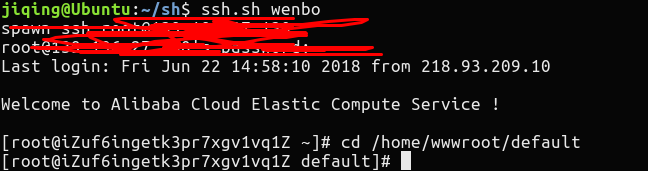
666 ,一个脚本,一键链接ssh。
案例二,进行cd操作
#! /usr/bin/expect

# 跳转到项目目录下

set pro_name [lindex $argv 0]

spawn bash

if {$pro_name != ""} {

    set target_dir "/home/wwwroot/default/$pro_name"

} else {

    set target_dir "/home/wwwroot/default"

}

# 判断目录是否存在

if {![file isdirectory $target_dir]} {

    puts "项目目录不存在"

    set target_dir "/home/wwwroot/default"

}

send "cd $target_dir\r"

interact
ps:expect的语法与shell脚本有点不同,多用用就习惯了。运用起来,让他们帮助你更好的工作。
更多功能,需要在工作中去探索和使用。我爱linux。
expect的安装与使用的更多相关文章
- [转]expect的安装
转自:http://blog.chinaunix.net/uid-20639775-id-2453085.html Expect是在Tcl基础上创建起来的,它还提供了一些Tcl所没有的命令,它可以用来 ...
- linux下expect环境安装以及简单脚本测试
expect是交互性很强的脚本语言,可以帮助运维人员实现批量管理成千上百台服务器操作,是一款很实用的批量部署工具!expect依赖于tcl,而linux系统里一般不自带安装tcl,所以需要手动安装 下 ...
- expect神器安装和使用
安装: mdkir /data/tools cd /data/tools wget http://prdownloads.sourceforge.net/tcl/tcl8.5.19-src.tar.g ...
- expect交互式安装软件
公司一些宿主机需要安装软件,吴老师要求写一个安装脚本: 脚本思路:首先要把安装的包拷贝到每台机器上,然后要让每台机器都运行一次安装命令:就想到了应用scp.ssh命令,但这两个命令需要输入对端密码,需 ...
- Linux Tcl和Expect的安装
一.先安装Tcl 1.下载:tcl版本 8.4.19 http://sourceforge.net/projects/tcl/files/Tcl/8.4.19/tcl8.4.19-src.tar.gz ...
- Linxu下 expect的安装与使用
expect学习 1.什么是except Expect是基于Tcl的一个相对简单的免费脚本文件语言工具,用于实现自动和交互式程序进行通信 is a software ...
- Linux expect的安装与使用
Expect是在Tcl的基础上创建的,可以用来做一些Linux下无法做到交互的命令操作,可用于远程管理服务器. 一.安装Tcl: 1.下载源码包: wget http://nchc.dl.source ...
- expect离线安装
expect5.45.4.tar.gz和tcl8.4.11-src.tar.gz压缩包请前往以下链接下载: https://download.csdn.net/download/gangzi221/1 ...
- expect 安装使用
expect 命令相当于crt远程连接,可用于脚本化实现多服务器巡检功能. 一.expect 命令安装: 1.rpm 文件下载:百度云链接:http://pan.baidu.com/s/1sl1wSU ...
随机推荐
- 玩转css样式选择器----当父元素有多个子元素时选中第一个
- Perl语言入门--2--变量与字符串
一.$ 简单变量:$ 以$开头+字母或下划线 区分大小写,变量长度不限,没有关键字,但不能和默认变量重复 1.整数的表示: 12 12e2 #1200 -12 #-12 1_200_ ...
- js中window.location.search的用法和作用
用该属性获取页面 URL 地址: window.location 对象所包含的属性 属性 描述 hash 从井号 (#) 开始的 URL(锚) host 主机名和当前 URL 的端口号 hostnam ...
- I.Tower Defense
给你p个重塔,q个轻塔,把这些塔放在n*m的图中,这些塔会相互攻击同行同列的,轻塔不能受到攻击,重塔能承受一个塔的攻击, 问放的方法数. 先假定n < m. 可以先枚举放轻塔的个数为s,显然,方 ...
- TOJ 4105
题意:有10万个点,10万个询问,没有更新,求L1<=L<=L2,R1<=R<=R2,有多少个, 其实转换一下:就是求一个矩形 (L1,R1) ----(L2,R2) 中有多少 ...
- 航空售票系统设计分析(Markdownpad2图片服务器上传无法显示)
一.体系结构设计 1.系统原型图 2.体系结构环境图 3.构建结构图 二.人机交互界面设计 1.用户分析结果及建议 本次分析的主要目标关注用户评论反馈,对反馈进行归纳,设计出用户喜欢的界面样式.用户的 ...
- ftrace 详解
http://www.ibm.com/developerworks/cn/linux/l-cn-ftrace/ http://www.ibm.com/developerworks/cn/linux/l ...
- nuxt.js 加百度统计
Mark一下: 在 Nuxt.js应用中使用Google统计分析服务,或者百度统计分析服务,推荐在 plugins 目录下创建 plugins/ga.js 文件.统计统计分析我们可以获取网站pv,uv ...
- 用户空间&内核空间学习 & top命令 & time命令
参考了这篇文章 http://www.ruanyifeng.com/blog/2016/12/user_space_vs_kernel_space.html 简单说,Kernel space 是 Li ...
- Linux驱动基础开发
Linux 内核配置机制(make menuconfig.Kconfig.makefile)讲解 前面我们介绍模块编程的时候介绍了驱动进入内核有两种方式:模块和直接编译进内核,并介绍了模块的一种编译方 ...