
微信小程序之商品发布+编辑功能(多图片上传功能)
小程序的商品发布页面:功能有多图片上传
遇到的问题记录一下:
1.uploadFile成功之后返回的参数是json字符串,一定要用JSON.parse转换为object格式
2.因为商品发布和编辑都是在同一个页面,因为异步的问题,在编辑页获取商品类别经常失败,所以这里在获取类别成功之后再获取商品详情
3.判断两位小数正则:/^\d+(\.\d{1,2})?$/
4.使用picker一些注意的地方:
 <picker name="category" mode="selector" range="{{category}}" range-key="title" value="{{categoryInd}}" bindchange="category">
        <input data-id='{{category[categoryInd].categoryID}}' name="category" type='text' value='{{category[categoryInd].title}}' disabled='true'></input>
      </picker>
range: 指定数组
range-key:显示指定数组中的某个key
value: 下标
5.这里重点说一下编辑页面下图片的添加和删除问题
有以下几种情况存在
点击添加和删除的时候都会调用后台接口来返回当前图片的文件夹路径用来存入新的图片
只是纯删除图片,可以直接调后台将图片从服务器中删除并返回
详情图片没动只改变了轮播的情况下
轮播没变详情改变了
两个都改变了
做添加的时候考虑到的问题,将添加的放到一个新数组中,上传时也用新数组上传,推翻了以前的添加时把原有图片全部删除重新上传(不能添加一张图片以前的还没了吧)
做删除的时候考虑到的问题,没有办法判断删除的时候是删的原来的还是新加的,这就有了以下的两个数组比对,相同的放到第三个数组中并上传,
添加时分别放到两个数组A,B中,A中包含有以前的图片和新加的,B中只有新加的图片,删除只删除A中
最后上传时,将A,B比对,相同的放到C中,将C上传(这样上传的就只有新添加的图片了,如果只有页面只有单张图片做编辑的话,就不用这么麻烦,添加的时候直接放到新数组中,删除也是新数组,最后上传依旧用新数组就行了。)
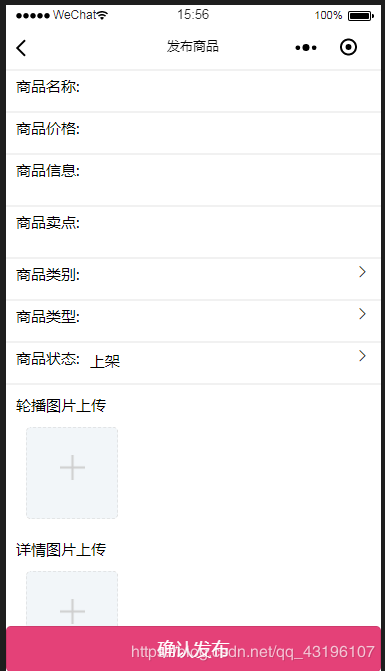
<!--pages/productReleased/productReleased.wxml-->
<!--商品发布-->
<form bindsubmit="formSubmit">
  <!--商品名称-->
  <view class='title'>
    <view class='title_text'>
      <text>商品名称:</text>
      <input name="title" type='text' value='{{title}}' bindblur='titleBlur'></input>
    </view>
  </view>
  <!--商品价格-->
  <view class='title'>
    <view class='title_text'>
      <text>商品价格:</text>
      <input name="price" type='number' value='{{price}}' bindblur='priceBlur'></input>
    </view>
  </view>
  <!--商品信息-->
  <view class='info-point'>
    <view class='title_text'>
      <text>商品信息:</text>
      <textarea name="info" class='textarea' value='{{info}}' bindblur='infoBlur'></textarea>
    </view>
  </view>
  <!--商品卖点-->
  <view class='info-point'>
    <view class='title_text'>
      <text>商品卖点:</text>
      <textarea name="point" class='textarea' value='{{point}}' bindblur='pointBlur'></textarea>
    </view>
  </view>

  <!--商品类别-->
  <view class='title'>
    <view class='title_text'>
      <text>商品类别:</text>
      <picker name="category" mode="selector" range="{{category}}" range-key="title" value="{{categoryInd}}" bindchange="category">
        <input data-id='{{category[categoryInd].categoryID}}' name="category" type='text' value='{{category[categoryInd].title}}' disabled='true'></input>
      </picker>
       <span class='icon iconfont icon-weibiaoti34'></span>
    </view>
  </view>

  <!--商品类型-->
  <view class='title'>
    <view class='title_text'>
      <text>商品类型:</text>
      <picker name="type" mode="selector" range="{{type}}" range-key="name" value="{{typeInd}}" bindchange="type">
        <input id='{{type[typeInd].id}}' name="type" type='text' value='{{type[typeInd].name}}'disabled='true'></input>
      </picker>
      <span class='icon iconfont icon-weibiaoti34'></span>
    </view>
  </view>

  <!--商品状态-->
  <view class='title'>
    <view class='title_text'>
      <text>商品状态:</text>
      <picker name="state" mode="selector" range="{{state}}" range-key="name" value="{{stateInd}}" bindchange="state">
        <input id='{{state[stateInd].id}}' name="state" type='text' value='{{state[stateInd].name}}'disabled='true'></input>
      </picker>
      <span class='icon iconfont icon-weibiaoti34'></span>
    </view>
  </view>

  <!--上传图片-->
  <view class='upImv'>

    <view class='upImv_text'>轮播图片上传</view>
    <view class="addImv">
      <!--这个是已经选好的图片-->
      <view wx:for="{{banner}}" wx:key="key" class="upFile" bindtap="showImageBanner" style="border-radius: 5px" data-id="{{index}}">
        <image class="itemImv" src="{{item}}"></image>
        <image class="closeImv" src="../../resources/images/delect.png" mode="scaleToFill" catchtap="deleteImvBanner" data-id="{{index}}"></image>
      </view>

      <!--这个是选择图片-->
      <view class="chooseView" bindtap="chooseBanner" style="border-radius: 5px" wx:if="{{chooseViewShowBanner}}">
        <image class="chooseImv" src="../../resources/images/add.png"></image>
      </view>
    </view>

    <view class='upImv_text'>详情图片上传</view>
    <view class="addImv">
      <!--这个是已经选好的图片-->
      <view wx:for="{{detail}}" wx:key="key" class="upFile" bindtap="showImageDetail" style="border-radius: 5px" data-id="{{index}}">
        <image class="itemImv" src="{{item}}"></image>
        <image class="closeImv" src="../../resources/images/delect.png" mode="scaleToFill" catchtap="deleteImvDetail" data-id="{{index}}"></image>
      </view>

      <!--这个是选择图片-->
      <view class="chooseView" bindtap="chooseDetail" wx:if="{{chooseViewShowDetail}}">
        <image class="chooseImv" src="../../resources/images/add.png"></image>
      </view>
    </view>

  </view>
  <button form-type='submit' class='sureRelease'>确认发布</button>
</form>
HTML
// pages/productReleased/productReleased.js
var app = getApp();
Page({
/**
* 页面的初始数据
*/
data: {
title: "",
info: "",
point: "",
price: "",
type: [{
name: "实物",
id: 0
}, {
name: "虚拟",
id: 1
}],
state: [{
name: "下架",
id: 0
}, {
name: "上架",
id: 1
}],
productID: 0,
category: [],
categoryInd: -1, //类别
typeInd: 0, //类型
stateInd: 1, //状态
banner: [], //轮播图片
bannerNew: [],
bannerAll: [],
detail: [], //详情图片
detailNew: [],
detailAll: [],
checkUp: true, //判断从编辑页面进来是否需要上传图片
chooseViewShowDetail: true,
chooseViewShowBanner: true,
params: {
productID: 0,
contentFile: "",
bannerFile: "",
check: false,
},
dis: false,
},
/**
* 生命周期函数--监听页面加载
*/
onLoad: function(options) {
this.setData({
productID: options.productID
})
this.getCategory();
},
/**
* 获取标题
*/
titleBlur(e) {
this.setData({
title: e.detail.value
})
},
/**
* 获取商品价格
*/
priceBlur(e) {
this.setData({
price: e.detail.value
})
},
/**
* 获取商品信息
*/
infoBlur(e) {
this.setData({
info: e.detail.value
})
},
/**
* 获取商品卖点
*/
pointBlur(e) {
this.setData({
point: e.detail.value
})
},
/**
* 商品价格
*/
price(e) {
this.setData({
price: e.detail.value
})
},
/**
* 商品类型
*/
type(e) {
this.setData({
typeInd: e.detail.value
})
},
/**
* 商品状态
*/
state(e) {
this.setData({
stateInd: e.detail.value
})
},
/**
* 商品类别
*/
category(e) {
this.setData({
categoryInd: e.detail.value
})
},
/**
* 获取商品类别
*/
getCategory() {
let params = {}
app.getCategoryList(params).then(res => {
var good = []
var g_type = res.data.categories[0].children //从接口中获取商品类别
for (var i = 1; i < g_type.length; i++) { //从下标为1开始循环,不显示全部
good[i - 1] = g_type[i] //将循环出来的数组,循环放入good中
}
this.setData({
category: good
})
if (this.data.productID != 0) { //防止先调用详情方法而不显示类别
if (res.state === 1) {
this.getProductDetail();
}
}
})
},
/**获取商品详情 */
getProductDetail() {
let params = {
userID: app.globalData.userID,
productID: this.data.productID
}
app.getReleaseProductDetail(params).then(res => {
let product = res.data.productDetail[0]
if (product.state) {
this.setData({
stateInd: 1
})
} else {
this.setData({
stateInd: 0
})
}
let categoryInd = -1;
for (var i = 0; i < this.data.category.length; i++) {
if (this.data.category[i].categoryID === product.categoryID) {
categoryInd = i
break;
} else {
categoryInd: -1;
}
}
if (product.bannerImages.length >= 2) {
this.setData({
chooseViewShowBanner: false
})
} else {
this.setData({
chooseViewShowBanner: true
})
}
if (product.detailImages.length >= 3) {
this.setData({
chooseViewShowDetail: false
})
} else {
this.setData({
chooseViewShowDetail: true
})
}
this.setData({
title: product.title,
info: product.info,
point: product.point,
typeInd: product.productType,
price: product.currentPrice,
banner: product.bannerImages,
detail: product.detailImages,
categoryInd: categoryInd
})
})
},
/**发布提交 */
formSubmit(e) {
let that = this
var priceTF = /^\d+(\.\d{1,2})?$/
if (e.detail.value.title === "") {
wx.showToast({
title: '请输入商品名称',
icon: "none",
duration: 1000,
mask: true,
})
} else if (e.detail.value.title.length > 60) {
wx.showToast({
title: '商品名称不得大于60字',
icon: "none",
duration: 1000,
mask: true,
})
} else if (e.detail.value.title.length === "") {
wx.showToast({
title: '请输入商品价格',
icon: "none",
duration: 1000,
mask: true,
})
} else if (!priceTF.test(e.detail.value.price)) {
wx.showToast({
title: '商品价格精确到两位',
icon: "none",
duration: 1000,
mask: true,
})
} else if (e.detail.value.info === "") {
wx.showToast({
title: '请输入商品信息',
icon: "none",
duration: 1000,
mask: true,
})
} else if (e.detail.value.point === "") {
wx.showToast({
title: '请输入商品卖点',
icon: "none",
duration: 1000,
mask: true,
})
} else if (that.data.categoryInd === -1) {
wx.showToast({
title: '请选择商品类别',
icon: "none",
duration: 1000,
mask: true,
})
} else if (that.data.typeInd === -1) {
wx.showToast({
title: '请选择商品类型',
icon: "none",
duration: 1000,
mask: true,
})
} else if (that.data.stateInd === -1) {
wx.showToast({
title: '请选择商品状态',
icon: "none",
duration: 1000,
mask: true,
})
} else if (that.data.banner.length === 0) {
wx.showToast({
title: '请选择轮播图片',
icon: "none",
duration: 1000,
mask: true,
})
} else if (that.data.detail.length === 0) {
wx.showToast({
title: '请选择详情图片',
icon: "none",
duration: 1000,
mask: true,
})
} else {
let params = {
userID: app.globalData.userID,
productID: that.data.productID,
title: e.detail.value.title,
price: e.detail.value.price,
info: e.detail.value.info,
point: e.detail.value.point,
categoryID: that.data.category[that.data.categoryInd].categoryID,
productType: that.data.type[that.data.typeInd].id,
state: that.data.state[that.data.stateInd].id
}
wx.showModal({
title: '提示',
content: '确定发布商品',
success(res) {
if (res.confirm) {
if (that.data.productID != 0) {
that.sureEdit(params); //编辑
} else {
that.sureRelease(params); //发布
}
that.setData({
dis: true,
})
}
}
})
}
},
/**确认发布 */
sureRelease(params) {
let that = this
app.addProduct(params).then(res => {
that.data.params.productID = res.data.productID;
that.data.params.bannerFile = res.data.bannerFile;
that.data.params.contentFile = res.data.contentFile;
for (var i = 0; i < that.data.banner.length; i++) {
wx.uploadFile({
url: app.globalData.baseUrl + '/wechat/release/addProductPhoto',
filePath: that.data.banner[i],
name: 'banner',
formData: {
'parameters': JSON.stringify(that.data.params)
},
})
if (that.data.banner.length === i + 1) {
for (var j = 0; j < that.data.detail.length; j++) {
if (that.data.detail.length === j + 1) {
that.data.params.check = true
}
wx.uploadFile({
url: app.globalData.baseUrl + '/wechat/release/addProductPhoto',
filePath: that.data.detail[j],
name: 'detail',
formData: {
'parameters': JSON.stringify(that.data.params)
},
success: function(res) {
if (JSON.parse(res.data).state === 1) {
wx.showToast({
title: '商品发布成功',
icon: "none",
duration: 2000,
mask: true,
success() {
setTimeout(function() {
wx.navigateBack({
delta: 0,
})
}, 1000);
}
})
} else {
wx.showToast({
title: '商品发布失败,请稍后再试',
icon: "none",
duration: 2000,
mask: true,
success() {
setTimeout(function() {
wx.navigateBack({
delta: 0,
})
}, 1000);
}
})
}
},
fail: function(res) {
if (JSON.parse(res.errMsg) === "request:fail socket time out timeout:6000") {
wx.showToast({
title: '请求超时,请稍后再试!',
icon: "none",
duration: 2000,
mask: true,
success() {
setTimeout(function() {
wx.navigateBack({
delta: 0,
})
}, 1000);
}
})
}
}
})
}
}
}
})
},
/**确认编辑 */
sureEdit(params) {
let that = this
app.addProduct(params).then(res => {
that.data.params.productID = res.data.productID;
//判断编辑页面下是否只改变了文字数据,选择图片后checkUp为false
if (that.data.checkUp && res.state === 1) {
wx.showToast({
title: '商品修改成功',
icon: "none",
duration: 2000,
mask: true,
success() {
setTimeout(function() {
wx.navigateBack({
delta: 0,
})
}, 1000);
}
})
}
//判断编辑页面下是否改变了图片 改变了则uploadFile
else {
that.checkBanner();
that.checkDetail();
//如果没有添加直接删除图片的话
if (that.data.bannerAll.length === 0 && that.data.detailAll.length === 0) {
wx.showToast({
title: '商品修改成功',
icon: "none",
duration: 2000,
mask: true,
success() {
setTimeout(function() {
wx.navigateBack({
delta: 0,
})
}, 1000);
}
})
}
//只改变bannerAll情况下,detailAll为空直接将bannerAll往数据库写入
else if (that.data.detailAll.length === 0) {
for (var i = 0; i < that.data.bannerAll.length; i++) {
if (that.data.bannerAll.length === i + 1) {
that.data.params.check = true
}
wx.uploadFile({
url: app.globalData.baseUrl + '/wechat/release/addProductPhoto',
filePath: that.data.bannerAll[i],
name: 'banner',
formData: {
'parameters': JSON.stringify(that.data.params)
},
success: function(res) {
if (JSON.parse(res.data).state === 1) {
wx.showToast({
title: '商品修改成功',
icon: "none",
duration: 2000,
mask: true,
success() {
setTimeout(function() {
wx.navigateBack({
delta: 0,
})
}, 1000);
}
})
} else {
wx.showToast({
title: '商品修改失败',
icon: "none",
duration: 2000,
mask: true,
success() {
setTimeout(function() {
wx.navigateBack({
delta: 0,
})
}, 1000);
}
})
}
},
fail(res) {
if (JSON.parse(res.errMsg) === "request:fail socket time out timeout:6000") {
wx.showToast({
title: '请求超时,请稍后再试!',
icon: "none",
duration: 2000,
mask: true,
success() {
setTimeout(function() {
wx.navigateBack({
delta: 0,
})
}, 1000);
}
})
}
}
})
}
}
//只改变detailAll,不改变bannerAll的情况下,直接将detailAll写入数据库
else if (that.data.bannerAll.length === 0) {
for (var j = 0; j < that.data.detailAll.length; j++) {
if (that.data.detailAll.length === j + 1) {
that.data.params.check = true
}
wx.uploadFile({
url: app.globalData.baseUrl + '/wechat/release/addProductPhoto',
filePath: that.data.detailAll[j],
name: 'detail',
formData: {
'parameters': JSON.stringify(that.data.params)
},
success: function(res) {
if (JSON.parse(res.data).state === 1) {
wx.showToast({
title: '商品修改成功',
icon: "none",
duration: 2000,
mask: true,
success() {
setTimeout(function() {
wx.navigateBack({
delta: 0,
})
}, 1000);
}
})
} else {
wx.showToast({
title: '商品修改失败',
icon: "none",
duration: 2000,
mask: true,
success() {
setTimeout(function() {
wx.navigateBack({
delta: 0,
})
}, 1000);
}
})
}
},
fail: function(res) {
if (JSON.parse(res.errMsg) === "request:fail socket time out timeout:6000") {
wx.showToast({
title: '请求超时,请稍后再试!',
icon: "none",
duration: 2000,
mask: true,
success() {
setTimeout(function() {
wx.navigateBack({
delta: 0,
})
}, 1000);
}
})
}
}
})
}
}
//如果detailAll和bannerAll都改变的情况下
else {
for (var i = 0; i < that.data.bannerAll.length; i++) {
wx.uploadFile({
url: app.globalData.baseUrl + '/wechat/release/addProductPhoto',
filePath: that.data.bannerAll[i],
name: 'banner',
formData: {
'parameters': JSON.stringify(that.data.params)
},
})
if (that.data.bannerAll.length === i + 1) {
for (var j = 0; j < that.data.detailAll.length; j++) {
if (that.data.detailAll.length === j + 1) {
that.data.params.check = true
}
wx.uploadFile({
url: app.globalData.baseUrl + '/wechat/release/addProductPhoto',
filePath: that.data.detailAll[j],
name: 'detail',
formData: {
'parameters': JSON.stringify(that.data.params)
},
success: function(res) {
if (JSON.parse(res.data).state === 1) {
wx.showToast({
title: '商品修改成功',
icon: "none",
duration: 2000,
mask: true,
success() {
setTimeout(function() {
wx.navigateBack({
delta: 0,
})
}, 1000);
}
})
} else {
wx.showToast({
title: '商品修改失败',
icon: "none",
duration: 2000,
mask: true,
success() {
setTimeout(function() {
wx.navigateBack({
delta: 0,
})
}, 1000);
}
})
}
},
fail: function(res) {
if (JSON.parse(res.errMsg) === "request:fail socket time out timeout:6000") {
wx.showToast({
title: '请求超时,请稍后再试!',
icon: "none",
duration: 2000,
mask: true,
success() {
setTimeout(function() {
wx.navigateBack({
delta: 0,
})
}, 1000);
}
})
}
}
})
}
}
}
}
}
})
},
/**判断轮播新旧数组是否有相同值 */
checkBanner() {
let banner = this.data.banner
let bannerNew = this.data.bannerNew
let bannerAll = this.data.bannerAll
for (var i = 0; i < banner.length; i++) {
for (var j = 0; j < bannerNew.length; j++) {
if (banner[i] === bannerNew[j]) {
bannerAll = bannerAll.concat(bannerNew[j])
this.setData({
bannerAll: bannerAll
})
} else {
console.log("banner无相同")
}
}
}
},
/**判断详情新旧数组是否有相同值 */
checkDetail() {
let detail = this.data.detail
let detailNew = this.data.detailNew
let detailAll = this.data.detailAll
for (var i = 0; i < detail.length; i++) {
for (var j = 0; j < detailNew.length; j++) {
if (detail[i] === detailNew[j]) {
detailAll = detailAll.concat(detail[i])
this.setData({
detailAll: detailAll
})
} else {
console.log("detail无相同")
}
}
}
},
/** 选择图片detail */
chooseDetail: function() {
var that = this;
if (that.data.detail.length < 3) {
wx.chooseImage({
count: 3,
sizeType: [ 'compressed'],
sourceType: ['album', 'camera'],
success: function(photo) {
//detail中包含的可能还有编辑页面下回显的图片,detailNew中包含的只有所选择的图片
let detail = that.data.detail;
detail = detail.concat(photo.tempFilePaths);
let detailNew = that.data.detailNew
detailNew = detailNew.concat(photo.tempFilePaths)
that.setData({
detail: detail,
detailNew: detailNew,
checkUp: false
})
that.chooseViewShowDetail();
if (that.data.productID != 0) {
let params = {
productID: that.data.productID,
isBanner: false,
index: -1,
}
app.deleteProductImage(params).then(res => {
//判断不为空防止将原有图片全删除后文件夹名返回空
if (res.data.fileContent !== "" && res.data.fileBanner !== "") {
that.data.params.contentFile = res.data.fileContent
that.data.params.bannerFile = res.data.fileBanner
}
})
}
}
})
} else {
wx.showToast({
title: '限制选择3个文件',
icon: 'none',
duration: 1000
})
}
},
/** 删除图片detail */
deleteImvDetail: function(e) {
var that = this;
var detail = that.data.detail;
var itemIndex = e.currentTarget.dataset.id;
if (that.data.productID != 0) {
wx.showModal({
title: '提示',
content: '删除不可恢复,请谨慎操作',
success(res) {
if (res.confirm) {
detail.splice(itemIndex, 1);
that.setData({
detail: detail,
checkUp: false
})
that.chooseViewShowDetail();
let params = {
productID: that.data.productID,
isBanner: false,
index: itemIndex,
}
app.deleteProductImage(params).then(res => {
if (res.data.fileContent !== "" && res.data.fileBanner !== "") {
that.data.params.contentFile = res.data.fileContent
that.data.params.bannerFile = res.data.fileBanner
}
})
}
}
})
} else {
detail.splice(itemIndex, 1);
that.setData({
detail: detail,
checkUp: false
})
that.chooseViewShowDetail();
}
},
/** 是否隐藏图片选择detail */
chooseViewShowDetail: function() {
if (this.data.detail.length >= 3) {
this.setData({
chooseViewShowDetail: false
})
} else {
this.setData({
chooseViewShowDetail: true
})
}
},
/** 查看大图Detail */
showImageDetail: function(e) {
var detail = this.data.detail;
var itemIndex = e.currentTarget.dataset.id;
wx.previewImage({
current: detail[itemIndex], // 当前显示图片的http链接
urls: detail // 需要预览的图片http链接列表
})
},
/** 选择图片Banner */
chooseBanner: function() {
var that = this;
if (that.data.banner.length < 2) {
wx.chooseImage({
count: 2, //最多选择4张图片- that.data.imgArr.length,
sizeType: ['compressed'], // 可以指定是原图还是压缩图,默认二者都有
sourceType: ['album', 'camera'], // 可以指定来源是相册还是相机,默认二者都有
success: function(photo) {
var banner = that.data.banner;
banner = banner.concat(photo.tempFilePaths);
var bannerNew = that.data.bannerNew;
bannerNew = bannerNew.concat(photo.tempFilePaths);
that.setData({
banner: banner,
bannerNew: bannerNew,
checkUp: false
})
that.chooseViewShowBanner();
if (that.data.productID != 0) {
let params = {
productID: that.data.productID,
isBanner: false,
index: -1,
}
app.deleteProductImage(params).then(res => {
if (res.data.fileContent !== "" && res.data.fileBanner !== "") {
that.data.params.contentFile = res.data.fileContent
that.data.params.bannerFile = res.data.fileBanner
}
})
}
}
})
} else {
wx.showToast({
title: '限制选择2个文件',
icon: 'none',
duration: 1000
})
}
},
/** 删除图片Banner */
deleteImvBanner: function(e) {
var that = this
var banner = that.data.banner;
var itemIndex = e.currentTarget.dataset.id;
if (that.data.productID != 0) {
wx.showModal({
title: '提示',
content: '删除不可恢复,请谨慎操作',
success(res) {
if (res.confirm) {
banner.splice(itemIndex, 1);
that.setData({
banner: banner,
checkUp: false
})
that.chooseViewShowBanner();
let params = {
productID: that.data.productID,
isBanner: true,
index: itemIndex,
}
app.deleteProductImage(params).then(res => {
if (res.data.fileContent !== "" && res.data.fileBanner !== "") {
that.data.params.contentFile = res.data.fileContent
that.data.params.bannerFile = res.data.fileBanner
}
})
}
}
})
} else {
banner.splice(itemIndex, 1);
that.setData({
banner: banner,
checkUp: false
})
that.chooseViewShowBanner();
}
},
/** 是否隐藏图片选择Banner*/
chooseViewShowBanner() {
if (this.data.banner.length >= 2) {
this.setData({
chooseViewShowBanner: false
})
} else {
this.setData({
chooseViewShowBanner: true
})
}
},
/** 查看大图Banner */
showImageBanner: function(e) {
var banner = this.data.banner;
var itemIndex = e.currentTarget.dataset.id;
wx.previewImage({
current: banner[itemIndex], // 当前显示图片的http链接
urls: banner // 需要预览的图片http链接列表
})
},
})
JS
/* pages/productReleased/productReleased.wxss */

page {
  background-color: #f1f1f1;
}

.title {
  margin-top: 5rpx;
  background-color: white;
  width: 100%;
  height: 80rpx;
}

.title_text {
  margin-left: 20rpx;
  width: 100%;
  height: 50rpx;
  padding-top: 10rpx;
  display: flex;
}

.title_text text {
  font-size: 30rpx;
}

.title_text input {
  font-size: 30rpx;
  width: 60vw;
  margin-left: 20rpx;
}

.textarea {
  height: 100rpx;
  font-size: 30rpx;
  margin-left: 40rpx;
  width: 500rpx;
}

.info-point {
  background-color: white;
  width: 100%;
  height: 100rpx;
  margin-top: 5rpx;
}

/*选择图片View*/

.addImv {
  background-color: white;
  /* border: 1px dashed gray; */
  display: flex;
  flex-wrap: wrap;
  align-items: center;
  margin-top: 5rpx;
}

.upImv {
  background-color: white;
  width: 100%;
  margin-top: 5rpx;
}

.upImv_text {
  font-size: 30rpx;
  margin-left: 20rpx;
  padding-top: 20rpx;
}

/*添加图片*/

.addImv .chooseView {
  width: 180rpx;
  height: 180rpx;
  margin: 20rpx 20rpx;
  background-color: #f2f6f9;
  border: 1px dashed lightgray;
  text-align: center;
  line-height: 180rpx;
  /* padding: 0rpx 7rpx; */
  border-radius: 5px;
  margin-left: 40rpx;
}

.addImv .chooseImv {
  width: 50rpx;
  height: 50rpx;
}

/*已选择的图片*/

.addImv .upFile {
  width: 180rpx;
  height: 180rpx;
  position: relative;
  padding: 0rpx 7rpx;
  margin-left: 40rpx;
  border: 1px solid #c0ccda;
}

.addImv .upFile .itemImv {
  width: 180rpx;
  height: 180rpx;
  padding: 0rpx 7rpx;
}

.addImv .upFile .closeImv {
  position: absolute;
  right: 0rpx;
  top: 0rpx;
  width: 50rpx;
  height: 50rpx;
}

.sureRelease {
  background-color: #e44178;
  color: white;
  position: fixed;
  width: 100%;
  bottom: 0rpx;
}

.icon {
  margin-left: 80rpx;
}
CSS
微信小程序之商品发布+编辑功能(多图片上传功能)的更多相关文章
- 微信小程序--问题汇总及详解之图片上传和地图
地图用的是百度的地图,链接:http://lbsyun.baidu.com/index.php?title=wxjsapi/guide/getlocation 获取日期时间可以用小程序里自带的js文件 ...
- 记录使用微信小程序的NFC和蓝牙功能读取15693芯片的开发历程
开发目标: (1) 对于Android手机,直接通过微信小程序调用手机的NFC功能,对15693协议的芯片进行读写操作: (2)对于苹果手机(及没有NFC模块的手机),通过微信小程序的蓝牙功能连接到蓝 ...
- 基于微信小程序的用户列表点赞功能
代码地址如下:http://www.demodashi.com/demo/13997.html 一.前言 (1).适合人群 1.微信小程序开发者 2.前端工程师 3.想入门学习小程序开发的人员 4.想 ...
- 微信小程序转发商品的详情页 + 转发功能(传参)
1.微信小程序转发传参,利用的还是onShareAppMessageapi 2.利用的还有json转换 JSON 是用于存储和传输数据的格式. JSON 通常用于服务端向网页传递数据 函数 描述JSO ...
- 解决微信小程序登录与发布的一些问题
解决微信小程序的问题 图片在电脑上显示但在手机上却无法显示的问题 要使用的是本地图片,不想把图片上传到网络再通过https的方式解决,解决方法如下: 1.image src中的图片地址对英文字母大小写 ...
- 微信小程序详细图文教程-10分钟完成微信小程序开发部署发布
很多朋友都认为微信小程序申请.部署.发布很难,需要很长时间. 实际上,微信和腾讯云同是腾讯产品,已经提供了10分钟(根据准备资源情况,已完成小程序申请认证)完成小程序开发.部署.发布的方式.当然,实现 ...
- 微信小程序---协同工作和发布
(1)协同开发和发布 在中大型的公司里,人员的分工非常仔细,一般会有不同岗位角色的员工同时参与同一个小程序项目.为此,小程序平台设计了不同的权限管理使得项目管理者可以更加高效管理整个团队的协同工作. ...
- 微信小程序之换肤的功能
pc或者移动端实现换肤功能还是比较简单的,大致就是需要换肤的css,还有正常的css:把当前皮肤类型存入本地:然后通过js读取并判断当前应该加载哪套css. 由于微信小程序没有操作wxss的api,所 ...
- 微信小程序背景音频播放分享功能
如果正常背景音频播放的话,只能跳转到自己对应的微信小程序,无法分享朋友圈,我们需要设置分享朋友圈,需要调用一个API 音频背景播放 注意:背景播放在锁屏后播放只支持IOS端,安卓端虽然可以播放,但是锁 ...
随机推荐
- [USACO] 奶牛混合起来 Mixed Up Cows
题目描述 Each of Farmer John's N (4 <= N <= 16) cows has a unique serial number S_i (1 <= S_i & ...
- Haoop Mapreduce 中的FileOutputFormat类
FileOutputFormat类继承OutputFormat,需要提供所有基于文件的OutputFormat实现的公共功能,主要有以下两点: (1)实现checkOutputSpecs方法 chec ...
- 创建sum求多元素的和
a = [1, 2, 3] b = [4, 5, 6] def sum_super(* args): s = 0 for i in args: s += sum(i) return s # print ...
- 自己写一个HashMap
package cn.aresoft; /** * HashMap原理 * * @author develp * HashMap是一种以键值对存储数据的数据结构,简单的来说是这样.内部怎么实现的呢?实 ...
- 【Codeforces 159B】Matchmaker
[链接] 我是链接,点我呀:) [题意] 笔和笔盖 笔有颜色和直径 笔盖也有颜色和直径 笔盖和笔如果直径相等 那么称为good 如果笔盖和笔直径相等.颜色也相等,那么称为very good 问你怎样安 ...
- 九度oj 题目1089:数字反转
题目1089:数字反转 时间限制:1 秒 内存限制:32 兆 特殊判题:否 提交:3531 解决:1935 题目描述: 12翻一下是21,34翻一下是43,12+34是46,46翻一下是64,现在又任 ...
- HDU 1220 简单数学题
题目大意是 在魔方上找到有多少对小立方块它们之间连接的点不超过两个 因为任意两个立方块之间相连的点就只有0,1,2,4 这样4种情况 那么我们只需要考虑总共的组成立方块对数 sum = C(2 , n ...
- 解决使用myeclipse电脑卡的问题
1. 原因:myeclipse会自动更新,因此会占用大量内存 2. 解决方法: (1)window->Perferences->General->Startup and Shutdo ...
- Ubuntu 16.04安装NASM汇编IDE-SASM
在Linux下,尤其是Ubuntu,SASM工具应该是用来开发汇编最好用的IDE,小巧且支持调试.支持的编译器有:NASM, MASM, GAS, FASM. 安装步骤: 下载: http://dow ...
- c++面试问题的几个方向
1 关于多态,面向对象的几个要点作为面向对象的程序员,这个问题是必须要弄清楚的,网上.教科书上都是标准答案,关键是理解内涵哦. 2 关于虚函数表和RTTI 这个Inside C++ Object Mo ...