
react-router-redux
reducer与按需加载组件的时候,一并加载对应的state,具体流程就不多说了,看代码!
reducer
import { combineReducers } from 'redux'

import { routerReducer } from 'react-router-redux'

export const makeRootReducer = asyncReducers => {

  return combineReducers({

    routing: routerReducer,

    ...asyncReducers

  })

}

export const injectReducer = (store, {key, reducer}) => {

  if(!store.asyncReducers[key]) {

    store.asyncReducers[key] = reducer;

    store.replaceReducer(makeRootReducer(store.asyncReducers));

  }

}
store
import { applyMiddleware, compose, createStore, combineReducers } from 'redux'

import { routerMiddleware } from 'react-router-redux'

import thunkMiddleware from 'redux-thunk'

import reducer, { makeRootReducer } from './reducer'

export default (initialState = {}, history) => {

  const middleware = [thunkMiddleware, routerMiddleware(history)];

  const enhancers = [];

  const store = createStore(

    makeRootReducer(),

    initialState,

    compose(

      applyMiddleware(...middleware),

      ...enhancers

    )

  );

  return store;

}
router
import React, { Component } from 'react'

import { Router, Route, Redirect } from 'react-router'

const moduleRoute  = require.context('../view', true, /router$/) //获取view视图下,所有router文件

const router = store => {

  return <Router>

    <Route path="/">

      {

        moduleRoute.keys().map(key => {

          return moduleRoute(key).default(store)

        })

      }

      <Redirect from='*' to='/'  />

    </Route>

  </Router>

}

export default router
入口文件app.js
import ReactDOM from 'react-dom'

import { Router, hashHistory } from 'react-router'

import React from 'react'

import { Provider } from 'react-redux'

import { syncHistoryWithStore } from 'react-router-redux'

import createStore from '...上面的store'

import router from '...上面的router'

const store = createStore({}, hashHistory);

store.asyncReducers = {};

const history = syncHistoryWithStore(hashHistory, store);

ReactDOM.render((

  <Provider store={store}>

    <Router history={history}>

      { router(store) }

    </Router>

  </Provider>

), document.getElementById("root"))
在view层级下创建一个test文件夹来编辑一下流程 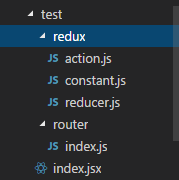
在test/ index.jsx 中简单编辑下
import React, { Component } from 'react'

import { connect } from 'react-redux'

class Test extends Component {

  render() {

    const { value } = this.props;

    return <h1>{ value }</h1>

  }

}

const mapStateToProps = state => {

  return { ...state.test }

}

const mapDispathToProps = dispatch => {

  return {

    //

  }

}

export default connect(mapStateToProps, mapDispathToProps)(Test);
reducer
const initState = { value: 'value' }

export default (state = initState, action) => {

  return state;

}
router
import { Route } from 'react-router'

import { injectReducer } from '...最上面定义的reducer'

export default store => {

  return <Route

    path='test'

    getComponent={(nextState, cb) => {

      import('../'/* webpackChunkName: 'Test' */)

      .then(module => {

        injectRoducer(store, {key: test, reducer: require('../redux/reducer')});

        cb(null, module.default);

      })

    }

  }/>

}
执行,在未加载该页面之前,store.state = { routing… };
进入test页面的时候, store.state = { routing…, test: { value: ‘value’ } }
react-router-redux的更多相关文章
- 最新的chart 聊天功能( webpack2 + react + router + redux + scss + nodejs + express + mysql + es6/7)
请表明转载链接: 我是一个喜欢捣腾的人,没事总喜欢学点新东西,可能现在用不到,但是不保证下一刻用不到. 我一直从事的是依赖angular.js 的web开发,但是我怎么能一直用它呢?看看最近火的一塌糊 ...
- [Redux] Adding React Router to the Project
We will learn how to add React Router to a Redux project and make it render our root component. Inst ...
- [Redux] Filtering Redux State with React Router Params
We will learn how adding React Router shifts the balance of responsibilities, and how the components ...
- [Redux] Navigating with React Router <Link>
We will learn how to change the address bar using a component from React Router. In Root.js: We need ...
- 实例讲解react+react-router+redux
前言 总括: 本文采用react+redux+react-router+less+es6+webpack,以实现一个简易备忘录(todolist)为例尽可能全面的讲述使用react全家桶实现一个完整应 ...
- 基于 React.js + Redux + Bootstrap 的 Ruby China 示例 (转)
一直学 REACT + METEOR 但路由部分有点问题,参考一下:基于 React.js + Redux + Bootstrap 的 Ruby China 示例 http://react-china ...
- 基于react+react-router+redux+socket.io+koa开发一个聊天室
最近练手开发了一个项目,是一个聊天室应用.项目虽不大,但是使用到了react, react-router, redux, socket.io,后端开发使用了koa,算是一个比较综合性的案例,很多概念和 ...
- 关于react router 4 的小实践
详细代码栗子:https://github.com/wayaha/react-dom-CY clone然后 npm install npm start 分割线 1.这个项目使用create-react ...
- React Router 4.x 开发,这些雷区我们都帮你踩过了
前言 在前端框架层出不穷的今天,React 以其虚拟 DOM .组件化开发思想等特性迅速占据了主流位置,成为前端开发工程师热衷的 Javascript 库.作为 React 体系中的重要组成部分:Re ...
- React Router API文档
React Router API文档 一.<BrowserRouter> 使用HTML5历史记录API(pushState,replaceState和popstate事件)的<Rou ...
随机推荐
- 如何安装多个pip包
要在命令行上安装多个软件包,只需将它们作为以空格分隔的列表传递,例如: pip install wsgiref boto
- 【搜索】P1468 派对灯 Party Lamps
P1468 派对灯 Party Lamps 我们来分析一下对灯的操作 1.对所有灯的,这时吧所有灯看成一个整体 2.奇偶数的操作,这时可以把每两个数看成一个循环节 3.对3X+ 1的操作,这时可以把每 ...
- java 定时任务-servlet
在web.xml中配置监听类. <listener> <listener-class>com.skin.generate.action.TaskManager</list ...
- npm的替代品
npm安装依赖包太慢,cnpm也快不到哪里去,偶然发现了yarn,特快特好用! 安装yarn:npm install -g yarn 查看版本号:yarn -v 安装依赖项:yarn install
- 【简●解】[HAOI2007] 理想的正方形
[简●解][HAOI2007] 理想的正方形 可恶的\(DP\). [题目大意] 有一个\(a*b\)的整数组成的矩阵,现请你从中找出一个\(n*n\)的正方形区域,使得该区域所有数中的最大值和最小值 ...
- 2018 CCPC 女生赛 hdoj6287 口算训练
题目地址:http://acm.hdu.edu.cn/showproblem.php?pid=6287 Summarize: 1.分解质因数: 2.二分查找函数lower_bound与upper_bo ...
- UVA12633 Super Rooks on Chessboard
题目描述 题解: 第一眼满眼骚操作,然后全部否掉. 然后屈服于题解,才发现这题这么执掌. 首先,如果这个东西是普通的车,那我们可以记录一下$x,y$的覆盖情况,然后减一下; 但是这个可以斜着走. 所以 ...
- InnoDB 事务隔离级别
InnoDB是一种平衡高可靠性和高性能的通用存储引擎.在MySQL数据库5.5.8版本开始,InnoDB是默认的MySQL存储引擎. InnoDB的主要优势 - 其DML操作遵循ACID,具有提交,回 ...
- 分享下找到的Github上大神的EmpireofCode进攻策略:反正我是用了没反应,改了代码后单位不进攻,蠢站在那里,我自己的策略调调能打败不少人,这个日后慢慢研究吧,Github上暂时找到的唯一策略
from queue import PriorityQueue from enum import Enum from battle import commander from battle impor ...
- CentOS 6.5 x64 安装jdk8
1.去官网下载Linux版本的jdk8,我下载的是下面这个 2.下载xftp和xshell来操纵服务器,可以搜索一下下载安装即可,安装完成后,打开xshell,新建链接为你的云服务器的IP地址和密码, ...