
MyBatis实现对数据库的增删改查
首先,整个项目的结构如图:
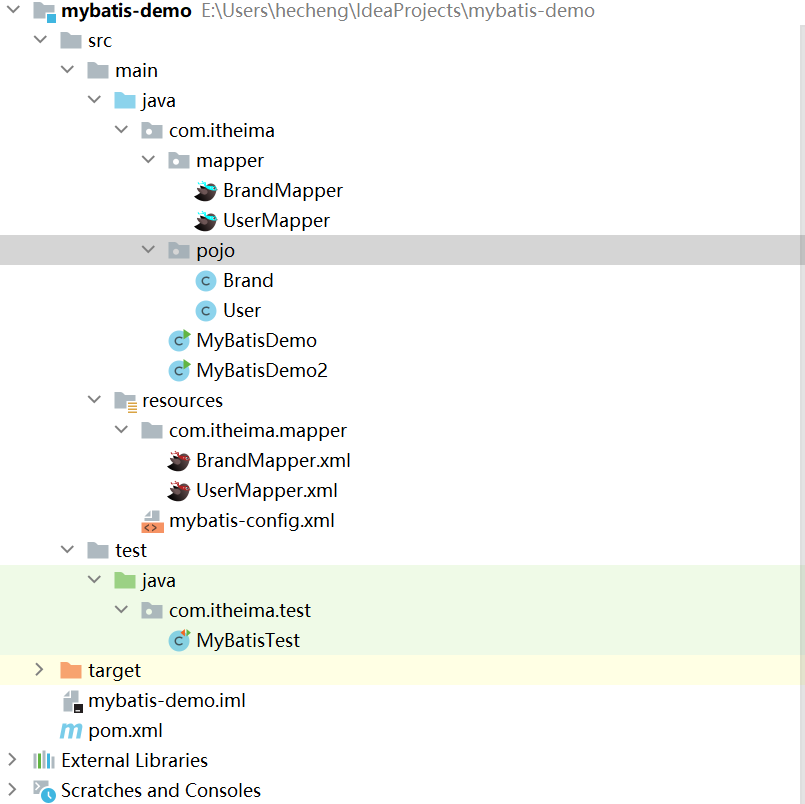
本次主要是对tb_brand表实现增删改查。
创建先后顺序
创建的先后顺序我在前一篇博客已经说清楚了,就不再赘述了,如果不知道如何创建的话,说明对mybatis还是不了解,建立仔细看一看上一篇博客,这是链接:一篇博客带你学会MyBatis
Brand实体类

package com.itheima.pojo;

public class Brand {

    private Integer id;

    private String brandName;

    private String companyName;

    private Integer ordered;

    private String description;

    private Integer status;

    public Integer getId() {

        return id;

    }

    public void setId(Integer id) {

        this.id = id;

    }

    public String getBrandName() {

        return brandName;

    }

    public void setBrandName(String brandName) {

        this.brandName = brandName;

    }

    public String getCompanyName() {

        return companyName;

    }

    public void setCompanyName(String companyName) {

        this.companyName = companyName;

    }

    public Integer getOrdered() {

        return ordered;

    }

    public void setOrdered(Integer ordered) {

        this.ordered = ordered;

    }

    public String getDescription() {

        return description;

    }

    public void setDescription(String description) {

        this.description = description;

    }

    @Override

    public String toString() {

        return "Brand{" +

                "id=" + id +

                ", brandName='" + brandName + '\'' +

                ", companyName='" + companyName + '\'' +

                ", ordered=" + ordered +

                ", description='" + description + '\'' +

                ", status=" + status +

                '}';

    }

    public Integer getStatus() {

        return status;

    }

    public void setStatus(Integer status) {

        this.status = status;

    }

}
mapper接口
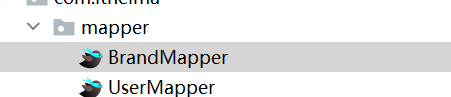
package com.itheima.mapper;

import com.itheima.pojo.Brand;

import org.apache.ibatis.annotations.Param;

import java.util.List;

import java.util.Map;

public interface BrandMapper {

    /**

     * 查询所有

     */

    public List<Brand> selectAll();

    /**

     * 查看详情:根据id查询

     */

    Brand selectById(int id);

    /**

     * 条件查询

     *  * 参数接收

     *      1.散装对象  如果方法中有多个参数,需使用@Param("sql占位符名称")

     *      2.封装对象

     *      3.map集合参数

     *

     */

    //List<Brand> selectByCondition(@Param("status") int status, @Param("companyName") String companyName, @Param("brandName") String brandName);

    //List<Brand> selectByCondition(Brand brand);

    List<Brand> selectByCondition(Map map);

    /**

     * 单条件动态查询

     * @param brand

     * @return

     */

    List<Brand> selectByConditionSingle(Brand brand);

    /**

     * 添加

     */

    void add(Brand brand);

    /**

     * 修改功能

     */

    int update(Brand brand);

    /**

     * 根据id删除

     */

    void delById(int id);

    /**

     * 批量删除

     */

    void delByIds(@Param("ids") int[] ids);

}
sql映射文件
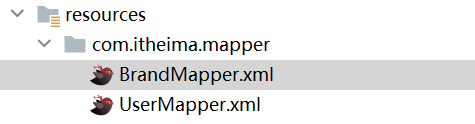
<?xml version="1.0" encoding="UTF-8" ?>
<!DOCTYPE mapper
PUBLIC "-//mybatis.org//DTD Mapper 3.0//EN"
"http://mybatis.org/dtd/mybatis-3-mapper.dtd">
<!--
namespace: 名称空间
-->
<mapper namespace="com.itheima.mapper.BrandMapper">
<!--
数据库表的字段名称 和 实体类的属性名称不一样,则不能自动封装
*起别名:对不一样的列名起别名,让别名和实体类的属性名一样
*缺点:每次查询都要定义一次别名
*解决:使用sql片段(但还是不灵活)
*resultMap:
1. 定义<resulMap>标签
2. 在<select>标签中使用resulMap属性替换resultType属性
-->
<!--
sql片段
-->
<!-- <sql id="brand_cloumn">id, brand_name as brandName, company_name as companyName, ordered, description, status</sql>-->
<!-- <select id="selectAll" resultType="brand">-->
<!-- select-->
<!-- <include refid="brand_cloumn"></include>-->
<!-- from tb_brand;-->
<!-- </select>-->
<!-- id:唯一标识 type:映射的类型,支持别名 -->
<resultMap id="brandResultMap" type="brand">
<!-- id:完成主键字段的映射 result:完成一般字段的映射 -->
<result column="brand_name" property="brandName"></result>
<result column="company_name" property="companyName"></result>
</resultMap>
<select id="selectAll" resultMap="brandResultMap">
select * from tb_brand;
</select>
<!--
*参数占位符:
1. #{} 会将其替换成?,用来防止sql注入
2. ${} 拼sql,会存在sql注入问题
3. 使用时机:
*参数传递的时候:#{}
*表名或列名不固定的情况下:${}(会存在sql注入)
*参数类型 :parameterType:可以省略
*特殊字符的处理:
1.转义字符
2.CDATA区 <![CDATA[ 内容 ]]>
-->
<select id="selectById" resultMap="brandResultMap">
select *
from tb_brand where id < #{id};
</select>
<!-- <select id="selectById" resultMap="brandResultMap">-->
<!-- select *-->
<!-- from tb_brand where id = #{id};-->
<!-- </select>-->
<!-- 条件查询 -->
<!-- <select id="selectByCondition" resultMap="brandResultMap">-->
<!-- select *-->
<!-- from tb_brand-->
<!-- where-->
<!-- status = #{status}-->
<!-- and company_name like #{companyName}-->
<!-- and brand_name like #{brandName}-->
<!-- </select>-->
<!--
动态条件查询
*if:条件判断
*test:逻辑表达式
*问题
*恒等式
*<where> 替换 where关键字
-->
<select id="selectByCondition" resultMap="brandResultMap">
select *
from tb_brand
/*where 1 = 1*/
<where>
<if test="status != null">
and status = #{status}
</if>
<if test="companyName != null and companyName != '' ">
and company_name like #{companyName}
</if>
<if test="brandName != null and brandName != '' ">
and brand_name like #{brandName}
</if>
</where>
</select>
<select id="selectByConditionSingle" resultMap="brandResultMap">
select *
from tb_brand
<where>
<choose><!-- 相当于switch -->
<when test="status != null"><!-- 相当于case -->
status = #{status}
</when>
<when test="companyName != null and companyName != '' ">
company_name like #{companyName}
</when>
<when test="brandName != null and brandName != '' ">
brand_name like #{brandName}
</when>
<!-- <otherwise>-->
<!-- 1 = 1-->
<!-- </otherwise>-->
</choose>
</where>
</select>
<insert id="add" useGeneratedKeys="true" keyProperty="id">
insert into tb_brand (brand_name,company_name,ordered,description,status)
values (#{brandName},#{companyName},#{ordered},#{description},#{status});
</insert>
<update id="update">
update tb_brand
<set>
<if test="brandName != null and brandName != ''">
brand_name = #{brandName},
</if>
<if test="companyName != null and companyName != ''">
company_name = #{companyName},
</if>
<if test="ordered != null">
ordered = #{ordered},
</if>
<if test="description != null and description != '' ">
description = #{description},
</if>
<if test="status != null">
status = #{status}
</if>
</set>
where id = #{id};
</update>
<delete id="delById">
delete from tb_brand where id = #{id};
</delete>
<!-- mybatis会将数组参数,封装成一个map集合
*默认: array = 数组
*使用@Param参数注解改变map集合key的名称
-->
<delete id="delByIds">
delete from tb_brand where id
in <foreach collection="ids" item="id" separator="," open="(" close=")">
#{id}
</foreach>
</delete>
</mapper>
核心配置文件

<?xml version="1.0" encoding="UTF-8" ?>

<!DOCTYPE configuration

        PUBLIC "-//mybatis.org//DTD Config 3.0//EN"

        "http://mybatis.org/dtd/mybatis-3-config.dtd">

<configuration>

    <settings>

        <setting name="logImpl" value="STDOUT_LOGGING" />

    </settings>

    <!-- 别名,UserMapper.xml文件中resultType属性就可以写pojo下的类名(类名还可以不区分大小写) -->

    <typeAliases>

        <package name="com.itheima.pojo"/>

    </typeAliases>

    <!--

    environments:配置数据库链接环境信息,可以配置多个environment,通过切换default属性切换不同的environment

    -->

    <environments default="development">

        <environment id="development">

            <transactionManager type="JDBC"/>

            <dataSource type="POOLED">

                <!-- 数据库链接信息 -->

                <property name="driver" value="com.mysql.cj.jdbc.Driver"/>

                <property name="url" value="jdbc:mysql:///mybatis?useSSL=false"/>

                <property name="username" value="root"/>

                <property name="password" value="123456"/>

            </dataSource>

        </environment>

        <environment id="test">

            <transactionManager type="JDBC"/>

            <dataSource type="POOLED">

                <!-- 数据库链接信息 -->

                <property name="driver" value="com.mysql.cj.jdbc.Driver"/>

                <property name="url" value="jdbc:mysql:///mybatis?useSSL=false"/>

                <property name="username" value="root"/>

                <property name="password" value="123456"/>

            </dataSource>

        </environment>

    </environments>

    <mappers>

        <!-- 加载sql映射文件 -->

        <!-- <mapper resource="com/itheima/mapper/UserMapper.xml"/>-->

        <!-- mapper代理方式 -->

        <package name="com.itheima.mapper"/>

    </mappers>

</configuration>
执行sql完成增删改查

package com.itheima.test;

import com.itheima.mapper.BrandMapper;

import com.itheima.pojo.Brand;

import org.apache.ibatis.io.Resources;

import org.apache.ibatis.session.SqlSession;

import org.apache.ibatis.session.SqlSessionFactory;

import org.apache.ibatis.session.SqlSessionFactoryBuilder;

import org.junit.Test;

import java.io.IOException;

import java.io.InputStream;

import java.util.HashMap;

import java.util.List;

import java.util.Map;

public class MyBatisTest {

    @Test

    public void testSelectAll() throws IOException {

        //1. 获取sqlsessionFactory

        //1. 加载MyBatis配置文件,获取SqlSessionFactory对象

        String resource = "mybatis-config.xml";

        InputStream inputStream = Resources.getResourceAsStream(resource);

        SqlSessionFactory sqlSessionFactory = new SqlSessionFactoryBuilder().build(inputStream);

        //2. 获取SqlSession对象

        SqlSession sqlSession = sqlSessionFactory.openSession();

        //3. 获取Mapper接口的代理对象

        BrandMapper brandmapper = sqlSession.getMapper(BrandMapper.class);

        //4. 执行方法

        List<Brand> brands = brandmapper.selectAll();

        System.out.println(brands);

        //5. 释放资源

        sqlSession.close();

    }

    @Test

    public void testSelectByid() throws IOException {

        //接收参数

        int id = 1;

        //1. 获取sqlsessionFactory

        //1. 加载MyBatis配置文件,获取SqlSessionFactory对象

        String resource = "mybatis-config.xml";

        InputStream inputStream = Resources.getResourceAsStream(resource);

        SqlSessionFactory sqlSessionFactory = new SqlSessionFactoryBuilder().build(inputStream);

        //2. 获取SqlSession对象

        SqlSession sqlSession = sqlSessionFactory.openSession();

        //3. 获取Mapper接口的代理对象

        BrandMapper brandmapper = sqlSession.getMapper(BrandMapper.class);

        //4. 执行方法

        Brand brand = brandmapper.selectById(id);

        System.out.println(brand);

        //5. 释放资源

        sqlSession.close();

    }

    @Test

    public void testSelectByCondition() throws IOException {

        //接收参数

        int status = 1;

        String companyName = "华为";

        String brandName = "华为";

        //处理参数

        companyName = "%"+companyName+"%";

        brandName = "%"+brandName+"%";

        //封装对象

        /*Brand brand = new Brand();

        brand.setStatus(status);

        brand.setCompanyName(companyName);

        brand.setBrandName(brandName);*/

        Map map = new HashMap();

        //map.put("status",status);

        //map.put("companyName",companyName);

        map.put("brandName",brandName);

        //1. 获取sqlsessionFactory

        //1. 加载MyBatis配置文件,获取SqlSessionFactory对象

        String resource = "mybatis-config.xml";

        InputStream inputStream = Resources.getResourceAsStream(resource);

        SqlSessionFactory sqlSessionFactory = new SqlSessionFactoryBuilder().build(inputStream);

        //2. 获取SqlSession对象

        SqlSession sqlSession = sqlSessionFactory.openSession();

        //3. 获取Mapper接口的代理对象

        BrandMapper brandmapper = sqlSession.getMapper(BrandMapper.class);

        //4. 执行方法

        //List<Brand> brands = brandmapper.selectByCondition(status, companyName, brandName);

        //List<Brand> brands = brandmapper.selectByCondition(brand);

        List<Brand> brands = brandmapper.selectByCondition(map);

        System.out.println(brands);

        //5. 释放资源

        sqlSession.close();

    }

    @Test

    public void testSelectByConditionSingle() throws IOException {

        //接收参数

        int status = 1;

        String companyName = "华为";

        String brandName = "华为";

        //处理参数

        companyName = "%"+companyName+"%";

        brandName = "%"+brandName+"%";

        //封装对象

        Brand brand = new Brand();

        //brand.setStatus(status);

        //brand.setCompanyName(companyName);

        //brand.setBrandName(brandName);

        //1. 获取sqlsessionFactory

        //1. 加载MyBatis配置文件,获取SqlSessionFactory对象

        String resource = "mybatis-config.xml";

        InputStream inputStream = Resources.getResourceAsStream(resource);

        SqlSessionFactory sqlSessionFactory = new SqlSessionFactoryBuilder().build(inputStream);

        //2. 获取SqlSession对象

        SqlSession sqlSession = sqlSessionFactory.openSession();

        //3. 获取Mapper接口的代理对象

        BrandMapper brandmapper = sqlSession.getMapper(BrandMapper.class);

        //4. 执行方法

        //List<Brand> brands = brandmapper.selectByCondition(status, companyName, brandName);

        //List<Brand> brands = brandmapper.selectByCondition(brand);

        List<Brand> brands = brandmapper.selectByConditionSingle(brand);

        System.out.println(brands);

        //5. 释放资源

        sqlSession.close();

    }

    @Test

    public void testAdd() throws IOException {

        //接收参数

        int status = 1;

        String companyName = "波导手机2";

        String brandName = "波导2";

        String description = "手机中的战斗机";

        int ordered = 100;

        //封装对象

        Brand brand = new Brand();

        brand.setStatus(status);

        brand.setCompanyName(companyName);

        brand.setBrandName(brandName);

        brand.setDescription(description);

        brand.setOrdered(ordered);

        //1. 获取sqlsessionFactory

        //1. 加载MyBatis配置文件,获取SqlSessionFactory对象

        String resource = "mybatis-config.xml";

        InputStream inputStream = Resources.getResourceAsStream(resource);

        SqlSessionFactory sqlSessionFactory = new SqlSessionFactoryBuilder().build(inputStream);

        //2. 获取SqlSession对象

        //SqlSession sqlSession = sqlSessionFactory.openSession();

        SqlSession sqlSession = sqlSessionFactory.openSession(true);

        //3. 获取Mapper接口的代理对象

        BrandMapper brandmapper = sqlSession.getMapper(BrandMapper.class);

        //4. 执行方法

        brandmapper.add(brand);

        Integer id = brand.getId();

        System.out.println(id);

        //提交事务

        //sqlSession.commit();

        //5. 释放资源

        sqlSession.close();

    }

    @Test

    public void testUpdate() throws IOException {

        //接收参数

        int status = 0;

        String companyName = "波导手机";

        String brandName = "波导";

        String description = "波导手机,手机中的战斗机";

        int ordered = 200;

        int id = 6;

        //封装对象

        Brand brand = new Brand();

        brand.setStatus(status);

        //brand.setCompanyName(companyName);

        //brand.setBrandName(brandName);

        //brand.setDescription(description);

        //brand.setOrdered(ordered);

        brand.setId(id);

        //1. 获取sqlsessionFactory

        //1. 加载MyBatis配置文件,获取SqlSessionFactory对象

        String resource = "mybatis-config.xml";

        InputStream inputStream = Resources.getResourceAsStream(resource);

        SqlSessionFactory sqlSessionFactory = new SqlSessionFactoryBuilder().build(inputStream);

        //2. 获取SqlSession对象

        //SqlSession sqlSession = sqlSessionFactory.openSession();

        SqlSession sqlSession = sqlSessionFactory.openSession();

        //3. 获取Mapper接口的代理对象

        BrandMapper brandmapper = sqlSession.getMapper(BrandMapper.class);

        //4. 执行方法

        int count = brandmapper.update(brand);

        System.out.println(count);

        //提交事务

        sqlSession.commit();

        //5. 释放资源

        sqlSession.close();

    }

    @Test

    public void testDelById() throws IOException {

        //接收参数

        int id = 6;

        //1. 获取sqlsessionFactory

        //1. 加载MyBatis配置文件,获取SqlSessionFactory对象

        String resource = "mybatis-config.xml";

        InputStream inputStream = Resources.getResourceAsStream(resource);

        SqlSessionFactory sqlSessionFactory = new SqlSessionFactoryBuilder().build(inputStream);

        //2. 获取SqlSession对象

        //SqlSession sqlSession = sqlSessionFactory.openSession();

        SqlSession sqlSession = sqlSessionFactory.openSession();

        //3. 获取Mapper接口的代理对象

        BrandMapper brandmapper = sqlSession.getMapper(BrandMapper.class);

        //4. 执行方法

        brandmapper.delById(id);

        //提交事务

        sqlSession.commit();

        //5. 释放资源

        sqlSession.close();

    }

    @Test

    public void testDelByIds() throws IOException {

        //接收参数

        int[] ids = {6,7};

        //1. 获取sqlsessionFactory

        //1. 加载MyBatis配置文件,获取SqlSessionFactory对象

        String resource = "mybatis-config.xml";

        InputStream inputStream = Resources.getResourceAsStream(resource);

        SqlSessionFactory sqlSessionFactory = new SqlSessionFactoryBuilder().build(inputStream);

        //2. 获取SqlSession对象

        //SqlSession sqlSession = sqlSessionFactory.openSession();

        SqlSession sqlSession = sqlSessionFactory.openSession();

        //3. 获取Mapper接口的代理对象

        BrandMapper brandmapper = sqlSession.getMapper(BrandMapper.class);

        //4. 执行方法

        brandmapper.delByIds(ids);

        //提交事务

        sqlSession.commit();

        //5. 释放资源

        sqlSession.close();

    }

}
maven配置文件

<?xml version="1.0" encoding="UTF-8"?>

<project xmlns="http://maven.apache.org/POM/4.0.0"

         xmlns:xsi="http://www.w3.org/2001/XMLSchema-instance"

         xsi:schemaLocation="http://maven.apache.org/POM/4.0.0 http://maven.apache.org/xsd/maven-4.0.0.xsd">

    <modelVersion>4.0.0</modelVersion>

    <groupId>org.example</groupId>

    <artifactId>mybatis-demo</artifactId>

    <version>1.0-SNAPSHOT</version>

    <dependencies>

        <!-- mybatis的依赖 -->

        <dependency>

            <groupId>org.mybatis</groupId>

            <artifactId>mybatis</artifactId>

            <version>3.5.5</version>

        </dependency>

        <!-- mysql驱动 -->

        <dependency>

            <groupId>mysql</groupId>

            <artifactId>mysql-connector-java</artifactId>

            <version>8.0.28</version>

        </dependency>

        <!-- junit单元测试 -->

        <dependency>

            <groupId>junit</groupId>

            <artifactId>junit</artifactId>

            <version>4.13.1</version>

            <scope>test</scope>

        </dependency>

        <!-- 添加slf4j日志api -->

<!--        <dependency>-->

<!--            <groupId>org.slf4j</groupId>-->

<!--            <artifactId>slf4j-log4j12</artifactId>-->

<!--            <version>1.7.19</version>-->

<!--        </dependency>-->

    </dependencies>

</project>
MyBatis实现对数据库的增删改查的更多相关文章
- SSMybatis整合 --详细解读Mybatis对oracle数据库进行增删改查(一)
Mybatis是现在主流的持久化层框架,与Hibernate不同的是,它鼓励程序员使用原声SQL语句对数据库进行操作.因此提供了非常灵活的功能.特别是当数据库同时访问数过多,需要进行优化时,使用sql ...
- mybatis实现MySQL数据库的增删改查
环境: jdk1.8 mysql5.7 maven3.6.0 IDEA 什么是mybatis框架? MyBatis 是一款优秀的持久层框架, 它支持自定义 SQL.存储过程以及高级映射. MyBati ...
- mybatis实现MySQL数据库的增删改查之二
这里直接附上代码: 1 package com.qijian.pojo; 2 3 import org.apache.ibatis.type.Alias; 4 5 6 public class Use ...
- Mybatis学习笔记(二) 之实现数据库的增删改查
开发环境搭建 mybatis 的开发环境搭建,选择: eclipse j2ee 版本,mysql 5.1 ,jdk 1.7,mybatis3.2.0.jar包.这些软件工具均可以到各自的官方网站上下载 ...
- java jdbc 连接mysql数据库 实现增删改查
好久没有写博文了,写个简单的东西热热身,分享给大家. jdbc相信大家都不陌生,只要是个搞java的,最初接触j2ee的时候都是要学习这么个东西的,谁叫程序得和数据库打交道呢!而jdbc就是和数据库打 ...
- SpringBoot+Mybatis+Maven+MySQL逆向工程实现增删改查
SpringBoot+Mybatis+MySQL+MAVEN逆向工程实现增删改查 这两天简单学习了下SpringBoot,发现这玩意配置起来是真的方便,相比于SpringMVC+Spring的配置简直 ...
- 小D课堂-SpringBoot 2.x微信支付在线教育网站项目实战_3-2.使用Mybatis注解开发视频列表增删改查
笔记 2.使用Mybatis注解开发视频列表增删改查 讲解:使用Mybatis3.x注解方式 增删改查实操, 控制台打印sql语句 1.控制台打印sql语句 ...
- SSM框架之MyBatis框架实现简单的增删改查
MyBatis框架介绍 MyBatis是一个优秀的数据持久层框架,在实体类和SQL语句之间建立映射关系是一种半自动化的ORM实现,其封装性要低于Hibernate,性能优越,并且小巧,简单易学,应用也 ...
- ThinkPHP实现对数据库的增删改查
好久都没有更新博客了,之前老师布置的任务总算是现在可以说告一段落了,今天趁老师还没提出其他要求来更新一篇博客. 今天我想记录的是我之前做项目,自己所理解的ThinkPHP对数据库的增删改查. 首先要说 ...
- Android学习---数据库的增删改查(sqlite CRUD)
上一篇文章介绍了sqlite数据库的创建,以及数据的访问,本文将主要介绍数据库的增删改查. 下面直接看代码: MyDBHelper.java(创建数据库,添加一列phone) package com. ...
随机推荐
- 动态规划--最长公共子序列( LCS 问题)
博客地址:https://www.cnblogs.com/zylyehuo/ # -*- coding: utf-8 -*- # 最长公共子序列的长度 def lcs_length(x, y): m ...
- Delphi 禁止重复运行程序的方法
第一种方法,使用"过程调用" procedure Del; // 自定义过程 var Mutex: THandle; begin Mutex := CreateMutex(nil, ...
- “决策-寻找过程”的黄金秘密工具,1/e 法则之应用(尤其日常生活中的应用)
https://www.ccgxk.com/magicword/327.html 目录 引言 著名的 1/e 法则内容和解释 应用到生活中的 1/e 法则是什么样? 相亲案例 看书.看电影案例 生活质 ...
- 使用 PHP 创建 Excel 读取器类
介绍: PHPExcel-1.8.1读取excel 创建 ExcelReader 类: ExcelReader 类旨在从 Excel 文件中读取数据.它以文件路径作为输入,并提供一个方法来从 Exce ...
- 【Unity】改变游戏运行时Window的窗口标题
[Unity]改变游戏运行时Window的窗口标题 零.需求 Unity打包好的Windows程序,启动后如何更改窗口标题?因为看着英文的感觉不太好,故有此想法.什么?你说为啥不改项目产品名?产品名会 ...
- 【Web】前端框架对微软老旧浏览器的支持
零.原因 最近要做一个项目,要能在学校机房运行的,也要在手机上运行.电脑和手机,一次性开发,那最好的就是响应式前端框架了.手机和正常的电脑兼容性问题应该都不大,但是学校机房都是Win7的系统,自带的都 ...
- Python的日志
Python的日志,看上去啰啰嗦嗦的.请大神写了个通俗易懂简单方便通用的日志: import logging # 配置日志记录级别和输出方式 logging.basicConfig(level=log ...
- 要命的DRG成本核算!
改开几十年的三座大山之一,鬼见愁的问题.会随着DRG的推进而让平头老百姓过上翻身做主的日子呢!? 对于DRG,首先医保部门需要了解病种成本状况,确定给你结算多少银子.第二,咱们医院靠医保吃饭,那就更需 ...
- 理解PostgreSQL和SQL Server中的文本数据类型
理解PostgreSQL和SQL Server中的文本数据类型 在使用PostgreSQL时,理解其文本数据类型至关重要,尤其对有SQL Server背景的用户而言.尽管两个数据库系统都支持文本存储, ...
- arthas安装和简单使用
介绍 Arthas 是一款线上监控诊断产品,通过全局视角实时查看应用 load.内存.gc.线程的状态信息,并能在不修改应用代码的情况下,对业务问题进行诊断,包括查看方法调用的出入参.异常,监测方法执 ...