
前端学习openLayers配合vue3(圆形形状的绘制)
上节课我们学了加载了矢量图片,这节我们来学绘制圆形
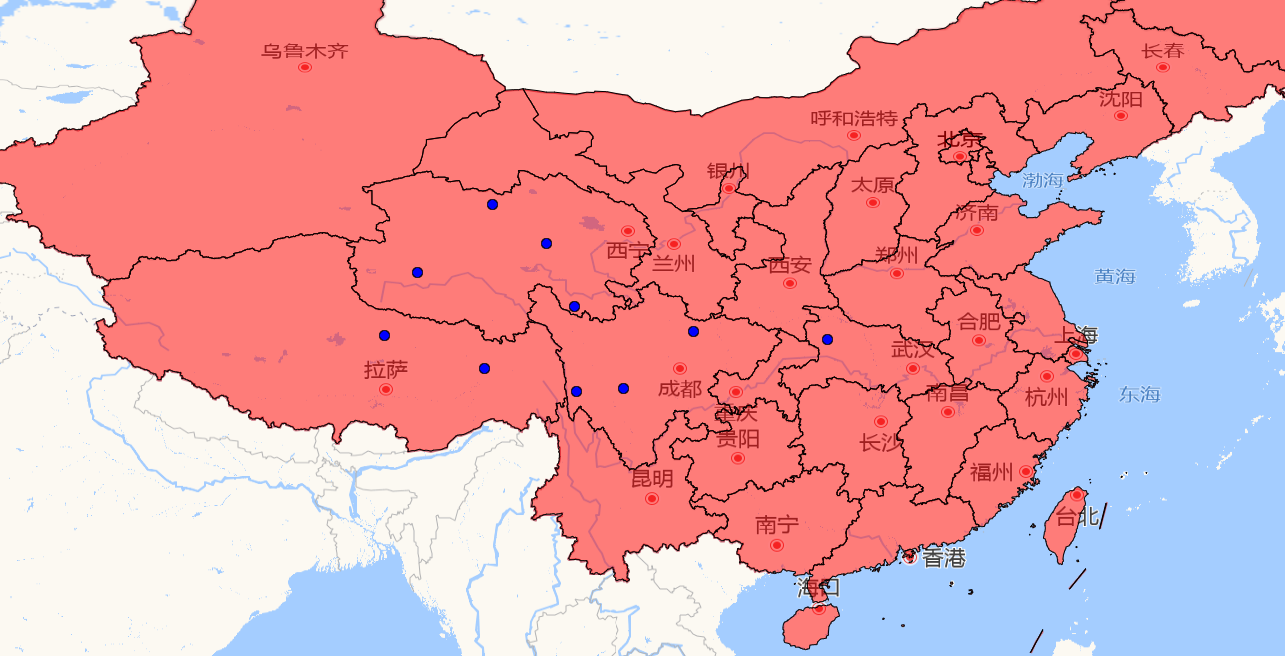
关键代码,第一段呢是设置圆点的操作,第二步是点击地图获取地图位置来设置圆点,ol还有很多类,各种形状的
 //设置圆点

  // let anchorLayer = new VectorLayer({

  //   source: new VectorSource(),

  // });

  // let anchorFeatures = new Feature({

  //   geometry: new Point(center),

  // });

  // anchorFeatures.setStyle(

  //   new Style({

  //     image: new Circle({

  //       radius: 5,

  //       fill: new Fill({ color: "red" }),

  //       stroke: new Stroke({ color: "black", width: 1 }),

  //     }),

  //   })

  // );

  // anchorLayer.getSource().addFeature(anchorFeatures);

  // map.addLayer(anchorLayer);
let layer = new VectorLayer({

    source: new VectorSource(),

  });

  map.addLayer(layer);

  map.on("click", function (e) {

    // 点击图层获取相对的位置进行相关圆点的新增

    let position = e.coordinate;

    let feature = new Feature({

      geometry: new Point(position),

    });

    feature.setStyle(

      new Style({

        image: new Circle({

          radius: 5,

          fill: new Fill({ color: "blue" }),

          stroke: new Stroke({ color: "black", width: 1 }),

        }),

      })

    );

    layer.getSource().addFeature(feature);

  });
效果图
完整代码
<script setup>

import { onMounted, reactive, ref } from "vue";

import { Feature, Map, View } from "ol";

import TileLayer from "ol/layer/Tile";

import { OSM, XYZ } from "ol/source";

import { fromLonLat } from "ol/proj";

import VectorLayer from "ol/layer/Vector";

import VectorSource from "ol/source/Vector";

import GeoJSON from "ol/format/GeoJSON";

import Style from "ol/style/Style";

import Fill from "ol/style/Fill";

import Stroke from "ol/style/Stroke";

import Icon from "ol/style/Icon";

import { Point } from "ol/geom";

import { Circle } from "ol/style";

defineProps({

  msg: String,

});

let map = reactive({});

let view = reactive({});

// let count=ref(0)

// let center=[114.305469, 30.592876];

let center = reactive([114.305469, 30.592876]);

onMounted(() => {

  initMap();

});

let initMap = () => {

  (view = new View({

    center,

    zoom: 5,

    projection: "EPSG:4326",

  })),

    (map = new Map({

      target: "map", //挂载视图的容器

      layers: [

        //瓦片图层source第三方,或者自带的,地图的底层

        new TileLayer({

          // source: new OSM(),//内置的国外地址,需要代理

          source: new XYZ({

            url: "http://wprd0{1-4}.is.autonavi.com/appmaptile?x={x}&y={y}&z={z}&lang=zh_cn&size=1&scl=1&style=7",

          }), //国内第三方数据源

        }),

        // 矢量图层

        new VectorLayer({

          source: new VectorSource({

            url: "https://geo.datav.aliyun.com/areas_v3/bound/100000_full.json",

            format: new GeoJSON(),

          }),

          //填充颜色

          style: new Style({

            fill: new Fill({

              color: "rgba(255, 0, 0, 0.5)",

            }),

            stroke: new Stroke({

              color: "black",

              width: 1,

            }),

          }),

        }),

      ],

      //视图

      view: view,

    }));

  //设置圆点

  // let anchorLayer = new VectorLayer({

  //   source: new VectorSource(),

  // });

  // let anchorFeatures = new Feature({

  //   geometry: new Point(center),

  // });

  // anchorFeatures.setStyle(

  //   new Style({

  //     image: new Circle({

  //       radius: 5,

  //       fill: new Fill({ color: "red" }),

  //       stroke: new Stroke({ color: "black", width: 1 }),

  //     }),

  //   })

  // );

  // anchorLayer.getSource().addFeature(anchorFeatures);

  // map.addLayer(anchorLayer);

  let layer = new VectorLayer({

    source: new VectorSource(),

  });

  map.addLayer(layer);

  map.on("click", function (e) {

    // 点击图层获取相对的位置进行相关圆点的新增

    let position = e.coordinate;

    let feature = new Feature({

      geometry: new Point(position),

    });

    feature.setStyle(

      new Style({

        image: new Circle({

          radius: 5,

          fill: new Fill({ color: "blue" }),

          stroke: new Stroke({ color: "black", width: 1 }),

        }),

      })

    );

    layer.getSource().addFeature(feature);

  });

};

let move = () => {

  // 设置北京的经纬度

  const beijing = [116.46, 39.92];

  const view = map.getView();

  view.animate({

    center: beijing,

    zoom: 10,

    projection: "EPSG:4356",

  });

};

</script>

<template>

  <div id="map">

    <div class="btns"></div>

  </div>

</template>

<style scoped>

.btns {

  display: flex;

  position: fixed;

  left: 20px;

  bottom: 20px;

  z-index: 999;

}

.btns div {

  width: 100px;

  height: 40px;

  display: flex;

  justify-content: center;

  align-items: center;

  cursor: pointer;

}

.read-the-docs {

  color: #888;

}

#map {

  margin: 0;

  width: 100vw;

  height: 100vh;

}

</style>
前端学习openLayers配合vue3(圆形形状的绘制)的更多相关文章
- vue—你必须知道的 js数据类型 前端学习 CSS 居中 事件委托和this 让js调试更简单—console AMD && CMD 模式识别课程笔记(一) web攻击 web安全之XSS JSONP && CORS css 定位 react小结
vue—你必须知道的 目录 更多总结 猛戳这里 属性与方法 语法 计算属性 特殊属性 vue 样式绑定 vue事件处理器 表单控件绑定 父子组件通信 过渡效果 vue经验总结 javascript ...
- web前端学习部落22群分享给需要前端练手项目
前端学习还是很有趣的,可以较快的上手然后自己开发一些好玩的项目来练手,网上也可以一抓一大把关于前端开发的小项目,可是还是有新手在学习的时候不知道可以做什么,以及怎么做,因此,就整理了一些前端项目教程, ...
- 前端学习 第五弹: CSS (一)
前端学习 第五弹: CSS (一) 创建css: <link rel="stylesheet" type="text/css" href="my ...
- 【FE前端学习】第二阶段任务-基础
技能学习部分: 1.需要熟练掌握HTML标签以及CSS各个常用属性. 2.掌握CSS3 常用属性 3.掌握jquery的基本用法,对于JS基本逻辑语句需要熟练掌握 上文 [FE前端学习]第二阶段任务- ...
- web前端学习笔记
web前端学习笔记(CSS盒子的定位) 相对定位 使用相对定位的盒子的位置常以标准流的排版方式为基础,然后使盒子相对于它在原本的标准位置偏移指定的距离.相对定位的盒子仍在标准流中,它后面的盒子仍以标准 ...
- 前端学习(十四):CSS布局
进击のpython ***** 前端学习--CSS布局 每个模块的相关央视就算是进本上都完成了,但是,这些模块想放在不同的位置 横着放,竖着放,斜着放... ... 想怎么放怎么放 那就用到了今天要说 ...
- 前端学习(八):CSS
进击のpython ***** 前端学习--CSS 现在的互联网前端分为三层: HTML:超文本标记语言.从语义的角度描述页面结构 CSS:层叠样式表.从审美的角度负责页面样式 JS:Javascri ...
- 前端学习 node 快速入门 系列 —— 简易版 Apache
其他章节请看: 前端学习 node 快速入门 系列 简易版 Apache 我们用 node 来实现一个简易版的 Apache:提供静态资源访问的能力. 实现 直接上代码. - demo - stati ...
- 前端学习 linux —— 第一篇
前端学习 linux - 第一篇 本文主要介绍"linux 发行版本"."cpu 架构"."Linux 目录结构"."vi 和 v ...
- 每天成长一点---WEB前端学习入门笔记
WEB前端学习入门笔记 从今天开始,本人就要学习WEB前端了. 经过老师的建议,说到他每天都会记录下来新的知识点,每天都是在围绕着这些问题来度过,很有必要每天抽出半个小时来写一个知识总结,及时对一天工 ...
随机推荐
- c语言里关于本地变量的一些规则
关于块的定义(自己的理解):就是☞{ }这个区域里面的东西以及" {} "这个符号的本身 ·本地的变量是定义在块内的 -->>1.它可以定义在函数的块内 void sw ...
- 2.16 Linux挂载详解
前面讲过,Linux 系统中"一切皆文件",所有文件都放置在以根目录为树根的树形目录结构中.在 Linux 看来,任何硬件设备也都是文件,它们各有自己的一套文件系统(文件目录结构) ...
- 两个新出的 JavaScript 运算符
在 ECMAScript 2021(ES12)中,JavaScript 引入了新的逻辑赋值操作符 &&= 和 ??=.这些操作符将逻辑运算符与赋值运算符相结合,提供了更加简洁.直观的赋 ...
- 前端稳定性工具-Sentry
什么是Sentry? Sentry本质上是一个服务器端的应用程序,它接收来自客户端(如Web应用程序.移动应用程序或后端服务)的错误日志,然后对这些日志进行聚合.分析和可视化.它提供了详细的错误报告, ...
- 简单但实用,RTC时钟使用指南
合宙Air201快速入门-RTC实时时钟使用示例- 本教程教你通过使用脚本代码,实现Air201内置RTC实时时钟同步时间.获取时间.设置时间等功能,可根据实际需求灵活应用. 我们先了解一些相关基础知 ...
- n皇后编程问题
n皇后编程问题是一个经典问题,记得2018年北京航空航天大学计算机学院的博士招聘的上机题目就是这个,这里给出几种实现方法: import time import itertools Num = 8 # ...
- MySQL创新版9.1.0于2024年10月15日正式发布-新功能特性先睹为快[译]
这个十月发布的版本是MySQL宣布转向新的LTS/Innovation发布模式后的第三个长期支持(LTS)版本和第二个创新(Innovation)版本.更多细节请参见MySQL发布:创新和长期支持.在 ...
- MySQL 8.0 OCP 最新中文考试题库(如需完整版请联系作者)
大家好!今天要给大家带来的是由Oracle公司研发的MySQL 8.0认证考试试题本次试题是全网最全面的试题,总共包含123道.试题正确率在95%以上.对于在今年报考MySQL8.0 中文版本的考生有 ...
- elasticsearch权限验证(Auth+Transport SSL)
转载:https://knner.wang/2019/11/26/install-elasticsearch-cluster-7-4.html 在新版的Elastic中,基础版(免费)的已经提供了基础 ...
- ThreeJs-04详解材质与纹理
一.matcap材质 这个材质不会受到光照影响,但是如果图片本身有光就可以一直渲染这个图片本来的样子,用来将一个图片纹理渲染到物体上的材质 代码实现 加载模型后,开启纹理渲染,并把它的材质变为这个材质 ...