
Android Material Design控件使用(二)——FloatButton TextInputEditText TextInputLayout 按钮和输入框
FloatingActionButton
1. 使用FloatingActionButton的情形
FAB代表一个App或一个页面中最主要的操作,如果一个App的每个页面都有FAB,则通常表示该App最主要的功能是通过该FAB操作的。
为了突出FAB的重要性,一个页面最好只有一个FAB
使用的时候需要导入desgin包,Android Studio 新版本都已经自动导入了,这里就不多说
compile 'com.android.support:design:25.1.0'
2. FloatingActionButton的大小一般有两种大小(官方)
- 56 * 56dp :默认的大小,最常用的尺寸。
- 40 * 40 dp :Mini版。
当然也是可以改变大小,不过一般使用
按钮中间图标大小官方推荐为 24*24dp
3.FloatingActionButton的属性
FloatingActionButton是继承ImageView,包含了ImageView的所有属性,除此之外,还有几个新增加的特殊属性,需要使用命名空间来使用。
引入命名空间:xmlns:app="http://schemas.android.com/apk/res-auto"
| 属性名 | 说明 |
|---|---|
| elevation | 阴影的高度 |
| fabSize | FAB的大小,为normal时,大小为:56 * 56dp ,为mini时,大小为: 40 * 40 dp |
| backgroundTint | FAB的背景颜色 |
| rippleColor | 点击FAB时,形成的波纹颜色 |
TextInputEditText
介绍
TextInputEditText是EditText的子类,相当于完善了有些EditText的缺点
当我们的界面处于全屏时,点击一个
EditText,默认情况下不是在它下面弹出键盘,而是进入到输入法的一个全屏的输入界面(通过配置android:imeOptions=”flagNoExtractUi”可以设为直接在当前界面显示)
如果我们给
EditText套上了一个TextInputLayout时,TextInputLayout会拿到EditText的hint显示出来并把EditText本身的hint设为空.这样我们在全屏的输入界面上,就显示不出来我们设置hint,因此TextInputEditText重写了EditText
TextInputLayout
介绍
这个布局其实是与EditText连用,可以实现密码框的显示与隐藏,和点击输入的时候,会将提示文字浮现在上方
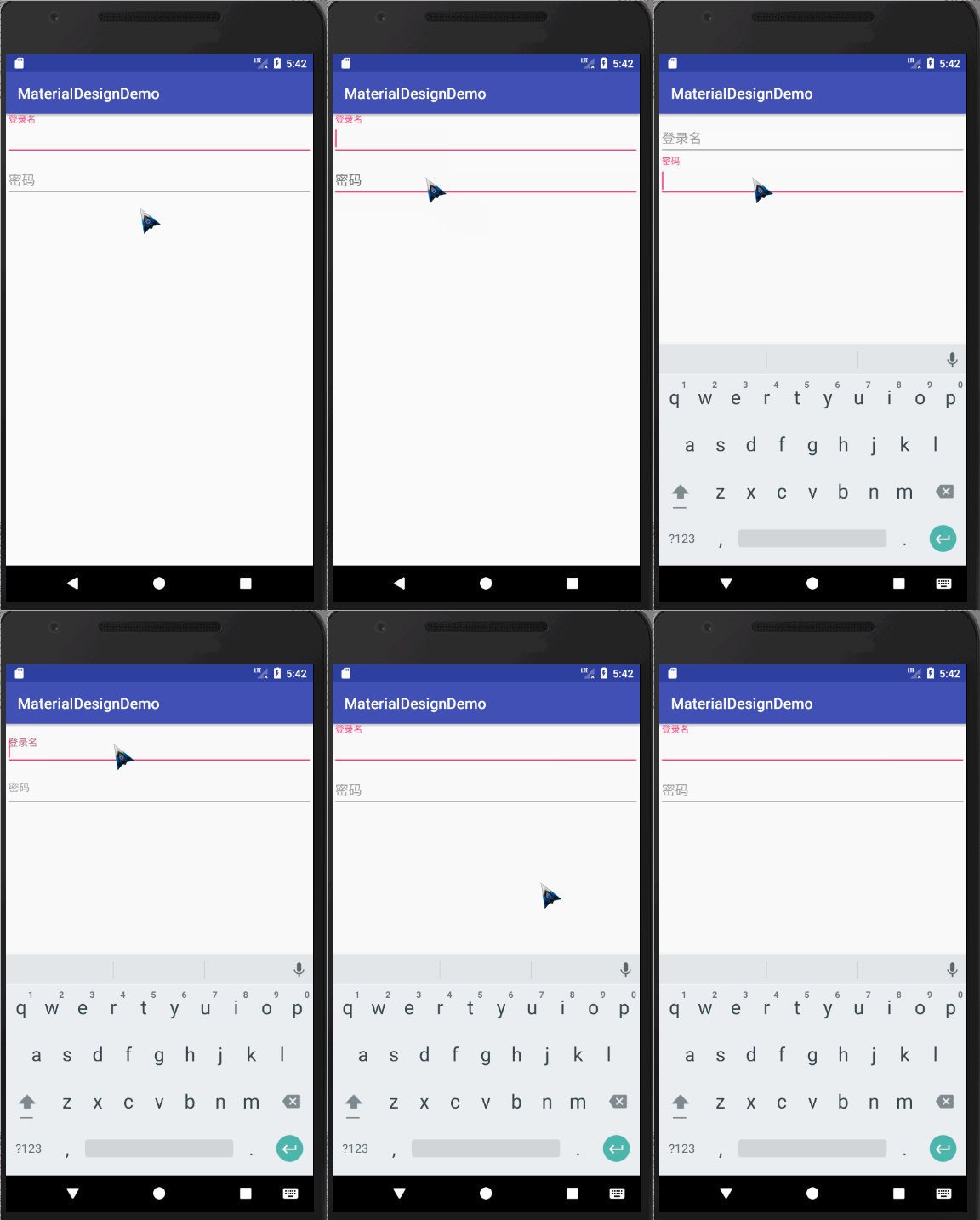
代码如下:
<?xml version="1.0" encoding="utf-8"?>

<LinearLayout

    xmlns:android="http://schemas.android.com/apk/res/android"

    xmlns:app="http://schemas.android.com/apk/res-auto"

    xmlns:tools="http://schemas.android.com/tools"

    android:layout_width="match_parent"

    android:orientation="vertical"

    android:layout_height="match_parent"

    tools:context="com.wan.homework.activity.Homework1Activity">

    <android.support.design.widget.TextInputLayout

        android:layout_width="match_parent"

        android:layout_height="wrap_content">

            <android.support.design.widget.TextInputEditText

                android:id="@+id/username"

                android:layout_width="match_parent"

                android:layout_height="wrap_content"

                android:hint="用户名"/>

    </android.support.design.widget.TextInputLayout>

    <android.support.design.widget.TextInputLayout

        android:layout_width="match_parent"

        android:layout_height="wrap_content">

        <EditText

            android:inputType="textPassword"

            android:id="@+id/password"

            android:layout_width="match_parent"

            android:layout_height="wrap_content"

            android:hint="密码"/>

    </android.support.design.widget.TextInputLayout>

</LinearLayout>
错误提示
TextInputLayout其实内置了一个用来显示错误提示的方法,方法名为setError,效果如下
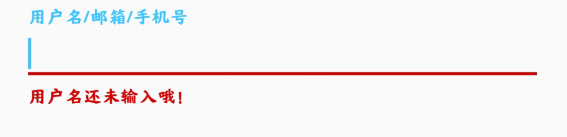
我们可以按钮的点击事件中,对用户的输入进行判断,从而显示错误信息
val userName = input_login_name.editText?.text.toString()

//验证用户输入

if (userName.isBlank()) {

	input_login_name.error = "用户名还未输入哦!"

}
PS:如果想要清空错误信息,将错误信息设置为""即可
input_login_name.error = ""
密码的显示与隐藏

如果想要实现此效果,只需要在将TextInputLayout的EditText的inputType属性设置为textpassword,将TextInputLayout的自定义属性passwordToggleEnabled设置为true即可
<android.support.design.widget.TextInputLayout

	android:id="@+id/input_password"

	android:layout_width="match_parent"

	android:layout_height="wrap_content"

	app:passwordToggleEnabled="true">

	<android.support.design.widget.TextInputEditText

		android:layout_width="match_parent"

		android:layout_height="wrap_content"

		android:hint="密码"

		android:inputType="textPassword"/>

</android.support.design.widget.TextInputLayout>
属性
| 属性名 | 说明 |
|---|---|
| app:Theme | 设置下划线或其他的颜色属性 |
| android.support.design:counterEnabled | 是否显示计数器 |
| android.support.design:counterMaxLength | 设置计数器的最大值,与counterEnabled同时使用 |
| android.support.design:counterTextAppearance | 计数器的字体样式 |
| android.support.design:counterOverflowTextAppearance | 输入字符大于我们限定个数字符时的字体样式 |
| android.support.design:errorEnabled | 是否显示错误信息 |
| android.support.design:errorTextAppearance | 错误信息的字体样式 |
| android.support.design:hintAnimationEnabled | 是否显示hint的动画,默认true |
| android.support.design:hintEnabled | 是否使用hint属性,默认true |
| android.support.design:hintTextAppearance | 设置hint的文字样式(指运行动画效果之后的样式) |
| android.support.design:passwordToggleDrawable | 设置密码开关Drawable图片,于passwordToggleEnabled同时使用 |
| android.support.design:passwordToggleEnabled | 是否显示密码开关图片,需要EditText设置inputType |
| android.support.design:passwordToggleTint | 设置密码开关图片颜色 |
| android.support.design:passwordToggleTintMode | 设置密码开关图片(混合颜色模式),与passwordToggleTint同时使用 |
Android Material Design控件使用(二)——FloatButton TextInputEditText TextInputLayout 按钮和输入框的更多相关文章
- Android Material Design控件学习(三)——使用TextInputLayout实现酷市场登录效果
前言 前两次,我们学习了 Android Material Design控件学习(一)--TabLayout的用法 Android Material Design控件学习(二)--Navigation ...
- Android Material Design控件学习(二)——NavigationView的学习和使用
前言 上次我们学习了TabLayout的用法,今天我们继续学习MaterialDesign(简称MD)控件--NavigationView. 正如其名,NavigationView,导航View.一般 ...
- Android Material Design控件学习(一)——TabLayout的用法
前言 Google官方在14年Google I/O上推出了全新的设计语言--Material Design.一并推出了一系列实现Material Design效果的控件库--Android Desig ...
- Android Material Design控件使用(四)——下拉刷新 SwipeRefreshLayout
使用下拉刷新SwipeRefreshLayout 说明 SwipeRefreshLayout是Android官方的一个下拉刷新控件,一般我们使用此布局和一个RecyclerView嵌套使用 使用 xm ...
- Android Material Design控件使用(一)——ConstraintLayout 约束布局
参考文章: 约束布局ConstraintLayout看这一篇就够了 ConstraintLayout - 属性篇 介绍 Android ConstraintLayout是谷歌推出替代PrecentLa ...
- Android Material Design 控件常用的属性
android:fitsSystemWindows="true" 是一个boolean值的内部属性,让view可以根据系统窗口(如status bar)来调整自己的布局,如果值为t ...
- Android Material Design控件使用(三)——CardView 卡片布局和SnackBar使用
cardview 预览图 常用属性 属性名 说明 cardBackgroundColor 设置背景颜色 cardCornerRadius 设置圆角大小 cardElevation 设置z轴的阴影 ca ...
- Android Support Design 控件 FloatingActionButton
经常刚可以看到悬浮控件,比如印象笔记的下面那个绿色的悬浮按钮,这个控件非常简单也是来自Design Support Library中同理需要在android studio中加入依赖库:design库 ...
- Android自己定义控件系列二:自己定义开关button(一)
这一次我们将会实现一个完整纯粹的自己定义控件,而不是像之前的组合控件一样.拿系统的控件来实现.计划分为三部分:自己定义控件的基本部分,自己定义控件的触摸事件的处理和自己定义控件的自己定义属性: 以下就 ...
随机推荐
- jQuery-弹幕
该方法可能有bug,毕竟简单粗暴 <!DOCTYPE html><html> <head> <meta charset="UTF-8"&g ...
- openGL-计算机图形大作业中出现的几个错误及解决
错误一 错误现象:按动相应按键i和o无法在x轴和y轴移动camera,但按相应按键p可以在z轴移动camera. 错误原因:为了移动camera,设置了三个全局变量x.y.z,用于gluLookAt( ...
- Codeforces Round #424 (Div. 1, rated, based on VK Cup Finals)
A 题意:给你人的坐标,钥匙的坐标,办公室的坐标.要求所有人能够拿到钥匙并且走到办公室的最短时间.一个位置只能有一个人,一个位置只有一把钥匙,人和钥匙可以在同一个位置. 思路:DP+贪心,dp[i]表 ...
- 京东618:Docker扛大旗,弹性伸缩成重点 (2015-06-23)
不知不觉中,年中的618和年终的11.11已经成为中国电商的两大促销日,当然,这两天也是一年中系统访问压力最大的两天.对于京东而言,618更是这一年中最大的一次考试,考点是系统的扩展性.稳定性.容灾能 ...
- ORACLE提交事务回滚
execute执行后 可以回滚 commit提交后 闪回恢复原来的数据 其实Oracle提交数据是分两步操作的,第一步execute执行,第二步commit提交.对应的PL\SQL也是要先点execu ...
- 转发: windows如何管理内存
(1)有三种方法:虚拟内存,内存映射文件,内存堆栈. 虚拟内存是将页文件加载到内存,适用于比较大的对象或结构: 内存映射文件是将磁盘上文件加载到内存,适用于大文件和单机的进程间内存共享: 堆栈就是动态 ...
- BCrypt实现密码的加密
这里设计到一个新的知识点,下来准备找找资料学习一下:Spring Security 我们都知道,密码这种东西存到数据库是不能以明文直接存入的,而是要经过加密,而且加密还颇多讲究 比如以前的 MD5加密 ...
- ECDSA数字签名算法
一.ECDSA概述 椭圆曲线数字签名算法(ECDSA)是使用椭圆曲线密码(ECC)对数字签名算法(DSA)的模拟.ECDSA于1999年成为ANSI标准,并于2000年成为IEEE和NIST标准.它在 ...
- Javascript高级编程学习笔记(30)—— BOM(4)navigator对象
window对象作为浏览器的全局对象.location对象保存了页面的url信息 那么navigator对象又有什么作用呢? navigator对象 该对象最早由 Netspace Navigator ...
- python_正则表达式概述
正则表达式(RegularExpression, re) - 是一个计算机科学的概念- 用于使用单个字符串来描述,匹配符合某个规则的字符串- 常常用来检索,替换某些模式的文本 # 正则的写法- .(点 ...