
Android Material Design控件使用(二)——FloatButton TextInputEditText TextInputLayout 按钮和输入框
FloatingActionButton
1. 使用FloatingActionButton的情形
FAB代表一个App或一个页面中最主要的操作,如果一个App的每个页面都有FAB,则通常表示该App最主要的功能是通过该FAB操作的。
为了突出FAB的重要性,一个页面最好只有一个FAB
使用的时候需要导入desgin包,Android Studio 新版本都已经自动导入了,这里就不多说
compile 'com.android.support:design:25.1.0'
2. FloatingActionButton的大小一般有两种大小(官方)
- 56 * 56dp :默认的大小,最常用的尺寸。
- 40 * 40 dp :Mini版。
当然也是可以改变大小,不过一般使用
按钮中间图标大小官方推荐为 24*24dp
3.FloatingActionButton的属性
FloatingActionButton是继承ImageView,包含了ImageView的所有属性,除此之外,还有几个新增加的特殊属性,需要使用命名空间来使用。
引入命名空间:xmlns:app="http://schemas.android.com/apk/res-auto"
| 属性名 | 说明 |
|---|---|
| elevation | 阴影的高度 |
| fabSize | FAB的大小,为normal时,大小为:56 * 56dp ,为mini时,大小为: 40 * 40 dp |
| backgroundTint | FAB的背景颜色 |
| rippleColor | 点击FAB时,形成的波纹颜色 |
TextInputEditText
介绍
TextInputEditText是EditText的子类,相当于完善了有些EditText的缺点
当我们的界面处于全屏时,点击一个
EditText,默认情况下不是在它下面弹出键盘,而是进入到输入法的一个全屏的输入界面(通过配置android:imeOptions=”flagNoExtractUi”可以设为直接在当前界面显示)
如果我们给
EditText套上了一个TextInputLayout时,TextInputLayout会拿到EditText的hint显示出来并把EditText本身的hint设为空.这样我们在全屏的输入界面上,就显示不出来我们设置hint,因此TextInputEditText重写了EditText
TextInputLayout
介绍
这个布局其实是与EditText连用,可以实现密码框的显示与隐藏,和点击输入的时候,会将提示文字浮现在上方
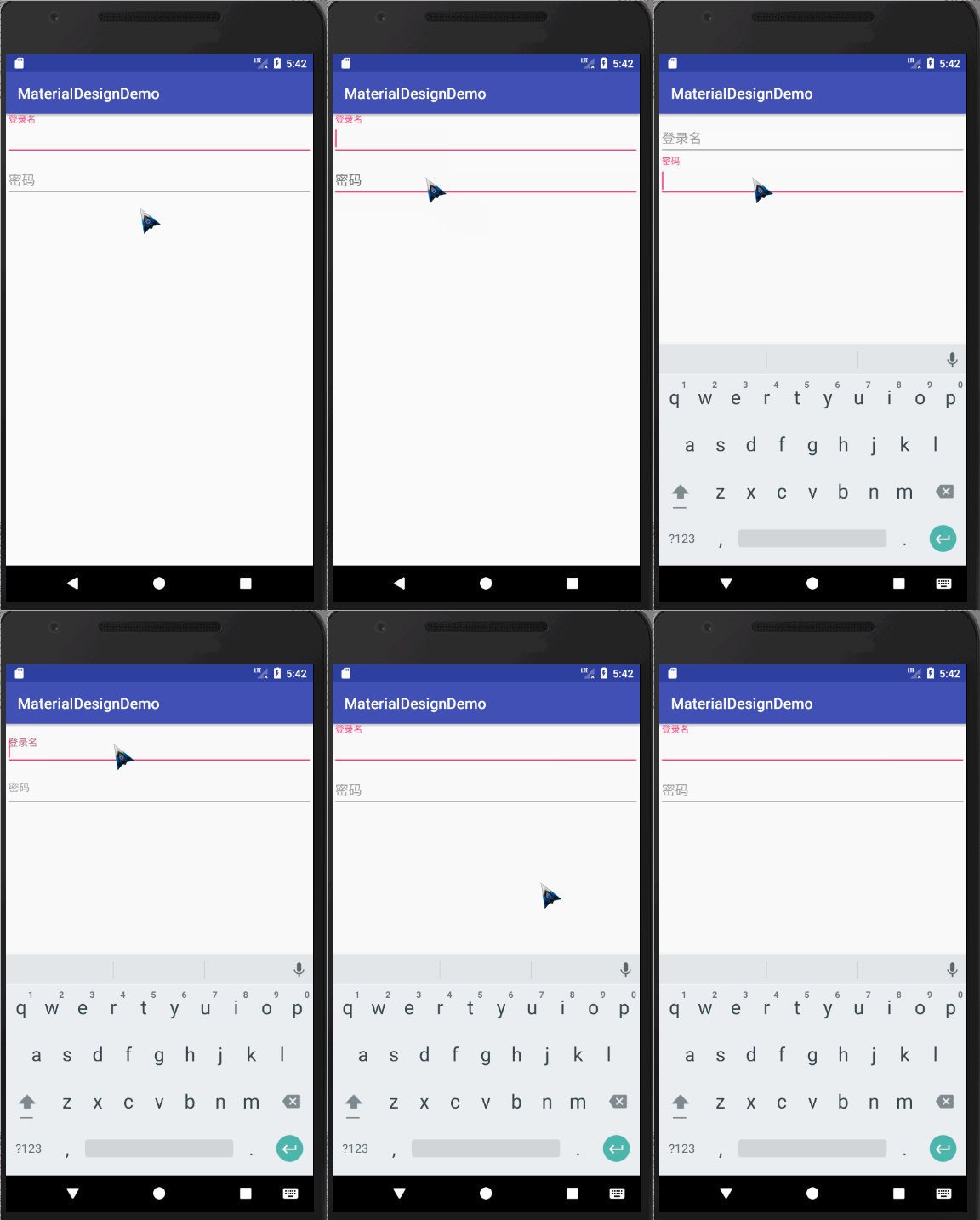
代码如下:
<?xml version="1.0" encoding="utf-8"?>

<LinearLayout

    xmlns:android="http://schemas.android.com/apk/res/android"

    xmlns:app="http://schemas.android.com/apk/res-auto"

    xmlns:tools="http://schemas.android.com/tools"

    android:layout_width="match_parent"

    android:orientation="vertical"

    android:layout_height="match_parent"

    tools:context="com.wan.homework.activity.Homework1Activity">

    <android.support.design.widget.TextInputLayout

        android:layout_width="match_parent"

        android:layout_height="wrap_content">

            <android.support.design.widget.TextInputEditText

                android:id="@+id/username"

                android:layout_width="match_parent"

                android:layout_height="wrap_content"

                android:hint="用户名"/>

    </android.support.design.widget.TextInputLayout>

    <android.support.design.widget.TextInputLayout

        android:layout_width="match_parent"

        android:layout_height="wrap_content">

        <EditText

            android:inputType="textPassword"

            android:id="@+id/password"

            android:layout_width="match_parent"

            android:layout_height="wrap_content"

            android:hint="密码"/>

    </android.support.design.widget.TextInputLayout>

</LinearLayout>
错误提示
TextInputLayout其实内置了一个用来显示错误提示的方法,方法名为setError,效果如下
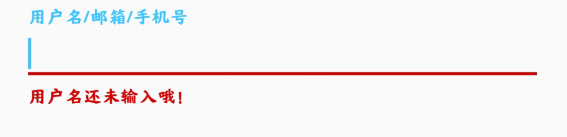
我们可以按钮的点击事件中,对用户的输入进行判断,从而显示错误信息
val userName = input_login_name.editText?.text.toString()

//验证用户输入

if (userName.isBlank()) {

	input_login_name.error = "用户名还未输入哦!"

}
PS:如果想要清空错误信息,将错误信息设置为""即可
input_login_name.error = ""
密码的显示与隐藏

如果想要实现此效果,只需要在将TextInputLayout的EditText的inputType属性设置为textpassword,将TextInputLayout的自定义属性passwordToggleEnabled设置为true即可
<android.support.design.widget.TextInputLayout

	android:id="@+id/input_password"

	android:layout_width="match_parent"

	android:layout_height="wrap_content"

	app:passwordToggleEnabled="true">

	<android.support.design.widget.TextInputEditText

		android:layout_width="match_parent"

		android:layout_height="wrap_content"

		android:hint="密码"

		android:inputType="textPassword"/>

</android.support.design.widget.TextInputLayout>
属性
| 属性名 | 说明 |
|---|---|
| app:Theme | 设置下划线或其他的颜色属性 |
| android.support.design:counterEnabled | 是否显示计数器 |
| android.support.design:counterMaxLength | 设置计数器的最大值,与counterEnabled同时使用 |
| android.support.design:counterTextAppearance | 计数器的字体样式 |
| android.support.design:counterOverflowTextAppearance | 输入字符大于我们限定个数字符时的字体样式 |
| android.support.design:errorEnabled | 是否显示错误信息 |
| android.support.design:errorTextAppearance | 错误信息的字体样式 |
| android.support.design:hintAnimationEnabled | 是否显示hint的动画,默认true |
| android.support.design:hintEnabled | 是否使用hint属性,默认true |
| android.support.design:hintTextAppearance | 设置hint的文字样式(指运行动画效果之后的样式) |
| android.support.design:passwordToggleDrawable | 设置密码开关Drawable图片,于passwordToggleEnabled同时使用 |
| android.support.design:passwordToggleEnabled | 是否显示密码开关图片,需要EditText设置inputType |
| android.support.design:passwordToggleTint | 设置密码开关图片颜色 |
| android.support.design:passwordToggleTintMode | 设置密码开关图片(混合颜色模式),与passwordToggleTint同时使用 |
Android Material Design控件使用(二)——FloatButton TextInputEditText TextInputLayout 按钮和输入框的更多相关文章
- Android Material Design控件学习(三)——使用TextInputLayout实现酷市场登录效果
前言 前两次,我们学习了 Android Material Design控件学习(一)--TabLayout的用法 Android Material Design控件学习(二)--Navigation ...
- Android Material Design控件学习(二)——NavigationView的学习和使用
前言 上次我们学习了TabLayout的用法,今天我们继续学习MaterialDesign(简称MD)控件--NavigationView. 正如其名,NavigationView,导航View.一般 ...
- Android Material Design控件学习(一)——TabLayout的用法
前言 Google官方在14年Google I/O上推出了全新的设计语言--Material Design.一并推出了一系列实现Material Design效果的控件库--Android Desig ...
- Android Material Design控件使用(四)——下拉刷新 SwipeRefreshLayout
使用下拉刷新SwipeRefreshLayout 说明 SwipeRefreshLayout是Android官方的一个下拉刷新控件,一般我们使用此布局和一个RecyclerView嵌套使用 使用 xm ...
- Android Material Design控件使用(一)——ConstraintLayout 约束布局
参考文章: 约束布局ConstraintLayout看这一篇就够了 ConstraintLayout - 属性篇 介绍 Android ConstraintLayout是谷歌推出替代PrecentLa ...
- Android Material Design 控件常用的属性
android:fitsSystemWindows="true" 是一个boolean值的内部属性,让view可以根据系统窗口(如status bar)来调整自己的布局,如果值为t ...
- Android Material Design控件使用(三)——CardView 卡片布局和SnackBar使用
cardview 预览图 常用属性 属性名 说明 cardBackgroundColor 设置背景颜色 cardCornerRadius 设置圆角大小 cardElevation 设置z轴的阴影 ca ...
- Android Support Design 控件 FloatingActionButton
经常刚可以看到悬浮控件,比如印象笔记的下面那个绿色的悬浮按钮,这个控件非常简单也是来自Design Support Library中同理需要在android studio中加入依赖库:design库 ...
- Android自己定义控件系列二:自己定义开关button(一)
这一次我们将会实现一个完整纯粹的自己定义控件,而不是像之前的组合控件一样.拿系统的控件来实现.计划分为三部分:自己定义控件的基本部分,自己定义控件的触摸事件的处理和自己定义控件的自己定义属性: 以下就 ...
随机推荐
- Akka-CQRS(6)- read-side
前面我们全面介绍了在akka-cluster环境下实现的CQRS写端write-side.简单来说就是把发生事件描述作为对象严格按发生时间顺序写入数据库.这些事件对象一般是按照二进制binary方式如 ...
- Win10下python不同版本同时安装并解决pip共存问题
特别说明,本文是在Windows64位系统下进行的,32位系统请下载相应版本的安装包,安装方法类似. 使用python开发,环境有Python2和 python3 两种,有时候需要两种环境切换使用,下 ...
- win10怎么查看激活到期时间如何看是否永久激活
win10怎么查看激活到期时间如何看是否永久激活 我们知道Windows系统需要激活后才可以使用全部功能,那么你的Windows10激活了吗?如何查看激活时间呢?是不是永久激活的?带着这些问题 ...
- 微信小程序支付接入实战
1. 微信小程序支付接入实战 1.1. 需求 最近接到一个小程序微信支付的需求,需要我写后台支持,本着能不自己写就不自己写的cv原则,在网上找到了些第三方程序,经过尝试后,最后决定了这不要脸作者的 ...
- feign包名路径添加问题
1. feign包名路径添加问题 1.1. 问题 在SpringCloud中使用feign调用路径中,不能在类上直接添加@RequestMapping(value = "/hospital- ...
- 音频格式RAW和PCM区别和联系
定义: RAW:在一些外国品牌的播放机中名为 BitSream,我们通常称为“源码”.意义是把光盘上的音频格式不加处理地.“原汁原味”地从同轴和光纤输出.这就要求用户的功放具备这种音频格式的解码功能 ...
- 简单的ld链接脚本学习
一. 链接脚本的整体认识 什么是链接文件呢?作用是什么呢? 当编写了多个C文件时,我们将他们编译链接成一个可执行的文件,此时就需要用到链接脚本文件(ld).ld脚本主要功能就是:将多个目标文件(.o) ...
- Redis 如何分析慢查询操作?
什么是慢查询 和mysql的慢SQL日志分析一样,redis也有类似的功能,来帮助定位一些慢查询操作. Redis slowlog是Redis用来记录查询执行时间的日志系统. 查询执行时间指的是不包括 ...
- 良好的JavaScript编码风格(语法规则)
编码风格 1.概述 "编程风格"(programming style)指的是编写代码的样式规则.不同的程序员,往往有不同的编程风格. 有人说,编译器的规范叫做"语法规则& ...
- OS之进程管理---多线程模型和线程库(POSIX PTread)
多线程简介 线程是CPU使用的基本单元,包括线程ID,程序计数器.寄存器组.各自的堆栈等,在相同线程组中,所有线程共享进程代码段,数据段和其他系统资源. 传统的的单线程模式是每一个进程只能单个控制线程 ...