
Unet 项目部分代码学习
github地址:https://github.com/orobix/retina-unet
主程序:
###################################################

#

#   Script to:

#   - Load the images and extract the patches

#   - Define the neural network

#   - define the training

#

##################################################

import numpy as np

import configparser as ConfigParser

from keras.models import Model

from keras.layers import Input, concatenate, Conv2D, MaxPooling2D, UpSampling2D, Reshape, core, Dropout

from keras.optimizers import Adam

from keras.callbacks import ModelCheckpoint, LearningRateScheduler

from keras import backend as K

from keras.utils.vis_utils import plot_model as plot

from keras.optimizers import SGD

import sys

sys.path.insert(0, './lib/')

from help_functions import *

#function to obtain data for training/testing (validation)

from extract_patches import get_data_training

#Define the neural network

def get_unet(n_ch,patch_height,patch_width):

    inputs = Input(shape=(n_ch,patch_height,patch_width))

    conv1 = Conv2D(32, (3, 3), activation='relu', padding='same',data_format='channels_first')(inputs)

    conv1 = Dropout(0.2)(conv1)

    conv1 = Conv2D(32, (3, 3), activation='relu', padding='same',data_format='channels_first')(conv1)

    pool1 = MaxPooling2D((2, 2))(conv1)

    #

    conv2 = Conv2D(64, (3, 3), activation='relu', padding='same',data_format='channels_first')(pool1)

    conv2 = Dropout(0.2)(conv2)

    conv2 = Conv2D(64, (3, 3), activation='relu', padding='same',data_format='channels_first')(conv2)

    pool2 = MaxPooling2D((2, 2))(conv2)

    #

    conv3 = Conv2D(128, (3, 3), activation='relu', padding='same',data_format='channels_first')(pool2)

    conv3 = Dropout(0.2)(conv3)

    conv3 = Conv2D(128, (3, 3), activation='relu', padding='same',data_format='channels_first')(conv3)

    up1 = UpSampling2D(size=(2, 2))(conv3)

    up1 = concatenate([conv2,up1],axis=1)

    conv4 = Conv2D(64, (3, 3), activation='relu', padding='same',data_format='channels_first')(up1)

    conv4 = Dropout(0.2)(conv4)

    conv4 = Conv2D(64, (3, 3), activation='relu', padding='same',data_format='channels_first')(conv4)

    #

    up2 = UpSampling2D(size=(2, 2))(conv4)

    up2 = concatenate([conv1,up2], axis=1)

    conv5 = Conv2D(32, (3, 3), activation='relu', padding='same',data_format='channels_first')(up2)

    conv5 = Dropout(0.2)(conv5)

    conv5 = Conv2D(32, (3, 3), activation='relu', padding='same',data_format='channels_first')(conv5)

    #

    conv6 = Conv2D(2, (1, 1), activation='relu',padding='same',data_format='channels_first')(conv5)

    conv6 = core.Reshape((2,patch_height*patch_width))(conv6)

    conv6 = core.Permute((2,1))(conv6)

    ############

    conv7 = core.Activation('softmax')(conv6)

    model = Model(inputs=inputs, outputs=conv7)

    # sgd = SGD(lr=0.01, decay=1e-6, momentum=0.3, nesterov=False)

    model.compile(optimizer='sgd', loss='categorical_crossentropy',metrics=['accuracy'])

    return model

#Define the neural network gnet

#you need change function call "get_unet" to "get_gnet" in line 166 before use this network

def get_gnet(n_ch,patch_height,patch_width):

    inputs = Input((n_ch, patch_height, patch_width))

    conv1 = Convolution2D(32, 3, 3, activation='relu', border_mode='same')(inputs)

    conv1 = Dropout(0.2)(conv1)

    conv1 = Convolution2D(32, 3, 3, activation='relu', border_mode='same')(conv1)

    up1 = UpSampling2D(size=(2, 2))(conv1)

    #

    conv2 = Convolution2D(16, 3, 3, activation='relu', border_mode='same')(up1)

    conv2 = Dropout(0.2)(conv2)

    conv2 = Convolution2D(16, 3, 3, activation='relu', border_mode='same')(conv2)

    pool1 = MaxPooling2D(pool_size=(2, 2))(conv2)

    #

    conv3 = Convolution2D(32, 3, 3, activation='relu', border_mode='same')(pool1)

    conv3 = Dropout(0.2)(conv3)

    conv3 = Convolution2D(32, 3, 3, activation='relu', border_mode='same')(conv3)

    pool2 = MaxPooling2D(pool_size=(2, 2))(conv3)

    #

    conv4 = Convolution2D(64, 3, 3, activation='relu', border_mode='same')(pool2)

    conv4 = Dropout(0.2)(conv4)

    conv4 = Convolution2D(64, 3, 3, activation='relu', border_mode='same')(conv4)

    pool3 = MaxPooling2D(pool_size=(2, 2))(conv4)

    #

    conv5 = Convolution2D(128, 3, 3, activation='relu', border_mode='same')(pool3)

    conv5 = Dropout(0.2)(conv5)

    conv5 = Convolution2D(128, 3, 3, activation='relu', border_mode='same')(conv5)

    #

    up2 = merge([UpSampling2D(size=(2, 2))(conv5), conv4], mode='concat', concat_axis=1)

    conv6 = Convolution2D(64, 3, 3, activation='relu', border_mode='same')(up2)

    conv6 = Dropout(0.2)(conv6)

    conv6 = Convolution2D(64, 3, 3, activation='relu', border_mode='same')(conv6)

    #

    up3 = merge([UpSampling2D(size=(2, 2))(conv6), conv3], mode='concat', concat_axis=1)

    conv7 = Convolution2D(32, 3, 3, activation='relu', border_mode='same')(up3)

    conv7 = Dropout(0.2)(conv7)

    conv7 = Convolution2D(32, 3, 3, activation='relu', border_mode='same')(conv7)

    #

    up4 = merge([UpSampling2D(size=(2, 2))(conv7), conv2], mode='concat', concat_axis=1)

    conv8 = Convolution2D(16, 3, 3, activation='relu', border_mode='same')(up4)

    conv8 = Dropout(0.2)(conv8)

    conv8 = Convolution2D(16, 3, 3, activation='relu', border_mode='same')(conv8)

    #

    pool4 = MaxPooling2D(pool_size=(2, 2))(conv8)

    conv9 = Convolution2D(32, 3, 3, activation='relu', border_mode='same')(pool4)

    conv9 = Dropout(0.2)(conv9)

    conv9 = Convolution2D(32, 3, 3, activation='relu', border_mode='same')(conv9)

    #

    conv10 = Convolution2D(2, 1, 1, activation='relu', border_mode='same')(conv9)

    conv10 = core.Reshape((2,patch_height*patch_width))(conv10)

    conv10 = core.Permute((2,1))(conv10)

    ############

    conv10 = core.Activation('softmax')(conv10)

    model = Model(input=inputs, output=conv10)

    # sgd = SGD(lr=0.01, decay=1e-6, momentum=0.3, nesterov=False)

    model.compile(optimizer='sgd', loss='categorical_crossentropy',metrics=['accuracy'])

    return model

#========= Load settings from Config file

config = ConfigParser.RawConfigParser()

config.read('configuration.txt')

#patch to the datasets

path_data = config.get('data paths', 'path_local')

#Experiment name

name_experiment = config.get('experiment name', 'name')

#training settings

N_epochs = int(config.get('training settings', 'N_epochs'))

batch_size = int(config.get('training settings', 'batch_size'))

#============ Load the data and divided in patches

patches_imgs_train, patches_masks_train = get_data_training(

    DRIVE_train_imgs_original = path_data + config.get('data paths', 'train_imgs_original'),

    DRIVE_train_groudTruth = path_data + config.get('data paths', 'train_groundTruth'),  #masks

    patch_height = int(config.get('data attributes', 'patch_height')),

    patch_width = int(config.get('data attributes', 'patch_width')),

    N_subimgs = int(config.get('training settings', 'N_subimgs')),

    inside_FOV = config.getboolean('training settings', 'inside_FOV') #select the patches only inside the FOV  (default == True)

)

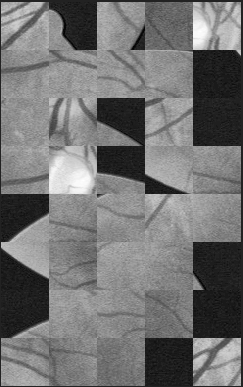
#========= Save a sample of what you're feeding to the neural network ==========

N_sample = min(patches_imgs_train.shape[0],40)#这里规定,要显示的图片最多不超过40张

visualize(group_images(patches_imgs_train[0:N_sample,:,:,:],5),'./'+name_experiment+'/'+"sample_input_imgs")#.show()

visualize(group_images(patches_masks_train[0:N_sample,:,:,:],5),'./'+name_experiment+'/'+"sample_input_masks")#.show()

#显示的结果会在下面贴出来

#=========== Construct and save the model arcitecture =====

n_ch = patches_imgs_train.shape[1]#得到每个patch的通道数

patch_height = patches_imgs_train.shape[2]#得到每个patch的高

patch_width = patches_imgs_train.shape[3]#得到每个patch的宽

model = get_unet(n_ch, patch_height, patch_width)  #the U-net model

print ("Check: final output of the network:")

print (model.output_shape)

plot(model, to_file='./'+name_experiment+'/'+name_experiment + '_model.png')   #check how the model looks like

json_string = model.to_json()#model.to_json:返回代表模型的JSON字符串,仅包含网络结构,不包含权值。可以从JSON字符串中重构原模型:

open('./'+name_experiment+'/'+name_experiment +'_architecture.json', 'w').write(json_string)

#============  Training ==================================

checkpointer = ModelCheckpoint(filepath='./'+name_experiment+'/'+name_experiment +'_best_weights.h5', verbose=1, monitor='val_loss', mode='auto', save_best_only=True) #save at each epoch if the validation decreased

# def step_decay(epoch):

#     lrate = 0.01 #the initial learning rate (by default in keras)

#     if epoch==100:

#         return 0.005

#     else:

#         return lrate

#

# lrate_drop = LearningRateScheduler(step_decay)

patches_masks_train = masks_Unet(patches_masks_train)  #reduce memory consumption

model.fit(patches_imgs_train, patches_masks_train, nb_epoch=N_epochs, batch_size=batch_size, verbose=2, shuffle=True, validation_split=0.1, callbacks=[checkpointer])

#========== Save and test the last model ===================

model.save_weights('./'+name_experiment+'/'+name_experiment +'_last_weights.h5', overwrite=True)

#test the model

# score = model.evaluate(patches_imgs_test, masks_Unet(patches_masks_test), verbose=0)

# print('Test score:', score[0])

# print('Test accuracy:', score[1])
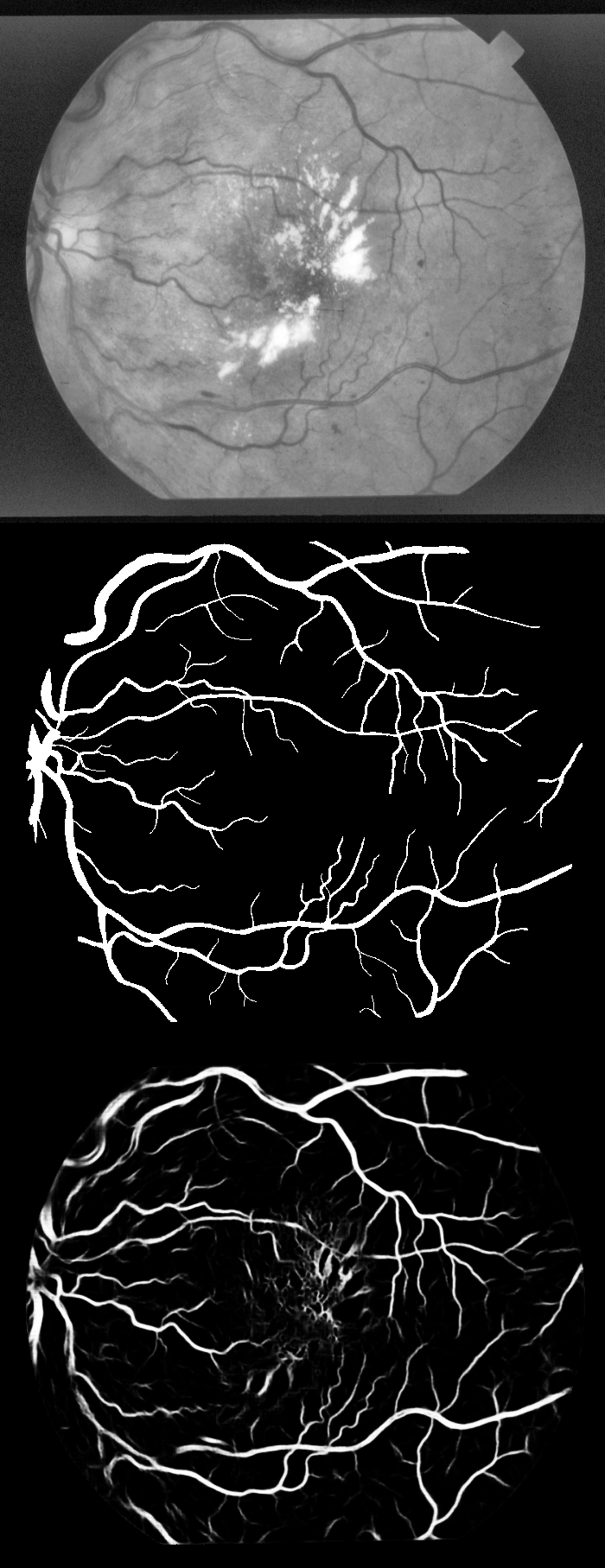
实验结果显示:上中下分别为原图-groundTruth-预测图
Unet 项目部分代码学习的更多相关文章
- R2CNN项目部分代码学习
首先放出大佬的项目地址:https://github.com/yangxue0827/R2CNN_FPN_Tensorflow 那么从输入的数据开始吧,输入的数据要求为tfrecord格式的数据集,好 ...
- FCN 项目部分代码学习
下面代码由搭档注释,保存下来用作参考. github项目地址:https://github.com/shekkizh/FCN.tensorflowfrom __future__ import prin ...
- CTPN项目部分代码学习
上次拜读了CTPN论文,趁热打铁,今天就从网上找到CTPN 的tensorflow代码实现一下,这里放出大佬的github项目地址:https://github.com/eragonruan/text ...
- JAVAEE——BOS物流项目02:学习计划、动态添加选项卡、ztree、项目底层代码构建
1 学习计划 1.jQuery easyUI中动态添加选项卡 2.jquery ztree插件使用 n 下载ztree n 基于标准json数据构造ztree n 基于简单json数据构造ztree( ...
- Android开源项目SlidingMenu本学习笔记(两)
我们已经出台SlidingMenu使用:Android开源项目SlidingMenu本学习笔记(一个),接下来再深入学习下.依据滑出项的Menu切换到相应的页面 文件夹结构: watermark/2/ ...
- IDEA 学习笔记之 Java项目开发深入学习(1)
Java项目开发深入学习(1): 定义编译输出路径: 继承以上工程配置 重新定义新的项目编译路径 添加source目录:点击添加,再点击移除: 编译项目: 常用快捷键总结: Ctrl+Space 代码 ...
- 201671010447 杨露露 实验十四 团队项目评审&课程学习总结
项目 内容 这个作业属于哪个课程 2016计算机科学与工程学院软件工程(西北师范大学) 这个作业的要求在哪里 实验十四 团队项目评审&课程学习总结 作业学习目标 总结这学期软件工程学习获得 一 ...
- 实验十四 团队项目评审&课程学习总结
项目 内容 这个作业属于哪个课程 2016计算机科学与工程学院软件工程(西北师范大学) 这个作业的要求在哪里 实验十四 团队项目评审&课程学习总结 团队名称 快活帮 作业学习目标 (1)掌握软 ...
- 201671010449 杨天超 实验十四 团队项目评审&课程学习总结
项目 内容 这个作业属于哪个课程 任课教师博客主页链接 这个作业的要求在哪里 作业链接地址 作业学习目标 1.掌握软件评审流程及内容 2.个人总结 实验一问题解答 实验一问题链接:https://ww ...
随机推荐
- 使用grep排除空行和注释行
grep的排除选项为 -v排除空行的命令是:grep -v '^$' filename排除以#注释的命令是:grep -v '^#' filename 结合起来就是,既排除空行又排除注释行的命令gre ...
- 什么是openstack
什么是openstack OpenStack是一个云平台管理的项目,它不是一个软件. 这个项目由几个主要的组件组合起来完成一些具体的工作. 想要了解openstack,第一步我们可以观察他的概念图: ...
- MySql delete和truncate区别
项目 delete truncate 添加where条件 可以添加 不可以添加 执行效率 略高 高 自增长列 delete删除后,插入数据的自增长 列值从断点开始 truncate删除后,插入数据的自 ...
- .NET中制做对象的副本(一)
.NET中对于复杂对象制作副本比较困难,闲暇之时写了这个方法,和大家分享. 本案例用于大型对象的副本制作,常见的应用场景就是树形对象节点的拷贝,但是也有局限性,目前使用于类里有基本类型(int sti ...
- 嵌入式系统C编程之错误处理【转】
转自:http://www.cnblogs.com/clover-toeic/p/3919857.html 前言 本文主要总结嵌入式系统C语言编程中,主要的错误处理方式.文中涉及的代码运行环境如下: ...
- 3.2. 使用 CPUFREQ 调节器【转】
转自:https://access.redhat.com/documentation/zh-cn/red_hat_enterprise_linux/6/html/power_management_gu ...
- Laravel资源理由器跟隐式控制的对比及是怎样的吧?- Route::resource vs Route::controller
stackoverflow找到的问题:http://stackoverflow.com/questions/23505875/laravel-routeresource-vs-routecontrol ...
- 驳2B文 "我为什么放弃Go语言"
此篇文章流传甚广, 其实里面没啥干货, 而且里面很多观点是有问题的. 这个文章在 golang-china 很早就讨论过了. 最近因为 Rust 1.0 和 1.1 的发布, 导致这个文章又出来毒 ...
- 【MySql】删除操作
删除表内数据,用 delete.格式为: delete from 表名 where 删除条件; 实例:删除学生表内姓名为张三的记录. delete from student where T_name ...
- kindEditor 富文本编辑器 使用介绍
第一版:存放位置: ---->把该创建的文件包放到javaWeb 过程的 WEB_INF 下:如图所示. 第二步:< kindEditor 插件的引用> :JS引用 <scr ...