
scrapy 爬取豆瓣互联网图书
- 安装scrapy
-
conda install scrapy
-
- 生成一个scrapy项目
-
scrapy startproject douban
-
- settings文件
-
# -*- coding: utf-8 -*-

# Scrapy settings for douban project

#

# For simplicity, this file contains only settings considered important or

# commonly used. You can find more settings consulting the documentation:

#

#     http://doc.scrapy.org/en/latest/topics/settings.html

#     http://scrapy.readthedocs.org/en/latest/topics/downloader-middleware.html

#     http://scrapy.readthedocs.org/en/latest/topics/spider-middleware.html

BOT_NAME = 'douban'

SPIDER_MODULES = ['douban.spiders']

NEWSPIDER_MODULE = 'douban.spiders'

# Crawl responsibly by identifying yourself (and your website) on the user-agent

#USER_AGENT = 'douban (+http://www.yourdomain.com)'

# USER_AGENT = 'Mozilla/5.0 (Windows NT 6.1; WOW64; rv:52.0) Gecko/20100101 Firefox/52.0'

USER_AGENT='Mozilla/5.0 (Windows NT 10.0; WOW64) AppleWebKit/537.36 (KHTML, like Gecko) Chrome/52.0.2743.116 Safari/537.36'

# Obey robots.txt rules

ROBOTSTXT_OBEY = False

# Configure maximum concurrent requests performed by Scrapy (default: 16)

#CONCURRENT_REQUESTS = 32

# Configure a delay for requests for the same website (default: 0)

# See http://scrapy.readthedocs.org/en/latest/topics/settings.html#download-delay

# See also autothrottle settings and docs

#DOWNLOAD_DELAY = 3

# The download delay setting will honor only one of:

#CONCURRENT_REQUESTS_PER_DOMAIN = 16

#CONCURRENT_REQUESTS_PER_IP = 16

# Disable cookies (enabled by default)

#COOKIES_ENABLED = False

# Disable Telnet Console (enabled by default)

#TELNETCONSOLE_ENABLED = False

# Override the default request headers:

#DEFAULT_REQUEST_HEADERS = {

#   'Accept': 'text/html,application/xhtml+xml,application/xml;q=0.9,*/*;q=0.8',

#   'Accept-Language': 'en',

#}

# Enable or disable spider middlewares

# See http://scrapy.readthedocs.org/en/latest/topics/spider-middleware.html

#SPIDER_MIDDLEWARES = {

#    'douban.middlewares.DoubanSpiderMiddleware': 543,

#}

# Enable or disable downloader middlewares

# See http://scrapy.readthedocs.org/en/latest/topics/downloader-middleware.html

#DOWNLOADER_MIDDLEWARES = {

#    'douban.middlewares.MyCustomDownloaderMiddleware': 543,

#}

# Enable or disable extensions

# See http://scrapy.readthedocs.org/en/latest/topics/extensions.html

#EXTENSIONS = {

#    'scrapy.extensions.telnet.TelnetConsole': None,

#}

# Configure item pipelines

# See http://scrapy.readthedocs.org/en/latest/topics/item-pipeline.html

ITEM_PIPELINES = {

   'douban.pipelines.DoubanPipeline': 300,

}

# Enable and configure the AutoThrottle extension (disabled by default)

# See http://doc.scrapy.org/en/latest/topics/autothrottle.html

#AUTOTHROTTLE_ENABLED = True

# The initial download delay

#AUTOTHROTTLE_START_DELAY = 5

# The maximum download delay to be set in case of high latencies

#AUTOTHROTTLE_MAX_DELAY = 60

# The average number of requests Scrapy should be sending in parallel to

# each remote server

#AUTOTHROTTLE_TARGET_CONCURRENCY = 1.0

# Enable showing throttling stats for every response received:

#AUTOTHROTTLE_DEBUG = False

# Enable and configure HTTP caching (disabled by default)

# See http://scrapy.readthedocs.org/en/latest/topics/downloader-middleware.html#httpcache-middleware-settings

#HTTPCACHE_ENABLED = True

#HTTPCACHE_EXPIRATION_SECS = 0

#HTTPCACHE_DIR = 'httpcache'

#HTTPCACHE_IGNORE_HTTP_CODES = []

#HTTPCACHE_STORAGE = 'scrapy.extensions.httpcache.FilesystemCacheStorage'
-
- 编写爬虫文件,位于spiders下面
-
import scrapy

from douban.items    import  DoubanItem

class MeijuSpider(scrapy.Spider):

    name = 'doubanmovie'

    allowed_domains=['book.douban.com']

    start_urls=['https://book.douban.com/tag/%E4%BA%92%E8%81%94%E7%BD%91']

    number=1;

    def parse(self, response):

        self.number = self.number+1;

        # print(response.text)

        objs=response.xpath('//*[@id="subject_list"]/ul/li')

        # print(objs)

        # print('test',response.xpath('//*[@id="content"]/div/div[1]/div/div/table[1]/tr/td[2]/div/a/text()').extract_first())

        print(len(objs))

        for i in objs :

            item=DoubanItem()

            item['name']=i.xpath('./div[2]/h2/a/text()').extract_first() or ''

            item['score']=i.xpath('./div[2]/div[2]/span[2]/text()').extract_first() or ''

            item['author']=i.xpath('./div[2]/div[1]/text()').extract_first() or ''

            item['describe']=i.xpath('./div[2]/p/text()').extract_first() or ''

            yield item

        next_page = response.xpath('//*[@id="subject_list"]/div[2]/span[4]/a/@href').extract()

        print(self.number);

        if(self.number >11):

            next_page = response.xpath('//*[@id="subject_list"]/div[2]/span[5]/a/@href').extract()

        print(next_page)

        if next_page:

            next_link=next_page[0];

            print("https://book.douban.com"+next_link)

            yield scrapy.Request("https://book.douban.com"+next_link,callback=self.parse)
-
- 编写pipe文件
-
# -*- coding: utf-8 -*-

# Define your item pipelines here

#

# Don't forget to add your pipeline to the ITEM_PIPELINES setting

# See: http://doc.scrapy.org/en/latest/topics/item-pipeline.html

class DoubanPipeline(object):

    def process_item(self, item, spider):

        with open('douban.txt','a',encoding='utf-8') as file:

            file.write(str(item['name'].replace("\n","").replace("\t","").replace(",",",").replace("\r","").strip() )

                       +','+item['score'].replace("\n","").replace("\t","").replace(",",",").replace("\r","").strip()

                       +','+str(item['author']).replace("\n","").replace("\t","").replace(",",",").replace("\r","").strip()

                       +','+item['describe'].replace("\n","").replace("\t","").replace(",",",").replace("\r","").strip()

                       + "\n"

                       )
-
- 执行
- 编写一个start.py文件
from scrapy.cmdline import execute

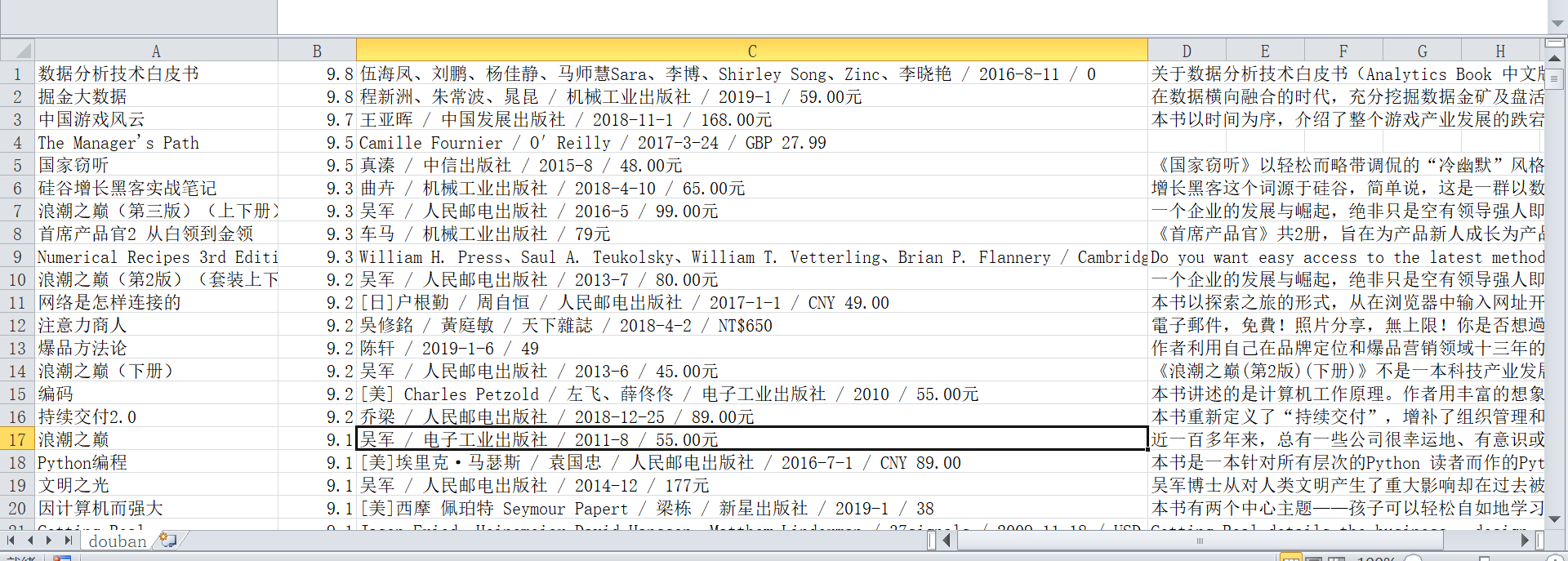
execute("scrapy crawl doubanmovie".split()) - 效果
-
- 编写一个start.py文件
scrapy 爬取豆瓣互联网图书的更多相关文章
- scrapy爬取豆瓣电影top250
# -*- coding: utf-8 -*- # scrapy爬取豆瓣电影top250 import scrapy from douban.items import DoubanItem class ...
- 爬取豆瓣网图书TOP250的信息
爬取豆瓣网图书TOP250的信息,需要爬取的信息包括:书名.书本的链接.作者.出版社和出版时间.书本的价格.评分和评价,并把爬取到的数据存储到本地文件中. 参考网址:https://book.doub ...
- Scrapy爬取豆瓣图书数据并写入MySQL
项目地址 BookSpider 介绍 本篇涉及的内容主要是获取分类下的所有图书数据,并写入MySQL 准备 Python3.6.Scrapy.Twisted.MySQLdb等 演示 代码 一.创建项目 ...
- 使用scrapy爬取豆瓣上面《战狼2》影评
这几天一直在学习scrapy框架,刚好学到了CrawlSpider和Rule的搭配使用,就想着要搞点事情练练手!!! 信息提取 算了,由于爬虫运行了好几次,太过分了,被封IP了,就不具体分析了,附上& ...
- scrapy爬取豆瓣电影信息
最近在学python,对python爬虫框架十分着迷,因此在网上看了许多大佬们的代码,经过反复测试修改,终于大功告成! 原文地址是:https://blog.csdn.net/ljm_9615/art ...
- Scrapy爬取豆瓣电影top250的电影数据、海报,MySQL存储
从GitHub得到完整项目(https://github.com/daleyzou/douban.git) 1.成果展示 数据库 本地海报图片 2.环境 (1)已安装Scrapy的Pycharm (2 ...
- Scrapy中用xpath/css爬取豆瓣电影Top250:解决403HTTP status code is not handled or not allowed
好吧,我又开始折腾豆瓣电影top250了,只是想试试各种方法,看看哪一种的方法效率是最好的,一直进行到这一步才知道 scrapy的强大,尤其是和selector结合之后,速度飞起.... 下面我就采用 ...
- python系列之(3)爬取豆瓣图书数据
上次介绍了beautifulsoup的使用,那就来进行运用下吧.本篇将主要介绍通过爬取豆瓣图书的信息,存储到sqlite数据库进行分析. 1.sqlite SQLite是一个进程内的库,实现了自给自足 ...
- Scrapy 通过登录的方式爬取豆瓣影评数据
Scrapy 通过登录的方式爬取豆瓣影评数据 爬虫 Scrapy 豆瓣 Fly 由于需要爬取影评数据在来做分析,就选择了豆瓣影评来抓取数据,工具使用的是Scrapy工具来实现.scrapy工具使用起来 ...
随机推荐
- Linux基础入门-用户及文件权限管理
一.Linux用户管理: 不同的用户的文件都是放在同一个物理磁盘上的甚至同一个逻辑分区或者目录里,但是由于Linux的用户管理和权限机制,不同用户不能轻易查看.修改彼此的文件. 1. 查看用户: wh ...
- 承接VR外包|AR外包|Unity3D外包|UE4外包(内附案例演示)
北京团队长年承接VR/AR项目外包 咨询QQ:372900288 微信:liuxiang0884
- MySQL运行内存不足时应采取的措施?
排除故障指南:MySQL运行内存不足时应采取的措施? 天一阁@ 老叶茶馆 1周前 导读 排除故障指南:MySQL运行内存不足时应采取的措施? 翻译团队:知数堂藏经阁项目 - 天一阁 团队成员:天一阁- ...
- C# Enum 获取枚举属性
Enum使用 获取枚举属性 注意:扩展方法必须定义为静态类,静态方法中. public enum EnumPatientSource { [Description("住院")] I ...
- python基础知识10---算法
一.递归 程序本身自己调用自己称之为递归,类似于俄罗斯套娃,体现在代码中:用户执行最外(N)层函数,最外侧调用N-1层函数,N-1层函数调用N-2层函数... 利用函数编写如下数列: 斐波那契数列指的 ...
- 简单的爬虫爬的完整的<img>标签,修改正则即可修改爬取内容
简单的爬虫爬的完整的<img>标签,生成<img>标签结果文件与爬虫经历的网页. <?php/** 从给定的url获取html内容** */function _getUr ...
- 使用Netty开发RPC的技术原理
本片文字摘抄自https://www.cnblogs.com/jietang/p/5615681.html 1.定义RPC请求消息.应答消息结构,里面要包括RPC的接口定义模块,包括远程调用的类名.方 ...
- ubuntu16.04上安装ros-kinetic
1.设置安装源 sudo sh -c 'echo "deb http://packages.ros.org/ros/ubuntu $(lsb_release -sc) main" ...
- suList() 和 asList()
String[] arr = { "a", "b", "c" }; List<String> aslist = Arrays.a ...
- ef6.0+mysql配合使用的问题
折腾了很久由于所用到的各种库版本问题:后来终于组合成了一个可用的:记录下各种库的版本 ef6.0 mysql5.5 mysql-connector-net-6.9.12.msi mysql-for-v ...